

I installed Newspaper theme mobile plugin. I noticed that sometimes, when I visit the site from my laptop, it displays the AMP/Mobile version. I configured the Mobile theme to Mobile + AMP.

Same here, only here to be different. On my iphone I sometimes just get my desktop and can’t use the menu here anymore.
Is very annoying because a lot of people still use their mobile phone.
I hope it will be read so that this can be solved in the next update.
-
This reply was modified 6 years by
RGLAS.

Hello !
This happens due to cache. Please follow our guide and make sure that WP Super Cache has been installed properly: https://forum.tagdiv.com/cache-plugin-install-and-configure/
Let us know the result.
Thank you !
Since installing the mobile plugin, I also have noticed another problem – one of the categories and all its sub-categories throw error 404 on mobile, but okay on desktop.

Hi itechguides, Vlad is right this problem is do to cache plugin settings. Unfortunately we do not tested WP-Rocket and we do not know the right configuration for it, only for WP Super Cache.
For the problem with categories, please provide me a link where I can take a loot to this problem.
Thank you!
If you open this link on a mobile device – https://www.itechguides.com/category/buying-guides/ – it gives 404 error
I changed to WP Super Cache and configured it with the above guide. I reenabled the mobile theme to use “Mobile + AMP” – monitoring it. It appears that my site got faster with WP Super Cache!
I did everything as described, just had to reinstall and activate my “tagDiv Mobile Theme”.
But when I go to my site on my iphone I get the message:
There has been a critical error on your website.
That’s strange, on the desktop and ipad no problem.
This is only on my home-Page all the others are doing well
-
This reply was modified 6 years by
I’ve been busy for a while but it changes from day to day, sometimes I see on my ipad the mobile theme, and on the iphone the desktop theme. I have the impression that NEWSPAPER doesn’t handle the mobile themes very well, I suspect it’s still in a beta phase.
I also have the change wp- concerns the critical error, but that doesn’t work either.
-
This reply was modified 6 years by
I am still having problems with this URL on mobile devices – https://www.itechguides.com/category/buying-guides/ – it gives 404 error. I am paying for support. Please find a solution to this problem!
Hi itechguides, indeed is look that for that category is display 404, this problem can be from untested plugin, if you can try only with theme plugins to see if the problem persists or not.
Hi RGLAS, you need to use the mobile theme plugin with amp and as for cache plugin we recommend wp super cache with the settings from our guide -> https://forum.tagdiv.com/cache-plugin-install-and-configure/
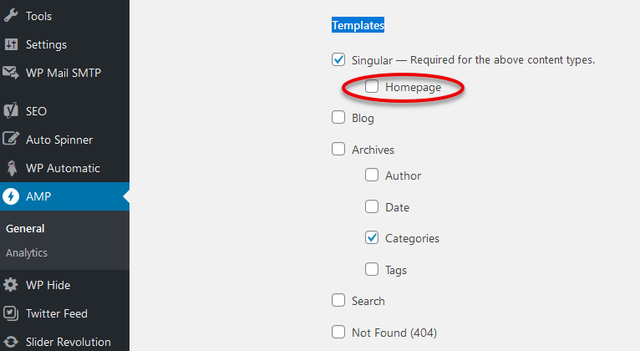
Also these settings -> https://i.imgur.com/lVPwlmM.png are referring on what elements to be apply the mobile theme layout when you are using the amp.
Thank you!
Hi Calin,
When i use wp super cache it’s give me a lot of problems.
on my mobile phone it’s not posible to see my slider, wahet i make
with slider revolution.
On my ipad and desktop there is no problem. it’s looks like
this happend after i use wp super cache. when i go back to wp rocket
is works.
So what can i do, that wp super cache work fine, with AMP.
-
This reply was modified 6 years by

Hi,
Are you maybe using the mobile theme plugin? That would explain if the content from desktop is not displayed on mobile. Is the slider inside a page? It can be displayed in a mobile page if that is what you want by entering its shortcode in the mobile editor for the desired page, for example
– https://www.screencast.com/t/VgOkSnGNH
– https://www.screencast.com/t/wl4DV430wn
– https://www.screencast.com/t/nYOxP1ac033
Maybe the issue is like this:
The super cache actually displays the mobile theme, and you are seeing the mobile theme version https://tagdiv.com/mobile-theme-automatic-optimization-for-mobile-newspaper-theme/
The rocket plugin does not display the mobile theme, so the same content from desktop will be used on mobile.
Let me know.
Thank you!
I can’t get it done, on my ipad I need the normal version of the site, that’s fine, but a page that doesn’t want to switch to AMP. (mobile version)
Do I change this then it is my mobile good and on the ipad again not, and this happens specifically on a page.
I don’t get this right
Hallo Calin,
I turned off WP Rocket, and now installed WP Super Cache again. work a little better now.
Sometimes a message: critical error on your website
But what I find below is a delay of a script on the mobile page of a webplayer which I don’t have under WP Rocket.
Check out our test page. http://wp.costablanca.fm at Listen Live this page shows the biggest problem.
-
This reply was modified 6 years by
which is also notice that on the mobile view the translation choice no longer works under http://wp.costablanca.fm/category/costa-blanca-news/
Hi,
Indeed the plugin for multi language that you are using is working only on responsive version, on mobile theme plugin is freezing, using this plugin you can display the responsive version only for posts and pages, for categories you do not have this option.
what you can do, is to use the mobile theme plugin only for amp -> https://i.imgur.com/AZ7LOGR.png also make sure that all theme requirements are as in our guide -> forum.tagdiv.com/requirements-for-newspaper/
Let me know the results!
Hello Calin,
I did what you suggested, but now I have another problem. have selected AMP in the Mobile Settings but now my “Listen Live” Page can no longer be used for the mobile, now get the same as on my desktop.
And that’s what I don’t want. If I do set it to be good on a mobile, then something else happens, if I choose “Listen Live” on my mobile and the page is loaded the menu no longer works, you have to click on the logo so you return to the home page.
remains strange. I also adjusted the all theme requirements as indicated.
Tried something else, which seems to work for a while.
When I tick “Mobile + AMP” in the Theme Panel everything seems to work fine.
In the AMP plug-in I have the choice between “Transitional” and “Advanced Settings” off. When I go to the website on my mobile I get the message “There has been a critical error on your website” but not on my Desktop or Ipad.
Hi,
Usually “There has been a critical error on your website” is caused by low resources or some plugins, what you can do is to double your resources and requirements and if the problem still persists, please check the plugins.
Let me know the results!
Thank you!
If I deactivate the Plug-in “tagDiv Mobile Theme”.
and only the plug-in “Official AMP for WP” Activate then the critical error is gone.
But then the “Listen Live” page doesn’t work properly anymore, like I made it for Mobile, so it shows the desktop mode. also that when I click on the menu on my mobile it doesn’t respond anymore. So I have to click on the Logo of the site again to be able to do something.
I think it’s strange, I can’t get out of this anymore.


