

I have upgraded my site located at https://www.theapex.racing to WordPress 5.0 and Newspaper 9.2.
After the upgrade, I am able to use tagDiv Composer to edit and save custom Cloud Templates. However, I am unable to save any changes made to pages created with tagDiv Composer. After clicking save, it just spins without ever completing the process.
I have checked the updated theme requirements and I am meeting all of them, including having the PHP memory limit set to 128 MB.

Hello,
Please increase the memory limit set to 256MB or 512MB, clear all the caches and check the results. Also, check the theme’s requirements from here -> https://forum.tagdiv.com/requirements-for-newspaper/
Thanks for your understanding!
Hello Catalin,
I have modified the memory limit and I’m still unable to save pages. The progress spinner just spins and the page is never saved. As I said previously, cloud templates save without any problem.
I have verified that everything in the theme status panel is green, which should mean that my site is meeeting all of the requirements as outlined in the link you provided above.
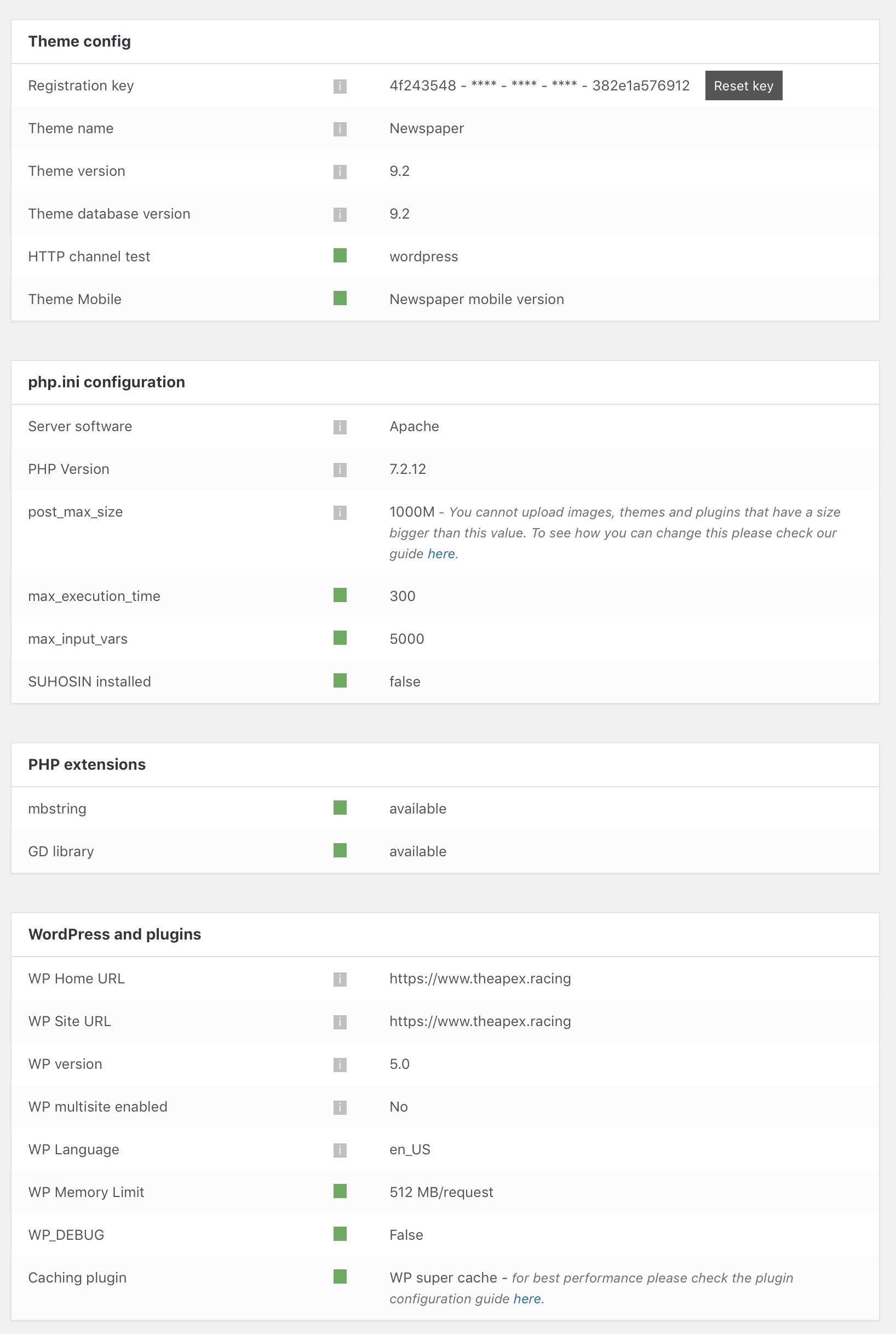
Hi,
Try to change the PHP version to 7.1 or max 7.2 and if the problem is still there, please send us an email at contact@tagdiv.com with your log-in information (wp-admin) so we can further investigate it closer your setup page. Also, provide the CPanel access for more investigations.
Thanks.
Hello,
Please send us an email at contact@tagdiv.com with your log-in information (wp-admin) so we can further investigate it closer your setup page. Also, provide the CPanel access for more further investigations.
Thanks.
I have read in another thread that the problem is actually with the mobile theme plugin, which I do have activated and don’t want to turn off.
However, I did turn it off for testing purposes and was able to save pages again.
Is there any timeframe for getting this problem resolved?
Hi,
It seems to be a mini problem in our theme regarding on theme panel savings when the Mobile Theme plugin is activated. You have two valid ways in this case: the first one could be to ignore the spinning when you press the save button saving is done, only you will not receive the confirmation or the second one, you should disable the mobile theme until you work on your website and then, activate it and check the results.
Thanks for your understanding!

Hello Catalin,
I have the same problem. Probably you have some problems with this theme.
I want to try Newsmag, because I am spending a lot time solving all issues with the new version of Newspaper 9 (Save problem, Sticky menu problem…).
How I can ask the refunding and buy Newsmag theme, because I have to migrate my actual News Portal urgently?
Regards
Hi,
You should request a full refund for Newsmag and then, you can buy the Newspaper. Check here -> https://themeforest.net/refund_requests/new
Thanks for your understanding!

Hmm, so i’m having same problem. The mobile theme is the culprit? I don’t want to disable mobile theme either. Any eta for a fix or is there a manual code fix i can do?
Hi rockchucksummit,
It seems to be a mini problem in our theme regarding on theme panel savings when the Mobile Theme plugin is activated. You have two valid ways in this case: the first one could be to ignore the spinning when you press the save button saving is done, only you will not receive the confirmation or the second one, you should disable the mobile theme until you work on your website and then, activate it and check the results.
Thanks for your understanding!


Hello Catalin
Please Visit My Website http://www.Softincome.In . Here Image loading Issue. Please Reply Me Why My Blog Images Not Showing

Hi,
Please make sure that all the settings are like in our requirements, please follow the guide carefully
– https://forum.tagdiv.com/requirements-for-newspaper/
and please increase all requirements that are lower, and follow all steps.
In most of the cases this is a plugin conflict, please deactivate ALL plugins except tagDiv Composer, also if you are using child theme or cache plugin, deactivate them, clear all cache and try again.
If there is still a problem, please provide some more details and some screenshots.
Let me know the results!
Thank you!
