

i hacve problem in site in
– speed site — google test give me 19 from 100 speed site on desktop 🙁
and give me 41 from 100 site speed on mobile
veiw this reult here in image

and second mobile google test
https://www.google.com/webmasters/tools/mobile-friendly/
please test this site here
this result

can’t load 33 image
why ?? and how solve this problem ??

Hi,
I’ve checked your site and the Gzip compression is not active – http://screencast.com/t/RDxvoBS3
Usually it can be easily enabled from the C-Panel area (or similar administration panel), just check the host documentation to see how it can be done.
You can also check the following guide – https://forum.tagdiv.com/how-to-make-the-site-faster/ – and this one – https://forum.tagdiv.com/topic/tutorial-pagespeed-2015/
Thank you!
i use this code in .hatecess
# END WordPress
AddType text/javascript .js
AddType application/vnd.ms-fontobject .eot
AddType application/x-font-ttf .ttf
AddType application/x-font-opentype .otf
AddType application/x-font-woff .woff
# BEGIN Expire headers
<IfModule mod_expires.c>
ExpiresActive On
ExpiresDefault “access plus 5 seconds”
ExpiresByType image/x-icon “access plus 2500000 seconds”
ExpiresByType image/jpeg “access plus 2500000 seconds”
ExpiresByType image/png “access plus 2500000 seconds”
ExpiresByType image/gif “access plus 2500000 seconds”
ExpiresByType application/x-shockwave-flash “access plus 2500000 seconds”
ExpiresByType text/css “access plus 700000 seconds”
ExpiresByType text/javascript “access plus 700000 seconds”
ExpiresByType application/javascript “access plus 700000 seconds”
ExpiresByType application/x-javascript “access plus 700000 seconds”
ExpiresByType text/html “access plus 600 seconds”
ExpiresByType application/xhtml+xml “access plus 600 seconds”
ExpiresByType font/truetype “access plus 2500000 seconds”
ExpiresByType font/opentype “access plus 2500000 seconds”
ExpiresByType application/x-font-woff “access plus 2500000 seconds”
ExpiresByType image/svg+xml “access plus 2500000 seconds”
ExpiresByType application/vnd.ms-fontobject “access plus 2500000 seconds”
</IfModule>
# END Expire headers
# BEGIN Cache-Control Headers
<IfModule mod_headers.c>
<filesMatch “\.(ico|jpe?g|png|gif|swf)$”>
Header set Cache-Control “public”
</filesMatch>
<filesMatch “\.(css)$”>
Header set Cache-Control “public”
</filesMatch>
<filesMatch “\.(js)$”>
Header set Cache-Control “private”
</filesMatch>
<filesMatch “\.(x?html?|php)$”>
Header set Cache-Control “private, must-revalidate”
</filesMatch>
</IfModule>
# END Cache-Control Headers
<IfModule mod_headers.c>
Header unset ETag
</IfModule>
<IfModule mod_alias.c>
RedirectMatch 403 /xmlrpc.php
</IfModule>
but site still slow and comperission not enable until now !!
and plugin speed not found in theme

Hello,
In order to enable gzip compression yopu need to contact your hosting provider as the setup is different from one server to another.
The speedbooster plugin can be found in the theme files http://screencast.com/t/73Jg7eC0
You can install it from there.
The speedbooster plugin has a compatibility list of plugins it can work with. If any plugin is found the is not on that particular list, it will shut down. You can use it with other plugins though if you want by following this topic: https://forum.tagdiv.com/topic/my-slow-loading-page-with-the-latest-update/
I hope this helps.
Thanks.
ok i make 2 point
–
1. Remove render blocking css/js – using the TagDiv SpeedBooster plugin (advanced users) -i cn send file تحرير td-speed-booster/td-speed-booster.php after change
2- enable gzip comperission in site but files facebook still not gzip copmerission — i disable facebook but not change any thing so i enable facebook idget again
finally all content site in my host enable gzip comperission
but result not fine until now
why ?

Hi,
I have checked your site again and you still have the following issues – http://screencast.com/t/qdONbihPTV
Please read and apply step by step to solve your errors – https://forum.tagdiv.com/how-to-make-the-site-faster/ Gzip compression is still not active and also read about how you can compress the images. I suggest to get someone to help you if you don’t have basic knowledge as we cannot provide custom services, sorry!
Also please make sure that Speed Booster is active, check System Status for this – http://screencast.com/t/LDPniI0Qpv as like Bogdan stated above it is tested only with these plugins – http://screencast.com/t/hcjLnOqh4i2 and if you have others active it will be automatically disabled.
To always enable speed booster remove or comment this code – http://screencast.com/t/RZLIOPUNdqh
Thanks!
1- Gzip compression is still not active
enable sir but this messege from third party ( facebook) — please check messege
يؤدي ضغط https://static.xx.fbcdn.net/rsrc.php/v2/yp/r/sOXUQGepNJD.js إلى توفير ١٦٥٫٨ كيلوبايت (تقليل بنسبة ٧٥٪).
يؤدي ضغط https://static.xx.fbcdn.net/rsrc.php/v2/yI/r/jG4p3Ps_5O2.js إلى توفير ١٢٢٫٦ كيلوبايت (تقليل بنسبة ٧٢٪).
يؤدي ضغط https://static.xx.fbcdn.net/rsrc.php/v2/yf/r/eItQ6CL9r9J.js إلى توفير ١٢٢٫٥ كيلوبايت (تقليل بنسبة ٧١٪).
يؤدي ضغط https://static.xx.fbcdn.net/rsrc.php/v2/yR/r/JgJ7uCwXCUZ.js إلى توفير ٧٠٫٥ كيلوبايت (تقليل بنسبة ٧٠٪).
يؤدي ضغط https://static.xx.fbcdn.net/rsrc.php/v2/yB/r/lSRul-v_nG1.js إلى توفير ٢٤٫٤ كيلوبايت (تقليل بنسبة ٧٠٪).
يؤدي ضغط https://static.xx.fbcdn.net/rsrc.php/v2/yH/r/WaT-PMT8du6.js إلى توفير ٢٤٫١ كيلوبايت (تقليل بنسبة ٦٧٪).
يؤدي ضغط https://static.xx.fbcdn.net/rsrc.php/v2/y0/r/d-obwDWT0IV.js إلى توفير ٢٢ كيلوبايت (تقليل بنسبة ٧٤٪).
يؤدي ضغط https://static.xx.fbcdn.net/rsrc.php/v2/y0/r/ZP_M6dihf5_.css إلى توفير ١٧٫٣ كيلوبايت (تقليل بنسبة ٧٧٪).
يؤدي ضغط https://static.xx.fbcdn.net/rsrc.php/v2/ys/r/MtMLhaIG7mj.css إلى توفير ١٦٫٩ كيلوبايت (تقليل بنسبة ٧٤٪).
يؤدي ضغط https://static.xx.fbcdn.net/rsrc.php/v2/y1/r/OnEtjpeyyGe.css إلى توفير ١٣٫٣ كيلوبايت (تقليل بنسبة ٧٣٪).
يؤدي ضغط https://static.xx.fbcdn.net/rsrc.php/v2/yo/r/wKMVsNFz5XR.js إلى توفير ١١ كيلوبايت (تقليل بنسبة ٦٩٪).
يؤدي ضغط https://static.xx.fbcdn.net/rsrc.php/v2/yP/r/FIuGH8jAmLq.js إلى توفير ٩٫٨ كيلوبايت (تقليل بنسبة ٦٤٪).
يؤدي ضغط https://static.xx.fbcdn.net/rsrc.php/v2/yS/r/ZDQXrINXZRK.js إلى توفير ١٫٨ كيلوبايت (تقليل بنسبة ٥٢٪).
يؤدي ضغط https://static.xx.fbcdn.net/rsrc.php/v2/yj/r/n0F_FGOE19x.css إلى توفير ٦٥٨ بايت (تقليل بنسبة ٥٦٪).
2- please give me type file to put this cpanel in option gzip compression
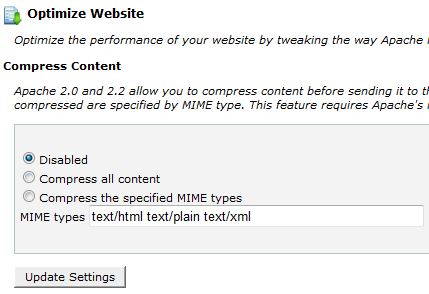
i used option number 3
3- Speed Booster show this messege in system status
v4.2 – Disabled – incompatible plugin detected: disqus-comment-system/disqus.php
i disable this plugin but still not active beacuse widget facebook and almost widget cause issue to speed booster
!!!!
finally i add plugin super cache and enable all option important in plugin but not effect also !!
-
This reply was modified 10 years by
omar ahmed.
Hi,
Yes I see that these files are external fb files unfortunately I cannot provide a solution for this, also the theme like button comes from facebook.
For images try a plugin like Smush it – https://wordpress.org/plugins/wp-smushit/
Or add the following code at the end of the functions.php file:
add_filter( 'jpeg_quality', create_function('', 'return 50;' ) );
It will compress all future added images to 50%, but you have to regenerate the thumbs for the images that were already uploaded, you can doit using the Force Regenerate plugin – https://wordpress.org/plugins/force-regenerate-thumbnails/
Regarding the speed booster plugin I have provided above a solution so it will work with all the plugins or you can check if it works only with tested plugins active:
To always enable speed booster remove or comment this code – http://screencast.com/t/RZLIOPUNdqh
Please note that Speed Booster is an optional plugin so you can disable it if you don’t want to use it and search for an alternative.
I also suggest to not use many plugins as your pagespeed will be affected.
Thanks!
ok sir thanks
2- please give me type file to put this cpanel in option gzip compression
Hello,
Maybe this will help: https://varvy.com/pagespeed/enable-compression.html -https://gtmetrix.com/enable-gzip-compression.html
We cannot provide a code for your cpanel as different servers have different configuration.
You will have to contact your hosting provider.
Thank you!
