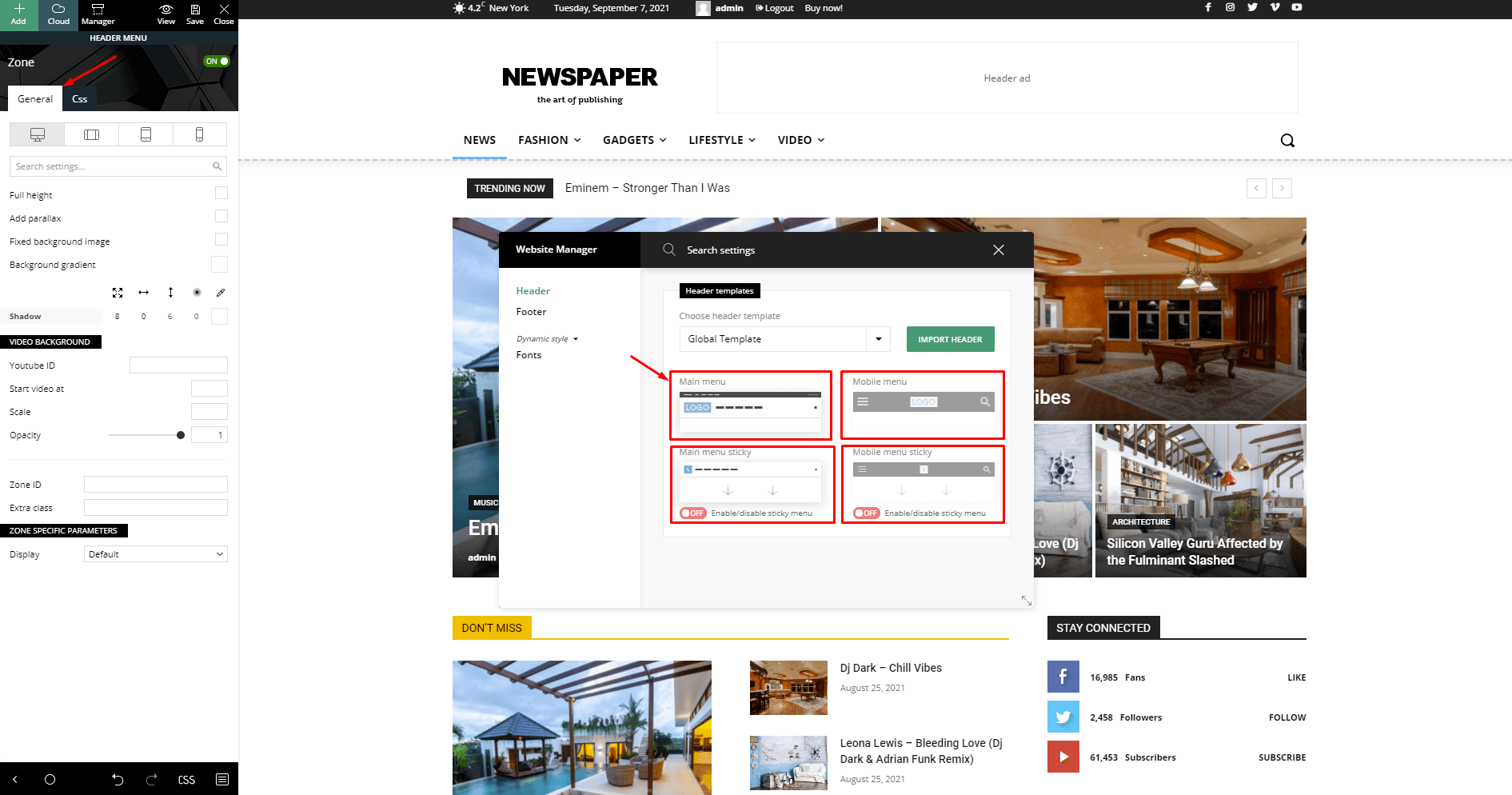
Hi, I have recently updated newspaper theme and after the update the sticky menu is showing empty column instead of showing sticky menu with small logo and menu. Can we bring back the same menu?
screenshot: https://drive.google.com/file/d/1hNZB-RQW3mJthFj73edem2riiJjqJCQU/view?usp=sharing

Hi,
I just checked teh website, and it appears that the sticky header is only on mobile, so I checked with the Wayback Machine to see how it was before the update https://prnt.sc/iT5WXE67POYX, and it was exactly as it is now, only for mobile https://web.archive.org/web/20260212122551/https://www.electronicsforu.com/, so this is not a theme update-related.
Please check our documentation for how to enable the sticky header https://forum.tagdiv.com/header-manager/ – https://forum.tagdiv.com/wp-content/uploads/2019/07/Header-Main-Menu.png
The sticky menu is already enabled from the backened, but when I am re-enabling it again, it is showing empty column for desktop.
https://drive.google.com/file/d/1VEMpwCzT4c200V_W38F2LH234gIDz63x/view?usp=sharing
Hi Calin, I am the admin of this website. the template was set up and was working properly earlier. I have shared Nov month way back machine link: https://web.archive.org/web/20251123180938/https://www.electronicsforu.com/
Kindly check and you can see a sticky menu just below the wayback machine header: https://drive.google.com/file/d/1ubln-UnwUSOeJEfXRLXHzsj2a-pSpBxt/view?usp=sharing
Hi,
Please check the following: Edit the homepage and open the Manager settings. Then, verify whether Main Menu Sticky is enabled. You can try disabling and re-enabling it to see if the issue persists. If it appears, click on one of its elements, then go to Header Menu Sticky. In the General tab, set the Sticky Type to Smart Snap, and for the Transition Effect, select Slide Down: https://prnt.sc/hyDeU23BayBc (the steps are in the image)
I hope this helps!

Hi,
I’m experiencing a similar issue related to the sticky functionality, but specifically with the Sticky Offset not working correctly.
I’m using the Newspaper theme with TagDiv Composer and have a sticky column (Table of Contents) in my single post layout.
Here’s the problem:
* The sticky feature itself is working (the column sticks while scrolling)
* However, the Sticky Offset value is ignored
* My header is fixed, and it overlaps the top part of the sticky column
So even though I set an offset (e.g., 120px), the sticky element does not respect that space, and part of the content is hidden behind the header.
It seems like the sticky behavior is not properly calculating the offset when a fixed header is present.
Is this a known issue after recent updates?
Is there an official fix or recommended workaround for this?
Thanks!
Hi ilisakpop99, I hope the answer in this topic https://forum.tagdiv.com/topic/sticky-offset-not-working-in-tagdiv-builder-header-overlapping-issue/ helps you!
I have deactivated and enabled it again, and making all changes you have suggested, for mobile it is working fine, but on desktop it is showing empty column.
https://drive.google.com/file/d/1V7KnxBCYT8JqNZ-C3QYgEnR445XHYtg9/view?usp=sharing
Hi Atithya, if when the sticky menu is enabled, and you have an empty column, it means that you didn’t have a sticky menu on that header and you need to add the elements you want in the empty column.
Now there is another solution, you cna also set a row as sticky to the top – https://prnt.sc/8oa-ZJaZmaT0 if you use this option, make sure that you also set a background color to the row – https://prnt.sc/1D5fDydQVYfc
I hope this will help you!