Hi, we tried to update the Visual Composer released via FTP and plugin upload. It will install fine, but when you try to get back onto the site or backend, you get a blank white screen no errors. We have to then delete or rename the plugin folder via FTP to get the site back up. Any input would be greatly appreciated, the CHANGE NOTES on Visual Composer are pretty lengthy and would be good to upgrade to this version.

4.3.5 is the latest version bundled with theme and tested compatible; which is version fixed for WP 4.1.
I imagine the free bundled version with custom modules will be updated with next theme update, as per usual practice.
This is mentioned in the theme docs, although perhaps more obtusely.
Noted, so ignore the update message for Visual Composer until next theme update? THanks
Yup:
from the theme docs:
How to Update Visual Composer plugin (WPBakery)
•The theme includes a license for this plugin so you don’t have to buy it.
•You don’t have to activate the plugin license, it’s already activated.
•You can’t update the plugin directly from the it’s producer.
•You don’t have to worry about the plugin update warnings.

Yes, you don’t need the update for anything yet … the updated version of Visual Composer has bugs and not fully stable.
A new version tested to work with the theme will be included with next theme update.
As noted in second post on this thread, current version tested compatible with the theme is 4.3.5.
The bundled version is only updated when the theme is updated. You cannot update it separately, nor would you want to as it might break the theme custom modules 🙂
SEE STICKY TOPIC TOP OF FORUM FRONT PAGE:
https://forum.tagdiv.com/topic/how-to-update-visual-composer-2/
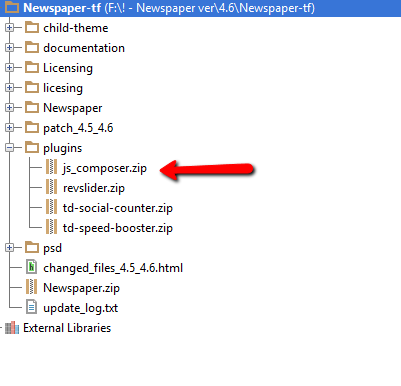
The Visual Composer plugin that comes with the theme is licensed to the theme, the license specifies that only we can provide the updates and you don’t have to buy it or register it. We provide updates on a regular basis, after we test the plugin for theme compatibility the plugin is included in the latest theme update, inside the Plugins folder:
https://forum.tagdiv.com/wp-content/uploads/2015/01/visualc_newspaper.png
Here is guide on how to update the plugin – https://forum.tagdiv.com/update-the-visual-composer-plugin-wpbakery/
Emil G.