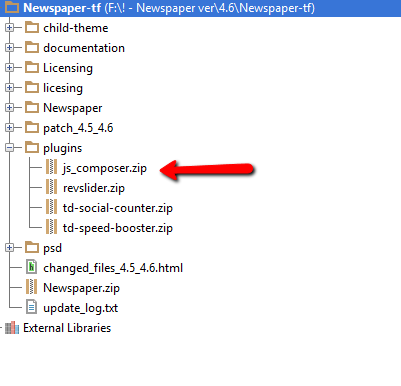
The Visual Composer plugin that comes with the theme is licensed to the theme, the license specifies that only we can provide the updates and you don’t have to buy it or register it. We provide updates on a regular basis, after we test the plugin for theme compatibility the plugin is included in the latest theme update, inside the Plugins folder:
https://forum.tagdiv.com/wp-content/uploads/2015/01/visualc_newspaper.png
Here is the guide on how to update the plugin – https://forum.tagdiv.com/update-the-visual-composer-plugin-wpbakery/
Conclusion – We’re testing the plugin latest version, if everything is ok we will include it in the next update and only then you can update the plugin by downloading the theme latest version and following the procedure presented in the plugin update guide.
Emil G.


can you help me, please. my editor page is block or hidden.


To confirm, the latest in the bundled folder for Newspaper Theme for Visual Composer is 4.3.5? This is the tested and certified correct? We still receive the update message for VC within WP dashboard FYI. The latest VC has numerous updates, will this be applied and tested soon to Newspaper Theme? This was the original topic and questions from all. Thank you for the support
Hi,
Yes, the VC version tested and included within the Newspaper theme files is version 4.3.5.
You don’t have to worry about the plugin update warnings just ignore them.
We will test it and we will release an update with the new version of VC as soon as they will fix issues that apparently they have with the current version. You can see their forum for more info: http://codecanyon.net/item/visual-composer-page-builder-for-wordpress/242431/comments?page=332
Thanks

I tried this, followed the steps. It installs and you can see the latest version of VC, but the buttons (such as Add new Row, Add new element, settings cog) don’t work. Some javascript problem?
We use Newspaper as a child theme, would this make a difference?
Thanks.

I just have a cheat sheet of the files I edit each time.
I have to do this anyway since we have a pre existing read counter field as “views” and so have to change that manually each time. Couple of other small tweaks we do each time, and some stuff we paste at end of functions.php. Not too time consuming and I know it will work! 🙂
Yes, I do 🙂
What I often do, is open two windows on my PC
one folder is the new theme update, one window is old theme update;
I do “sort by date” which pushes the modified files to top.
Then I open the old one, and then the new one and make changes to match.
I also make backup for my custom CSS each time, do a full FTP backup, and do tools > export, each time, out of general paranoia.
Hi,
You can use this solution and import the styling from the js_composer.css file: https://forum.tagdiv.com/topic/buttons/
Thanks

Hi,
I bought the Visual composer Standalone plugin cause it’s seems to be a problem witj Woocommerce…
I would like to install the last update but each time I activate the plugin, the admi page is still balnk ?!
Here is the answer from WPBAKERY :
Hi rudy,
The issue is because there is an inbuilt version of visual composer (or the related code) present in your theme which is overriding the standalone plugin version and hence causing the issue. You will have to get rid of it. I would advise you to do so with the help of theme author, otherwise you might loose the extra elements added by him. Once this is done, you can install the standalone plugin and it will work fine. Kindly check.
Thank you,
Best regards
Rudy
Hi,
What theme version do your use as the latest version of the theme(4.6.1) doesn’t have an inbuilt version of VC plugin.
Please also note that we provide an unmodified version of the VC plugin, tested to work well with the theme. The theme dose remove though the VC front editor.
Please disable all plugins then install and activate just you version of Visual Composer Standalone plugin then check again as this should work and also make sure that you also update to the latest theme version.
Thanks
Yes I use the last version ; I ask to WPbakery to make test and here is their answer :
Hi rudy,
I switched over to a default theme like twenty fifteen at your end and activated the woo-commerce plugin: http://awesomescreenshot.com/0004aplvf7 and you can see that admin does not crash. So, as mentioned previously the issue seems to be arising from the theme. Kindly check.
Thank you,
Best regards
Rudy
Hi,
I can’t offer you an exact answer on this. Could you please give us wp-admin and FTP access so we can also check this or just send us your errorlog file as it should show what went wrong.
Please use our email address for this: contact@tagdiv.com and also provide more details about this issue you have so we can recreate it.
Also include a link tot his tread.
Thanks

I am confused. I am trying to install the plugin for the first time. It is in the required plugin section in APPEARANCE/INSTALL PLUGINS – however when I try to install, I get an error saying the target directory already exists. I cannot delete the plugin and reinstall from here.
If I try to upload as the instructions direct, I get the same message: target directory already exists. It thinks it is there, but it wont let me install.
If I go to the theme plugin section, the plugin does not appear in either installed or activated. How do I install or update?
Thanks.
-
This reply was modified 11 years by
sailingchance.
Hi,
Connect via FTP an delete the plugin’s folder: http://screencast.com/t/nYdSwwrzUhkK then try to install the plugin according to this guide: https://forum.tagdiv.com/update-the-visual-composer-plugin-wpbakery/
Thanks

Hi,
The “pick and drop items..” issue was reported when using an older version of the plugin together with the latest version of WordPress (4.1).
Please make sure that you download and update your theme to the latest version (4.6.1) and also remove and install the VC plugin from the /plugins folder which came with the theme files, use this guide: https://forum.tagdiv.com/update-the-visual-composer-plugin-wpbakery/
This was tested so you shouldn’t have any issues.
Thanks

Hi,
The Visual Composer latest version (4.4.3) will be tested and included in the next theme update.
We’re currently having it this under testing and we’re waiting to see if this is a stable version so if all is ok we will provide it within next week.
The grid elements function is also on our todo list, we are working on this and we’ll include a fix for this in the next update.
Sorry for the inconvenience!
Thanks
———————————————————————————-
thanks for your answer ^^
So i have one more question.
How can i change layout in my mobile screen?
i wanna shown one big slider and under two column picture in mobile or small monitor.
but now just one column~
for example
now my theme is like this in mobile(when shown mobile screen)
one big slide and under just 1 column
but i wish like this shape in mobile
big slider and under column should separate~
like a masonry~
at the least shown 4~6 posts(2 column) in mobile screen
but now i can just 2 posts
So i will waiting your kind answer.
see you lucian ^^*