Andrei L.
 Hi
Note that the Speed Booster plugin disable itself when an incompatible plugin it’s installed. We added this measure to avoid conflicts with the plugins that won’t allow to move their CSS/js resources at page bottom. To keep it always activated comment or delete the indicated lines from td-speed-booster.php: http://screencast.com/t/RZLIOPUNdqh You can check this topic for more information about speed booster usage: https://forum.tagdiv.com/topic/speed-booster-questions/
Hope this help.
Thanks!
Andrei L. Hi
Most likely there is an incompatibility or it’s needed a different approach on this. Unfortunately I can’t provide a solution now as this is a task which require many customizations. If you still need guidance on this or you’re not aware of the steps you need to take in this regard please consider hiring a developer or a freelancer to do this for you as we can’t offer customization services at the moment.
Thanks!
Andrei L. Hi
The like an share buttons are available only for posts and can be enabled from theme panel > posts settings: http://screencast.com/t/SYmyA7LK
Thanks!
Andrei L. Hi
We didn’t tested the adrotate plugin so I can’t guarantee that will work 100%. However from our reports received from different users, the plugin works fine.
I am not sure why the plugins does not work on your site but you can try to deactivate all others plugins except Visual Composer and adroatate, just to be sure that there is no conflict, clear the cache memory, also check if the ad code it’s ok then test again.
Note that if you want to display it using the php code you will have to use the do_shortcode function like this:
echo do_shortcode('ad-rotate-shortcode'):
You can also check this tutorial here, it may help: http://www.wpbeginner.com/plugins/how-to-manage-ads-in-wordpress-with-adrotate-plugin/
Thanks!
Andrei L. Hi
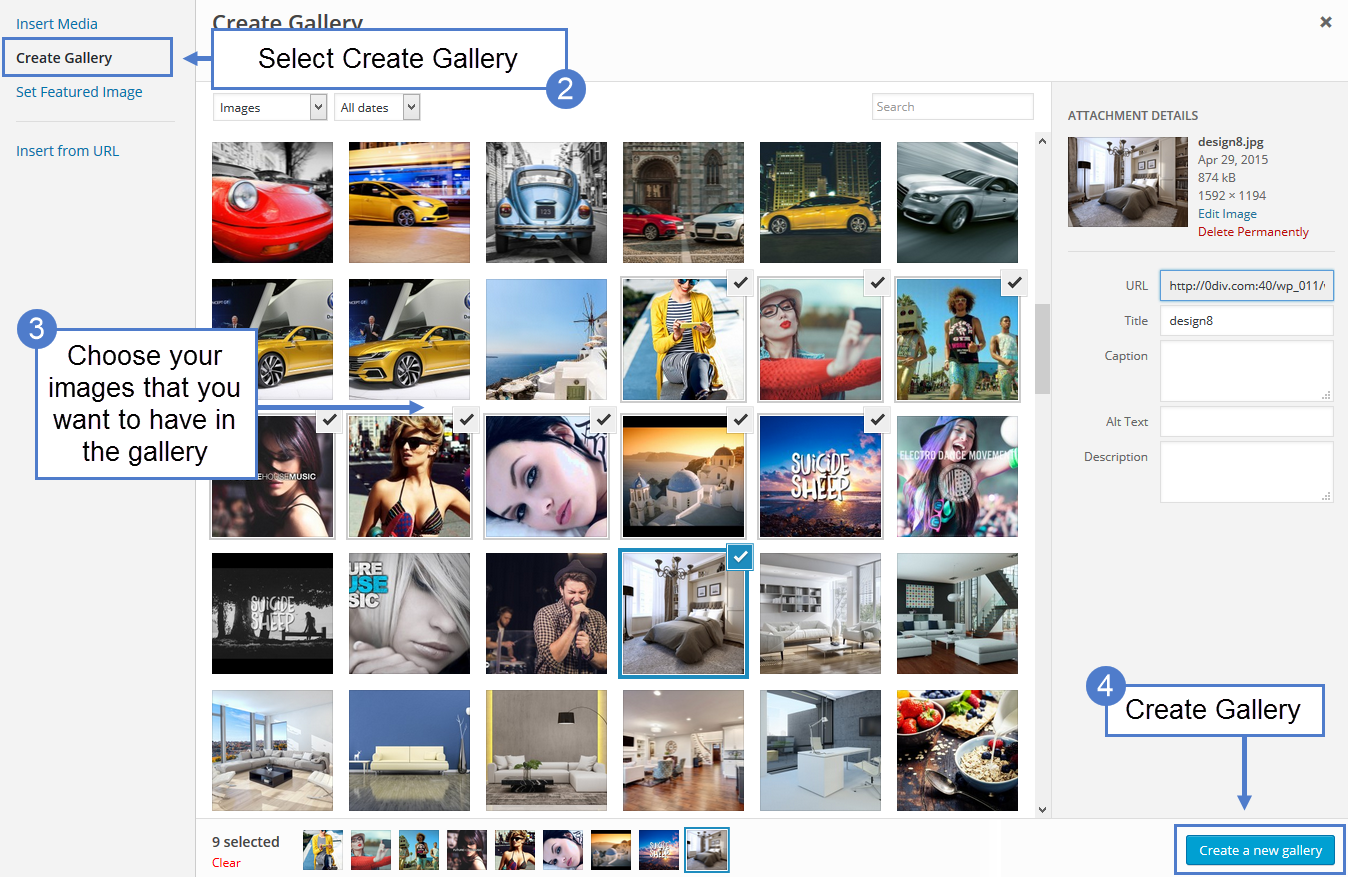
You can create a media gallery on your page following this steps: https://forum.tagdiv.com/wp-content/uploads/2015/05/2015-06-17_9-34-24.png – https://forum.tagdiv.com/wp-content/uploads/2015/05/2015-06-17_9-37-04.png – http://screencast.com/t/cwxNTmcjV
The result should be like here: http://screencast.com/t/jO5r4XUAn6fM
Let me know how it goes.
Thanks!
-
This reply was modified 10 years by Andrei L..
Andrei L. Hi
That error appear because ad-sense javscript can’t read the width for the container where the ad must be displayed. We will investigate this issue when will be possible, meanwhile you can check this tutorial and implement the solution provided there: http://webgilde.com/en/adsense-auto-resizing-error/
Hope this help.
Thanks!
Andrei L. Hi
This can be achieved by adding some conditions at the query but this is the hard way and unfortunately I can’t provide a solution now as this task require many customizations. However you can use the post id filter to chose which page will be dispelled in a certain block: http://screencast.com/t/qt8suv5Z Insert in the indicated field only the ids for the pages that you want to be displayed in that block. To get the page id follow this link: http://screencast.com/t/9V7zgx6WK
Thanks!
Andrei L. Hi
You can add a condition like this in td_module_single_base.php file http://screencast.com/t/sWdYXBSX
if (is_single()) {
            $content = $content . td_global_blocks::get_instance('td_block_ad_box')->render(array('spot_id' => 'custom_ad_4'));

        }
The result will be like here: http://screencast.com/t/Kl9YxQVKd This implementation should work even with Disq plugin active.
Let me know how it goes.
Thanks!
-
This reply was modified 10 years by Andrei L..
Andrei L. Hi
To achieve that you will need edit the page-pagebuilder-latest.php file and add this css class here: http://screencast.com/t/Jy5HpX5gPHCu Next step is to add this css in theme panel > custom code > custom css:
@media(max-width: 768px){

.hide-on-mobile{

display: none!important;

}

}
To hide more article box please check this topic, I’ve posted a solution there: https://forum.tagdiv.com/topic/view-on-mobile-mode-the-more-stories-covered-all-content/
Thanks!
Andrei L. Hi
The theme’s social share buttons weren’t designed to work on pages, only on posts. To achieve that you will need some custom modifications in theme’s files and unfortunately I can’t provide a solution now. You can try a share plugin with a similar functionality. I can’t recommend a specific plugin for this but I found here some informations which may help you in this regard: http://www.bloggingwizard.com/top-wordpress-social-sharing-plugins-2014/
Thanks!
Andrei L. Hi
I’ve tested the plugin’s functionality on my side and works fine. I am not sure why this happens so please provide a link where I cab inspect this so I can take a closer look at this issue.
Thanks!
Andrei L. Hi
I am not sure I understand your issue completely. Do you mean that the changes made in theme panel does not applies on front-end? If this happens try to deactivate all plugins except Visual Composer, clear all caches and test again. Also check in browser console while you’re saving the settings if there are any errors. Usually a 403 or a 404 error it’s displayed there if something goes wrong.
If this is not what you mean please provide more details about your issue and also provide your site url so I can inspect it closer.
Thanks!
Andrei L. Hi
You can insert an ad under post title using do_shortcode function in the file corresponding with post template used, like here: http://screencast.com/t/sOX6p9gHJ
<?php echo do_shortcode('[td_block_ad_box spot_id="custom_ad_1"]'); ?>
To get the shortcode add an ad box into a blank page then switch in backend editor copy and paste this code: http://screencast.com/t/Kcqsjk9C7xbU inside do_shortcode function.
For homepage you can use the adbox clock from Visual Composer like here: http://screencast.com/t/0kTjlWwwg – http://screencast.com/t/USSisJGc
Hope this help!
Thanks!
-
This reply was modified 10 years by Andrei L..
Andrei L. Hi
Replied you here: https://forum.tagdiv.com/topic/sidebar-display-block-7-is-too-compacted/#post-93123
Thanks!
Andrei L. Hi
Try this css in theme panel > custom code > custom css: http://screencast.com/t/uT8p4gb8qW
.td-post-category{

    display: table;

    margin-left: auto;

    margin-right: auto;

    margin-bottom: 3px;

}
Thanks!
Andrei L. Hi
This usually happens when you have only one post in the category set in slid’s filter. To avoid that just comment the indicated lines from td_block_slide.php file: http://screencast.com/t/tzFPzU220YR
Thanks!
Andrei L. Hi
Try this css in theme panel > custom code >custom css: http://screencast.com/t/lqKyTlMg
.td-logo-text{

color: green!important;

}

.td-tagline-text{

color: blue!important;

}
Thanks!
Andrei L. Hi
First you need to add a class for this subtitle like here: http://screencast.com/t/PIstFup73
<p class="no-margin"><strong>More posts and reviews</strong></p>
After this uou will need this css in theme panel > custom code > custom css: http://screencast.com/t/fAq0nkRexe
.td-post-content .no-margin {
margin-bottom: 0px!important;
}
.td-post-content ul{
margin-top:0!important;
}
Let me know how it goes.
Thanks!
-
This reply was modified 10 years by Andrei L..
Andrei L. Hi
The theme does not have an option to rotate the ads. To achieve that you can try a plugin like ad-rotate. We didn’t tested plugin but from our records it works fine for most users.
Thanks!
Andrei L. Hi
I looked over WordPress official documentation and the action used it’s correct. I also tested the code on my side and works fine.
Thanks!
Andrei L. Hi
Try to deactivate all plugin except Visual Composer, clear all caches and test again. Also check in browser console while you’re saving the settings if there are any errors. Usually a 403 or 404 error appear in this situations.
Regarding the ad issue please make sure that you’re not using any ad-blocker software as I’ve checked your site with google chrome and the header ad it’s displayed fine: http://screencast.com/t/NVwwEtdkpDq
Thanks!
Andrei L. Hi
Please provide more details about what you’re trying to do so I can check and get back to you with a more accurate answer.
Note that the theme does not control the way a specific plugins works. The plugins are managed by WordPress and they can be used in many different ways. It’s a good practice to read the plugins documentation to become more familiar with it and also a very important thing is to test it if is compatible with the theme.
Thanks!
Andrei L. Hi
To achieve that you need to edit the loop file corresponding with the post template used for post and move the indicated line like here: http://screencast.com/t/XgplJP2zrKD Also you will need this css in theme panel > custom code > custom css: http://screencast.com/t/Jjlzc4DkBp
.td-category{

float: left;

}
Let me know how it goes.
Thanks!
Andrei L. Hi
Sorry for missing your second question!
I suppose that you want to add a title for the ads displayed in post content. If so please check this topic, I’ve posted a solution here: https://forum.tagdiv.com/topic/inline-ad-titles/
If this is not what you mean please provide more details.
Thanks!
Andrei L. Hi
The theme use a custom function to get the featured image http://screencast.com/t/m3TNv3gi6EVH – http://screencast.com/t/IOXvSwWksK I can’t say hoe the indicated function will work with our theme as we didn’t test it and most probably you will need some custom modification in order to work.
Please consider that this is a very complex task which involve many customizations and very good coding skills. If you can’t do it yourself my advice is to find someone to help you or hire a freelancer to do this for you as we can’t offer any customization services at the moment.
Thanks!