

 ben.hinc
 I have read in another thread that the problem is actually with the mobile theme plugin, which I do have activated and don’t want to turn off.
However, I did turn it off for testing purposes and was able to save pages again.
Is there any timeframe for getting this problem resolved?
ben.hinc I can confirm that changing the PHP version to 7.1.24 has not solved the problem.
Prior to upgrading to Newspaper 9.2 and WordPress 5.0, we never had any issues with TD Composer.
ben.hinc Hello Catalin,
I have modified the memory limit and I’m still unable to save pages. The progress spinner just spins and the page is never saved. As I said previously, cloud templates save without any problem.
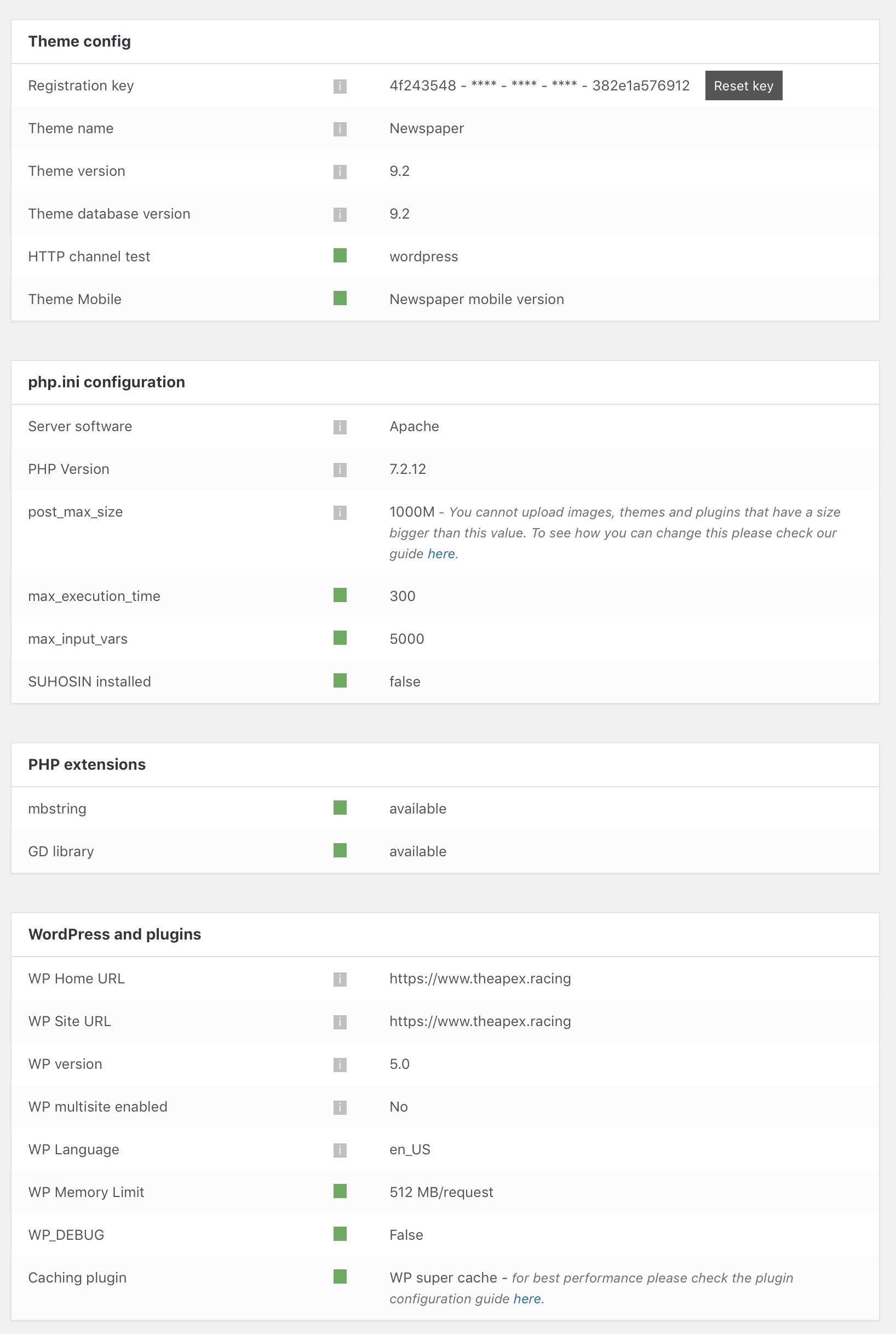
I have verified that everything in the theme status panel is green, which should mean that my site is meeeting all of the requirements as outlined in the link you provided above.
ben.hinc Thank you Simion for your response.
We’ve invested a lot of time in carefully designing our website using your Cloud Templates so reverting to the standard category template isn’t an acceptable solution, nor is discontinuing the use of the plugin that enables our podcast to work.
As an interim solution since I haven’t gotten a resolution that solves the actual problem, I have created a page that is identical to the Cloud Template originally created for the category and redirected the category to it.
This way, when someone accesses the category — https://www.theapex.racing/the-braking-point-podcast, they are transparently taken to the page at https://www.theapex.racing/the-braking-point. Because the category itself retains a standard Newspaper template, the functioning of the feed located at https://www.theapex.racing/the-braking-point-podcast/feed is unaffected.
This solution has worked fine, except we also use your mobile theme. By redirecting the category to a page, we have to create a mobile page that acts like a category.
Is there a way I can add a post loop of posts from a specific category on a mobile page?
ben.hinc Update:
I posted this issue to PowerPress plugin support forum and got this response:
Looking at your screenshots, it appears the theme was stripping the category feed of all of the settings applied by PowerPress. There is an option in PowerPress >> Settings, Advanced Mode >> Feeds tab to keep outside plugins from modifying podcast feeds (it can also help with theme-based issues sometimes). If you’re still having trouble, enable this option and save the changes.
Other than that, all you can do is get support from the theme developer. If the category-based podcast feed is working as expected under a default theme, the issue isn’t with PowerPress.
The full thread is located here: https://wordpress.org/support/topic/powerpress-incompatible-with-tagdiv-newspaper-cloud-templates/#post-10878019
I can confirm that I had the setting he refers to turned on already. Even with the plugin set to prevent outside plugins from adjusting the RSS feed of the category, it is still unable modify the feed when a Cloud Template is applied to the category.
ben.hinc For example the mobile plugin could support non https, and support javascript, and various things which AMP does not support, ad units, TagDiv API, speed booster hooks, etc.
The only reason I’m suggesting a single plugin as a solution is because AMP for WP, when used with Automattic’s AMP plugin, can function as both an AMP plugin and the site’s mobile theme.
I can toggle a setting in AMP for WP and it will replace Newspaper with its theme (which is AMP compliant) for any mobile visitor.
That’s what I would envision Newspaper’s implementation to be like: completely transparent to the end user. For normal people who don’t know what AMP is, it would serve as a mobile theme as it does now. For those who want AMP functionality and are willing to live with the limitations it brings, they can flip a switch and everything is instantly AMP’d.
It’s not like the work hasn’t been and isn’t being done by the AMP for WP guys — everything is open source and freely available. It could literally be taken, sprinkled with a little Newspaper magic and be ready to go.
ben.hinc I get what you’re saying. I would think that the developers would be MORE interested than I am that websites using their theme have the best AMP experience available.
Let’s say — for the sake of argument — that Newspaper is the best desktop theme available anywhere. And, continuing this hypothetical, let’s also say that on mobile, when using the mobile plugin, it’s also the best theme money can buy. The absolute, hands-down best.
If this were true, why would the developers be okay with whatever AMP implementation a site owner wants to use?
To protect the integrity of the theme and keep it at the forefront, I’d certainly want to offer my own solution if I had my name on this theme.
But to have every experience be the best available EXCEPT when someone clicks into a site from a mobile search result? That reflects poorly on everyone involved.
ben.hinc I’m sorry, I must have missed where Chris offered advice on how to achieve what I’m looking to accomplish.
I’m asking for the mobile theme that is put in place when the tagDiv mobile theme plugin is activated be AMP compliant so that when someone searches on mobile and clicks an AMP link, that is what they see.
Anything less than that is unsatisfactory and very much a brick wall.
I’m not looking for alternatives. I’m not looking to modify some existing AMP template to be close to the real thing. These are all workarounds that offer a less-than-optimal experience. Am I the only one that sees this?
What I don’t understand is why everyone seems to be so accepting of compromises and workarounds.
Just a quick note: I already have a heavily customized AMP implementation that is just as functional as the tagDiv mobile theme (maybe more so). The problem is that it ISN’T the tagDiv mobile theme. It’s not like I’m not familiar with how this works and I’m coming at this with zero knowledge which seems to have been implied in this thread.
-
This reply was modified 9 years by
ben.hinc.
ben.hinc Judging by the number of brick walls I’m hitting with this topic, including in this thread, six months may not be enough time to prepare for AMP’s inclusion as a ranking signal.
Now is the time to work out these challenges. A forward-thinking theme and plugin developer would have had this figured out yesterday so that six months from now, money could be made.
I’m dismayed by the snail-like pace I’m encountering and the overall lack of concern. I can’t believe I don’t have a legion of people clamoring for the same thing I’m asking for. How is this not a worry of every single website that uses this theme for a serious business purpose and is actually planning not just six months into the future but for the next several years?
I would understand if a tagDiv representative came into this thread and argued with me. But to suggest that six months is too far in the future to plan for is disconcerting.
ben.hinc AMP is not a ranking signal yet.
The key word here is “yet.” Isn’t it better to be proactive rather than reactive?
Forget about today’s ranking — it’s tomorrow’s ranking that AMP support will impact.
ben.hinc AMP needs custom classes, compliant post meta code, special ad unit setup, custom hooks for plugins, no use of javascript stuff, https-only elements, etc., etc.
Most of these issues have been solved by the AMP for WP plugin I linked to in an earlier reply (when used in conjunction with Automattic’s plugin). Therefore, they CAN be solved.
There’s no reason why tagDiv’s mobile plugin can’t solve all the same issues in the exact same way this plugin has and deliver a full Newspaper-like mobile experience while maintaining AMP compliance.
And trust me — I’m aware of the HTTPS requirement. We’ve moved our site as well as our podcast to HTTPS in order to comply with it.
ben.hinc You can’t make a page identical to your desktop version for AMP as that defeats the purpose of the mobile friendly AMP framework. It’s supposed to be “lean and mean.”
I feel like none of you are actually listening to what I’m saying.
I’m NOT advocating that the AMP version be identical to the DESKTOP version.
I’m advocating it be identical to the mobile plugin version provided by tagDiv which, as I understand it, was developed to be “lean and mean.”
I don’t want a responsive version of my site to be the AMP version. I don’t want responsiveness at all.
I want tagDiv’s mobile plugin with AMP compliance. That is it. Until this happens, I will continue to advocate for it. And, for the third time, the first news theme for WordPress that can offer a mobile experience (NOT a desktop experience) that is also AMP compliant will win my business.
ben.hinc I’m not disputing the fact that the AMP templates can be edited. I make many customizations to mine and have to make them each time the plugin is updated.
What I would PREFER is the following:
— Someone searches Google for content and sees my site in the search results.
— Because they’re on a mobile device, they’re presented with a link to an AMP-compliant version.
— When they click the link, they are taken to a page that looks identical to any other page on my site when viewed on a mobile device.
I firmly believe that the first WordPress news-focused theme that can offer this experience will win big. I simply don’t understand why anyone here is defending a less-than-optimal experience for website visitors who come in by clicking on an AMP link in mobile search results.
ben.hinc Using Accelerated Mobile Pages plugin (Khaludi) AND WordPress AMP plugin AND Yoast Glue (if using Yoast WordPress SEO) all work perfectly for me and have done for months – ALL used together never failed – some cutomisation options built in too.
Thanks for your note. This is the solution I’m using.
But as I tried to state in my reply above, until the experience using an AMP-compliant page is indistinguishable from a non-AMP page, the solution remains incomplete as far as I’m concerned.
ben.hinc I appreciate your thoughtful response. I think it’s misleading to suggest that AMP “replaces” the mobile theme. It’s offered as an alternative to the mobile theme and with proper implementation, Google will find the AMP version, show it in mobile search results and rank it higher than a corresponding non-AMP (but still optimized for mobile) page. On my site, we use AMP for SEO purposes only and as much as we can, we direct visitors to the regular mobile version of our site because this is the experience we prefer and want our visitors to have.
Just like theme authors keep up with the ins and outs of changes to WordPress and how their themes interact with various plugins, I don’t think it’s too much to ask that they keep up with AMP.
There are many plugins like AMP for WP that take what Automattic is doing with their “agnostic” plugin and greatly enhance it. For example, just in the time that I’ve been using AMP for WP, the authors have added optimizations specific to Newspaper as well as support for plugins that do not display properly with Automattic’s plugin like Tobias Bäthge’s awesome TablePress. This is all done, of course, without breaking AMP validation.
I’m not suggesting that the Newspaper developers start from scratch. Plugin authors like those behind AMP for WP have shown that AMP functionality can be extended using Automattic’s plugin as a base.
My idea would be for tagDiv’s mobile theme plugin to work in the same way — essentially allowing Automattic’s plugin to do the heavy lifting and adding Newspaper-specific design and functionality on top of it.
My website, The Apex, chose Newspaper and continues to use it because of the awesome experience afforded by the mobile theme plugin. However, that experience becomes diluted when the best experience can’t get the best search ranking due to Google’s insistence on AMP compliance.
I have seen very good AMP implementations on other sites that aren’t based on WordPress — so good, in fact, that it was nearly impossible to tell the difference between AMP and non-AMP. This demonstrates to me that it is indeed possible to offer a fully functional and well-designed experience while keeping in compliance with the evolving AMP standard.
Seeing these sites should make it abundantly clear that what is offered by Automattic’s plugin isn’t sufficient. Yes, it creates pages that validate against the AMP standard. But it doesn’t make the THEME compliant with AMP, only the site’s content. I’m doing a disservice to my site’s visitors by giving them a less-than-optimal experience. I want them to use Newspaper’s mobile theme and tagDiv should want them to use it too — but that’s not going to happen as long as AMP pages rank higher than others and tadDiv continues to see AMP as a distraction.
The best news theme for WordPress, which Newspaper undoubtedly is, will not remain the best for long if it cannot deliver a best-in-class AMP experience for its paying customers like me. SEO is critically important for sites that use themes like Newspaper and denying the importance of AMP as well as the experience when viewing an AMP-compliant page is a big mistake. tagDiv should not be content allowing the AMP experience for sites using Newspaper to be dictated by a third party.
The first major news-style theme for WordPress that offers built-in support for AMP with no difference in the experience over non-AMP mobile pages will be a winner in this space. I can’t help but think that tagDiv is missing a huge opportunity here.
ben.hinc The official AMP plugin offered by WordPress greatly limits the functionality of the Newspaper theme. Multi-page posts appear as one page, Smart Lists do not function properly and many other elements are missing.
I have asked the Newspaper developers to introduce native AMP support in their theme but they do not seem interested.
Again, the official AMP plugin is not a suitable solution for most instances. What is needed is an AMP-compliant version of Newspaper’s mobile theme plugin.
ben.hinc I understand. We are using one of the smart list styles on desktop that does not do this to images and we find that using a smart list is the best solution available for presenting this kind of information.
I have done a lot of customizations to both the main and mobile themes by tweaking the source code directly. All of these customizations have come from you and your colleagues’ assistance in this forum.
Are there any code changes I can make to the mobile smart list template that would stop this image replacement from happening?
Examples of changes I’ve already made to mobile:
- Remove pagination on homepage
- Change display of homepage block from “featured” to regular and offset the list below by three
- Remove display of sister categories on category pages
- Remove Whatsapp and Pinterest sharing options
As you can see, I’m not opposed to making changes when necessary and this smart list image issue is certainly one that has an impact.
Regarding using the responsive theme instead of mobile, this is not an option. We have promoted your mobile theme in particular as one of the reasons to visit our website and we won’t give up on that.
Any suggestions you can provide for modifying the code are appreciated. Thank you.
ben.hinc Bogdan,
I appreciate your response. First, I want to let you know that I contacted the author of the plugin. He is aware of the cause of the conflict and pledged to fix it with his next release.
Regarding using either the mobile theme or an AMP plugin to offer a mobile experience, I think this is the wrong approach. An AMP-enabled mobile page is completely different than the pages generated by your mobile theme plugin. AMP pages get added visibility in Google search results and lead to increased clicks, impressions, and user experience thereby leading to improved SEO. AMP compatibility may also impact ranking within Google search results.
AMP isn’t about providing a theme but rather supporting a set of technologies that give the pages preferential treatment in Google search — an important element of any news site. I find it difficult to believe Newspaper is the best news theme for WordPress if it does not make it easy to support the implementation of AMP pages. On my site, AMP pages are only viewed when clicking on a Google search result on a mobile device. Visiting the site directly will load the regular mobile theme. Additionally, we provide a link on the AMP page to load the mobile theme for a better experience.
Making compromises for better search result placement is not optimal. Because of this, modifying the existing mobile theme so it is compatible with AMP would obviously be the preferred solution but you have stated in previous communications with me that this is not on your roadmap.
Therefore, choosing an official AMP plugin that works flawlessly with Newspaper as you have done with Contact Form 7, WP Super Cache, Font Awesome 4 Menus and other plugins is essential to ensure that Newspaper remains the best and most full-featured news theme for WordPress. The AMP for WP plugin is the best we’ve found and this is the one I would recommend you take a look at.
Thanks,
Ben
ben.hinc I have resolved two of the three issues above by deactivating the tagDiv Composer plugin.
ben.hinc Quick follow up:
I’ve managed to edit the code above to show the category I want and customized it appropriately. However, when I duplicate the code to make a second “block,” I only get a header with no posts. Is it written in such a way that it can’t be duplicated? Here is my modified code:
        <div class="td-container td-pb-article-list td-main-content" role="main">

            <?php if ( empty( $paged ) or $paged < 2 ) { ?>

                <h4 class="block-title"><span>IndyCar</span></h4>

            <?php }
// query used on Latest Articles section
$wp_query_args = array(
'ignore_sticky_posts' => 1,
'post_status' => 'publish',
'posts_per_page' => 5,
'paged' => $paged,
'category_name' => 'indycar'
);
query_posts($wp_query_args);
locate_template('loop.php', true);
wp_reset_query();
?>
</div>
<div class="td-container td-pb-article-list td-main-content" role="main">
<?php if ( empty( $paged ) or $paged < 2 ) { ?>
<h4 class="block-title"><span>Sports Car</span></h4>
<?php }
// query used on Latest Articles section
$wp_query_args = array(
'ignore_sticky_posts' => 1,
'post_status' => 'publish',
'posts_per_page' => 5,
'paged' => $paged,
'category_name' => 'sportscar'
);
query_posts($wp_query_args);
locate_template('loop.php', true);
wp_reset_query();
?>
</div>
Thank you.
ben.hinc Thank you so much for the response. I’d like to change the sorting of the grid to recent, so this helps. I’d also like to replace the recent list of articles under that with blocks for specific sections like those that are found on the main theme. Is there a way to edit the code to accomplish this as well?
Example:
        <div class="td-container td-pb-article-list td-main-content" role="main">

            <?php if ( empty( $paged ) or $paged < 2 ) { ?>

                <h4 class="block-title"><span><?php echo $td_list_custom_title; ?></span></h4>

            <?php }
$posts_per_page = get_query_var('posts_per_page') ? get_query_var('posts_per_page') : 10;
// query used on Latest Articles section
$wp_query_args = array(
'ignore_sticky_posts' => 1,
'post_status' => 'publish',
'posts_per_page' => $posts_per_page,
'paged' => $paged,
);
query_posts($wp_query_args);
locate_template('loop.php', true);
echo td_page_generator_mob::get_pagination();
wp_reset_query();
?>
</div>
Example: could I take the above code and limit the query to a single category? And, repeat the code several more times to create additional blocks?
Thanks again.
ben.hinc This solved the issue! Thank you so much.
Newspaper 7 was the first time I had every enabled the TagDiv Speed Booster plugin. I’ve deactivated it and the page load issues have disappeared.
Thank you as well for the other suggestions.
ben.hinc I have checked my “Post Title” font settings and the only one I have set is the default.

I’ve also noticed that in addition to the fonts loading and changing, the colors and other theme elements do as well. For example, we have red links and red backgrounds on our block/widget titles, but when the page first loads, these are all blue before they switch to red.
It seems if the pages are loading a whole different stylesheet before it loads our customizations. Can you assist with this? I don’t have the ability to make a video of this related issue but I will later today if that would help. Thanks.
UPDATE: I have checked my color settings in the Theme Panel and confirmed that no color is set to blue – only red, black, and white. Why is blue showing up at all?
Also, if you look closely at the sidebar in the desktop video above, you can see the widget titles with blue backgrounds for a split second before they turn red.
