

 BlogMickey
 Thank you for the follow-up. I eagerly await a fix and update
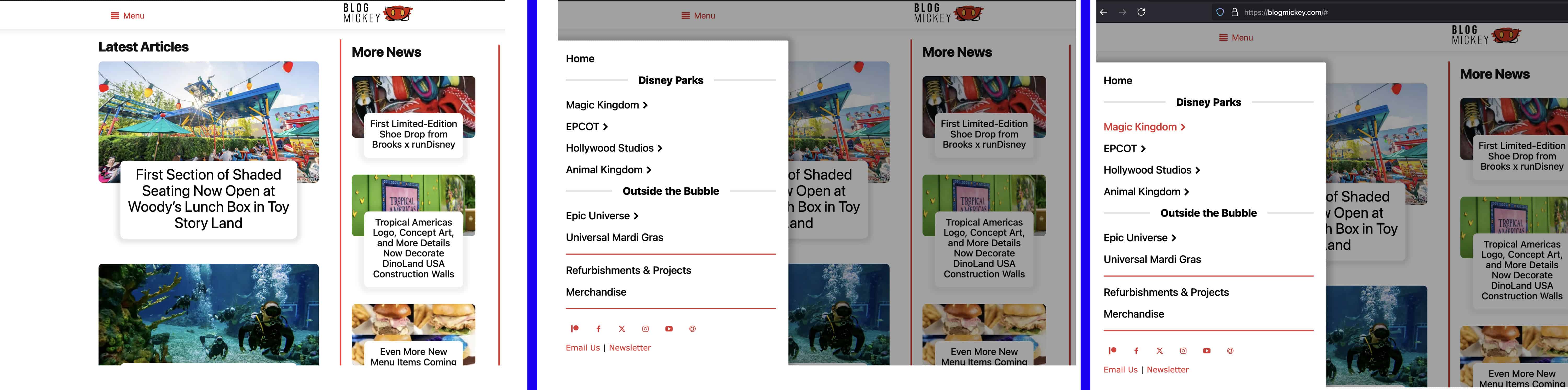
BlogMickey Yep! I’ve got the initial modal that is seen in the screenshots, and that triggers a second modal (that isn’t showing), that links/displays to a specific page with various elements
For example, you’d click the initial menu to bring up the menu seen in the screenshot. If you then click on “Magic Kingdom” it would bring up another modal, which would be populated by a page with various elements such as image boxes and an article loop.
BlogMickey I’m not aware of any plugins that should interfere with the modal popup behavior.
I have “preloaded” selected for the Modal Content Load
BlogMickey Yes, the popup modal works from the menu “page” (https://blogmickey.com/flyout-menu/), but not as a menu from my homepage/site pages
BlogMickey There have been no changes to my modal popup. The only change to my site was updating to the latest version of the Newspaper theme
BlogMickey Sorry, not a menu, but rather a series of popup modals that I have built to function as a menu.
As seen in the series of screenshots below, the menu opens when I click on the hamburger icon. It then presents a series of options. When I click any of the secondary popup modals (indicated by a right arrow next to the menu item). The page simply throws a ‘#’ at the end of the URL and nothing happens
BlogMickey Is there a way to feature request this? It would be an awesome option
BlogMickey I’m also experiencing this problem
BlogMickey Thanks for the reply. The content is saved, as my revision history shows all of the shortcode.
Any thoughts as to why the TagDiv Composer button wouldn’t show up on the standard edit page?
BlogMickey I’m having the same issue
BlogMickey I’ve uninstalled and re-installed and now the TagDiv Composer button is gone completely in a post and page
BlogMickey Please make this fix a high priority. I want to use the composer, but having it broken obviously makes it impossible. Any workarounds?
BlogMickey Well, that was a wild ride, but here’s the solution: Had to completely delete the old td-composer from my site and install the new zip in the 8.7 package.
I updated to 8.7 originally from Envato
BlogMickey Actually my entire site is experiencing a 500 since upgrading
