

 cpope
cpope 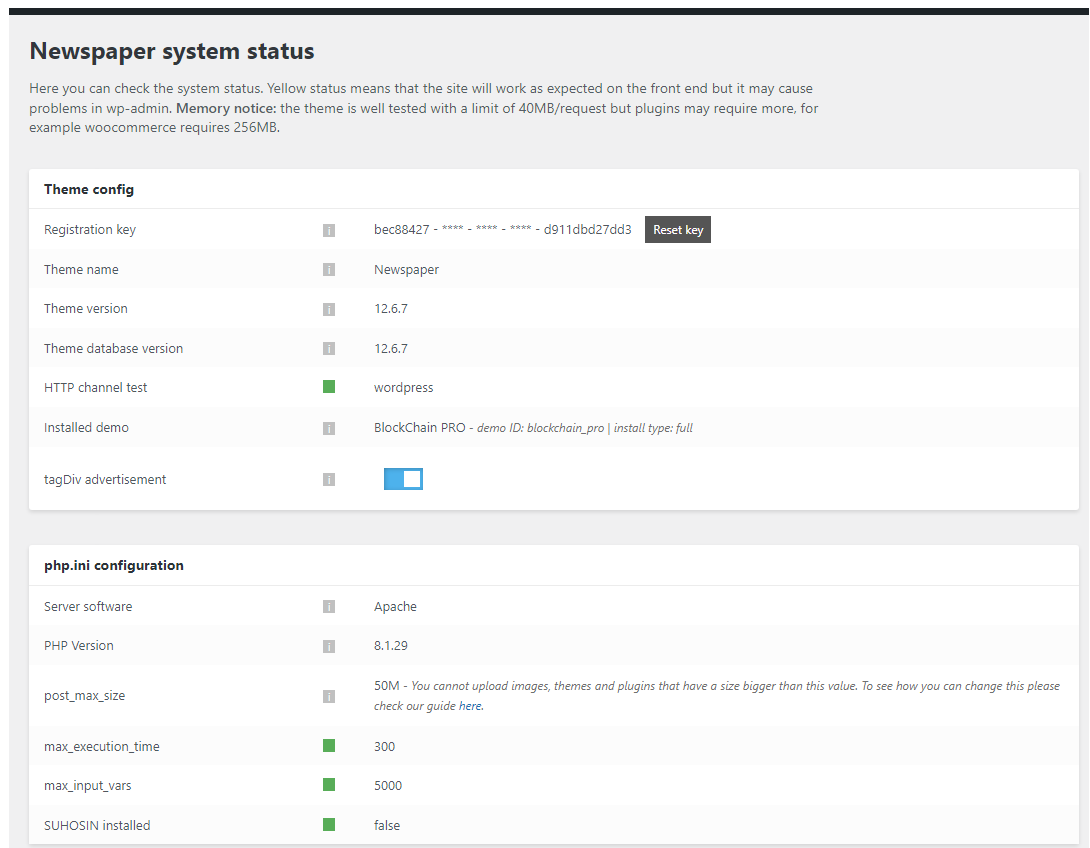
The Save issue is only on the home page. Save works on other pages and post.
cpope website: https://ijjc.com
cpope I don’t want to download apps to my laptop.
Here is a link to the sequence of pages for the 200 Ok error. The second link shows the mouse link being executed at the bottom left of the screenshot.
https://ijjc.com/wp-content/uploads/2023/04/ijjc.com-home-page.png
https://ijjc.com/wp-content/uploads/2023/04/home-with-mouse-on-edit-with-TagDiv-Composer.png
https://ijjc.com/wp-content/uploads/2023/04/ijjc.com-home-page.png
cpope OK
The server encountered an internal error or misconfiguration and was unable to complete your request.
Please contact the server administrator at webmaster@dsmrs.bv4me.com to inform them of the time this error occurred, and the actions you performed just before this error.
More information about this error may be available in the server error log.
cpope Thanks it working.
cpope Thanks the fixed the issue I can edit.
Really really thanks
cpope Thanks for the instructions, working through the steps, I will update you.
cpope how do I provide screen shot? the img and link are asking me provide a http//: link?
cpope How do I provide an image of the pages?
cpope Here what I discovered I can go the dashboard- edit pages and post:
The post and page list I can edit with Backend Editor Gutenberg Editor but not TAGDIV COMPOSER.
cpope Okay I doing what you ask me to the order as presented.
cpope I received this same message twice:
Hello !
We have tried to login into your website but unfortunately we are required to use a password in order to join you JJcoin website.
Please provide wp-admin credentials for your website.
Thank you !
Vlad S.
Here is my general concern about this effort.
What happen to the cPanel Request in concert with website; them asking for cPanel credential as the second request portion to the first email.
I am not sure if I understand what Tech Support really needs are they restricted from using resources in cPanel.
I gave access to cPenal — My Godaddy account cPanel providing full access to all resources.
The email was asking for two levels of access to my website: 1. admin 2. website cPanel.
Here‘s what I provided:
The credential I provided will give you the same access.
GoDaddy cPanel Access:
Please click here this a direct link to cPanel. (Tested by three others to see if it was only working for in three different browsers).
https://p3plcpnl0044.prod.phx3.secureserver.net:2083/logout/?locale=en
User Name for cPane: XXX
Password for cPanel: XXXX (has been changed)
Once there you will have access to the wp-admin and File Manager in the cpanel.
Next
Select the Section block title Software
Click on INSTALLATRON Applications Installer.
Next click on wp-admin links provided on the installatron page:
Funding & Payment Services: (using Newspaper; license in PDF submitted in second email)
Click on the following links
ijjcoin.com/wp-admin/
Software and technical Service: using Newspaper; (license in PDF submitted in second email)
scigov.com/wp-admin
They could use the back arrow or the cPanel return icon to left top corner to back to back and forward etc. also access to databases and resources.
cpope The email was sent as requested
cpope Made sure the two actions where accomplished.
Still the same message:
This site can’t be reached The webpage at https://ijjcoin.com/wp-admin/post.php?post_id=77052&td_action=tdc&tdbTemplateType=page might be temporarily down or it may have moved permanently to a new web address.
ERR_SPDY_PROTOCOL_ERROR.
Why would it say the site can’t be reached?
cpope Both license our providing the same message.
cpope Thanks I will work with it, it an option, I will let you know.
Again, thanks the service and communication is great.
cpope I looked at the header manager. I couldn’t find a template in the cloud that provided a vertical menu nor a two column configuration.. Plus I need to up to 8 titles with there corresponding text to exchange the content per title on the same page.
Do you have an example that I look at?
The site is in development stages.. The https in that setup for the site. http://ijjcoin.com the page is Key Features.
cpope The bug in that conflicting is WPBakery Page Builder ver 6.0.3. It offer the Accordion features that TD composer doesn’t.
cpope How to update the theme instruction. I should be okay.
Thanks
cpope Question how do I upgrade to v9.7.2, without losing my 25 hours of work in v9.6.1. I already loss 3 hours trying to get 9.6.1 theme panel to work.
Please really help.
cpope should I go back to earlier version Newspaper? –have 9.6
cpope I have another issue the footer accepting Theme Option changes:
Plugins: activate List:
tagDiv Cloud Library
tagDiv Composer
tagDiv Mobile Theme
tagDiv Newsletter
tagDiv Social Counter
I am using the Crypto Template.. I used some of the preset templete, a few sections, pages also.
cpope I deactivated plugins, made the Theme Panel Changes, afterwards I reactivated the plugins.
I going to deactivate the plugins later today, reactive newspaper’s first … work through the rest, I will find it.
Thanks


