

 datingvergleich
 I am having the same issue with the TownTalk Child theme. LCP check is failing for mobile view in Google Page Speed tests. LCP for the mobile view of posts is about 5 seconds.
I am using WP Rocket Premium with all optimizations turned on.
Obviously, this is mainly related to the thumb image on top of the posts. This image is loaded in full size and then resized to the mobile width.
For some reason, I did not have this issue when installing the theme first time. Could it have turned up with the latest version updates?
My URL: https://www.dating-vergleich.com/alternativ/gleichklang/
There must be a better way to include this image. I assume, that all your child themes have this same issue.
Looking forward to a feedback on this.
Best regards
Joachim
datingvergleich I am having the same issue with the TownTalk Child theme. LCP check is failing for mobile view in Google Page Speed tests. LCP for the mobile view of posts is about 5 seconds.
Obviously, this is mainly related to the tumb image on top of the posts. This image is loaded in full size and then resized to the mobile width.
My URL: https://www.dating-vergleich.com/alternativ/gleichklang/
There must be a better way to include this image. I assume, that all your child themes have this same issue.
Looking forward to a feedback on this.
Best regards
Joachim
datingvergleich Dear Bettina,
thank you so much for your valuable and untiring support! Your assistance by email has solved the issue. Very much appreciated.
Kind regards
Joachim
datingvergleich Thank you! Support request with login details has been sent by email.
datingvergleich Dear Bettina,
please understand that I have checked any templated created with tagdiv composer. There is no such modal button.
The code appears on any page (posts, pages, homepage, category pages, archive pages, …). So, it is universally included in the theme.
In the code surrounding the links, I can find classes like “td-coaching-mm” which indicates that the Coaching header has been used. This, in fact, has never been the case.
So, I assume there is a technical glitch with the theme and I would be really grateful if someone of your team could take a look.
Thank you!
datingvergleich I am sorry, but this is still not the solution.
The only modal on the homepage is the newsletter optin. This does not contain the problematic code.
Further, it appears on every single page in the frontend.
Please see this code snippet:
<div id="tdm-popup-modal-menu" class="tdm-popup-modal-wrap tdm-popup-modal-over-screen" style=""><div class="tdm-popup-modal-bg"></div><div class="tdm-popup-modal td-theme-wrap"><div class="tdm-pm-header"><div class="tdm-pmh-close">
It seems to me as if it is implemented in the header/menu section. However, I cannot find it in the cloud templates.
I have checked any field one by one without any result. How can I locate it eventually?
datingvergleich Please take a look at this section of the source code of any website page:
<div class="tds-button td-fix-index"><span class="tdm-btn-text">See pricing</span><i class="tdm-btn-icon td-icon-arrow-right-rounded"></i></div></div>
These links are inserted automatically. However, if you check a page in desktop browser (not in mobile theme), let’s say:
https://www.dating-vergleich.com/
There is no such button or link visible. So it seems to be hidden somehow. This really hurts my SEO and Google rankings, as hidden links (leading to 404 error pages) are a negative ranking factor and should by all means be avoided.
Maybe the classes of this div block of the code section gives your technical team a hint where and how it is inserted by the theme.
datingvergleich Dear Bettina,
please kindly note that I do not use the Coaching PRO header. Editing 404 templates does not solve the issue.
The links are inserted into the page header automatically by the theme.
Please recheck it?
datingvergleich I have deactivated mobile theme and AMP pages for testing, now.
However, the links to the 404 pages are still there. After investigating the source code for the desktop version of the theme, I have found following section:
</div></div><div class="tdm_block td_block_wrap tdm_block_button tdi_30 tdm-block-button-full tdm-content-horiz-right td-pb-border-top td-press-button td-move-arrow td_block_template_1"  data-td-block-uid="tdi_30"     >

<style>@media (max-width:767px){.tdi_30{text-align:left!important}}</style>

<style>.tdm_block.tdm_block_button{margin-bottom:0}.tdm_block.tdm_block_button .tds-button{line-height:0}.tdm_block.tdm_block_button.tdm-block-button-inline{display:inline-block}.tdm_block.tdm_block_button.tdm-block-button-full,.tdm_block.tdm_block_button.tdm-block-button-full .tdm-btn{display:block}.tdc-row .tdi_30 .tdm-btn{height:auto;padding:15px 25px}@media (min-width:768px) and (max-width:1018px){.tdc-row .tdi_30 .tdm-btn{height:auto;padding:12px 20px}}</style>

<style>.tdc-row .tdi_31{padding:15px 25px;height:auto;line-height:1}.tdc-row .tdi_31 i{font-size:16px}body .tdc-row .tdi_31 .tdm-btn-icon:last-child{margin-left:10px}body .tdc-row .tdi_31{background-color:var(--tt-accent-color)}body .tdc-row .tdi_31:after{background-color:var(--tt-hover)}body .tdc-row .tdi_31 .tdm-btn-text,body .tdc-row .tdi_31 i{color:#ffffff}.tdc-row .tdi_31 svg{fill:#ffffff;fill:#ffffff}.tdc-row .tdi_31 svg *{fill:inherit;fill:inherit}body .tdc-row .tdi_31:hover .tdm-btn-text,body .tdc-row .tdi_31:hover i{color:#ffffff;-webkit-text-fill-color:unset;background:transparent;transition:none}body .tdc-row .tdi_31:hover svg{fill:#ffffff;fill:#ffffff}body .tdc-row .tdi_31:hover svg *{fill:inherit;fill:inherit}body .tdc-row .tdi_31 i{color:#ffffff;-webkit-text-fill-color:unset;background:transparent}body .tdc-row .tdi_31:hover i{color:#ffffff;-webkit-text-fill-color:unset;background:transparent;transition:none}.tdc-row .tdi_31:before{border-width:0px;border-style:solid}.tdc-row .tdi_31{font-size:16px!important;line-height:1.2!important;font-weight:600!important;text-transform:uppercase!important;letter-spacing:0.5px!important;height:auto}@media (min-width:768px) and (max-width:1018px){.tdc-row .tdi_31{padding:12px 20px;height:auto;line-height:1}.tdc-row .tdi_31{font-size:14px!important}}</style><div class="tds-button td-fix-index"><span class="tdm-btn-text">See pricing</span><i class="tdm-btn-icon td-icon-arrow-right-rounded"></i></div></div></div></div><div class="vc_column tdi_33  wpb_column vc_column_container tdc-column td-pb-span4">

<style scoped>.tdi_33{vertical-align:baseline}.tdi_33>.wpb_wrapper,.tdi_33>.wpb_wrapper>.tdc-elements{display:block}.tdi_33>.wpb_wrapper>.tdc-elements{width:100%}.tdi_33>.wpb_wrapper>.vc_row_inner{width:auto}.tdi_33>.wpb_wrapper{width:auto;height:auto}.tdi_33{justify-content:center!important;text-align:center!important}@media (min-width:768px) and (max-width:1018px){.tdi_33{padding-top:30px!important;width:36%!important}}</style><div class="wpb_wrapper" ><div class="tdm_block td_block_wrap tdm_block_socials tdi_34 tdm-content-horiz-left td-pb-border-top td_block_template_1"  data-td-block-uid="tdi_34" >

<style>.tdm_block.tdm_block_socials{margin-bottom:0}.tdm-social-wrapper{*zoom:1}.tdm-social-wrapper:before,.tdm-social-wrapper:after{display:table;content:'';line-height:0}.tdm-social-wrapper:after{clear:both}.tdm-social-item-wrap{display:inline-block}.tdm-social-item{position:relative;display:inline-block;vertical-align:middle;-webkit-transition:all 0.2s;transition:all 0.2s;text-align:center;-webkit-transform:translateZ(0);transform:translateZ(0)}.tdm-social-item i{font-size:14px;color:var(--td_theme_color,#4db2ec);-webkit-transition:all 0.2s;transition:all 0.2s}.tdm-social-text{display:none;margin-top:-1px;vertical-align:middle;font-size:13px;color:var(--td_theme_color,#4db2ec);-webkit-transition:all 0.2s;transition:all 0.2s}.tdm-social-item-wrap:hover i,.tdm-social-item-wrap:hover .tdm-social-text{color:#000}.tdm-social-item-wrap:last-child .tdm-social-text{margin-right:0!important}</style>

<style>.tdi_35 .tdm-social-item i{font-size:14px;vertical-align:middle}.tdi_35 .tdm-social-item i.td-icon-linkedin,.tdi_35 .tdm-social-item i.td-icon-pinterest,.tdi_35 .tdm-social-item i.td-icon-blogger,.tdi_35 .tdm-social-item i.td-icon-vimeo{font-size:11.2px}.tdi_35 .tdm-social-item{width:28px;height:28px;margin:5px 10px 5px 0}.tdi_35 .tdm-social-item i{line-height:28px}.tdi_35 .tdm-social-item-wrap:last-child .tdm-social-item{margin-right:0!important}.tdi_35 .tdm-social-item i,.tds-team-member2 .tdi_35.tds-social1 .tdm-social-item i{color:var(--tt-accent-color)}.tdi_35 .tdm-social-item-wrap:hover i,.tds-team-member2 .tdi_35.tds-social1 .tdm-social-item:hover i{color:var(--tt-hover)}.tdi_35 .tdm-social-text{display:none;margin-left:2px;margin-right:18px}@media (min-width:768px) and (max-width:1018px){.tdi_35 .tdm-social-item i{font-size:12px;vertical-align:middle}.tdi_35 .tdm-social-item i.td-icon-linkedin,.tdi_35 .tdm-social-item i.td-icon-pinterest,.tdi_35 .tdm-social-item i.td-icon-blogger,.tdi_35 .tdm-social-item i.td-icon-vimeo{font-size:9.6px}.tdi_35 .tdm-social-item{width:24px;height:24px}.tdi_35 .tdm-social-item i{line-height:24px}}</style><div class="tdm-social-wrapper tds-social1 tdi_35"><div class="tdm-social-item-wrap"><i class="td-icon-font td-icon-instagram"></i><span style="display: none">Instagram</span></div><div class="tdm-social-item-wrap"><i class="td-icon-font td-icon-linkedin"></i><span style="display: none">Linkedin</span></div><div class="tdm-social-item-wrap"><i class="td-icon-font td-icon-twitter"></i><span style="display: none">Twitter</span></div></div></div><div class="td_block_wrap td_block_raw_css tdi_36 td-pb-border-top td_block_template_1"  data-td-block-uid="tdi_36" ><div id=tdi_36 class="td_block_inner td-fix-index"><style>.td-coaching-mm .td-sd-menu-icon.tdm_block_icon_box {

  cursor: pointer;

}

.td-coaching-mm .td-sd-menu-icon.tdm_block_icon_box .tdm-col-icon {

  transition: padding 0.1s ease-in-out;

}

.td-coaching-mm .td-sd-menu-icon.tdm_block_icon_box:hover .tdm-col-icon {

  padding-right: 10px;

}

</style></div></div></div></div></div></div></div></div>
Here, these problematic links are inserted in the header section. However, the links are not visible (i.e. hidden) on the rendered web pages and I cannot find them in the tagdiv composer templates.
Do you have a clue how to remove them and why/how they are inserted?
datingvergleich Dear Bettina,
as I like the concept of the mobile theme and AMP pages, it would be a pity to deactivate them. Isn’t there another configuration or tweaking option to hinder them from creating those URLs?
According to your documentation, the AMP option should only create slugs with /amp/ added to the post URLs. I don’t understand why the other slug endings are created or whether they have a function at all.
Kind regards
Joachim
datingvergleich Thank you!
datingvergleich Thank you very much!
datingvergleich Dear Bettina,
thank you for your quick reply! I understand that there is this pricing page (accessible under https://www.dating-vergleich.com/switching-plans-wizard/). This is fine and this URL is not contained in any tagDiv Composer.
The problem is, that the theme has apparently created thousands of pages with this slug, e.g.
- https://www.dating-vergleich.com/kategorien/tipps-und-ratgeber/beziehungen-partnerschaft/page/2/switching-plans-wizard/
- https://www.dating-vergleich.com/kategorien/empfehlungen/switching-plans-wizard/
- https://www.dating-vergleich.com/kategorien/tipps-und-ratgeber/flirten-verfuehren-erobern/page/6/switching-plans-wizard/
This should not be the case. There seems to be a technical issue with the theme or an important setting that I am missing.
Further, the theme has created many 404-error-pages with following slugs:
/bookmark-page/, /tagdiv/, /tagdivofficial/.
Please see following ahrefs screenshot (column = Target URL):
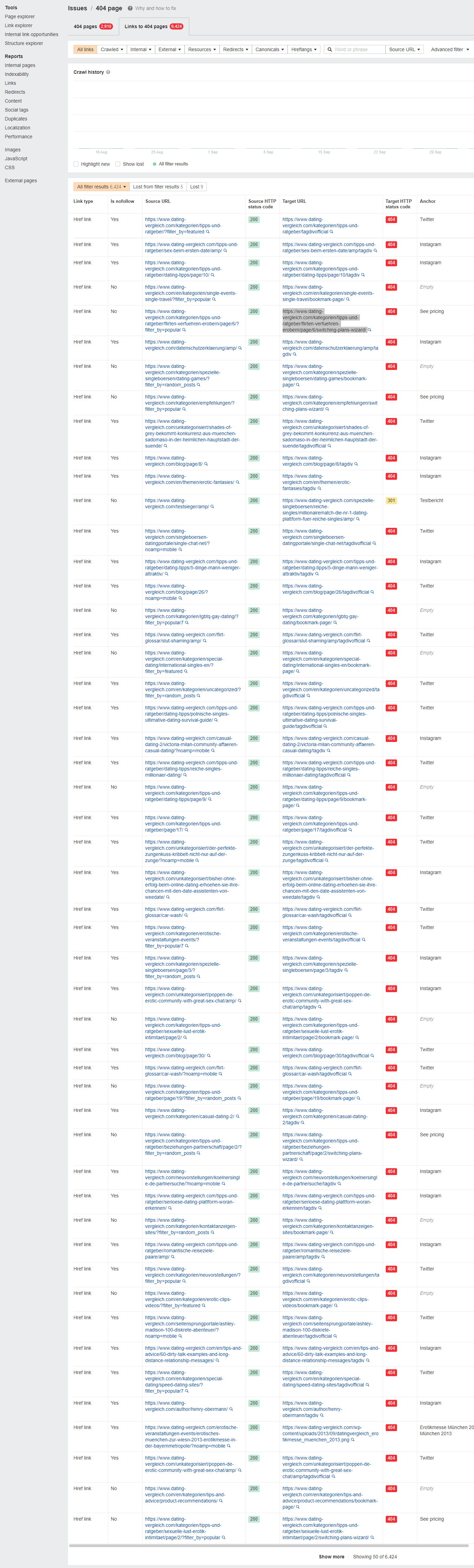
Could you please recheck?
Thank you
Joachim
