

 Ersoy B.
 +1, it’s very annoying 🙁
Ersoy B. And it’s gone.. I turned off Jetpack Image Cloud, purge the cache.. and turn on now, it’s ok
-
This reply was modified 7 years by
Ersoy B..
Ersoy B. I have same problem.. Appears today.. well I noticed today but at least one week ago, there wasn’t.
-
This reply was modified 7 years by
Ersoy B. +1
Ersoy B. Yes, you can.. use cloud templates.. you can choose on of them
Ersoy B. Thank you Catalin.. I put the CSS codes but actually there is no difference. The mobile menu doesn’t get active until the page loading %100.
And the about page speed, yes I read all this staff. I used Super Cache and Cloud etc. before. But after I found another small problems. For example, I change a image, but it doesn’t change for a while, something like this. And every time I need the clean cache.. a lot of work for me.. Anyway I’m not so expert all this. I don’t want to mess something doing speed solutions.
Anyway thank you again..
Ersoy B. Senin gönderdiğin şey böyle görünüyor. Orada da “General” diye kırmızı bir şey yok
-
This reply was modified 7 years by
Ersoy B. Eğer Cloud Template kullandı isen, oradan değiştirmen gerekebilir..
Yalnız gönderdiğin resimlere bakıyorum, çok açık diyorsun ama hala sorunu göremedim. Ki anladığım kadarıyla Calin denilen arkadaş da göremiyor. Screenshot alınca üzerine ok falan göstersen belki daha iyi anlaşılacak..
-
This reply was modified 7 years by
Ersoy B. Theme Panel’de Translations bölümünden Türkçe’yi seç.. Eğer olmadı ise, bazılarının tercümesi yok, sen yazıp “Save” yap.
Aslında sorunu ben de anlamadım ama tercüme ile alakalı olduğuna göre buradan yapılabilir..
Ersoy B. Hocam menüleri normal (3 tanesi) ve mobile olarak ayrı ayrı oluşturuyorsun. Eğer dördünü de değişik yapmak istersen bir ona tıkla bir buna karışıyor bir süre sonra
Sticky Menuyu da yine ayrıca desktop, tablet falan üçü için ayrıca bir de yine mobil için oluşturuyorsun, aynı şekilde..
Yani sonuç olarak 4 tane değişik header oluyor..
Reklam olayı bende hiç yok.. Onu bakamadım şimdi
Ersoy B. Yes, I did…
It is not enough to choose “sticky menu”.. I create a new header for empty row..
When you choose “sticky menu” in the top place appears a blank row.. you need to fill it, create e header. So, you can create a different sticky header in this way.. A little bit confusing..
@reelyorum sağol hocam, sen yazınca şimşek çaktı, olayı anladım 🙂 Senin dediğin gibi blank bir header seçince hata veriyor nedense. Sadece yukarıda koyduğum resimde save demeden önce oraya bir header oluşturmak gerekiyor
-
This reply was modified 7 years by
Ersoy B.  Ersoy B.
 Hello Bogdan, I think you don’t understand my question..
I applied “Nomad” demo to whole my site from Theme Panel as you can see https://www.ersoybalci.com
Nomad Demo is coming with 2 header in Cloud Templates
1. Front Page Header Cloud Template – Nomad (you saved it as a “Font” but I correct as a Front, anyway you can fix it next update)
2. Global Header Cloud Template – Nomad
“The Menu” is working.. “The Sticky Menu” isn’t working as I explain above
Ersoy B. Ok, thank you. I know there was the sorting method but, maybe I’m wrong, when I bought the themes, I remember there wasn’t “oldest” between options.
Anyway, I thought that you said, create a template for each category but a lot of works for me.. now I’m only waiting.. Thank you one more time for your attention..
Ersoy B. Thank you anyway, I understand that.. meanwhile I’ve just seen that in “sort order” of blocks exist “oldest post”.. that wasn’t before, last year, I mean..
Ersoy B. I forget to say “Maybe you used default category templates before and the code worked.” Yes, I was using the default category…
Ersoy B. First, thank you Simion for your answer, you guys doing great job.
It’s good to know “sort the loop elements” in your list but how I understand reading some documents or some post in this forum.. “from old to new” is not part of the wordpress philosophy. In that case, it won’t be my solution.
So, maybe you can provide some partial solution or some small codes.. that can be works for me (if it possible, sure).. I conform with this even if I need to modify after every update as before
Ersoy B. Image Height is 200 but I didn’t it. It comes automatically. That’s way you can’t see whole image. You see only a part of it “IAR” but must be “viarbus”…
Ersoy B. 
-
This reply was modified 9 years by
Ersoy B. Ok.. one by one.. http://www.aturquia.com right side, below google ads.. there are two “single image” the code before (VC time) and now is like this (I’m only putting here one of them)
[vc_single_image image="1661" img_size="full" add_caption="yes" alignment="center" onclick="custom_link" img_link_target="_blank" css_animation="appear" link="http://www.viaurbis.com"]
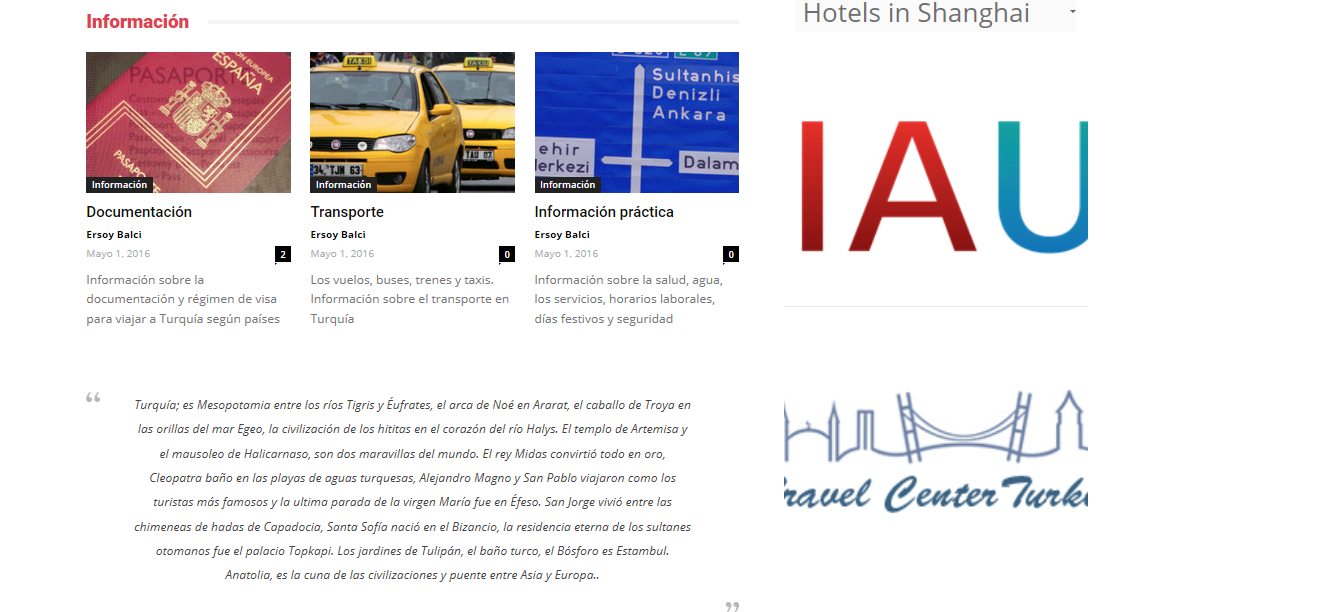
Now only you can see a big image (a part of it) and the link isn’t work
-
This reply was modified 9 years by
Ersoy B. I forgot to say… After 8
Ersoy B. Me too, I have an account and I use Newspaper for 2 different sites. Now I must create 2 accounts more (total 3) with 2 different mail and username.. No sense this..
-
This reply was modified 9 years by
Ersoy B. I found a solution but I don’t know it’s a good way.. If you put a “fake” Smart List, the Article Inline Ad doesn’t show..
For example I don’t use H6 in my post, so I choose it for one of Smart List and that’s it. The Article Inline Ad disappears 🙂
