

 gachugbu
 Well, I appreciate your prompt reply.
I have the latest Newspaper version 12.6.8. I have also a free account with MailChimp.
I have used Composer to place the Newsletter element on my page, then I have gone to collect the Embed code from my MailChimp account, placed it on the Embed Code/Feedburner window of my Newsletter plugin, and selected of course MailChimp. But nothing the element stays the same.
This has been the problem for many years. I thought the newer versions of Newspaper would make the difference.
Newsletters would have been a vital aspect of my customer engagement, but sadly it’s one of the missing links with Newspaper Theme, as far as I can tell.
We probably need a video of the setup, because I have followed your tutorial step-by-step to no avail.
gachugbu Hi, it’s likely you didn’t understand my problem, but I appreciate your desire to help. For now, it’s not a big problem. I can live with it. Thanks a lot.
gachugbu Thank you for your response.
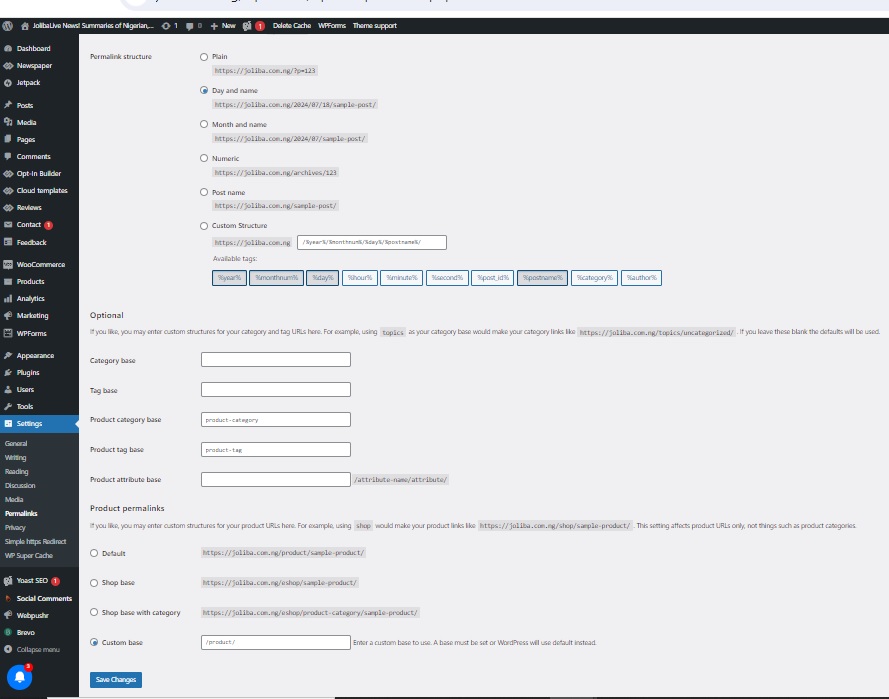
However, I’m sad to report that the path you indicated for me—”Dashboard -> Appearance -> Permalinks”—does not have a permalink. There is only a permalink under Settings…then Permalink.
Please see the image of my permalink page attached.
I can’t figure out how to correct the URL by reordering my webpage structure from the attached permalink page.
For example, my webpage “Nigeria” is currently at https://joliba.com.ng/category/nigeria.
I want it to be https://joliba.com/nigeria.
I don’t need it to be behind the category in the URL.
Do I have the wrong permalink page? How can I do this with my permalink page in the image attached?
Thanks a lot.
gachugbu Good morning, please.
First, I get “Invalid Reply From Server Endpoint” when I try to access the templates from Composer. Please tell me how to resolve this. My server resources are fine; I have 256 MB of WP-php memory. The problem started two weeks ago.
Second, my web pages are behind a category; Eg. joliba.com.ng/category/world
I would like it to be joliba.com.ng/world
How can I put the URL correctly?
Thank you for your time and expertise in anticipation of your guidance.
Godson
gachugbu Grateful!
gachugbu Okay, thanks.
In another matter, I am not using the tagDiv mobile theme or Google MVP. I am fine with the normal mobile version of my newspaper theme. But please, how can I change the font and enlarge the size of the text in the body of my posts, particularly with the mobile?
Thank you.
