

 ionutm
 Hi,
Yes, we’re using banners, but without any custom settings.
We’ve kept td banners’ postion on posts templates like https://managementpro.ro/antreprenoriat-am-creat-o-panza-speciala-pentru-dormit-putin-procesata-si-fara-imprimeuri-sinteza/ or added them to new build pages (https://managementpro.ro/stiri-antreprenoriat-noutati/) changing the “alt attribute” for each. Maybe it just needs more time to overwrite “spot_img” in search console statistics.
Best,
IM
ionutm Hello, Thank your for your reply! I did some further investigations and it looks like the actual culprit was my cache plugin. I’ve changed some of it’s settings and seems that it behaves properly now. Thank you for your support and sorry to have bother you.
ionutm Hello,
I could use your support with some issues on my mobile pages. My website has most of its pages built using tagDiv Composer (and not the responsive version), but I’ve noticed the following behavior when these pages are accessed, namely:
– when a visitor accesses them, they are displayed in the responsive version (which has some design issues)
– when a user accesses them (so after login), they show up as they were designed with tagDiv Composer
Something like this 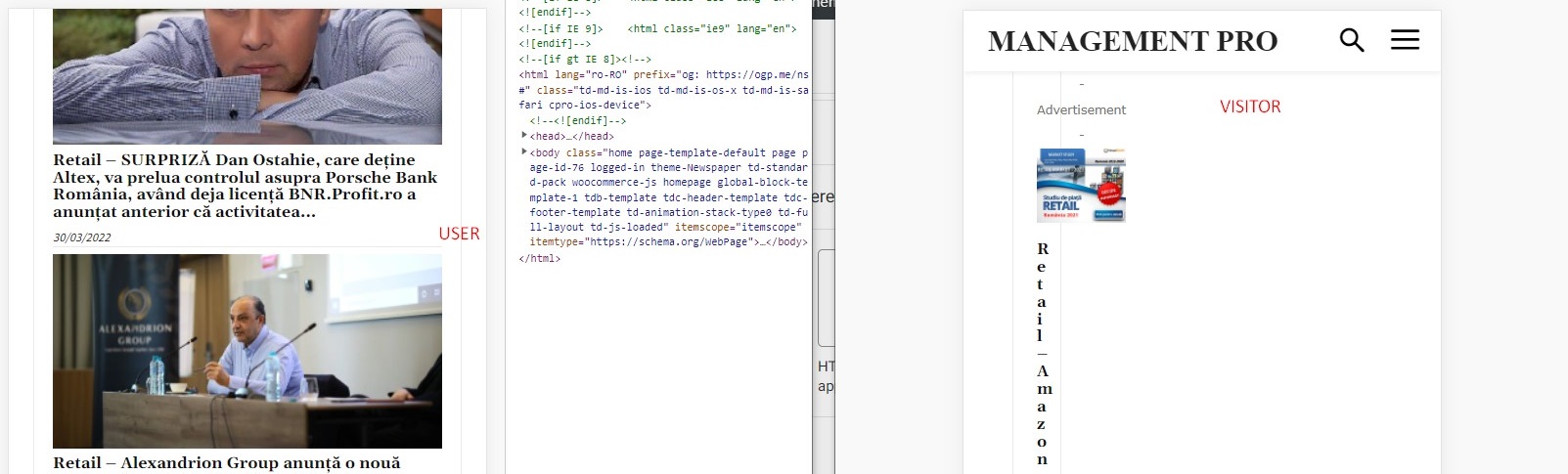
After some debugging, I’ve tracked down these issues to be related to the Wordfence plugin, which is set up in learning mode; the problem is that if I disable Wordfence, I’m losing other page settings like sticky menu setting, login menu setting, colors, etc.
Could you help me further debug it or recommend a solution? I can provide admin login if needed.
Best,
Ionut
-
This reply was modified 4 years by
ionutm.
ionutm Hello Bettina,
Thank you, it looks like there was a conflict with one of the plugins. I was able to save the changes after disabling al non-theme related plugins
Best,
I.
ionutm Hi,
My issue is not about how to assing a new template, but on the fact that is no longer saving the new assigned template:
“…then I have issues saving changes to theme pannel. Namely, I want to change the category template to a template downloaded from cloud, but after apparently a succesful saving it comes back to “Inherit from Global Settings”.
ionutm Hello Anamaria,
Thank for your solution. I was able to change the order of columns but only on pages built from scratch (just like in your video) not on a post template downloaded from cloud, I guess there are some limitations there.
Regards,
I
ionutm Hi,
Could you forward the message to the next tier, maybe a dev coleague? It is not related to tagdiv blocks or page buillding features.
We`re trying to run a plugin that uses “the_excerpt” and “the_content” as hooks to interact with wordpress/ tagdiv and fetch the content from excerpt. Now, the plugin works on some pages where the excerpt is displayed, but not on search page… which lead us to think that the hooks/filters (“the_excerpt” and “the_content”) have something extra on this page.
Do you guys provide dev documentation for the theme?
Best,
I.
ionutm Hi,
I think the question was missunderstood.
The filter mentioned reffered to WP hooks (https://developer.wordpress.org/plugins/hooks/filters/)
We’re using a plugin that relies on these hooks to show a tooltip and for some reason in doesn’t work on search results pages, although it has no issues on post or category pages.
Best,
I
ionutm Hi,
Is there some custom filter applied to the excerpts outputted in Post Loop on Search results page? Because we’re triyng to run a plugin which relies on “the_excerpt” and “the_content” filters and it doesn’t work.
Best,
I.
ionutm Hi,
Thank you!
I’ve missed the filter iniatially as I was under the impression that it would apply for sorting order.
Best,
I.
ionutm Hi,
I’m trying to add Single External Shortcode to a page but I can no longer find it in Viewport, altough I’ve used it on other pages before and it shows up when editing a post page. I’ve deactivated all plugins not related to the theme, including cache optimizing plugins but without succes.
What can I do to add it to a page?
My Theme version is: 11.3.1
Regards,
IM
