

 Jair Prandi
 I set the ad in-line to be shown after 1 paragraph and it’s working so far. I wish there was the option to put it in zero paragraphs.
Jair Prandi What the hell! Why did you change that?
Now the Adsense ad at the beginning of the articles (which gave me more income) does not work at all.
I will try to install an Ads plugin
Jair Prandi The ad did not work anymore on the Article Inline Ad option. Then I inserted it into Article top ad. But it gets centralized and I want to leave it at the beginning of the article on the left. There is no option for this setting. How do I do?
Jair Prandi Hello!
Today’s 9.5 update fixed the problem!
Jair Prandi OK! I sent the email with the hits as requested!
Jair Prandi The problem is that when I update the theme I can no longer access the WordPress panel. With this, I also can not enable the Composer plugin.
Memory problem, it’s not. I had checked.
Is there any way for you to check my website to find out the problem?
Jair Prandi Hello!
In the last two updates of the Journal theme I’m having problems.
I tried to do the update today and after I update the theme, the site keeps working, but I can not log in to WordPress anymore.
My TagDiv Composer plugin was disabled. I tried to activate it, as it suggested and it got even worse. Neither site worked anymore. So I went through the Cpanel and renamed the plugin and everything went back to normal.
I had to leave the old version of July to work.
The site is the https://www.viagensecaminhos.com
Jair Prandi Even with today’s review the error keeps happening!
After updating to Journal 9 I could no longer access the adim of WordPress, I had to go back and back in the previous version.
I tried 3 times and the same thing happens, so I kept the previous version until it was resolved!
The site is https://www.viagensecaminhos.com
site memory
define( ‘WP_MEMORY_LIMIT’, ’96M’ );
} else {
define( ‘WP_MEMORY_LIMIT’, ’96M’ );
}
}
if ( ! defined( ‘WP_MAX_MEMORY_LIMIT’ ) ) {
if ( false === wp_is_ini_value_changeable( ‘memory_limit’ ) ) {
define( ‘WP_MAX_MEMORY_LIMIT’, $current_limit );
} elseif ( -1 === $current_limit_int || $current_limit_int > 268435456 /* = 256M */ )
-
This reply was modified 8 years by
Jair Prandi.
-
This reply was modified 8 years by
Jair Prandi After updating to Journal 9 I could no longer access the adim of WordPress, I had to go back and back in the previous version.
I tried 3 times and the same thing happens, so I kept the previous version until it was solved!
The site is https://www.viagensecaminhos.com
Jair Prandi Excuse me! Had inserted the CSS in the wrong place!
Now it worked perfectly!
Thank you!
Jair Prandi Jair Prandi I tested CSS, but unfortunately it did not work!
Jair Prandi Excuse me! you’re right!
I had changed the settings to test earlier, after the code was set I did not go back to what it was.
It is perfect!
Thank you!
Jair Prandi It’s partially working. I have several tabs side by side in the Desktop menu, but in the mobile phone only the Home and the first one (Destinations) appear.
The rest of the Menu does not appear, and in Destinations only the first sub category appears (Brazil), the second (South America) does not appear either.
Veja a imagem do Menu completo – 
Jair Prandi Thanks for the feedback!
I took the recommended actions. It worked in parts …
The search worked and the menu has opened, however only the first menu item is opening.
Jair Prandi I’m also having trouble!
The menu and mobile theme search on my site http://www.viagensecaminhos.com does not work.
When you hold down the icon of the mobile menu, the url with # – http://www.viagensecaminhos.com/ #
I have already disabled some plugins and it did not help.
Jair Prandi I think there’s a problem. When you click on the Mobile menu icon, the link appears with # at the end.
Jair Prandi Could you tell me which plugins could be damaging the site? Do you know what they are?
Jair Prandi Could you tell me which plugins could be damaging the site?
Jair Prandi Could you tell me which plugins could be damaging the site?
Jair Prandi Hello! After the last update of the theme, the main menu of my site stopped working in the mobile version.
The site is http://www.viagensecaminhos.com/
Jair Prandi Sorted out! This time it worked!
Thank you!
Jair Prandi Olá!
I did what you recommended, but it did not work!
The eye icon and the view count continue to be displayed.
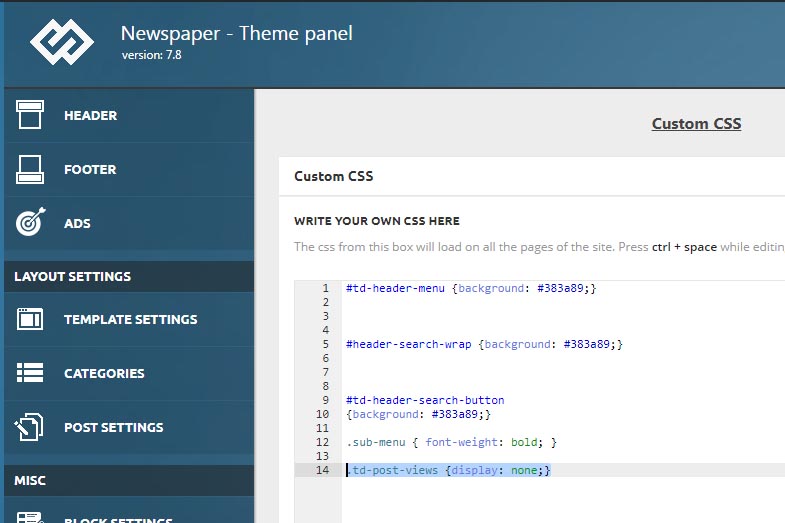
-
This reply was modified 9 years by
Jair Prandi I want to remove the little eye icon from the views of the posts, but I want the views to continue being counted to classify my block of popular posts, how do I?
