mauta
mauta I discovered that he author of the post had put in the excerpt in homepage a <br without >…
Thank you all the same!!!
mauta The problem happens with a post released this morning, I try to restore it.
mauta Thanks! I solved the problem for redo/undo arrows.
mauta I mean the sticky posts.
mauta Thanks, effectively I forgot to update the TagDiv plugins, Cloud Library and Composer, and I had to put the header and single post templates back, instead of the default ones.
But the function of wordpress for display featured posts in homepage doesn’t work.
Maybe it’s a conflict with some plugin? Jetpack?
Best regards
mauta Thanks.
On our staging space with fewer active plugins in addition to those of tagDIV, It doesn’t happen
https://staging.nazioneindiana.com/?s=noword
On official site indeed we have a greater number of active plugins.
I will try to deactivate one by one those not present in the staging space.
Best regards
mauta sorry:
The menu appears only when the search has no results.
mauta It works!!! Do you think it all happened because I made the code changes without deactivating the plugin?
Thanks and best wishes for the new year!
-
This reply was modified 4 years by
mauta.
mauta hy, I try first in staging ambient
it is impossible to save the changes
appear this
Something went wrong. Your changes may not have been saved. Try again. There is a possibility that you need to manually fix the problem and upload the file via FTP.
Only the codes appear throughout the site
https://staging.nazioneindiana.com/
It’s possible eliminate the attual Tag div composer plugin an download a new to reinstall it?
The social icons now appear in theme panel.
Thanks
mauta hy, I try first in staging ambient
it is impossible to save the changes
appear this
Something went wrong. Your changes may not have been saved. Try again. There is a possibility that you need to manually fix the problem and upload the file via FTP.
Only the codes appear throughout the site
https://staging.nazioneindiana.com/
It’s possible eliminate the attual Tag div composer plugin an download a new to reinstall it?
The social icons now appear in theme panel.
Thanks
-
This reply was modified 4 years by
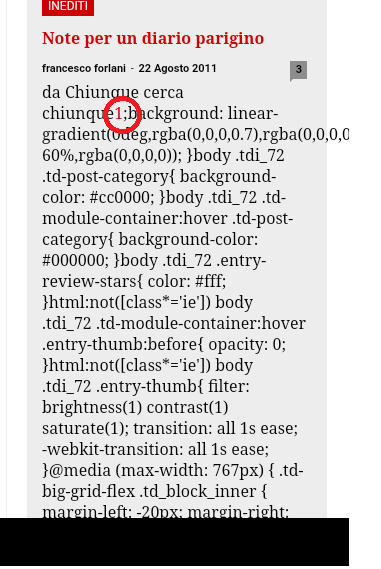
mauta Thanks for your patience and suggestions. I think I have discovered the reason for the problem: this author uses very often to put footnotes in the first lines of posts, which then appear in homepage in the excerpt, with the WP-Footnotes plugin that puts the text of the footnote between two brackets ((text)) in the body of the post. I don’t know why but it’s these two brackets that mess everything up.
https://www.nazioneindiana.com/wp-content/2021/11/footnote.png
I found 80 of his posts with footnotes in the first lines and I think the only solution is to modify them or prevent the use of (()) in the excerpt.
Best regards
Orsola
mauta The archive is set to display the random posts.
Another strange thing is that the css code appears only for an author, in posts from about 10 years ago, for the others all is normal. We have an emormous archive of 11.881 posts from 2003.
I initially thought it depended on copy and pasting from word documents, which generates weird html tags. But I checked and in text mode everything is normal.
I will try to do tests on plugins and clear the cache.
Thanks!
mauta Thank you, the video popup was disabled. Now I can click on the triangle icon and launch a popup video. But I still don’t see the video preview, only the triangle start icon.
mauta Thank you for your reply.