

 pscholtz
 Also how do I get rid of the author in the except? See below:

pscholtz I got this to work by using your Raw Html element with a tag.
I’d still like to know why it doesn’t when using your Single Image element as I’d prefer to use that than HTML.
pscholtz Hi I tried that but it doesn’t work.
1. I add a Single Image element.
2. I click the Single Image element so it’s properties show.
3. I click the upload icon next to the Image label.
4. I select Insert from URL and paste my URL (https://thegrotto.co.za/webcam/snap_c1.jpg).
5. I click Insert into page.
6. The icon shows next to the Image label but the Single Image element says “Render failed – no image selected”.
Screen shots:

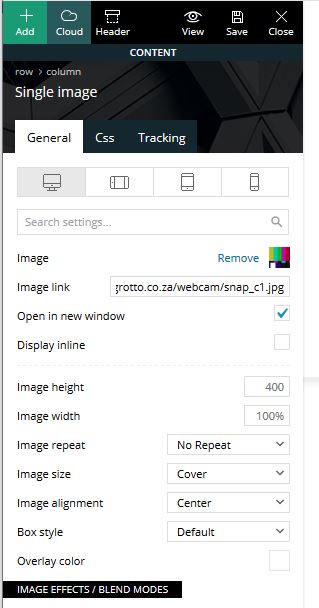

Please help urgently, I’ve been trying for days to get this to work. It’s critical that I can display an image from a URL.
pscholtz No, the link remains the same. The content of the image changes.
How do I load a image from a URL (that does not change)?
pscholtz Finally figured this out…
You need to go to Header Manager, then select the Sticky Menu to enable it. The editor will show the sticky menu, don’t close the Header Manager, hold your mouse over the header/menu and click Row in the popup, then without moving your mouse right click and select Clear. Now in the Header Manager set it back to a non sticky menu. Save and refresh.
pscholtz Hi Vlad,
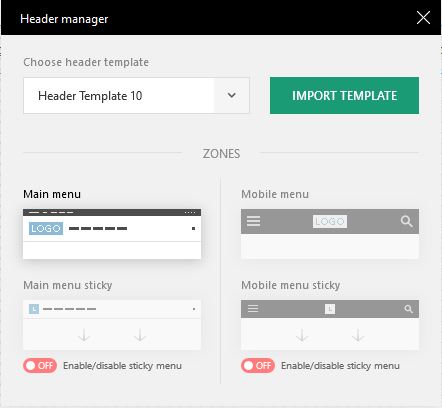
I created a new header based on Header Template 10. As you can see in the Header Manager the Sticky Menus are set to off.
Yet when I scroll up on the site a menu appears. How do I disable this? I don’t want a header or menu appearing when scrolling up.
I have the latest version 10_10.1 installed.

-
This reply was modified 6 years by
pscholtz.
pscholtz pscholtz pscholtz Edit:
Seems it RTFM time 😉
I have found that I need to learn to the the composer then I can make my own headers…

