

 Redlemon
 Hi Bettina, I will create a staging environment for you within a couple of days, and grant you access to that instead. Just to clarify, do you actually need cpanel access, or would FTP access to the public_html directory suffice?
Redlemon Hey Bettina, I owe you a video showcasing the issue for mobile users. I hope this showcases enough of the issue. In the bottom left of the screen I have included a notepad where I am explaining what is going on as I am making the changes to the template. Please keep an eye on that too during this video. I will be looking forward to hearing back from you. Thank you.
Redlemon We will be looking forward to hearing back from you soon. Same problem as reported here: https://forum.tagdiv.com/topic/single-post-inline-ads-mobile-hiding-parts-of-articles/#post-421261
Redlemon Hey,
Thanks for your input. You do realize that not all posts are of equal lengths though, right? Nor is it practical to create one template for every number of paragraphs.
I followed the links in the link you shared, and I quickly ended up in this post ( https://forum.tagdiv.com/topic/single-post-content-ad-paragraph-setting/ ) where the user chrisebejermt showcased the actual problem with the behavior of the ads, and this is just for the desktop version ( https://www.screencast.com/t/GYLcHbNP ). In mobile there are equally as many issues, yet some different ones. Like I explained, and you can test this yourself if you’d like, when the number of paragraphs in the article is not exactly the number of paragraphs in the template, it is not impossible that ads are causing paragraphs to go missing. You asked for a video, and I’ll make sure to share one soon. But bear in mind that for the time being I have to manage to find a solution for my client, who needs ads easily inserted in articles, which I clearly can’t give him with Newspaper theme out of the box. And that’s a bummer.
Redlemon Please do, as from a different panel of the same plugin’s (Query Monitor) I can see that TD-Composer’s queries by far outnumber all the other queries made on page load. 314 compared to a remainder of less than 70 queries for the rest of the plugins. And the total time needed to execute those queries effectively kills our efforts towards a better SEO score, and/or to speed up the serving speed of the site. Including browser caching it!
Redlemon I don’t know why the images are not visible publicly. Please allow me to retry posting them.
Back end settings for inline ads inside single post
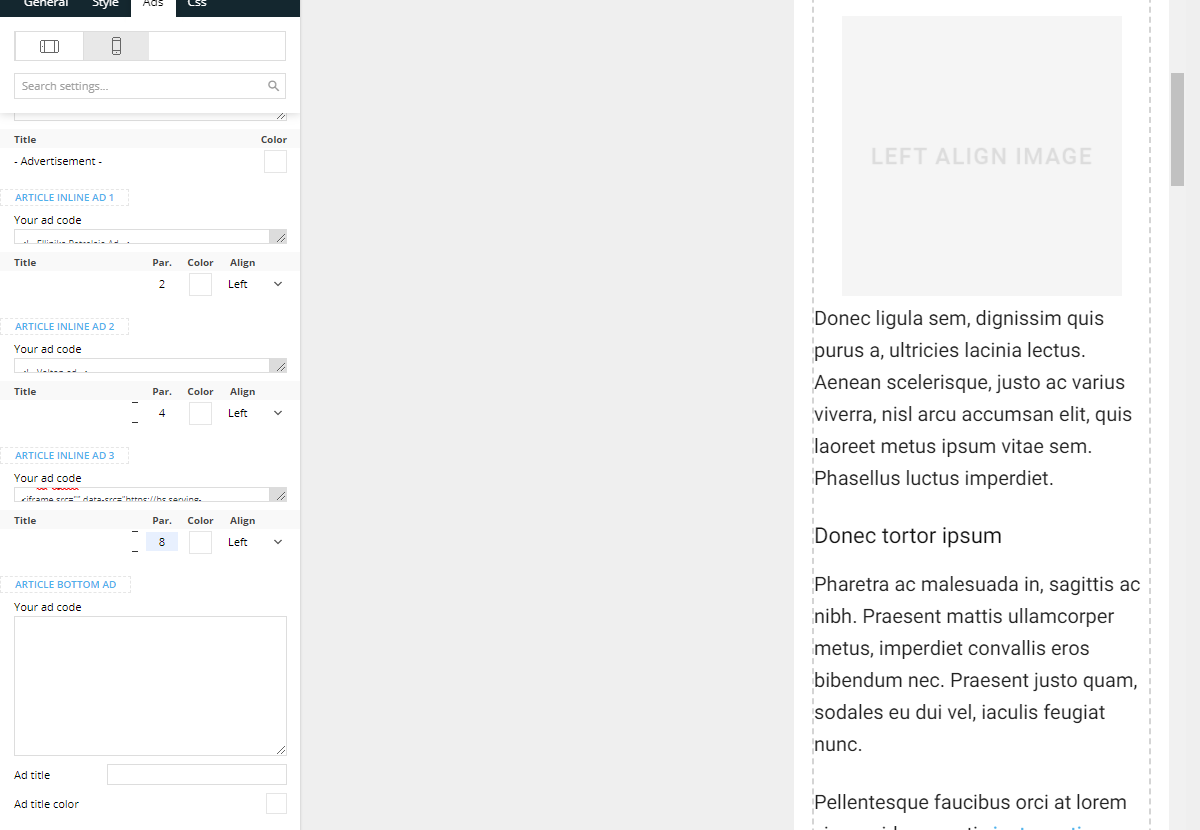
Front end source code of a single post

Redlemon Hi Anamaria, thank you for the confirmation!
Redlemon [SOLVED] While waiting for a reply, we managed to get to the bottom of this strange issue. It was all due to a plugin conflict.
-
This reply was modified 5 years by
Redlemon.
Redlemon Hi Anamaria,
Thank you for your reply. Indeed we are using Cloudflare, and we have never enabled Rocket Loader for this domain name. Additionally, we had been having this problem on our development subdomain in the first place, for which we are not using Cloudflare, and the behavior is exactly the same there also.
Anyway, sure, let us continue this thread via email.
Thank you!
Redlemon Hi Anamaria,
Working in Gutenberg I have no such issues with the very same shortcodes whatsoever. One of them is even generated directly from inside the functions.php which does not come in conflict with de-activating all plugins for the purpose of this testing.
In staging I checked the .htaccess file and the following rules are present:
<IfModule mod_substitute.c>
SubstituteMaxLineLength 10M
</IfModule>
# END WordPress
# BEGIN cPanel-generated php ini directives, do not edit
# Manual editing of this file may result in unexpected behavior.
# To make changes to this file, use the cPanel MultiPHP INI Editor (Home >> Software >> MultiPHP INI Editor)
# For more information, read our documentation (https://go.cpanel.net/EA4ModifyINI)
<IfModule php7_module>
php_flag display_errors Off
php_value max_execution_time 60
php_value max_input_time 60
php_value max_input_vars 5000
php_value memory_limit 384M
php_value post_max_size 64M
php_value session.gc_maxlifetime 1440
php_value session.save_path “/var/cpanel/php/sessions/ea-php74”
php_value upload_max_filesize 64M
php_flag zlib.output_compression Off
</IfModule>
<IfModule lsapi_module>
php_flag display_errors Off
php_value max_execution_time 60
php_value max_input_time 60
php_value max_input_vars 5000
php_value memory_limit 384M
php_value post_max_size 64M
php_value session.gc_maxlifetime 1440
php_value session.save_path “/var/cpanel/php/sessions/ea-php74”
php_value upload_max_filesize 64M
php_flag zlib.output_compression Off
</IfModule>
Additionally I tried de-activating all plugins except for the four tagdiv ones, to no avail.
Saving the theme does not throw any errors. It just seems impossible for the shortcode edit to be saved once inserted in the edit content popup box. I’ve tried both the “text with title” and the “column text” modules, and they both behave the same way.
Please kindly note that Simion from your team has recently checked our configuration from within the WP back-end AND the cPanel, and has confirmed that everything configuration-related is in the correct order. So it shouldn’t be – and it does not seem or feel to be – a configuration issue.
I have forwarded you an email on your support email with an attachment of our showcasing the described issue. For your convenience, the subject of that email was “screen recording showcasing issue with saving of module with shortcode”.
What is the correct series of steps to follow in order to successfully save the inserted content in the edit content popup box?
Please review and advise.
Thank you!
Redlemon Hi Simion,
Do you have any update? Did you have a chance to take a look at it yet? Until yesterday, it used to happen every now and then. Now whenever I try to do almost any edit whatsoever through the WYSIWYG editor it hangs, taking the front-end down with it.
This is a nightmare!
Please get back to us asap.
Thanks.
Redlemon Hi Simion,
We have forwarded you an with the subject of “request for support after forum suggestion”. Please review and advise.
Thank you.
Redlemon Hi Simion,
Thank you. Sure, let us continue the discussion there.
Thank you also.
Redlemon Hi Vlad,
The subject was “Support invitation for finupnews.gr”.
Thank you.
Redlemon I hate it when I have to revive old threads, even more so when they are related to persisting or re-occurring problems that were thought to have been addressed.
We have invited you via email and direct wp user creation to help us.
For no apparent reason, it appears as some mobile pages templates are again being injected the content of the front (home) page at the bottom of their contents.
Please see the screenshot shared below which showcases the problem:
https://imgshare.io/image/pNhQHf
Redlemon Hi Vlad,
Thank you for the input. We have adjusted the max memory limit to 512MB and will be waiting for a new traffic spike to see how the server will behave.
Is 200MB an arbitrary value or the actual memory usage for the theme?
Regards,
RL.
Redlemon Hey Vlad,
Happy new year! Apologies for the delayed response; we were on a holiday break.
Thank you for touching base. After an a-ha-moment, we managed to address the issue.
Feedback for everyone interested: it turned out the responsive tabs of the desktop page were set, for tablet (landscape), tablet (portrait), and mobile. Then the mobile page had been introduced to override the default settings – mostly the order of the columns. It was proven that that was applied as expected, but then, after the end of the (mobile) page content, the desktop page content would take over at the bottom of the page.
Solution: for both tablet views, and for the mobile view inside the desktop (default) page, we hid all rows manually, one by one. There has been no more unwanted content appended after that.
Redlemon Hi Vlad,
Thanks for touching base. We managed to address those issues as well in the meantime, but thanks for the suggestion.
Thanks again for your input, and kind regards.
Edit (for other people who may be facing similar issues): We found out the footer and headers were overridden by the mobile pages created through the tag div composer (left hand side panel, top options). Once a mobile page is created, settings for those should be set separately through the cloud templates, and applied to those as well. At least that’s what did the trick in our case.
-
This reply was modified 5 years by
Redlemon Hi Vlad,
The link is finupnews.gr
We managed to discover that simply choosing to edit the tablet preview was not sufficient. Since we had applied separate MOBILE PAGE settings, we noticed that the tablets were inheriting those settings. Unfortunately, any extra content that on mobile is rendered vertically, on tablets was appended to the right hand side, due to the greater device screen width.
Then, while editing the MOBILE PAGE we realized that the tablet tab inside the mobile page editor controls what the tablet looks like IF there are any mobile page settings set. Clicking that and tinkering with the various options per row, column, and element we were able to address some, but not all, of the aforementioned issues. But it’s a good start.
The difference in the functionality between the two is not clear enough, hence the confusion!
One persisting issue we are facing now, though, is the following: When the default content ends in the TagDiv Editor, it appears like it is being repeated all over. However, none of it is displayed on the actual page when viewed as a normal visitor. The footer, however, differs from the default one on the actual page, while in the TagDiv Composer is nowhere to be found. To experience what is described above, please try visiting the link I shared, and ispecting the footer from within Chrome’s DevTools (as if it was a mobile device). Compare that to the footer of the link when viewed from the browser of a physical mobile device. The virtual version appears to have a blue background color, while the physical device renders it in black. The structure of the footer also differs between the two.
Please review and advise.
Thank you.
Redlemon Hi Vlad,
Thanks for the prompt reply. The link to the website is finupnews.gr
Indeed, the footer can be, and is being, edited directly from any page, but what we save as opposed to what we are getting differs. As if the edits are never applied.
Thank you.
