

 renatols
 Hi, there’s no other way? I can’t deactivate all plugins, I have security plugin, redirect, ssl, schema, and others necessary plugins that maybe I’ll need to configure again. The most of them I’m using in others wordpress instalation there I can comment, and them wont use the newspaper theme.
renatols Follow. Thanks!
[nutricaoemfoco.com.br]
renatols Hi, no it’s not about the Home Page, it was in a post, all actually. But I could solve this using a plugin. Thanks.
P.S.: Please, remove the hyperlink from the post above (this is creating an useless backlink to my site). Thankyou so much.
renatols Thankyou.
-
This reply was modified 6 years by
renatols.
renatols It doesn’t work to me, because I will nedd it enter in cathegories for instance. And in other menus. Some themes there this type of option, simply putting th epost ID on the correct field.
renatols Before the update when I update a post, almost always I receive in the top page the notifications about amp erros. When I click I go to a page to forget the issues AMP issues, etc.
THis doesn’t happens anymore. Where I can do it in this new version? Where I can inspect for AMP erros that search console is talking about me?
renatols Ok. Thanks.
renatols I see now. In the adsense there’s the option. Thanks!
renatols Thankyou.
renatols Thanks. One doubt. The tag div composer works only to pages? And not in the posts?
renatols For instance, I had intalled this theme: Global Medicine, but My site is not like the demo.
renatols Thankyou. I don’t know if I understand right.
Should I create a page called Home and in this page put all configurations that I want?
I have 2 pages only:
Contact and privacy police.
Regards.
renatols Hi, there’s nothing like this in my website. Should I install the plugins: tagDiv Mobile Theme and tagDiv Newsletter?
renatols Thankyou, but I couldn´t find where I can set this to align like your screenshot. Can you plese show me the path?
renatols I mean, I use the ad box in the footer 1 spot, but I think this is not aligned correctly. I think will be good if it were aligned with the last image form the featured posts.
renatols I’ll try this. Thanks!
renatols Thanks.
Well all those errors seem to come from the google site kit plugin.
Could you please check again, I deactivate the Google Kit plugin. Thanks.
renatols Hi, thanks, But I’m not showing any ads yet. Maybe this is from Google site kit.
And viewing your picture I don’t figure ut what it means and what should i do to solve it. Can you please give me some advice?
If I’ll use the Google ads in the future, can I use this without site kit from Google? Only using the ads spots from the theme?
Regards.
-
This reply was modified 6 years by
renatols Hi,
nutricaoemfoco.com.br
It´s a little bit better now, after I install the autoptimize plugin.
Thanks.
renatols I installed the Autoptimize plugin and things got better, but theres a notice that this plugin may could be not compatible with AMP.
renatols The way I see, the theme is the most responsible for the errors:
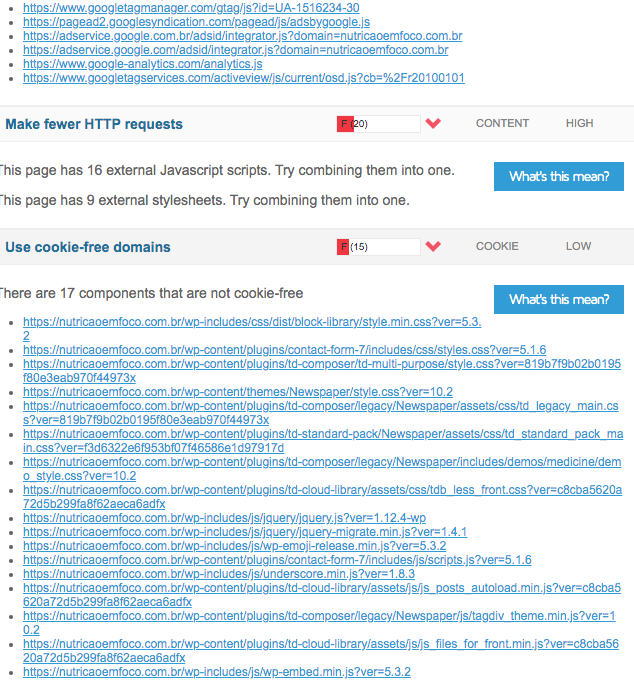
I just need to solve this ASAP, if someone can help me with an advice, I appreciate.
Regards.
renatols Thankyou, I already did everything you suggested. But as I see, the most is about the theme:

And My score now is 38, befeore was 98. I uninstall some plugins as smush, optimize, w3 total cache. I want to know if were necessary hire third part services to improve it.
renatols The same with me.
renatols Hi, I simply deactivate the mobile theme plugin.
renatols Thankyou for the explanation, as I understand, I have two create 2 versions of the same page if I use the plugin. A desktop and a mobile. Am I right?
