

 rjdtramirez
 I have done all the requirements see screenshot below of my status
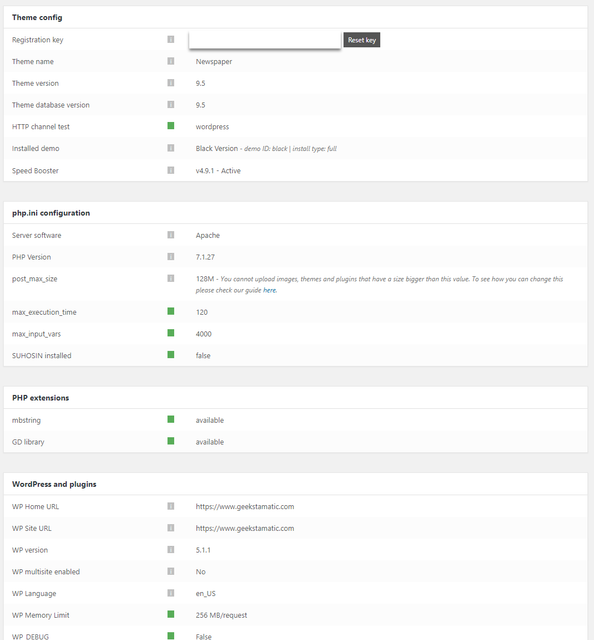
and disable my child theme
but issue still persist. i saw also this error below

rjdtramirez Up for this. I wanted to know also how to change it from bottom right, to bottom left placement. Thanks!
rjdtramirez Hi Simion,
Sorry. I already found out that it was in the plugins. I’m suspecting that WPMU Dev’s Hummingbird plugin conflicts with the existing GoDaddy(my hosting) Cache function
rjdtramirez Hi @Bogdan,
I only need to know what are the theme files being loaded when I install Black or Default demo theme? with no content. Just the files(css? shortcodes?) I saw only these file “/demos/black/demo_style.css”

I tried removing it via chrome developer tools debugger and it turned out fine? I believe i already have the default when i remove the demo_style from the page. But still these are my challenges:
1.) Aside from demo_style.css are there any file I should modify/remove/add? I’m already fine with header and footer(but it would be better if I’ll know how to switch them too)
2.) How can I save the setting?(I believe I can set cookies but is there a function/method I can invoke?) just to load the Default Newspaper style
On press of a button, it will switch Black Newspaper Demo style to Default Newspaper Style and vice-versa that’s what I only want to achieve. And maybe some of the users might benefit from these. This will give the readers an option to choose for their theme preference.
Thanks a lot!
-
This reply was modified 9 years by
rjdtramirez. Reason: Update
rjdtramirez Hi Emil,
I’m referring to Theme Switch button on the fly. Wherein if I press a button, I’ll be able to switch theme example. What is installed is black, then I want to switch to Default or other demo theme.
What I’m thinking is to understand how is Install button at demo works? So I’ll be able to know what files are needed to be replaced or remove on click.
Thanks
rjdtramirez Is there a bug? Thanks
rjdtramirez Is it also possible if I add PHP scripts here:

Or make a template inline with search or beside the menu

all I want to do is to create a Random Post Button, whenever I click that button, I’ll be redirected to a random post.
Thanks!
rjdtramirez Do we have documentation of css files of newspaper for demos? I’m thinking of CSS files of Newspaper(default) and Black version. If I can identify them, I’ll then create a script to replace a css file. Thank you!
rjdtramirez Hi @bogdan,
What I meant was, switch just the colors from Light to Dark. Is this possible? Thanks!
rjdtramirez Thank you all for your reply. My site is now implementing SSL. 🙂
rjdtramirez Thanks for this
rjdtramirez haha! I was just hoping that this works. anyway, I do the manual way haha! Thanks!
