Satyajit3097
 Hi Anamaria,
I know this is not directly related to newspaper theme. But, I am writing here because I did not get any help from rank math plugin side. They don’t have any live support chat, their help centre is tutorial based. My problem is not solve after go through their tutorial. If you have any idea about how to solve this problem, please share me. Thanks
Satyajit3097 Hi, Bettina.
As per your direction, I have uninstall the Mobile Theme Plugin to show Ads in the inline content of mobile version. But, new problem has been raised i.e. URL is available to Google, but has issues – AMP page is invalid.
I have also observed that after creating mobile page using cloud library templates, a number of issues has been raised like 1) All pages setting has been changed for mobile view 2) Mobile Home page changed, 3) AMP issues created
What to Do ?
-
This reply was modified 3 years by
Satyajit3097.
-
This reply was modified 3 years by
Satyajit3097 Ok, can I place after every 2-3 paragraphs OR it has limit. In the option of Single Post Content Template only showing following:
Article Top AD
Article Inline AD1
Article Inline AD2
Article Inline AD3
Article Bottom AD
Please suggest how to place Google Ads after every 2-3 paragraphs, because some of my articles have more than 15-20 paragraph
-
This reply was modified 3 years by
Satyajit3097 If I uninstall Ad Inserter Plugin then How To Insert Ads in every where like after paragraph 2, 4, 6, 8, 10 and so on. I think Newpaper Theme don’t have such type of facility. I am also little bit confusion about which Ads will place specially for mobile Ads. HTML ad unit code or AMP ad unit code.
-
This reply was modified 3 years by
Satyajit3097 I have successfully uninstall Mobile theme plugin from Newspaper. But still Google Ads not show in the inline content of mobile version. While I have already placed Google Ads in every where i.e. Single Post Content – Article Inline AD1, Article Inline AD2, Article Inline AD3 and Ad Inserter Plugin.
-
This reply was modified 3 years by
Satyajit3097 Ok, I have uninstall the Mobile Theme plugin as you directed. But after uninstall it, all my post/article are showing in mobile unorganized manner. Then how to create a beautiful template / Single Post Mobile Template through Cloud Library Post Template. Please suggest
Satyajit3097 Hi, I have created the Single Post Mobile Template through Cloud Library Post Template.
But, still my problem is not solve Google Ads is showing only in before the article start and after article is finished.
Please check my website Tazahindi.com and what next thing is required to do.
Satyajit3097 Ok,
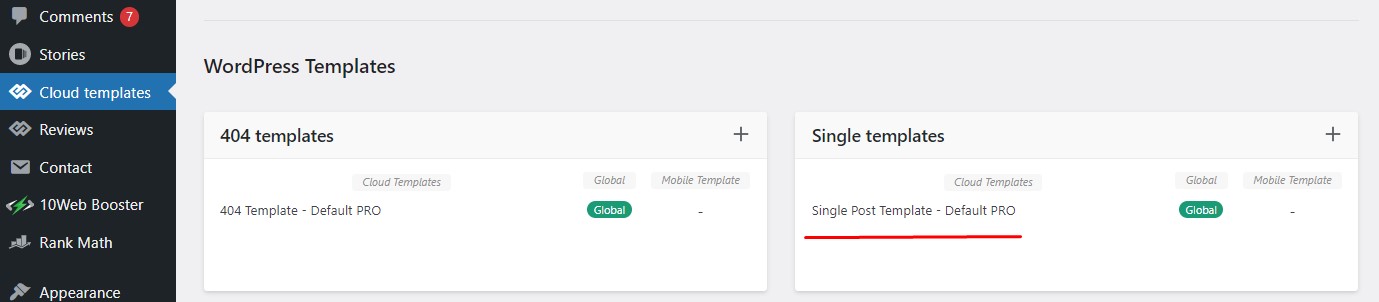
You mean, if I use cloud templates, then you have the option to display the ads as I need. I am sending a screen shot of Cloud Library Post Template, link is HERE, please check and how to use this template properly for my blog posts.
Also, intimate is it use for all the devices OR only for mobile version.
Thanks in advance.
-
This reply was modified 3 years by
Satyajit3097 Hello Bettina Good morning,
1) I did not fully understand what you would like to suggest in above reply. As per your direction, this is not possible in mobile theme + amp THEN NOW WHAT TO DO so that Google Adsense Ads show in the whole content where I would like to show Ads.
2) If I dot not use Mobile Theme plugin, then WHAT TO DO ?
Thanks in advance.
Satyajit
-
This reply was modified 3 years by
Satyajit3097 My issue is Google Ads is not showing in the mid of content of my website Tazahindi.com . I mean, I would like to show Ads after paragraph 2,4,6,8,10,12,14 and so on while any person open any of my article in mobile device. But that is not showing.
After N number of efforts, it is only showing after title of article, then after FAQs and Comments section. But, not showing ARTICLE INLINE AD. I have already place every where in the Newspaper Theme panel i.e. Mobile Theme General ADS, Article ADS, ARTICLE INLINE AD area.
Hence, please suggest what to do ? You can open any article of my website https://tazahindi.com/ in mobile device then you can understood my problem.
Satyajit3097 If I remove the Single Post Featured Image from the cloud, then it will be removed from all blog post.
My problem is how to change the position of FEATURED IMAGE from one place to another.
So, is there have any option or code snippet to change the position of Featured image of all my blog post from Top of the content to 1-2 paragraph below.
Satyajit3097 Hi Calin,
Thanks for suggestion. I will try to solve my problem as you suggested.
Satyajit3097 I have try following:
.page-id-394 .entry-title {
display: inline;
}
or,
.page-id-394 .entry-title {
display: block;
}
but, not works, then what to do ?
Satyajit3097 I have try through custom CSS area of theme panel but not works for me.
Satyajit3097 As of now, I did not use any custom CSS in my website. I have designed the home page with the help of TadDiv Composer.
I have also try to delete that custom CSS but it is not implement in real time in Newspaper Theme. Please suggest how to add / delete any custom CSS in Newspaper Theme or using TagDiv Composer.
-
This reply was modified 4 years by
Satyajit3097 You are not completely understood the problem. I did not mention post title is missing, post title is showing perfectly in all my post, if you see in all particular post and in the pages.
I have designed my Home Page, where I displaying different category posts in section wise, where now only showing feature image, name of author, date of publish & category of post. In earlier, where post tile was also shown below the feature image. But since two days is not showing.
So, my problem is that post tile is not showing only in my Home Page/ Front page, where I displaying different posts in category wise. You can see from my home page link given below, what is exactly I am saying.
It was fine almost eight months, but suddenly not showing from two days. I want solution for that. Please suggest, what to do ?
Satyajit3097 You are not completely understood the problem. I did not mention post title is missing, post title is showing perfectly in all my post, if you see in all particular post and in the pages.
I have designed my Home Page, where I displaying different category posts in section wise, where now only showing feature image, name of author, date of publish & category of post. In earlier, where post tile was also shown below the feature image. But since two days is not showing.
So, my problem is that post title is not showing only in my Home Page/ Front page, where I displaying different posts in category wise. You can see from my home page link given below, what is exactly I am saying.
It was fine almost eight months, but suddenly not showing from two days. I want solution for that. Please suggest, what to do ?
-
This reply was modified 4 years by
-
This reply was modified 4 years by
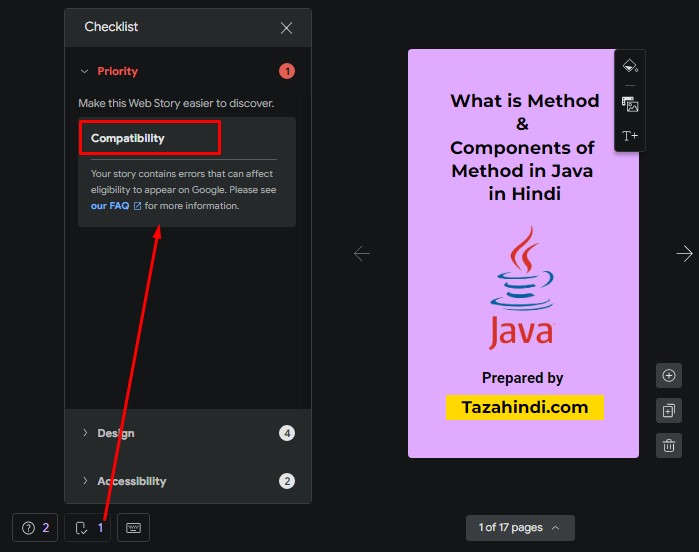
Satyajit3097 Since two days, all my Web Stories showing Compatibility errors and indicate that this error can affect eligibility to appear on Google Search.
Google Search Console of my website showing following 10 errors:
1. The parent tag of tag ‘html’ must be ‘!doctype’.
2. Tag ‘amp-story’ is not allowed to have any sibling tags (‘body’ should only have 1 child).
3. A tag on this page requires an AMP component ‘script’ tag, which is missing.
4. A mandatory AMP HTML tag is missing from this document.
5. Tag found outside the document head which is only allowed as a direct child of the document head.
6. Only amp-boilerplate and amp-custom ‘style’ tags are allowed, and only in the document head.
7. Custom JavaScript is not allowed.
8. Disallowed attribute or attribute value present in HTML tag.
9.Tag or text which is only allowed inside the body section found outside of the body section.
10. Malformed URL found for attribute ‘href’ in tag ‘a’.
Summary:
1) AMP compatibility issue- 10 errors mentioned above
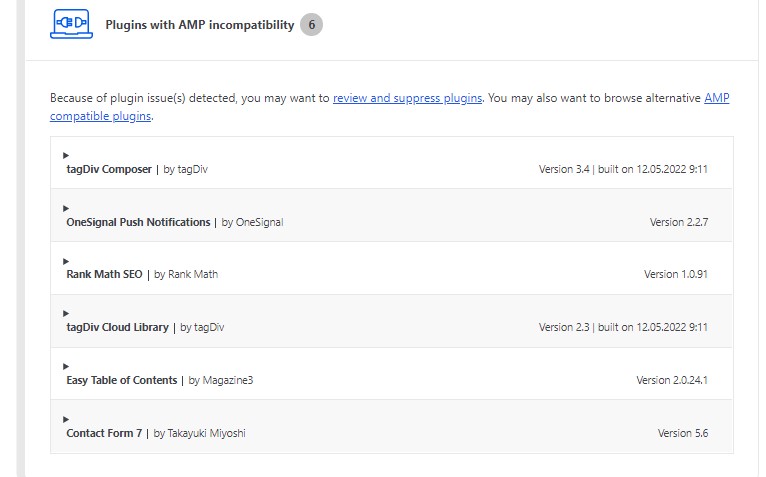
2) AMP Plugin Settings showing following compatibility issues
https://tazahindi.com/wp-content/uploads/2022/06/AMP-Scan-report.jpg
3) Google Web Stories Plugin compatibility issue:
https://tazahindi.com/wp-content/uploads/2022/06/Web-Stories-Compatibility-issue.jpg
4) Breadcrumbs issue-Either “name” or “item.name” should be specified
I am using wordpress and Newspaper premium theme to run my website. Because of above problem my view are reduced. Please help to solve above issues.
I have tried number of thing but unfortunately don’t work anyone for me. Please sort out my problem as early as possible, just because of that my page view is continuously decreasing.
Please help to solve above problems.
Thanks in Advance.
From Satyajit.