

 SquallSFU
 I’m not ruling out that something has changed in the Mailerlite code. I deleted the old code, saved and re-entered the code by picking it up again from Mailerlite. It worked.
SquallSFU Thanks so much.
SquallSFU Okay. Now I know I have to do this every 60 days.
SquallSFU True! Thank you.
SquallSFU I guess it depends on the screen size. For example, with a space of 1 px (however not beautiful to look at), the menu is equally cropped.
SquallSFU Thanks to you.
SquallSFU The account is connected and the user id is set in Social Counter widget in tagDiv Composer, but Instagram followers count is incorrect. I don’t know why.
SquallSFU That you know, does the Social Counter module now work with Instagram?
SquallSFU I sent you the email. Thank you.
SquallSFU Thanks for all your time.
Newspaper is updated, but if I go to Instagram Account Access Configuration, this screen appears to me: https://i.ibb.co/LkL9rrs/foto.jpg
In Connected Account: “A critical error has occurred on your website. Check the site administrator’s mailbox for instructions.”
SquallSFU I think I solved it. What a fright!
However, I notice that Instagram elements still don’t work. It’s normal? I thought the new version had solved the problem.
SquallSFU In Newspaper, I see this: https://i.ibb.co/TRmyDsq/foto.jpg
SquallSFU Thank you!
SquallSFU Forget it.
The problem appears to have resolved itself by setting up adaptive ads.
I have another question, even if off topic: where can I define the meta description?
SquallSFU Thank you, I did it!
SquallSFU No solution solved the problem, but I found what caused it. In General > Extra > Offset posts, was set the value 4 as default. As there were not enough posts, nothing appeared, despite setting an ID in Filter.
SquallSFU Thanks. So this is a single review. Is there a way to allow visitors to rate the articles?
SquallSFU Okay. I know CSS. Which file or panel should I work on?
SquallSFU I’m new on Newspaper so I don’t know the resources and their names well. From what I understand, they are all changes that I have to make in the TagDiv composer, right?
-
This reply was modified 6 years by
SquallSFU.
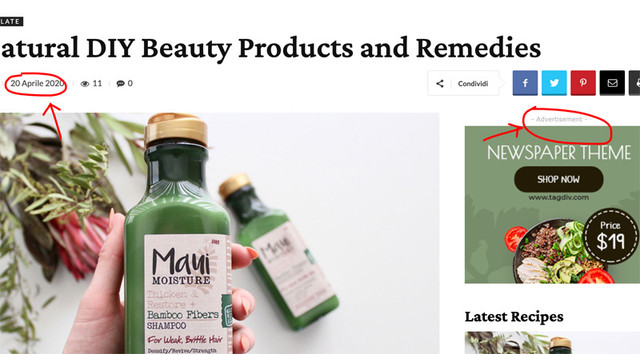
SquallSFU Hi guys, is it normal that some settings in Theme Panel are not applied? For example:
– In Social Networks, I set mine, but in the site menu I see others;
– In Post Settings, I have disabled “Show date”, “Show author box” etc. but they continue to appear in the post pages;
– In Ads, I customized “Ad title” in all ads, but “- Advertisement -” continues to appear on the site.
Why? Am I leaving something out?
SquallSFU I installed it. Thanks a lot.
SquallSFU I don’t have this. Is it a plugin?
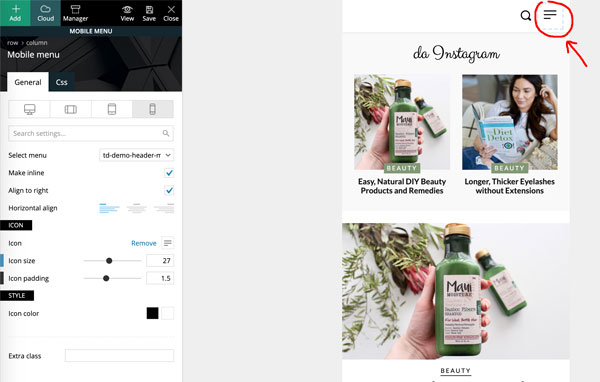
SquallSFU Thank you for your time. In tagDIV Composer (or in another location), how can I personalize the menu that opens by clicking on this icon? The same by clicking on the “search” icon. I want to partially customize the style.
-
This reply was modified 6 years by
SquallSFU Thanks a lot. Now it remains to understand how to change the Mobile menu in the first photo.
SquallSFU I had already disabled as in the image, but the date continues to appear, even in the articles.


