

 vexx
vexx Thank you for your input Chris, appreciate it. Ya, I’m aware of the story, and you might be right, but this feud is pissing me off. Especially when Matt is pretty pissed at them and might pull some shitty move (or even WP Engine, for that matter). I’m not a fan of either party:) I aim to build something pretty big, and I’d hate to have to replace it after I build it and populate it with thousands of entries. Even migrating from ACF to Jet Engine or something similar is a headache, but it’s better done from the start.
vexx Unfortunately, I’m using ACF Pro, I need some features not present with the free version. Also, SCF was forked but has no developer. The WP team stated they are looking for a dev to step in and take the project. Not exactly what you want to hear when you’re using a plugin for an extended database.
My questions still remains. Does Newspaper have any other similar plugins that’s compatible with?
Thanks!
-
This reply was modified 1 year by
vexx.
vexx Understood. Are there any other ACFs alternatives that you recommend that work or are compatible with Newspaper?
vexx Ya, that’s a decent workaraound. Thanks for your time!
vexx Thank you for your response. Indeed, this works. However, I want to display posts from that custom taxonomy and general articles from the site, in another section. Can I add more than 1 Post type in the live search? If I add the ACF post type, it creates the sections I want to display via the fields. I just want to add articles as well from the site to the search.
Thank you in advance!
-
This reply was modified 2 years by
vexx I would love to know how, if you can give me an example. If I have the ACF field “name”, I can’t output it in the composer unless I use it the custom field shortcode. If I use {cpt_name}, it doesn’t show anything. However, once I install CPT Ui and add a post type with it then attach the ACF fields to it, it works with no problem.
In out button case, unless I’m missing something, I have to have CPT UI. Would love to find out there’s another way so I can uninstall CPT
vexx Thank you for the response. Unforturtuntely, I figured you have to have CPT UI installed which is kinda redunant now with ACF. i thought only having ACF installed would let me pull the fields in Composer. That’s not the case however.
I hate having 2 plugins to do this, but it is what it is, it seems 🙂
vexx It seems it was from the CPT User Reviews block. Solved!
vexx Disregard that, I had an extension of the mobile browser. It seems to work, but the PageSpeed still shows the page isn’t lazy loaded.
vexx Edit: If I test the site on my mobile device (not emulated), the images are not lazy loaded at all, it loads the full page.
vexx Hey,
I don’t disagree it’s not loading properly for me, but if I do a Google Pagespeed test, besides having a very low grade, it shows that images aren’t deferred. I’m not sure why.
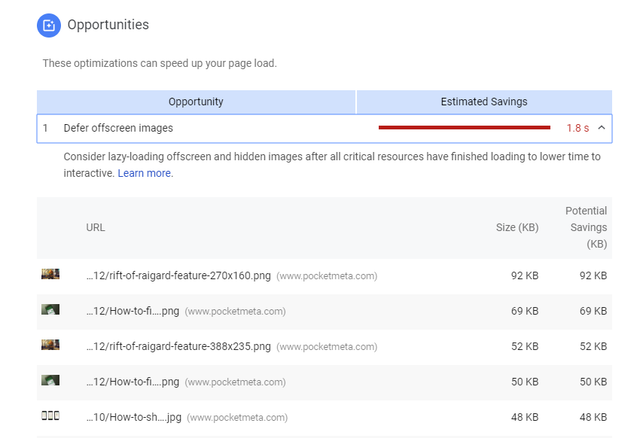
I’m not using the mobile plugin. Also, the mobile grade is slightly higher with lazy load turned off, I’ve did 5 runs to do an average, but since there are too many factors, I won’t blame LAzy for this. However, I don’t understand why it doesn’t show the images are deferred.
vexx The site is: http://www.pocketmeta.com
Currently, the plugin is disabled, let me know if/when you want it enabled. Also, I didn’t check the homepage, only single pages.
vexx I found the solution, we can close this thread. Thanks!
vexx I’ll give you an example, I’m using the header style 5 and the file associated with this header is parts/header/header-style-5.php . If I inspect the header menu element in Chrome, there is a style=”height: 60px” in the header’s div. This forced height is not present within any file and I can’t find it where it’s actually defined. I searched into the js theme file but couldn’t find any reference that can inject this style into this header.
vexx Hey Catalin,
I know the theme doesn’t support that natively, that’s why I decided to create a child theme and modify the theme files manually. However, why I’m not a stranger do both css and php, I was looking for some pointers (or the file) in which the menu’s height is defined.
Thanks!
vexx Hey,
Thanks a lot, will get to it.
vexx Heya,
Ya, I solved it..sorry for getting back that late. Basically, the theme has the schema.org attributes all over the sidebar, in every link from the list. If you enable rich pins on Pinterest, it will scan your article page, and it will get the first link from your sidebar and get that.
The solution is simple, you must edit td_block.php and remove the itemprop attributes and add open graph to your article page. You can do that manually by addning the meta to your header or just install a plugin that does that for you.
vexx An update, if I place the css rules FIRST in the Advanced CSS Desktop box, they work with no problem. If ANY other rule, that has no relation with the id and div is placed before, it doesn’t work anymore.
vexx I’ve tried using !important, no success. The rules that I want to override are:
.td-menu-wrap #td-top-menu {
padding-left: 2px !important;
}
These are meant for the desktop 1200px. If I change the padding directly in style.css works with no problem – I copy paste that to Advanced CSS in the desktop 1200+ field, nothing happens. Not sure if this is a bug
vexx Hey Radu,
I’m not using the speed booster plug and I’ll try using the !important rule. Will report back shortly, thanks!
vexx sorry for the late reply: http://www.filecluster.com/howto/disable-aero-windows-7-8052/
vexx I agree, but this happened to a new article, with a new image and the crop option activated.
vexx Thanks alot Radu, I’ve already upgraded, works flawlessly so far.
vexx Sounds great Radu, thanks alot
vexx Well, I can’t give you an example since I reverted back to 2.x. I have a bunch of authors that write articles and I couldn’t leave the site to 3.0 until you guys fixed it. Once I upgrade to 3.0 again, I’ll be happy to provide you with a link.
Also Radu, is it possible that after you guys reupload the fixed theme, to tell us which were the fixed modifications? I already customized my 3.0 theme last night (there were some things incompatible with 2.x and I had to redo them) and I hate to do that again..it’s easier for me to add the code or reupload certain fixed files.
Thanks!
