webowner001
 Hello,
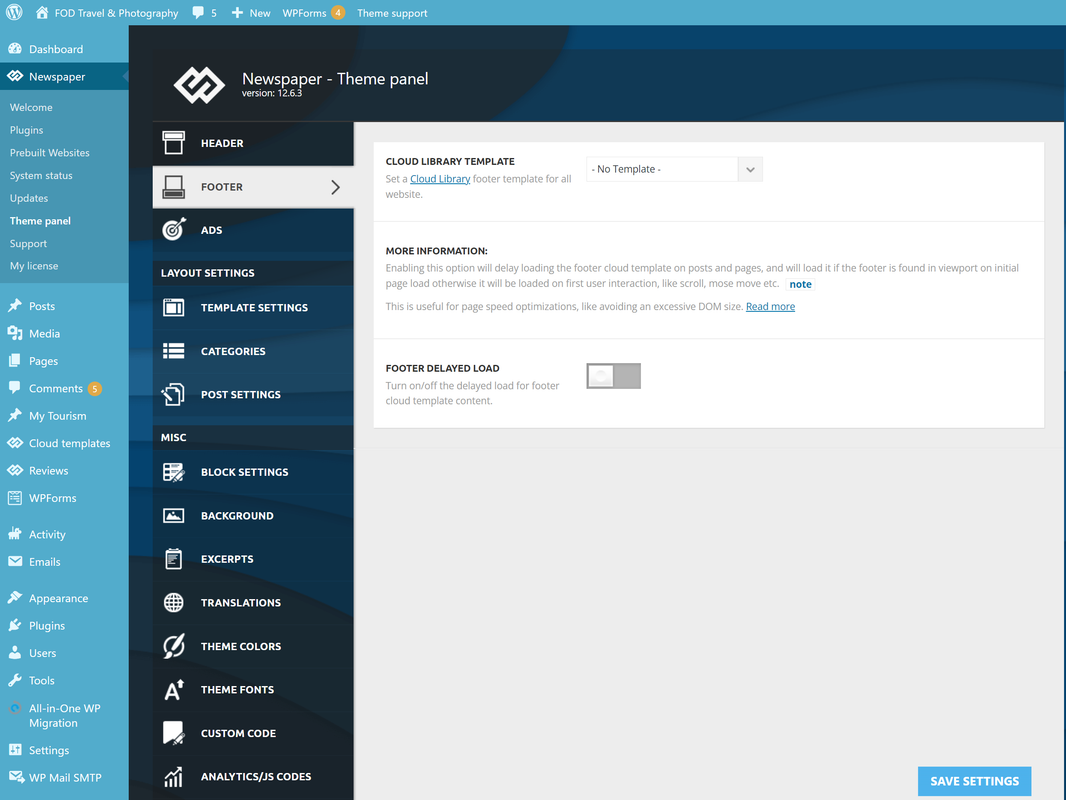
Thankyou for the reply.. BUT, I don’t have that footer info box in my panel?
Not sure why. I have latest Newspaper version 12.6.3 – but NO footer panel, as you show in your screen shot.
Here is my screen-shot -> https://i.postimg.cc/wxb2TwFF/nofooter.png
How do I get it back and make this copyright change?
webowner001 Hi,
I need more details please. It does not seem that I am using a footer template at all, as there is no footer cloud template. I have tried to change the copyright statement manually through footer.php – but it doesn’t do anything. HOW else can I change this statement? Bottom-left side @ http://fodphotosite.com
Every time an update is done to the theme, something always seems to get messed up. Footer/Copyright is very difficult to change – please provide me with full details.
Thank you so much.
webowner001 Also, all POST settings are correct under Newspaper – Settings – to designate the Cloud Template…
webowner001 HI,
Thank-you so much. I have set Sticky header for Both ipad & mobile on the HOME page only at this time; and wonder if there is an EASY method to apply this to ALL mobile headers at once? Global settings perhaps – not sure where I go to do this, all at once.
Otherwise it will be very time consuming to do this on EVERY page that I have.
Thank you.
webowner001 Hello
Please also check MAIN page @ http://FODPhotosite.com – I felt sure the mobile header was on this page, but when viewed it goes to LIVING MAGAZINE… I have lots of pages, and need to have my MOBILE Header Added to every page.
I have checked with Mobile S23 Ultra, and Apple iPAd Pro and it is doing sam thing – showing LIVING magazine. It seems to work some times for mobile header and then reverts back to the Living Magazine header. How do I keep my Main MOBILE HEADER and get it on every page, globally – all at once?
Thank you.
webowner001 OK, Never mind – It seems to work, but I had to add the URL in the link box, about 2-3 times, each time SAVING before it actually worked….
webowner001 Hi Again,
Not sure what I did – but it seems ALL pages now on Mobile have same header – Except for the NEWS page.
Please see my earlier post for NEWS problem and let me know how to fix.
Thank you so much!
webowner001 Hey, Thank you SOOO MUCH – Yes, this worked. I have deactivated the Newspaper Mobile plugin, and the AMF and then “Create the Mobile Template”. Awesome. Thank you so much for your quick & awesome reply with screen shots & details. Fantastic; So happy to have my site working. Please confirm the same at your end, and let me know what mobile device you are using – @ http://FODPhotoSite.com
webowner001 Hi There,
Thank you for the CUstom CSS code, I have removed the Categories – BUT, please tell me:
How do I remove the Popular Posts?
Where exactly is the Footer-Template 2 page? And/Or what Code do I need to enter to remove Popular Posts. My idea, is to add a module where by I can select the posts and in what date I want to display there.
Please advise the correct code to find and remove through perhaps “footer.php”? Or, where else is Template 2 – Footer?
Thank you so much.
webowner001 NEver Mind – Figured it out 🙂
webowner001 Figured it Out – Can Be Closed.
webowner001 Hi There,
It’s okay but thank you for your reply.
I can achieve this with a plugin – https://wordpress.org/plugins/quick-pagepost-redirect-plugin/
Best Regards