

Hi! Is there any way i can use elements made in visual composer on a page build with TagDiv composer?
I have a team members grid set up now in Visual Composer however the styling of this page is different from the other pages because they were made with TagDiv composer. I can’t use any templates because these two modeling tools can’t seem to work together on a single page. Please help!
I need a page similiar to this one:
https://test.circulaireconsumptiegoederen.nl/over-ons-oud/het-team/
(password = groendoen)
How can i recreate a team layout like this one using only TagDiv Composer?
And how can i recreate a layout like this using TagDiv composer?
https://test.circulaireconsumptiegoederen.nl/doe-mee-test/
When i try to edit a page with TagDiv Composer i get this error:
Error at zones: 6(models) : 5(dom). The model does not match the content Current state has involved an issue. You could try an UNDO operation (CTRL+Z / CTRL+SHIFT+Z)
This is a page i want to use to display custom post types

Hello!
Do not use both page builders on the same time.
For the moment, the only solution is to shift from WPBakery to Composer.
So, I gladly recommend you to shift from WPBakery to Composer, because WPBakery is an old builder plugin.
Please check our guide to know how to shift from WPBakery to Composer: https://forum.tagdiv.com/visual-composer-tagdiv-composer-transition/
If you will use a cloud template, then you can edit the template and find in Composer an element called ” Team Member ” and some settings for that. For more information about TagDiv Composer plugin, check our documentation here: https://forum.tagdiv.com/tagdiv-composer-tutorial/
Unfortunately, there is no such element(https://test.circulaireconsumptiegoederen.nl/doe-mee-test/) in TagDiv Composer to be able to build exactly the same feature.
You can not edit a default template/CPT with TagDiv Composer plugin.
Check the differences here:
– https://forum.tagdiv.com/design-post-pages-using-cloud-library-templates/
– https://forum.tagdiv.com/design-post-pages-using-default-templates/
If you want to try CPT, then you can take a look here:
https://forum.tagdiv.com/custom-post-type-support/
Hope that helps you!
Thank you!
Your colleague already pointed me to this page: https://forum.tagdiv.com/custom-post-type-support/ and thank you but it doesn’t help me. Also i suspect the info on this page is outdated because i can’t find these files:
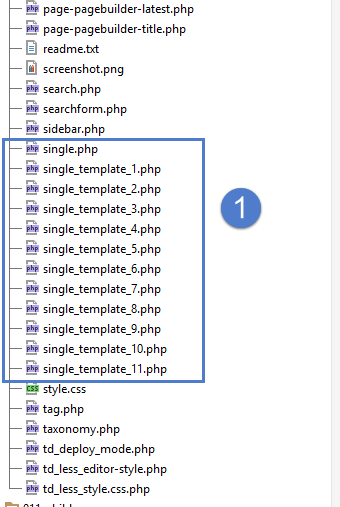
It looks like the root of the Newspaper theme but i don’t see these files in my theme folder, where are the located?
I would like to disable/uninstall WP Bakery pagebuilder but i first need to be sure that TagDiv Composer can offer me the same solutions.
-
This reply was modified 5 years by
Breinblik.
Also i tried assigning a module to my Custom Post types
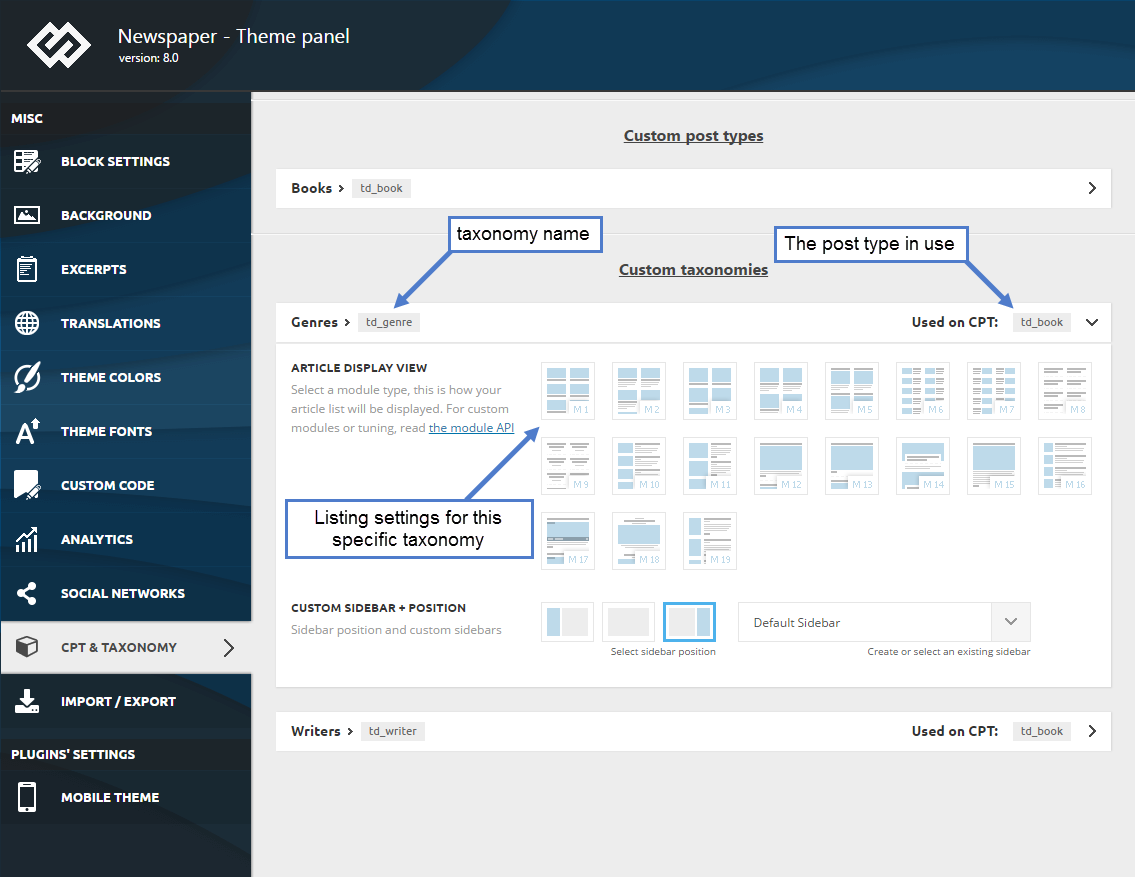
but after saving these changes i made in the theme panel i don’t see any changes in the frontend, it seems like these changes aren’t coming trough. What steps can i take to debug this and find the solution?
Hello!
It is like that: single-icoonprojecten.php
Please try not to reply multiple times in the topic if possible, this will only delay our response. Replying multiple times will refresh the topic date and move it to the back of the line, we answer from oldest to newest.
Thank you!
ok thank you!
“It is like that: single-icoonprojecten.php”
This one i got figured out.. i was asking about the others: single_template_1.php to single_template_11.php. I think i should rename these as well because i assume then i’ll be able to attach these templates to my custom post types

Hello!
This issue has been already discussed here: https://forum.tagdiv.com/topic/problem-with-custom-taxonomies/
Thank you!

Bettina,
We have inherited a Newspaper site that was running VC. We need to transition pages that were formerly in VC to tagDiv and repeatedly find support articles referencing this post (https://forum.tagdiv.com/visual-composer-tagdiv-composer-transition/). Unfortunately that link results in a 404 error. Can you post an updated/accurate URL or point us in the direction of a similar resource? Thank you!
Hello @risdall!
Please check those screenshots to know how to shift from WPBakery to Composer: https://www.screencast.com/t/6xLVMmlsY ; https://www.screencast.com/t/zWHrRmK1LQC ; https://www.screencast.com/t/vuFdT9Stx ; https://www.screencast.com/t/DWbSf3qj ; https://www.screencast.com/t/QuHyGccTK71v
Thank you!
