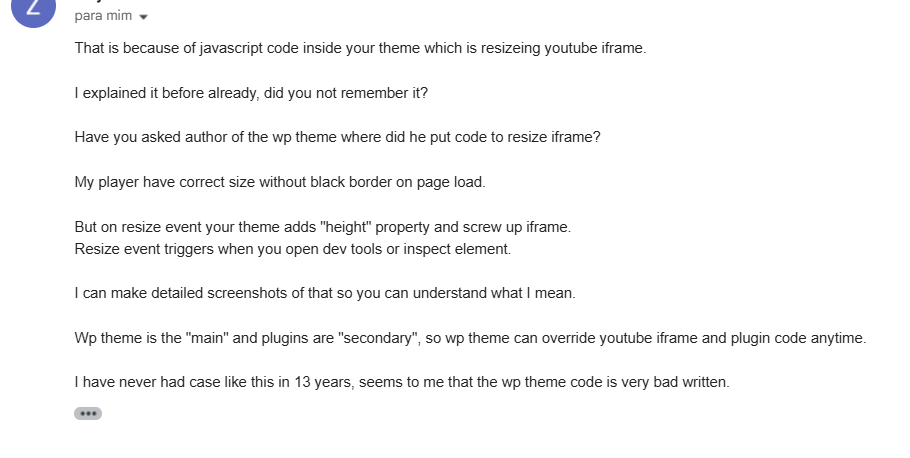
Good evening, For a month now I have been trying to resolve a major problem with the creator of a video and m3u8 player plugin. He always warned me that it was the theme and I didn’t believe it, until I put in some codes and the problems actually started. What’s going on? Newspaper themes are messing up my site. I bought a YouTube video plugin and other live videos. What’s happening is that black bars appear covering half of the live broadcast, whether it’s a YouTube video or a live broadcast. I asked the owner of the plugin to analyze my site. He told me that it’s the Newspaper theme. The plugin owner said, “Something in your theme is dynamically adding these CSS properties to each iframe on the page.” He also said, “It seems to me that the WP theme code is very poorly written.” The alignment is crooked in HTML. When you type code to make the same line, as shown in the screenshot. I recorded a video for you to see the black bars in videos caused by the theme. The screenshot was taken by the plugin owner, who had access to my site and saw that the theme was the cause of the problem. Check everything out. Please support me with this. I’ve never had any support. I bought a theme. This year I decided to change it and I have this big problem. Please help me solve it. Check out the screenshot from the plugin owner, and also the misalignment. And the video.
Plugin owner support said about the theme problem: screenshot
https://i.postimg.cc/kXKmW6BL/Screenshot-1520.png
https://i.postimg.cc/JnMDWVSz/Screenshot-1518.png
Videos show theme problem that pulls and makes black bars appear on the player
https://app.screencast.com/MJkIiOuLEBJxd?conversation=A9syM6Fg9s9tNmGS6bmyhE
https://app.screencast.com/ZsV9V21yHYRsM?conversation=SmeQsFxBRWcdZcPEb2iGof
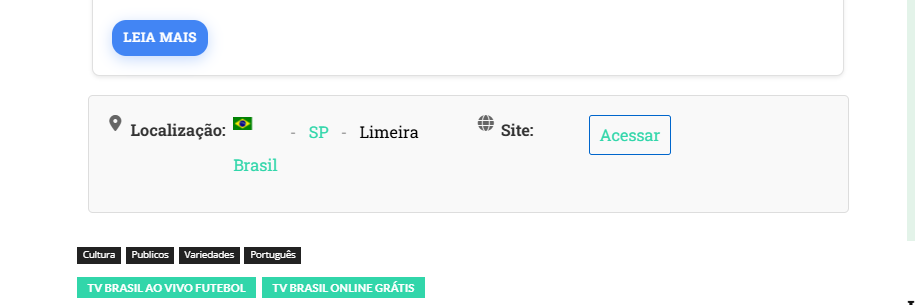
Another problem, I’ve already written and put icons, I tried everything in the screenshot, the icons appear higher and the text doesn’t stay aligned
https://i.postimg.cc/4yKhWvr6/Screenshot-1519.png
I’m using a translator and it doesn’t come out perfect. I said that for a month I tried to resolve it with the plugin owner. We put some CSS codes, “additional CSS”, in customize, it didn’t work. I deleted it, I did everything, I uninstalled the theme, I restored the site, I did everything, nothing worked. I’m tired, you know, I’m late to finish the site, because of this problem. Everything was done. I ask that you resolve this. A position from the creator of this theme.
The plugin author sent me this, so you can analyze the error. Check out the following screenshots.
https://ibb.co/twH7xcrM
https://ibb.co/93k2JyFW
https://ibb.co/twp83mVK
https://ibb.co/MxczrG0b

I didn’t ask for help configuring the plugin or adjusting it, just how to make the theme stop pulling pages to the side, upwards, and not leaving static. I explained everything. It seems like you don’t pay attention to the explanation. The problem is the theme. I’m going to open a new topic and explain. I can’t add any HTML codes. Everything is crooked in this poorly written theme. And it seems like there’s no solution. You still come asking me to look for a professional. The problem is the theme. Okay. You’ll need to record videos to explain everything, so that everyone knows and doesn’t buy this theme anymore, as it doesn’t have any solution.
Hello RENATO, I understand your frustration, but please note that despite the fact that you no longer have support for the theme since 2017, we have tried to help you with what is strictly related to the theme (options, settings …), but in cases like this where you have clearly mentioned that you are using a plugin or custom code (in your case you add HTML in articles), we have no way to help you, these things are clearly specified in our list of what support is offered for – https://i.imgur.com/1C3kvrZ.png – https://forum.tagdiv.com/support-policy-2/
Just a quick note: it would’ve been helpful to include a link to the site so we can check the solution directly. If it’s a matter of CSS, there’s a good chance we can help with that. However, please keep in mind that we’re not able to make changes to the theme’s core code.
Have a beautiful day.
Calin, your obligation is to maintain a static website. I can’t just put a simple HTML code. Both through the DAV Composer and the WordPress editor, everything comes out crooked and misconfigured, as I showed in the video.
Look at this. I can’t put any HTML code that is crooked and misconfigured.
https://app.screencast.com/qA2cQ6mHEMbpF?conversation=1PCbACJTV0l3lpghdD9zLK
I tested the same code in an HTML test and it should stay that way.
https://app.screencast.com/ZFGYevEMUURy5?conversation=Q4zgwFSErhlrUP3dHvCMuZ
About support, I was going to buy two more themes from you to use the same website in other languages. Another simple problem to solve, I’m reluctant to analyze the problem in depth. Something fundamental is to keep the theme static, without pulling it from one side to the other. I’ve never seen this before, besides making everything crooked and out of alignment, it even messes up paid plugins. Then you come and tell me you don’t have to do it, I tell you, I can make a sequence of videos in English, exposing to millions of followers, all my anger that I have with this theme. The ones who will lose out are you.
it was supposed to come out this way, as the forecast shows, with my HTML ready.
the radio above and localization with the Brazilian flag.
look how it’s coming out. horrible, this theme is messing up everything
https://glostv.com/706-2/
theme pulling up and black bar appears on youtube broadcast. https://glostv.com/youtube-teste/
Hi,
To resolve the problem with the image use this css
img {

    width: auto;

}
In case that this is not strong enough you can add the body class like this:
body img {

    width: auto;

}
The css can be set in the theme panel > custom code > custom css so it will apply globally – https://i.imgur.com/njCC3jR.png
This one “theme pulling up and black bar appears on youtube broadcast. https://glostv.com/youtube-teste/” for me is not displaying any video – https://i.imgur.com/hyqEn9B.png maybe you have remove it.
In this case, the theme is pulling up, you don’t have to do anything. I’ve already uninstalled the theme and installed it from scratch. The error persists. I liked the theme, so I’m insisting on it. I need to solve the problem. This specific problem occurs on YouTube and in posts that have HTML.
Two pages, for example, are happening on YouTube.
A video
https://glostv.com/youtube-teste/
A live broadcast
https://glostv.com/teste-youtube-2/
Regards, the code you sent me has improved, but it’s still messy, as shown in the video. I added a code where it was quite messy. The Brazilian flag appears straight in the code preview, and when you publish, the CSS of your theme pulls the flag up, and it was pulling everything. I fixed it using a code. I just couldn’t fix the flag. Check out the video. And then I showed the players where the CSS of the theme is pulling up a lot.
where the black bar cuts the image in half.
https://app.screencast.com/murtzKTKUfxQL?conversation=MyiYHLltrbUWHKXActQtSQ
I ask that you contact the owner or person responsible for the theme, ask them to make a static page, fix this. Because I’ve been stuck on this for over a month, looking for a solution, I recently discovered that the theme is causing this headache.
Hi,
For video problem try this custom css:
.Elite_video_player iframe{

      height: revert-layer!important;

}
Set the code in the theme panel > custom code > custom css – https://i.imgur.com/xFgOaaP.png
For the situation with the flag up if you can provide a link to it I will adjust it (the one provided before no longer work https://i.imgur.com/UXhBGui.png)
Cain, for now this previous code should solve it.
However, I have this problem, the thumbnails do not appear in the Elite Video Player plugin, I complained to the plugin owner, he replied “The thumbnails do not appear… this is related to your theme – see my video recording. opacity: 0 is set in your theme!”
I recorded a video showing details of the problems and added subtitles to the video so you can understand the problem. Watch this video.
https://app.screencast.com/a4VYB8Fn1KKZX
of these posts
https://glostv.com/774-2/
https://glostv.com/radio/
in this case, the thumbnails are having problems in your theme. Help me solve this.
Another problem I need to fix is a default location description, the theme is pulling up the Brazilian flag and in just a simple HTML code, I need to fix this, watch the video.
https://app.screencast.com/mVrQYB1dKUNyG
from this post
https://glostv.com/radio/
I need a solution for this too.
Hi,
For this https://i.imgur.com/jpdkHwn.png is normally use opacity 0 and a js should set it to 1 to create an animation, but it seems that for the plater you are using the js is not trigger, so the best option is to set the opacity to 1 using css
body.td-animation-stack-type0 .td-animation-stack .entry-thumb, body.td-animation-stack-type0 .post img:not(.woocommerce-product-gallery img):not(.rs-pzimg), body.td-animation-stack-type0 .td-animation-stack .td-lazy-img {

    opacity: 1;

}
Set the css code in the theme panel > custom code > custom css
The location img has an bottom margin that needs to be adjusted https://i.imgur.com/zfzDehI.png this can be resolve using this css:
.location img {

margin-bottom: 1px;

}
Thank you!
Calin, I did what you asked, but I noticed that the page was all crooked, especially the main container. I’m not going to blame Elite Video Player, because the HTML code itself, which makes Rádio Mix run, is crooked. It’s crooked, more or less like this, as I put a red arrow. If I don’t fix this, I won’t be approved on the monetization platforms, I’ll crash and be rejected. I need to fix this. I’ve tried everything. Take a look at the screenshot and the page. Look closely, it’s crooked. I asked a friend to look at it for me and he confirmed that it really is crooked. He told me it’s something in the theme. Please help me fix this.
I only mentioned two, but they’re all like this.
https://ibb.co/XZNVMXh0
https://ibb.co/DyZ5Yw7
Of these pages,
https://glostv.com/radio/
https://glostv.com/tv-horizonte-ao-vivo/

@Renato
Comprei esse tema e está foda ! eles não dão suporte CERTO, nem com o suporte ativo pago .. é complicado!!! boa sorte ai !
Estou com problema de consumo de 100% 120% na VPS e eles não fazem nada ! foi migrar para esse tema e meus problemas começaram!!!
Sempre colocam culpa nos plugins dos outos ! RESUMINDO. .só pode usar o tema deles e mais nada!!!!
@FelipeNunes, porque está consumindo muito VPS é o tema pesa muito? seu site está qual VPS? é da hostinger 4 GB de RAM a KVM 1? estou pensando pegar uma, estou cheio problemas esse tema. tem algum tema bom me indicar? esta sendo dificil montar site esse tema. Felipe voce mesmo configurou seu VPS, sei muito complicado.
@renato, tenho uma empresa séria que trabalha com VPS tops, e que te da suporte top! vou te encaminhar meu whats.
link doQR CODE:https://prnt.sc/o0YjV8_E02B6
sai da hostinger …
Grande Abraço
@felipeNunes estou sem Whatsapp no momento, mais salvei aqui seu link, assim arrumar meu celular te chamo. abraço
Calin, You can take a look, I checked on my cell phone, and on other devices, I thought my monitor was defective, but I saw other devices were crooked too, this capture on the cell phone, it looks like something from the theme, the whole page is crooked, and all pages. https://ibb.co/29ScmkM
Hi @RENATO,
Are you referring to the left and right margins? If so it’s related to some extra css added on some elements, for example – https://i.imgur.com/FcOhvvy.png – https://i.imgur.com/Xt8oGTh.png those should have left and right padding set 0 and it will be look like this – https://i.imgur.com/pJh3mhr.png
Thank you!
@Calin Take a look at me, it’s all the posts, looking, the theme is all crooked, if it’s not that, my monitors that are not even 2 years old, are defective. but the impression I see is that everything is crooked,
https://ibb.co/XZNVMXh0
https://ibb.co/DyZ5Yw7
From these pages,
https://glostv.com/radio/
https://glostv.com/tv-horizonte-ao-vivo/
I left this post open, it’s an image from YouTube, you can see that the YouTube cover of the broadcast is completely disfigured, any image from YouTube is like that, I mean the cover.
as for the crooked theme, I put arrows showing how I see the image right on my monitor, it seems like everything is crooked. seriously, take a look carefully at all of this for me.
https://ibb.co/TDrjHQMn
this page.
https://glostv.com/diatv-ao-vivo/
Hi,
I think that something is indeed related to your monitors, to me it looks beautiful, aligned, straight, not crooked.- https://i.imgur.com/yk5AxuL.png even the images provided by you are not crooked, only the arrows placed on the images are crooked
If possible please check on other devices/computers.
Thank you!
@Calin Help me, I have this cover image from the YouTube broadcast and it has this broken image, I tried everything to solve it but, from research I saw it was something related to the theme. I tried everything and couldn’t solve it.
as shown here https://ibb.co/tMg13Rbv
from this page https://glostv.com/abc13-houston/
another problem, which I tried everything to solve, sharing on social networks, the preview of the personalized cover doesn’t appear, I have to show it soon and description when I press share, and it doesn’t appear, I tried everything, to fix this, I downloaded several sharing plugins, I researched I saw that it is also a theme,
it appears like this, https://ibb.co/G4gDyj17
from this page.
https://glostv.com/abc13-houston/