
- NewspaperWP Rocket and Newspaper Theme: Optimization Guide
- TutorialsFrom WPBakery to tagDiv Composer
- TutorialsOffset Feature
- TutorialsWhat is Ajax preloading?
 superflymarketing
Hi there,
We’ve recently launched our site and have included the AMP plugin for support. We haven’t changed anything with the plugin, simple enabled it for posts and that’s it.
When running the Google AMP test on our pages they fail with error: “The text inside tag ‘style amp-custom’ contains ‘CSS !important’, which is disallowed.”
For example see here – https://gaminglyf.com/news/2018-03-14-microsofts-new-xbox-live-avatars-will-launch-in-april/amp/
We’re struggling to figure out what’s causing the issue? When viewing the highlighted code in the Google test it doesn’t contain ‘!important’ anywhere in the code let alone the highlighted section. What’s going wrong here?
 Simion C.
 You could change the thumbnail used by the AMP related articles, if this is needed. It will require you to modify the module used for that section
– https://www.screencast.com/t/YRQoWfTZn
Use a size that is also used on your website, maybe this one
– https://www.screencast.com/t/iAQfSF6k
I will add this on our list as well, so a more popular thumbnails size is used by that section, such as the one I mentioned.
 pureglamtv
Hi everyone,
using latest version 7.8.2. and everything seems fine, except the featured image on blogposts with selected Style7 and Style8.
-> https://www.pureglam.tv/2016/08/17/griffith-observatory-griffith-park-los-angeles/
-> Missing image online and available at: https://cdn1.pureglam.tv/wp-content/uploads/2016/08/Los-Angeles-Griffith-Observatory-Griffith-Park-Sehenswuerdigkeit-LA-Luxus-Reiseblogger-LAX_1975-001.jpg
-> https://www.pureglam.tv/2016/05/12/qatar-airways-einfuehrungsflug-qr914-doha-adelaide-airbus-a350-inaugural-flight/
-> Missing image online and available at: https://cdn1.pureglam.tv/wp-content/uploads/2016/05/Business-Class-Qatar-Airways-QR058-QR060-Muenchen-Doha-Aviation-Reiseblog-Hamad-International-004.jpg
All images and most files will be loaded via CDN (Keycdn) and without any problems for months, except on these two styles.
Please help and give a solution, how to display these pics again. All photos were available on our CDN, but your theme won’t display theme (only Style7, Style8)
Thank you
Simion C. Hi,
I have inspected the post you mention, there is no problem with it when in AMP version
– https://www.screencast.com/t/bz27MUaTjYz
The post passes AMP validation and there is no problem with it.
Thanks
Simion C. Hi,
That topic is referring to the AMP version of the post. The thumbnails will be created from the featured image you set for the post. You could set a featured image for the posts, then select a post template that does not show the featured image in the post page (template 5 or 12).
That way you can start the posts with an image of your choosing in the post content, and have a different thumbnail for the post.
Thanks
Simion C. Hi,
You can set colors for various elements as creating the post
– https://www.screencast.com/t/93yraB6qF
But for all posts at once you could try that with CSS, that would be the only way of achieving something like that. For example a code like this will set a color for the paragraphs and all headings in the post content belonging to a specific category
– https://www.screencast.com/t/nDjjeNRa
The browser inspector can help you identify the elements needed and create custom code
– https://forum.tagdiv.com/create-custom-code-using-the-browsers-inspector/
Thanks
Simion C. Indeed the theme has no SEO settings, this is left for you to make the configuration as you want. We recommend the Yoast SEO plugin in the matter
– https://forum.tagdiv.com/facebook-share/
In terms of structured data the theme contains basic needed data, including author and updated mentioned
– https://www.screencast.com/t/7F1klei0lieG
You can test the theme demo posts with the Google structured data tool
– https://search.google.com/structured-data/testing-tool/u/0
Enable the AMP plugin and in time Google will index the AMP URLs in time
– https://support.google.com/webmasters/answer/6340290?hl=en
– https://developers.google.com/search/docs/guides/about-amp
 Edward
 Read this manual: https://forum.tagdiv.com/header-ads-adsense/
and etc.
Header Banner example:

Side Bar Banner example:
 Catalin
 Hello Syams,
At the moment, the AMP for Newsmag was not released but we will consider to include it in near future updates.
Thanks for your understanding!
 sbrauer
Dear support team,
I checked some other discussions here before but could u not find the answer.
Currently the caption is displayed on the bottom-right of the image. How can I edit that the caption is displayed BELOW the image?
Thank you a lot for your answer.
Example
http://digitalrevolution.nz/fishandgamenz/articles/a-babe-in-the-woods/
 alecaus
Please, check image!
Instagram dont appears Follow Count.. Its correct.
I set the ID for Instagram: emagrecebr for example.
 Syams
SyamsRecently, I find Newspaper AMP. It’s amazing. Do you release AMP for Newsmag?
 Amit
AmitHello team,
Is there a possible way to show GitHub embedded code on Newspaper AMP?
 khen888
 Please take note that I’ll disable your AMP plugin. It’s USELESS for those who earn from Google Adsense.
Fix it asap!
khen888I already enable AMP plugin, insert adsense code in the AMP panel:
Two of my AMP pages were indexed in Google search. But when I view that pages using my mobile phone, I cannot view the ads.
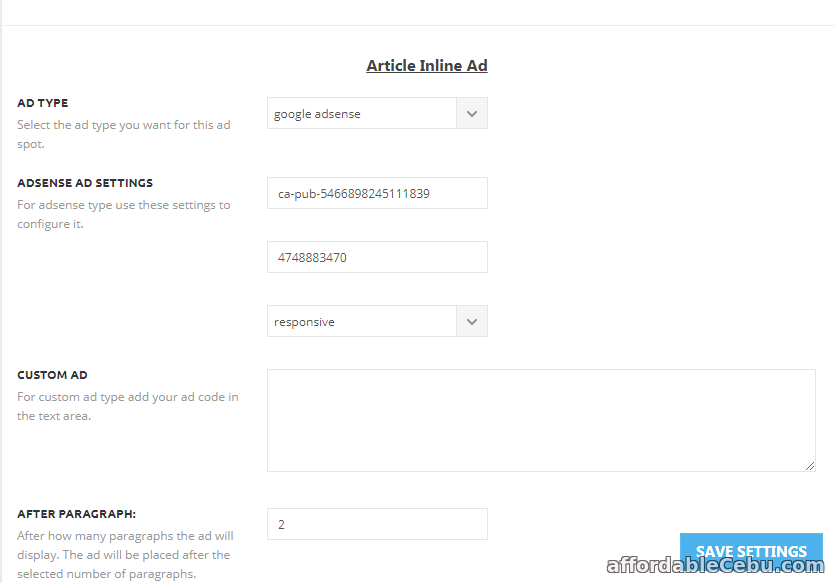
Something is wrong with the AMP panel.
Please fix this problem. I read many issues here regarding adsense amp ads not working in Newspaper theme (with amp plugin enabled.).
Can you please check it and let me know it if you already fix it
Website: https://topbusinessfinance.com
 Jimmy Díaz
It bothers me to use the tagDIv mobile version plugin just for one reason. there is no option or way to hide ABOUT US and FOLLOW US in the footer. the subject newspaper I use for a personal blog not for a company nor are we several people. that problem I have only with the mobile plugin and amp. but in the normal version I could hide them. I hope you can change that in future versions.
 hellonikoloz
Hello,
The default login modal location is in top bar.
How can i change its location to wherever i want? for example to put join modal(login/sign up) in sidebar and not in the top.
Thanks
 Ladiesabroad
 Hi
The Sharing buttons at the end of each blog post has gotten it´s colours back. I still have the above CSS given to me 26/8-16 as I had before, and have not changed anything. I notice more choices have been given to costumize the sharing buttons look, for example doing them all black, but I still prefer having them gray. Can the above CSS be modified to work for the new button options?
https://www.ladiesabroad.se/2018/03/manadens-staycation.html
thanks from Lena
 srky333
 You are GREAT! How I can find which loop-single and single_template to edit? In exmple You use post template 2, I often use default post template…
And Can I display time when is post published nex to dte od post published for example now is 17th March and I want 17th March 12:50…
 doheditors
Hi there,
I recently installed Newspaper and am having some issues with the Molongui Authorship Premium plugin. For the most part, it works with no issue, I can still assign guest authors to posts. However, there are a couple of minor issues,
(1) When one tries to view the author page, it bring up the guest author’s photo but there’s no bio or any other info. And the post and comment count are the site total, not the ones for that specific guest author.
Landing page: http://duringofficehours.com/
Example author page: http://duringofficehours.com/author/william-bowden/
(2) When trying to display posts by category, etc. on the home page, it shows the main account’s name instead of the guest author’s name. The page is live but not the assigned landing page until issue is fixed: http://duringofficehours.com/home
Not sure how to deal with these issues or if it’s a theme or plugin issue.
Any help is appreciated!
 meinsen
 But there is an option to change the menu color in the AMP theme panel.
 Ken0929
Hi, I have 2 questions.
1. I’m using pagebuilder+overlay menu for page template. At first, the header menu wouldn’t be transparent so I use the code as below and it’s working now.
.page-template-page-pagebuilder-overlay .td-header-wrap .td-header-menu-wrap-full {
background-color: transparent;
}
but it’s not working on mobile. The header menu still won’t be transparent.
2. How can I adjust padding-top when I add row ID to use smooth scrolling? I’m using sticky menu(Header style3-multipurpose). So when I scrolling, headlines will be covered with menu bar.
 brianjcameron
Is there a way to change the block used in the related images on AMP. It is using a size I am not using in the rest of my design, and I would like to avoid adding another image size to my disk space.
 pemoru
Hi,
I have installed the AMP plugin and after a few days an error appeared in almost all post and I dont know how to correct it.
“The author stylesheet specified in tag ‘style amp-custom’ is too long – we saw 70217 bytes whereas the limit is 50000 bytes.”
What can I do? Here its an example of a post with the error https://www.palabraderunner.com/descarga-todas-tus-actividades-de/amp/
And this is a capture in the amp validator
https://imgur.com/a/qcRKI
Where can i see that stylesheet?
Thanks
 Judong Yang
I want to keep feature image function in front page, which it looks better.
but i want to use other image in post for the first image instead of default feature image, how can i do that?
should i do it as they discussed as following link in forum
https://forum.tagdiv.com/topic/amp-how-can-i-stop-the-featured-image-displaying/


