
- ApiPractical example – How to add a new Block and Module
- Apitd_api_top_bar_template::delete
- Apitd_api_top_bar_template::update_key
- Apitd_api_top_bar_template::update
- Apitd_api_top_bar_template::add
- Apitd_api_single_template::delete
- Apitd_api_single_template::update_key
- Apitd_api_single_template::update
- Apitd_api_single_template::add
- Apitd_api_footer_template::delete
- Apitd_api_footer_template::update_key
- Apitd_api_footer_template::update
- Apitd_api_footer_template::add
- Apitd_api_smart_list::delete
- Apitd_api_smart_list::update_key
- Apitd_api_smart_list::update
- Apitd_api_smart_list::add
- Apitd_api_thumb::delete
- Apitd_api_thumb::update_key
- Apitd_api_thumb::update
 raefiazrani
Hi, the is a of problem with the alignment when you open any of the post in mobile (AMP version) it shifted a bit to the left.
Website > Jomdive.com
 Josan
Josan My pleasure…
Than you can try adding multiple buttons in pagination style and add links to your blog pages 2, 3 and 4.
For example add button like 2, 3, 4, > and than add link to these buttons like http://www.example.com/blog/page2 to button 2 and repeat like this on button 3 and 4.
This is nice idea and i will try to implement it too on my site.
 slivertorp
 That’s very interesting, thanks for sharing that! I really appreciate your help.
Ideally, I would like to keep the pagination below my articles on the homepage, so people can directly click on page 4 for example.
Instead of one click on Load More and 1 click on Page 4 in the blog section. It is just a user experience thing.
Let’s see what tagDiv support can do for me 🙂
Josan Thanks for reply. I mean add another menu like mobile theme’s menu.
For example a menu like this on right side:
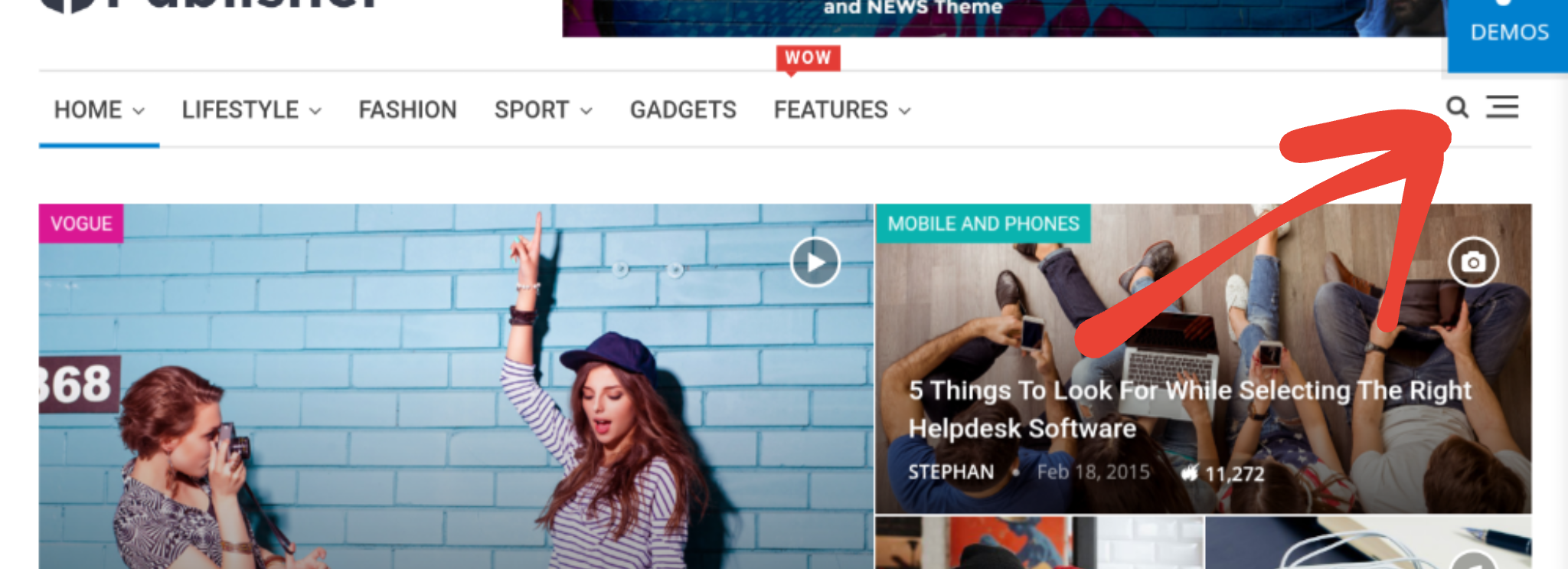
Which when clicked open a menu like mobile theme:
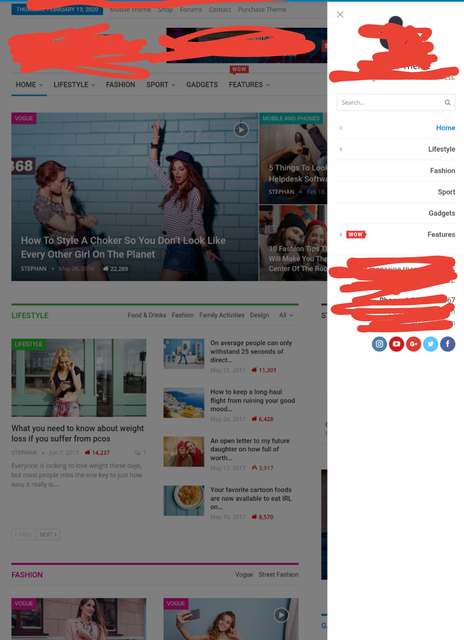
Thanks
-
This reply was modified 6 years by
Josan.
Josan You can achieve this by using TagDiv composer. I did same on my site.
So here is what you have to do:
First create a Blog page to show your latest posts.
Than edit your homepage with tagdiv composer. In post loop section remove pagination and below the post loop add a button with link to your blog page. You can visit my site for an example.
Also you can customise your blog page in theme panel as you want.
 nfzambrano
Hi,
The Newspaper theme is an extraordinary tool. It allows you to easily solve many everyday tasks. However, we have this small inconvenience.
We are having problems with the way galleries are displayed on iPad tablets. The shading and text of the gallery images are shifted to the right, placed on the sidebar.
These are images of what happens:
- An image of the way the gallery is displayed on the Desktop (without any problem):

- This other is a sample of how the gallery is displayed on the iPad:

As you can see, the shadow of the gallery and the texts of the images move to the right, above the sidebar.
Any ideas on how to resolve this issue?
Thank you very much in advance for your help.
 Vlad S
 Hello !
Please provide an example of your issue. Let us know what are the steps that you’re following in order to try it on our side.
Thank you !
 dennisjpitocco
 Thank you, but as mentioned above, Theme Panel/Footer is already set to apply globally but isn’t showing up on any of our blog pages. See this blog page as an example:
 Simion C.
 Hi,
The option to edit the footer template will be removed in coming updates. The correct way to edit the footer template is to set it for example in the theme panel, in general
– https://prnt.sc/r3jbu4
Then if you would like to edit it, edit a page or a template that uses it, like the homepage for example – https://prnt.sc/r3jcsr
Thanks
 TheSayleboat
Hello!
I’m using the infinite load option for my category archive pages. Is there a way to insert an ad banner after every * post?
For example, they are scrolling down the archive and after every 5th post – they see an ad.
Possible?
Simion C. Hi,
Why would you like to do that exactly? AMP is served by Google, through the search results page – https://prnt.sc/r3igi8 and lately some socials are serving AMP as well for mobiles.
The cached AMP versions of your content can only be accessed through the Google SERP.
If you check AMP only, that means that the mobile theme will be used only for visitors coming from Google, the others will see the responsive version of the website. An option to serve AMP for all users does not exist, I don’t believe that is even possible.
Thanks
Simion C. Hi,
You can check what Yoast will load in the source of the page, for example
– https://prnt.sc/r3i4hp
That should be picked by Google, from what I can see it does see the Yoast schema, for example the datepublished that is loaded by Yoast – https://prnt.sc/r3ic7m
It should work according to the Yoast documentation
– https://developer.yoast.com/features/schema/yoast-seo/
– https://developer.yoast.com/features/schema/pieces/article/
Thanks
 Kassimon90
Hi
I do not know why the AMP Plugin does not work cause i activated together with the mobile theme but only the mobile theme is working , when i go the theme panel to activate AMP only or the AMP + Mobile theme setting , they do not work only the Mobile theme setting is working .
 ir
ir I’ve resolved it- there was cache issue. Please help me with the question posted here: https://forum.tagdiv.com/topic/changing-amp-slug-from-example-comamp-to-example-comamp/
irI’ve designed custom Home page using WPBakery (set as home page) and even after AMP is disabled the home page is showing the AMP version home page when accessed through mobile.
Please help on how to disable AMP on the front page.
irI’ve been using AMP plugin before switching to Newspaper theme that supported example.com/amp slug , but after switching to Newspaper theme the AMP slug has changed to example.com?amp it is requested help in changing the slug to example.com/amp instead of example.com?amp
 wmhurtado
 I continue with the same problem, I followed the instructions to the letter, I deactivated all the plugins, I made the changes in the settings according to the requirements but being on my website and trying to click on “Edit with TD Composer” the browser shows me the error that this page does not work ERR_EMPTY_RESPONSE remaining in the following URL: http://clasificacionarancelaria.com.bo/wp-admin/post.php?post_id=41&td_action=tdc&tdbTemplateType=page&prev_url=%2F%2Fclasificacionarancelaria.com.bo%2F
Please help me
 Anangpal singh
 Team tagdiv theme … amp not working why no buddy replying with solution.
Anangpal singhamp not working on site.. even amp option not showing in wp dashboard side bar.
web address: pencopy.com
tagdiv team not replying at mail.
help if possible …
 robertn
Hello, I noticed that when I post something I select the main image that will be shown on the home page for example, at this point it’s ok, but when I open the post the main image shows again, I would like to know if this can be prevented. Show the main image in like home page but when you open the post, it doesn’t appear.
 SangHun Shin
The mobile version does not allow you to click on a category. I thought it was due to a “WP Content Copy Protection & No Right Click” plug-in problem, but I don’t think so.
The link is not linked to the part that shows the category in the mobile version. Until the theme update, there was no problem. I’d like to attach a picture, but I don’t know what to do.
Looking at the contents of the forum, others seem to be having the same problem as me. How do we solve this?
SangHun ShinThe mobile version does not allow you to click on a category. I thought it was due to a “WP Content Copy Protection & No Right Click” plug-in problem, but I don’t think so.
The link is not linked to the part that shows the category in the mobile version. Until the theme update, there was no problem. I’d like to attach a picture, but I don’t know what to do.
 yourin
Hello,
I installed the Mobile Theme and the amp plugin and it works mostly goon on my mobile device.
But sometimes my normal homepage is gone and my mobile homepage loads on a computer screen. I looks really weird, how can i fix this thay my mobile theme only loads on mobile decives.
Greetings Youri
http://www.gulpengeuljournaal.nl
 neutrelz
Hey,
I use my website for webview mobile application. I want the ads to appear only on computer logins. AMP had without ads, is it possible? İf yes, how?
 drevio
Hello,
Can you help me how to forward all mobile visitors to AMP site?
I tried to check AMP only.
http://prntscr.com/r2jat6
But, when I tried it I forwarded to Responsive Desktop theme.
I already clear the cache.
My site is this : https://bit.ly/321F9lx
