- ApiPractical example – How to add a new Block and Module
- Apitd_api_top_bar_template::delete
- Apitd_api_top_bar_template::update_key
- Apitd_api_top_bar_template::update
- Apitd_api_top_bar_template::add
- Apitd_api_single_template::delete
- Apitd_api_single_template::update_key
- Apitd_api_single_template::update
- Apitd_api_single_template::add
- Apitd_api_footer_template::delete
- Apitd_api_footer_template::update_key
- Apitd_api_footer_template::update
- Apitd_api_footer_template::add
- Apitd_api_smart_list::delete
- Apitd_api_smart_list::update_key
- Apitd_api_smart_list::update
- Apitd_api_smart_list::add
- Apitd_api_thumb::delete
- Apitd_api_thumb::update_key
- Apitd_api_thumb::update
 SAUBHAGYA55
Since two days to install Newspaper 10 theme of my website but the Amp post were not indexing yet. The settings is Amp+mobile is there any modification needed please reply.
 jamiesharpe
 Hi Amit – thank you for getting back to me. You highlighted images that I spent a lot of time optimizing and replacing, but per your feedback above it looks like those images are still slowing down my site. If it’s OK with you I’d like to take one example and please let me know what I need to do?
From your list: croatia.gif
What I had originally: https://www.screencast.com/t/v3vyqA933j – PNG file, size 2 MB
What I optimized and replaced on my front page: https://www.screencast.com/t/dinVpk7Yg – JPEG file, size 40 kb
I really hope we can work off this one example and tell me what I’m doing wrong, so I can optimize it for all the other images. Please let me know and thank you for your help.
 technodipu
I have installed the default Pro demo of version 10.2 of Newspaper X. But if something changes from the theme panel, that doesn’t change. For example – Theme Color, Theme Font, Footers, Ads, Category, Social Networks etc. I tried my best. But I couldn’t change it. I’ve even completed the previous requirements. Please help.
 dennisjpitocco
 A COMPLETE & COSTLY DISASTER
You logged into our Site and left it broken – during our peak morning traffic hours this morning. No Backup? No advance warning? Our Server Administrator is now working diligently to restore, noting that we’ve lost the past 24 hours of posts, comments and activity – a very costly adventure, as we’ve also lost sponsored/native content and our Server Admin charge will be significant.
You deactivated all the plugins using WP admin (which means some settings in some of them will be lost). You even knocked out all the images from our Amazon cloud.
You just left the website broken, with almost every plugin deactivated, instead of reactivating and rolling back.
_______________________________
YOUR MESSAGE TO US THIS MORNING:
Hello! We have inspected your issue, managed to install the Newspaper 10.2 and plugins accordingly but the work we do on backend does not reflect on front end and that was the issue that you were facing from the beginning. This is happening due to cache, either from cloudflare or someplace. Clear your cache and then try to see if your page restores. We suggest you to not revert until you see the cache cleared. That should fix most of the problems that are happening at the moment.
Waiting for your reply!
Vlad S.
_____________________
NOTE: We had the caching turned OFF during prior updates, and also cleared browser caches, which did not fix the issue. OUR website cannot move past the 9.x version in the foreseeable future, and your attempt has cost us time & $$$$. Very disappointing.
 Adeba
AdebaRight now I am trying to solve step by step things were always bothering me.
So one thing which is strange on mobile view.
I like the mobile theme shown on amp and mobile pages but sometimes I see the mobile theme sometimes in the amp view.
Boring and no categories.
I use the switch to show mobile theme on amp and mobile view.
I have no idea what logic is behind this to have two views and when the software decides what to show.
Sometimes I got amp view and after reloading several times the nicer mobile theme shows up.
Any hint?
 richardmeriveles2019
Is there a way to make the publish time appear in Newspaper theme?
 meri
meriHi,
I have a question: if I use a cloud template for the posts and add the “modified date”, will this modified date appears on the mobile version (mobile plugin for mobile+amp)?
I’m asking this because Google now indexes the website from their mobile version and not the desktop one so there’s no point adding a modified date if it doesn’t reflect on the mobile version.
Thanks
 gumball44
Hi
Why don’t my urls from mobile contain /amp ?
I need it to solve a problem.
Kind regards
 Calin
Calin Hi,
Is possible that not all the elements from default pro demos to be name “default”, for example, these are the cloud templates use for the default pro demo -> http://prntscr.com/q5gveb searching in this way you’ll be able to find them in tagDiv Cloud Library.
Thank you!
 epirusonline
 Hello, I agree with you but for example Yoast SEO plugin which is actually a plugin standard for most wordpress websites also causes problems.
 Simion C.
 Hi,
You can translate pages and posts as mentioned in this guide
– https://wpml.org/documentation/theme-compatibility/create-multilingual-wordpress-websites-using-the-newspaper-theme-and-wpml/
So for example you can craete the post in the main language, set the subtitle text as you want it – https://prnt.sc/q5g68j
Then translate the post in the other languages and add the desired subtitle
– https://prnt.sc/q5g6yq – https://prnt.sc/q5g77h
Each translated post can have it’s own subtitle, source/via, post template etc. It is like creating a new post/page. They will be switched when the language is switched.
If you have more questions let us know.
Thank you!
Calin Hi,
Please try not to reply multiple times in the topic if possible, this will only delay our response. Replying multiple times will refresh the topic date and move it to the back of the line, we answer from oldest to newest.
In order to create a mega menu you’ll need to have set posts on categories, you can check our documentation for mega menu here -> https://forum.tagdiv.com/mega-menu/
Also the image will be crop after the thumb size ( dimension ), if you do not mean this, please provide some more details and some examples.
Thank you!
 helaroyo
I can’t get inline-block images
Example: https://www.videnciatarot.com/tarot-gratis-tarot-del-amor-gratis/
Please help
 learn4funs
 Hi,
I have already pasted this add code under going to The theme panel>mobile theme setting> Mobile ads.
Even Header top ads and Article top ads and AMP ads code section also filled by the code but nothing showing. It is amazon banner ads.
here is the screeshot please have a look.
 mikevic80
Hello,
Since the latest update, the tagDiv Composer plugin seems to be breaking our website preview URL. We deactivated all the plugins and only reactivated tagDiv Composer and the issue came back. It can be seen here:
https://www.victoriabuzz.com/?p=76602&preview=1&_ppp=6a2ed5948b
Any suggestions to fix? Thanks!
This is the error message we see on the test website:
Fatal error: Uncaught Error: Call to a member function format() on bool in /nas/content/staging/victoriabuzz/wp-content/plugins/td-composer/legacy/common/wp_booster/td_module_single_base.php:672 Stack trace: #0 /nas/content/staging/victoriabuzz/wp-content/plugins/td-standard-pack/Newspaper/parts/single/loop-single-2.php(42): td_module_single_base->get_item_scope_meta() #1 /nas/content/staging/victoriabuzz/wp-content/plugins/td-standard-pack/Newspaper/parts/single/single_template_2.php(56): require_once(‘/nas/content/st…’) #2 /nas/content/staging/victoriabuzz/wp-includes/template-loader.php(98): include(‘/nas/content/st…’) #3 /nas/content/staging/victoriabuzz/wp-blog-header.php(19): require_once(‘/nas/content/st…’) #4 /nas/content/staging/victoriabuzz/index.php(17): require(‘/nas/content/st…’) #5 {main} thrown in /nas/content/staging/victoriabuzz/wp-content/plugins/td-composer/legacy/common/wp_booster/td_module_single_base.php on line 672
 vv2005
 Hello,
Sorry for reopening the thread. I had a doubt. I was going through forum threads and I saw this-> https://prnt.sc/q56lq6 Is this mobile theme? If yes, how to enable those slider grid? And also, what code should I add to the mobile theme editor front page, so that I could view a few posts from each category on the mobile theme?
For example:-
Category 1
Latest post 1
Latest post 1
Category 2
Latest post 1
Latest post 1
Category 3
Latest post 1
Latest post 1
I know that disabling mobile theme would enable responsive theme, but I wanted to use mobile theme because it is super fast.
Eagerly waiting for your reply.
Thank you
 cmisquitta
Please could you check and confirm if everything is good with the pc and mobile site.
 hamadani
 https://smartphoneaccessoriesreview.com/ this is my site sir
and this is one example you can see the table in the post when you open it from the desktop while you can’t see it if you open the post from the mobile or ipad https://smartphoneaccessoriesreview.com/ubeesize-tripod/
-
This reply was modified 6 years by
hamadani.
 Sjom
Sjom Dear Vlad S
Thank you for your answer.
We use only last part youtube url. Example BHACKCNDMW8
We send screenshot.
Many thanks
 Vlad S
 Hello !
Newspaper theme does not have a function specially for that. You can try a MYSQL count but this is not covered by the support team. After a quick google I’ve found this code that can be run on your database: SELECT COUNT(meta_key) AS Allpostcounts FROM wp_postmeta where meta_key like "post_views_count"
You can find out more about it here: https://www.google.com/search?q=wp+post+meta+views&sxsrf=ACYBGNQ0LnJtMBPmQZbpn-iO5jlYWn2yfQ:1575294353157&ei=kRXlXaCjCannrgS65KX4Dw&start=10&sa=N&ved=2ahUKEwjgr9jijJfmAhWps4sKHTpyCf8Q8tMDegQIDBAy&biw=1920&bih=1008
Thank you for your understanding !
 johng4603
Hello
In Theme Panel > Sharing > Social Networks – I’m only seeing ‘Naver’
I’m wanting to show Facebook etc. on my posts, but currently can only display ‘Naver’
Thanks
John
Running WordPress 5.3 & Newspaper 10.2
 lucagrandicelli
Dear support,
i need to create a new “Flex block 1” to be customized by my own. So i tried following this tutorial usign the Theme API:
https://forum.tagdiv.com/practical-example-how-to-add-a-new-block-and-module/
but when i substitute the code from the following paths:
td-composer\legacy\Newspaper\includes\modules\td_module_flex_1.php
td-composer\legacy\Newspaper\includes\shortcodes\td_flex_block_1.php
it just doesn’t work.
Can you please point me at the right files to be included and initialized in order to create a new custom Flex Block 1?
Thank you very much.
 Mycryptopedia
Hi, I have an issue regarding my article dates showing the last time they were updated. For example, if I published an article on the 1st of December, then updated the article 4 days later, the most recent date doesn’t show (i.e. 4th December). Instead, the date will still show as the 1st of December.
Usually, I would get around this issue by making some changes in the ‘td_module_single_base.php’ by changing ‘get_the_time’ to ‘get_the_modified_time’ in the newspaper theme. However, with the Newspaper Theme 10 update, this file no longer exists.
How can I ensure that my articles show the date that they were last updated?
Any help in resolving this issue would be greatly appreciated.
MycryptopediaHi, I have an issue regarding my article dates showing the last time they were updated. For example, if I published an article on the 1st of December, then updated the article 4 days later, the most recent date doesn’t show (i.e. 4th December). Instead, the date will still show as the 1st of December.
Usually, I would get around this issue by making some changes in the ‘td_module_single_base.php’ by changing ‘get_the_time’ to ‘get_the_modified_time’ in the newspaper theme. However, with the Newspaper Theme 10 update, this file no longer exists.
How can I ensure that my articles show the date that they were last updated?
Any help in resolving this issue would be greatly appreciated.
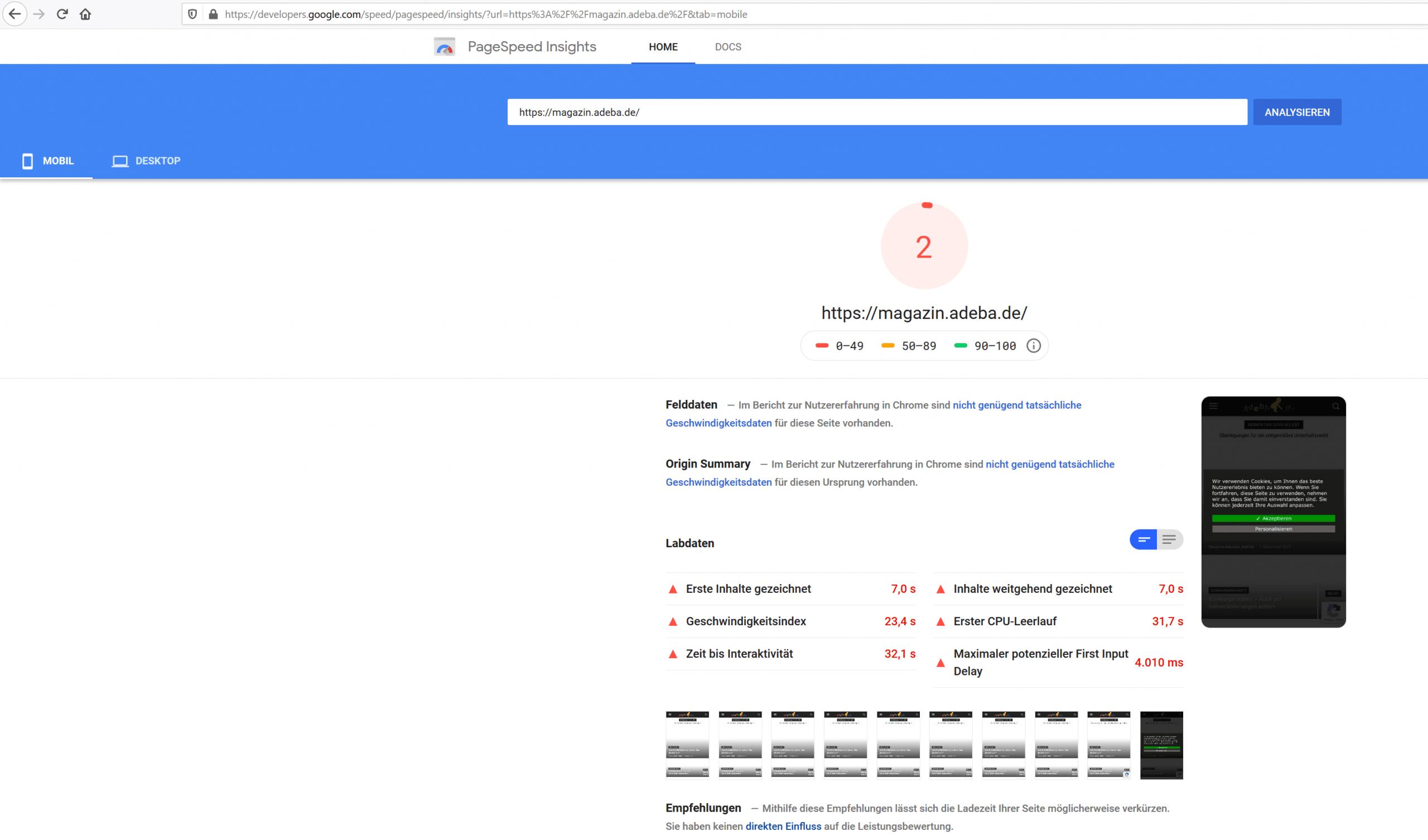
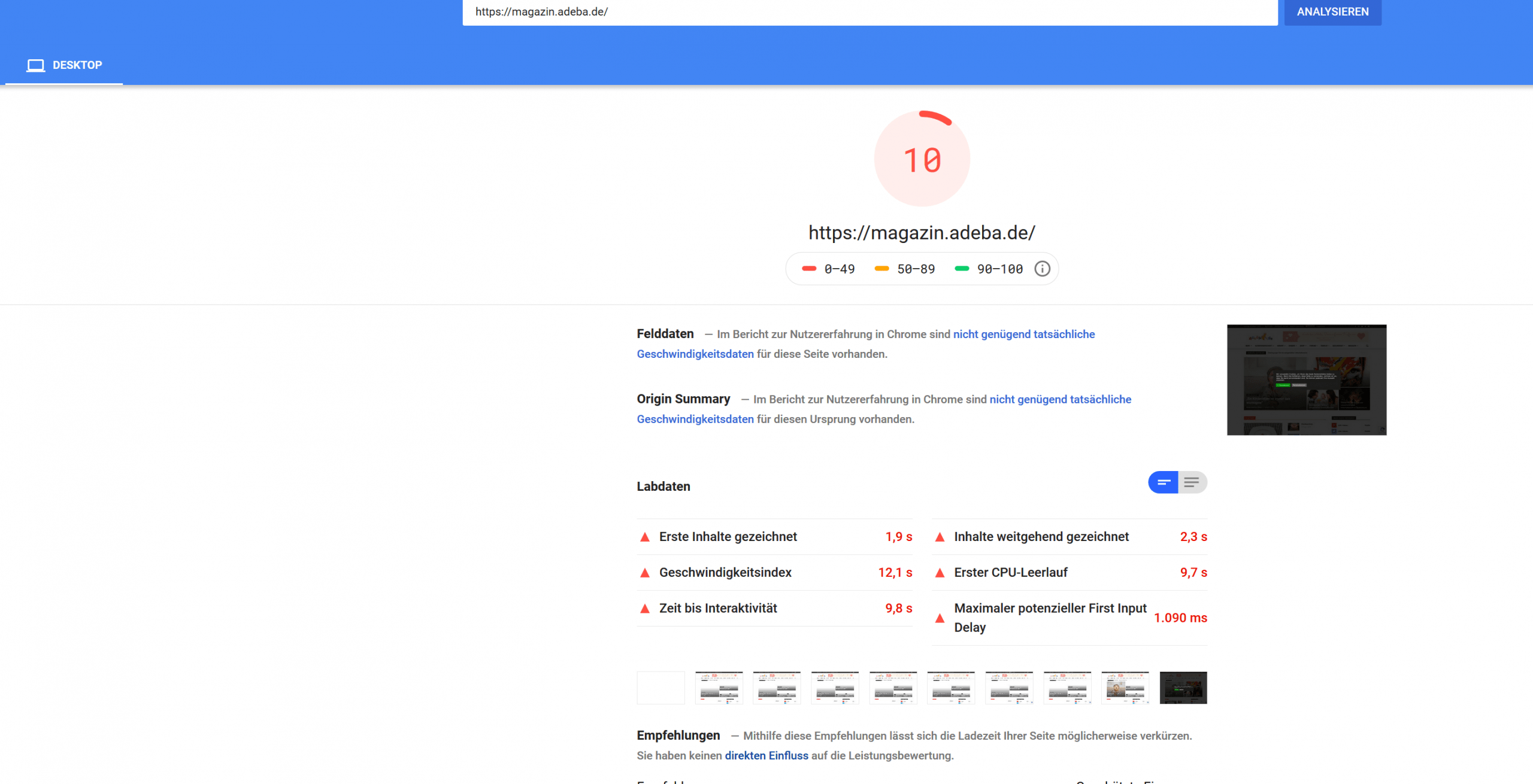
AdebaA new record on my website. After updating to the new design 10.2 and deinstalling Standad Pack I got a new negative speed record.
Sitespeed 2
https://developers.google.com/speed/pagespeed/insights/?url=https%3A%2F%2Fmagazin.adeba.de%2F&tab=mobile
https://magazin.adeba.de/wp-content/uploads/2019/12/2-scaled.png
Sitespeed 10
https://developers.google.com/speed/pagespeed/insights/?url=https%3A%2F%2Fmagazin.adeba.de%2F&tab=desktop
https://magazin.adeba.de/wp-content/uploads/2019/12/1adeba-scaled.png
Even an own server 🙁
So any help is welcome, because things are really getting interesting.
https://tagdiv.com/newspaper-10/
Blazing-Fast Websites
We’ve been working on the idea of making the Newspaper Theme light and fast for a long time. We’re now delighted to give you an excellent way to build a website that is optimized for fast loading speed out-of-the-box.
When you deactivate it, things are starting to get interesting, and your website tends to speed up by itself. ?