
- ApiPractical example – How to add a new Block and Module
- Apitd_api_top_bar_template::delete
- Apitd_api_top_bar_template::update_key
- Apitd_api_top_bar_template::update
- Apitd_api_top_bar_template::add
- Apitd_api_single_template::delete
- Apitd_api_single_template::update_key
- Apitd_api_single_template::update
- Apitd_api_single_template::add
- Apitd_api_footer_template::delete
- Apitd_api_footer_template::update_key
- Apitd_api_footer_template::update
- Apitd_api_footer_template::add
- Apitd_api_smart_list::delete
- Apitd_api_smart_list::update_key
- Apitd_api_smart_list::update
- Apitd_api_smart_list::add
- Apitd_api_thumb::delete
- Apitd_api_thumb::update_key
- Apitd_api_thumb::update
 juanca1612
 Hi Vlad,
So from what I understand, is that the AMP version of the site is not always shown, but is Google the one who shows it when it thinks appropriate? In the rest of the visits the mobile theme version is accessed, is that so?
On the other hand, a technical query that I do not know if you could help me, and is that one of the pages tells me Search Console that the html amp tag is missing, how is this solved?
Thank you!!
 kotsiak
The appearance in mobile is
The header shows: newspaper and “discover” the art of publishing”
I have changed the text logo and text tag line (newspaper theme panel – header – logo and favicon)but still appears the same.
At the mobile instead of th mobile view of the site, there is one post under the other.
Also, at the left and the right of the title instead of the 3 lines of the menu and instead of the circle of the search there is a square with “x”
It’s still the same even if the AMP is activated or not.
 shokuhinet
Dear support
I set new element – flex block1 on pages.
But this does not display right way.
Please see these images.
Working area is
https://www.shokuhin.net/images/sample1.png
Browsing
https://www.shokuhin.net/images/sample2.png
Please tell me how to fix this problem.
Regards
Koyo Mori
 Edward
 If you had The Yoast plugin installed, the page source code would have the following lines (for example):
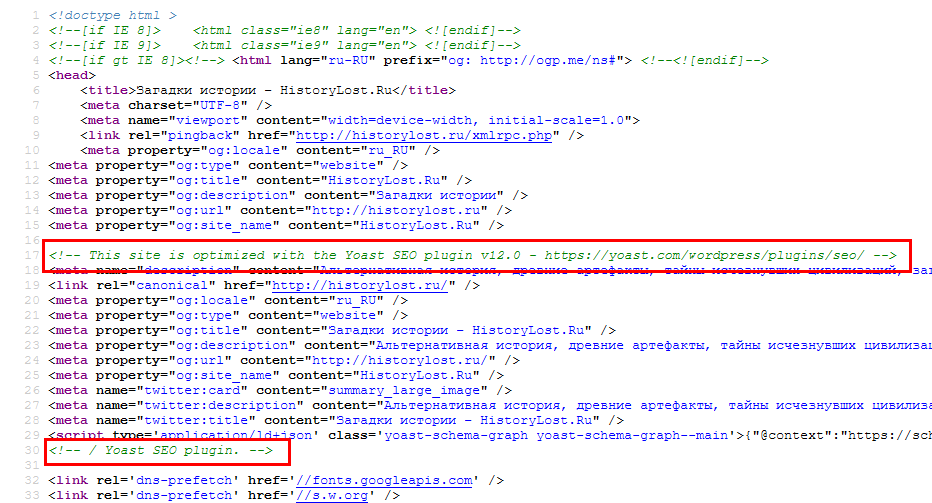
Disable *ALL* untested plugins (Jetpack too) and try again.
 Laudess
hi,
I don’t understand, my products are ok, settings ok, pages ok in menu settings but all my woocommerce pages dont want to appear ; near an example :
http://www.vegetable.fr/produit/ticket-forum-vegetable/
Secondly, when i see my website on Google Chrome, the stiky menu don’t work :
i have php error lines.
Could you help me pls ?
Thanks,
Laurent
 Sprint News
 Sorry My mistake; the theme is Newspaper (9.8) and not MewsMag
Mobile theme is deactivate because the client prefere the newspaper theme responsive appearance. The client DO NOT WANT mobile theme.
But also activating the mobile theme nothing change in the menu.
The site is under construction. Let me know where I can send you U&P
 microbioma
Hi, the Post ID filter doesn’t work. I tried with Big grid 2 and Flex block 2.
From the visual composer everything seems fine, but then the live website doesn’t behave like it should.
Here’s an example.
11062 is the ID of the first post that appears in the second picture.
How can I fix this?
Thanks
kotsiakI cannot login to wordpress. When I put username and password nothing happens and it redirects me to my_site/wp-login.php.
The last things I’ve done before having this problem, was te installation of Glue for Yoast SEO & AMP plugin and W3 Total Cache plugin.
What can I do in order to be able to login ?
Thanks
 Calin
Calin Hello,
If you want to edit the header in child theme you need to edit the header that you are using, for example if you are using the header style 1 you need to set in child theme in folder parts> header set the header-style-1.php http://prntscr.com/p5ioqh this file mast be take from wp-content/plugins/td-composer/legacy/Newspaper/parts/header/header-style-1.php you can check more about how to use our child theme in our documentation from here -> https://forum.tagdiv.com/the-child-theme-support-tutorial/
Also please provide some more details about what you want to achieve, maybe this can be achieve with tagDiv Cloud Library and tagDiv Composer, now you can edit the header how you want.
Thank you!
 exitmotion
 Can i use the (Basic WordPress, Theme & Plugins Setup)
to get the site update to the 9.8 version? cause i can’t do it myself.
 2amarketing
Hello,
Somehow I’ve probably made a conflict of code but not sure where. Any ideas?
https://dev.roadracingworld.com/magazine/issues/

Edward The ToC for each article can be done manually using anchor-links for each subtitle.
For example: https://www.rapidtables.com/web/html/link/html-anchor-link.html
Or search via Google “html anchor”.
 rjsneltzer
When I try to add a new post or look back at old posts, the template is all messed up. It has the Post Title and the post settings, yoast, amp, are all right under that and I can’t see to actually add blocks or content.
 DavidTal
 Thanks Calin. So how would you suggest making a table of content on the post?
I don’t require a plugin, just need to be able to make ToC for articles. So that for example, <H2> titles are in a table and linked to relevant <H2> below (# on-page link)
thanks
 Andreas
 Hi,
Thanks for your immediate response.
I’m using the Ultimate Member plugin which has an option under General>Users>User Display Name and which I set to First Name & Last Name.
Before changing that setting and with the UK plugin installed I did not have this issue. The login menu showed the user’s username.
Now, I changed that option back to the default WP display name option and when I register a new user with no name and last name, the username appears on the login menu.
With this setup though, the article author byline shows the username of the author which I do not want.
So, the issue here is:
1. I don’t mind having shown the username instead of first and last name in the login menu as it is the standard.
2. I want to show the first name and last name in the author byline instead of the username. I can manually do this by changing the WP user option for each author, but that is not ideal.
I hope this information is useful.
Looking forward to your kind response.
Regards,
Andreas
 vnatius
On the FAST NEWS demo of your theme, how can i add the icon to the menus, where do i see the shortcode for this icons example of the menu icon shortcode (class=”tdc-font-fast tdc-font-fast-home). Where can i get this shortcode
 Vlad S
 Hello !
You can find that logo in Theme Panel – Header – Logo & Favicon: https://www.screencast.com/t/8Ui38lAYoGpd
Thank you !
Calin Hello,
If you are using the responsive version of theme the h tags will be the same for mobile version to, but for amp is possible to have a different structure, but if you are using the mobile theme the structure of h tags will be change for mobile version.
Thank you!
Vlad S Hello !
Please make sure that you have modified the template that you are using. Also please note that Loop is related with single post template. For example: Loop 1 with post template 1 and so on.
Thank you !
 mparlevliet
Is there way to slightly reduce the space/line break between the Featured Image and the Article Top Ad? I’m using Mobile + AMP, and this is of course on the Mobile site. I’m seeing this blank space on both Android and iPhones.
https://www.vitalthrills.com/wp-content/uploads/2019/09/mobilead.jpg
 suprim
Hello,
My website seems broken on google cached version here is the url https://webcache.googleusercontent.com/search?q=cache:vpZTHYSIf2AJ:https://highlightsfootball.com/+&cd=2&hl=en&ct=clnk&gl=uk
 Xristos
Hello,
How can I display more posts into TAG and CATEGORIES pages? For example in the Url: https://porto-rafti.gr/tag/porto-rafti-gr/ you can see 10 posts and then you change the page to see more. How can I see for example 14 post / per page? Same settings into Categories pages.
How can I add code for Google AdSense at the top and bottom of the tag and categories pages, not in the sidebar! ( I already have google Ads into sidebar).
I add google AdSense code inside the Theme -> Ads -> Article inline ad and Article bottom ad. Why most of the time I can not see it on my desktop, but I can see it on my mobile phone. ( I haven’t any ad-block on my browser). I import the google AdSense code into my website before 5 days.
Please let me know if you have any other questions or concerns.
Best Regards,
Chris.
 kuber666
Hello,
We have set up H1, H2 by designing the home page ourselves in our website.
H1 appears on H2 desktop theme but not on mobile.
I want to know, that SEO we have done in desktop theme, will the same SEO remain in the mobile and amp or will it change according to the mobile and amp theme.
https://prnt.sc/p4qj9b
https://prnt.sc/p4qjgs
https://prnt.sc/p4qjx4
Thanks
kuber666Hello,
We have set up H1, H2 by designing the home page ourselves in our website.
H1 appears on H2 desktop theme but not on mobile.
I want to know, that SEO we have done in desktop theme, will the same SEO remain in the mobile and amp or will it change according to the mobile and amp theme.
Pic 1 : https://prnt.sc/p4qj9b
Pic 2 : https://prnt.sc/p4qjgs
Pic 3 : https://prnt.sc/p4qjx4
Thanks
Calin Hello,
If you want to highlighting a text you can do it like this -> http://prntscr.com/p4osc6 from what I can see in your example that text is set in a box, in order to can take you a proper advice I will need to inspect the post/page that contain that highlight text.
Thank you!



