
 kpkurankar
Hello,
I can not open “New Post” page. it remains blank and I can’t add or type anything there and following message appears at the bottom of the page. however I can edit the already created posts.
Please tell me how to solve the issue. I didn’t upgraded Visual composer but this message appeared automaticaly from 1 day.
deprecated and are no longer supported in newer versions of Visual Composer.
o Contact Form 7Place Contact Form7
o RowPlace content elements inside the row
o Text BlockA block of text with WYSIWYG editor
o SectionGroup multiple rows in section
o IconEye catching icons from libraries
o SeparatorHorizontal separator line
o Separator with TextHorizontal separator line with heading
o Message BoxNotification box
o Facebook LikeFacebook “Like” button
o Tweetmeme ButtonTweet button
o Google+ ButtonRecommend on Google
o PinterestPinterest button
o FAQToggle element for Q&A block
o Single ImageSimple image with CSS animation
o Image GalleryResponsive image gallery
o Image CarouselAnimated carousel with images
o TabsTabbed content
o TourVertical tabbed content
o AccordionCollapsible content panels
o Pageable ContainerPageable content container
o SectionSection for Tabs, Tours, Accordions.
o Custom HeadingText with Google fonts
o ButtonEye catching button
o Call to ActionCatch visitors attention with CTA block
o Widgetised SidebarWordPress widgetised sidebar
o Posts SliderSlider with WP Posts
o Video PlayerEmbed YouTube/Vimeo player
o Google MapsMap block
o Raw HTMLOutput raw HTML code on your page
o Raw JSOutput raw JavaScript code on your page
o Flickr WidgetImage feed from Flickr account
o Progress BarAnimated progress bar
o Pie ChartAnimated pie chart
o Round ChartPie and Doughnat charts
o Line ChartLine and Bar charts
o Empty SpaceBlank space with custom height
o Post GridPosts, pages or custom posts in grid
o Media GridMedia grid from Media Library
o Post Masonry GridPosts, pages or custom posts in masonry grid
o Masonry Media GridMasonry media grid from Media Library
o Old TabsTabbed content
o Old TourVertical tabbed content
o Old AccordionCollapsible content panels
o Block 1
o Block 2
o Block 3
o Block 4
o Block 5
o Block 6
o Block 7
o Block 8
o Block 9
o Block 10
o Block 11
o Block 12
o Block 13
o Block 14
o Block 15
o Block 16
o Block 17
o Block 18
o Block 19
o Block 20
o Block 21
o Block 22
o Block 23
o Block 24
o Block 25
o Big Grid 1
o Big Grid 2
o Big Grid 3
o Big Grid 4
o Big Grid 5
o Big Grid 6
o Big Grid 7
o Big Grid 8
o Big Grid 9
o Big Grid 10
o Big Grid 11
o Big Grid 12
o Big Grid Full 1
o Big Grid Full 2
o Big Grid Full 3
o Big Grid Full 4
o Big Grid Full 5
o Big Grid Full 6
o Big Grid Full 7
o Big Grid Full 8
o Big Grid Full 9
o Big Grid Full 10
o Big Grid Slide
o News ticker
o Video Playlist
o Video Playlist
o Ad box
o Image box
o Author box
o Authors box
o Homepage post
o Popular category
o Slide
o Text with title
o Weather
o Exchange
o Instagram
o Pinterest
o List Menu
o Social Counter
o Revolution SliderPlace Revolution slider
o Revolution Slider 5
o WP SearchA search form for your site
o WP MetaLog in/out, admin, feed and WordPress links
o WP Recent CommentsThe most recent comments
o WP CalendarA calendar of your sites posts
o WP PagesYour sites WordPress Pages
o WP Tag CloudYour most used tags in cloud format
o WP Custom MenuUse this widget to add one of your custom menus as a widget
o WP TextArbitrary text or HTML
o WP Recent PostsThe most recent posts on your site
o WP CategoriesA list or dropdown of categories
o WP ArchivesA monthly archive of your sites posts
o WP RSSEntries from any RSS or Atom feed
 Luciano13x
Why is not my author’s box visible to my avatar photo? I put in the widget the author box, entrentato, the avatar photo never appears and in all other templates works.
 Bogdan B.
 Hi,
In order to remove more from author you can use 2 methods:
The css method:
.td_block_related_posts .td-related-right {

display:none;

}
You can add the code in the theme panel-> custom css box.
Or you can edit the theme files: comment out or delete this part: http://screencast.com/t/Okmq7lxTDzGd
Thank you!
 Simion C.
 Hi,
There is no way to use custom code to do this. It can only be done by modifying the theme files. The solution provided by Bogdan will work on the post page author box. You will need to enter this code
target="_blank"
In the mentioned file, exactly like this
– https://www.screencast.com/t/jRQP77XAcz
Then when you will click on the author avatar, name or website they will open in a new tab.
If you want to make this change for the author box displayed on the author page, this is the file where you can do the same thing
– https://www.screencast.com/t/Pq1TLREo0
Thanks
Simion C. Hi,
There is no option by default to modify the avatar size on the author box element
– https://demo.tagdiv.com/newspaper/author-box/
Try setting a custom size in the theme files here
– https://www.screencast.com/t/TXRlmwyL17Tm
Please note that this may provide unexpected results, and you revert to default if this is the case.
Font style and size could be changed with Css using the browser inspector as a guide.
Here is a tutorial about using the inspector to identify the elements on the page and their classes in order to create custom code
– https://forum.tagdiv.com/create-custom-code-using-the-browsers-inspector/
In the post page there are options in the theme panel to customize the author card
– https://forum.tagdiv.com/author-card/
– https://www.screencast.com/t/wniYgp1y
Please correct me if I misunderstood something.
Thanks
 awoodhams
Hello! How can I customize the author box? For example, I’d like to make the picture larger, and adjust the font style and size. Thanks!
awoodhamsHello! How can I make the website link in the author box open in a separate window? Thanks for your help!
 kevinang
Dear author,
I have been enjoying the theme very much so far. But there’s one problem: guest author.
My blog has many guest authors, and creating username for each is not feasible. I understand that ‘guest author’ feature is not within the theme, but I’d like to know if you could suggest some custom coding. No plugins have worked flawlessly, as many replaced the name of the author in a single post, but also replaced all author names one the sidebar, etc. Ideally, I’d like to keep using the User for some posts, and custom author for other. However, if it be easier to just remove the use of User and author box, for the sake of flexibility of custom authorship, I will be happy to do so.
Thank you!
K
 CVBJ_Creative
I’m sorry if this isn’t a theme-specific question, or if it’s more of a WordPress-in-General question, but please let me know where I should look to get this answered. I really like the “author box” functionality, however, the way we post items is somewhat different, I think, than what’s intended. I work for a newspaper, and while we have probably a dozen writers, we only have one or two people posting those stories to the website. We pull stories from the paper written by our writing team, but once they’re on the website, credit is given to the editor who posted the story, not the original writer.
It’s very bad form to list the website poster’s name as the “author”, as they didn’t originally write the piece. It might even be legally actionable if it’s even suggested that someone else wrote the article. Is there a way within the Newspaper 8 theme (or maybe WordPress itself) to specify the writer of an article if that person is not the one logged in and entering data onto the website? I think it would be really cool to have all of our writers represented by his or her own “author box”, but none of them have access to the website to update it (nor would they want to).
One option is to remove the “author” variable from the post template and just type their name in (as we did with our previous theme), but we’d much rather have the original writer showcased in an Author Box if at all possible (and assuming they agree to it).
Bogdan B. Hello,
Since the icon does not react to the font settings, you can align the other ones to the new icon like so:
.author-box-wrap .td-author-social .td-icon-font{

font-size:20px;

}
Add the code in the theme panel-> custom css box
Thanks.
 thelacivert
 Okay now, plugin author fixed the problem with a simple exclude rule. If anyone experience same problem, here is the solution:
Go to WP Fastest Cache settings, then click to “Exclude” tab, go bottom and “Add New Rule” from Exclude JS section, paste “js_files_for_live_css.min.js” to textbox and save. Then go to “Delete Cache” tab, click “Delete Cache and Minified CSS/JS”
Done!
thelacivert Okay now, plugin author fixed the problem with a simple exclude rule. If anyone experience same problem, here is the solution:
Go to WP Fastest Cache settings, then click to “Exclude” tab, go bottom and “Add New Rule” from Exclude JS section, paste “js_files_for_live_css.min.js” to textbox and save. Then go to “Delete Cache” tab, click “Delete Cache and Minified CSS/JS”
Done!
 Edward
 Disable Show Author Box here:
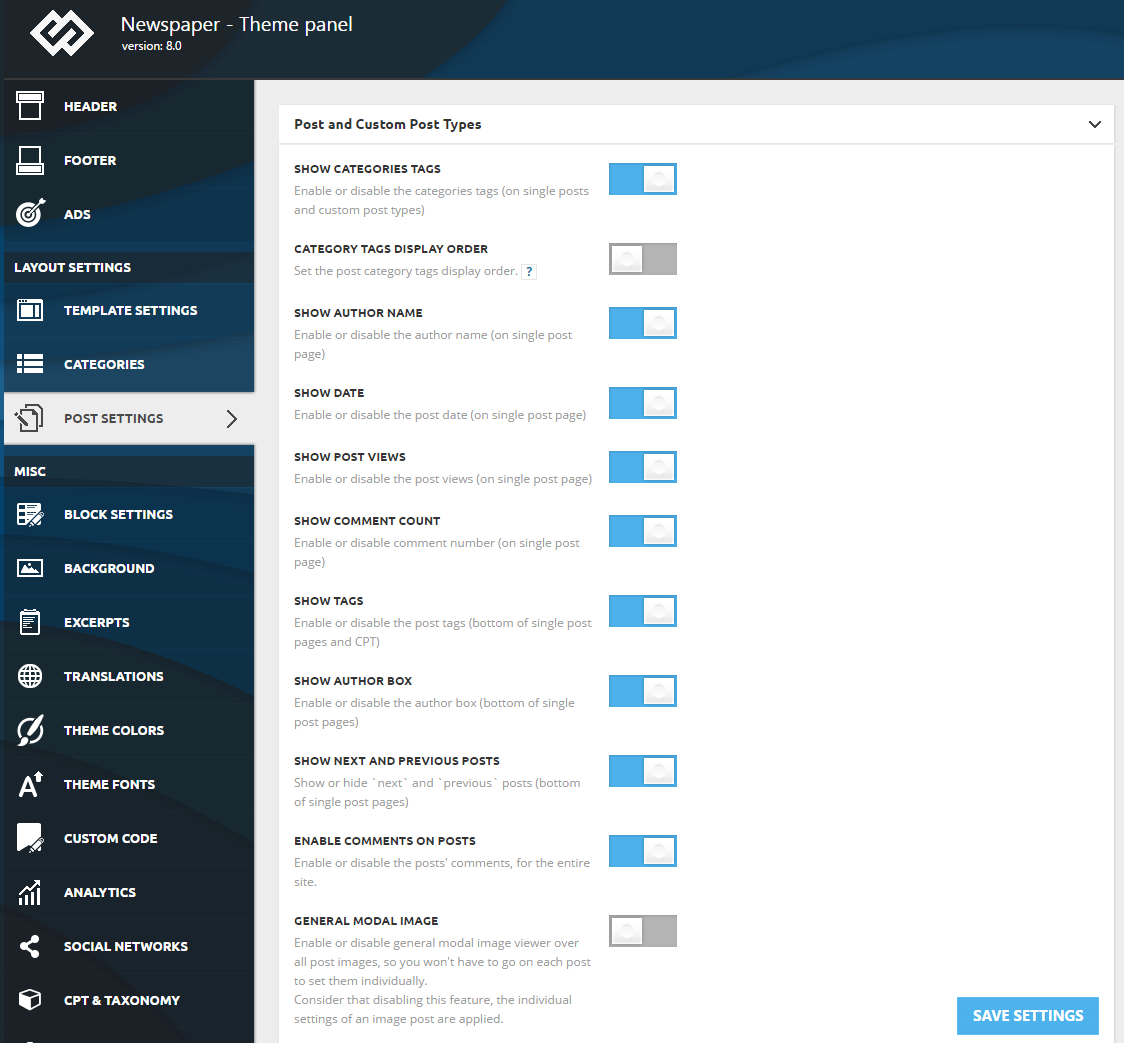
 drvarun5179
 Okay, as per the request, here are complete steps: (assuming you have set up nameservers for your domain correctly pointing to cloudfare domains)
This guide is for GoDaddy though, similar may be available, i don’t have experience over other hostings.
1. Under Crypto tab of Cloudfare, create an Origin Certificate. Select RSA as private key and don’t forget to add wildcards (subdomain). Hostnames should include yourdomain.com and *.yourdomain.com .
2. Get the private key and certificate. Keep the tab open or save it to some text files.
3. In your hosting cPanel, head to SSl/TLS section.
4. Enter the private key and add the one generated by Cloudfare Origin Certificate (Step 2)
5. Repeat for Certificate.
6. For the CA Bundle, you will have to copy it from here- Cloudfare Root Certificate
7. Validate the SSl through Install and Manage SSL Certificates.
8. Head to Crypto section of Cloudfare and activate Full(strict) under SSL (very top of crypto).
That’s all steps needed for setting up free Cloudfare SSL https Certificate.
Apart from that, you might also need to set up redirection from http to https using .htaccess code. For that, do following:
> Head to root directory and edit .htaccess file. Add this code just after RewriteEngine On–
RewriteCond %{HTTPS} off

RewriteRule ^(.*)$ https://%{HTTP_HOST}%{REQUEST_URI} [L,R=301]
Final step i would recommend is to setup search engines- Google, Bing and Yandex to use https also. You can submit them separately on them.
Apart from that, very last trick, most people tend to submit their sitemap to search engines and wait for them to process their website pages. I would recommend you edit the pages first, add SEO to them, and when you are done (yes, completely satisfied with everthing including on-page optimization as well as interlinking), simply force the search engines to re-crawl your pages.
Following is a short guide to force re-index pages-
1. Google- Head to search console and use fetch and render tool.
2. Bing- Don’t use fetch as bot, rather use this link and submit your pages.
3. Yandex- You can use re-index important pages.
Hope this helps. 🙂
Bogdan B. Hi,
In order to remove more from author you can use 2 methods:
The css method:
.td_block_related_posts .td-related-right {

display:none;

}
You can add the code in the theme panel-> custom css box.
Or you can edit the theme files: comment out or delete this part: http://screencast.com/t/Okmq7lxTDzGd
Thank you!
 mokepivecugu
Hi, i would like to remove most of the Author link because its a single author page.
Can you please give me a hint how to remove the tab “MORE FROM AUTHOR” below each article? We are using POST TEMPLATE Style 6.
Thanks for help!
Simion C. Hi,
The author box displays the information based on the user Id. You just need to enter this Id in the required field and all the user information, and they will be displayed in the author box. In this topic you can find more information about how to configure this element – https://forum.tagdiv.com/topic/author-box-5/
Thanks
 zaouad
I’m trying to model my post after the baby demo blog.
I am unable to setup the tagdiv Author Box.
What fields are mandatory?
What is the Author ID? is it the name my user profile?
Where is the description below it entered?
Where does the picture with a round border taken from?
Any help would be greatly appreciated.
 Berbi
Berbi Hi Catalin,
Sorry, young DIY here :). I tried, but somehow it didn’t work.
As my default post template is “default” http://www.screencast.com/t/WVqhl8xyADA, I opened loop-single.php in /wp-content/themes/Newsmag.
I found the code line http://www.screencast.com/t/dIlv0ivnQmo, now can you let me know where I shall paste it ?
Here is the full code:
<?php
/**
* The single post loop Default template
**/
if (have_posts()) {
the_post();
$td_mod_single = new td_module_single($post);
?>
<article id=”post-<?php echo $td_mod_single->post->ID;?>” class=”<?php echo join(‘ ‘, get_post_class());?>” <?php echo $td_mod_single->get_item_scope();?>>
<div class=”td-post-header td-pb-padding-side”>
<?php echo td_page_generator::get_single_breadcrumbs($td_mod_single->title); ?>
<?php echo $td_mod_single->get_category(); ?>
<header>
<?php echo $td_mod_single->get_title();?>
<?php if (!empty($td_mod_single->td_post_theme_settings[‘td_subtitle’])) { ?>
<p class=”td-post-sub-title”><?php echo $td_mod_single->td_post_theme_settings[‘td_subtitle’];?></p>
<?php } ?>
<div class=”meta-info”>
<?php echo $td_mod_single->get_author();?>
<?php echo $td_mod_single->get_date(false);?>
<?php echo $td_mod_single->get_views();?>
<?php echo $td_mod_single->get_comments();?>
</div>
</header>
</div>
<?php echo $td_mod_single->get_social_sharing_top();?>
<div class=”td-post-content td-pb-padding-side”>
<?php
// override the default featured image by the templates (single.php and home.php/index.php – blog loop)
if (!empty(td_global::$load_featured_img_from_template)) {
echo $td_mod_single->get_image(td_global::$load_featured_img_from_template);
} else {
echo $td_mod_single->get_image(‘td_640x0’);
}
?>
<?php echo $td_mod_single->get_content();?>
</div>
<footer>
<?php echo $td_mod_single->get_post_pagination();?>
<?php echo $td_mod_single->get_review();?>
<div class=”td-post-source-tags td-pb-padding-side”>
<?php echo $td_mod_single->get_source_and_via();?>
<?php echo $td_mod_single->get_the_tags();?>
</div>
<?php echo $td_mod_single->get_social_sharing_bottom();?>
<?php echo $td_mod_single->get_next_prev_posts();?>
<?php echo $td_mod_single->get_author_box();?>
<?php echo $td_mod_single->get_item_scope_meta();?>
</footer>
</article> <!– /.post –>
<?php echo $td_mod_single->related_posts();?>
<?php
} else {
//no posts
echo td_page_generator::no_posts();
}
 wsikes
 Nothing changed. The text is still pink. This is the text in the related post/ more from author box at the bottom of the posts.
-
This reply was modified 9 years by
wsikes.
wsikesI thought that I changed all of my accent colors, but it seems that the headers on this box retained the demo colors. Where can I change this?
Also, how can I remove the “more from author” portion of this section? I want to keep the related post portion.
 ravejungle
I wanna make about us page and insert Autor box of my writer . But i have big problem when i insert Autor box from visual composer i add everything corectly but when i write autor id in option nothing happend my author box is empty. And one more quick question when my writer sometimes add pictures in post or twitter code they dindt show .
 CMA TAPASH PAUL
I have inserted the matched content beta code through the custom code in the theme panel. But the issue is i did not find any setting to get the box filled with the size of Related articles or more from the author. Current i am using 640*300 size. But 728*90 is smaller for the matched content. Exact size just like the Related articles or more from the author. And how to implement through custom css. Can we get a size may be 728*300.
Simion C. Hi,
If you want to enter the admin Id in the author box, this does not display the Id in the normal way. Try entering the value 1 in the required field in order to use the admin in the author box. For all other users you can find the Id as shown above.
Thanks
Simion C. Hi,
I believe you are not entering the proper user Id – https://www.screencast.com/t/f6LnBhQdgd
Please make sure you are using the correct data for the author box, in order for this to display the author you want. Example and result
– https://www.screencast.com/t/7GDDWQrs3
– https://www.screencast.com/t/tii5p1lsYg
– https://www.screencast.com/t/ESr6Wl3Y3
Thanks
