
- ApiPractical example – How to add a new Block and Module
- Apitd_api_block::delete
- Apitd_api_block::update_key
- Apitd_api_block::update
- Apitd_api_block::add
- ApiAPI – Blocks – Introduction
- Apitd_api_thumb::update_key
- Apitd_api_thumb::update
- Apitd_api_thumb::add
- ApiAPI – Thumbnail – Introduction
- Apitd_api_category_top_posts_style::update_key
- Apitd_api_category_top_posts_style::update
- Apitd_api_category_top_posts_style::add
- ApiAPI – Category top section style – Introduction
- Apitd_api_module::update_key
- Apitd_api_module::update
- Apitd_api_module::add
- ApiAPI – Modules – Introduction
- ApiUsing the Theme API in plugins
- ApiThe Theme API
 Calin
Calin Hi,
I will try to explain it better this time.
You need to use tagDiv Composer, edit the homepage and select the blocks where you want to disable the clicks and add the class “disable-click” in the general tab in extra class – https://i.imgur.com/Fimm5LS.png, then based on the above code you used repalce it with this one:
body .disable-click .td-image-wrap {

pointer-events: none;

}
or
body .disable-click .td-module-container,

body .disable-click .td_module_wrap {

pointer-events: none;

}
Calin Hi,
What you can do is to add to teh code an extra class and set that class on the blocks you want to remove the click option https://i.imgur.com/Fimm5LS.png and the class should be set in the provided css after body, for example:
body .disable-click .td-image-wrap {

pointer-events: none;

}
I hope this will help!
Calin Hi,
Yes, this can be done.
You need to have the theme, and after that, make sure you create a full backup. Then install the Newspaper theme. After that, there are two options: you can either directly install the demo you like, or you can import pages and Cloud templates from the cloud.
After using either of these options, you’ll need to use the Theme Builder and tagDiv Composer to edit the content and set it to display what you want in each block.
Also, we can help you here on the forum or via email at contact@tagdiv.com
Thank you.
 AjitSirohi
 Thanks, it is working. I need a sligh modification.
I have three Sections/Modules on Home Page. All three sections/modules use Flex-Block-1. Is it possible that I can disable Clicks on Block-1/Module-1 but allow it on Blok-1 & Block-3. Right now it disables Click throughout the website. That is not what I want. Please help.
 Bikul
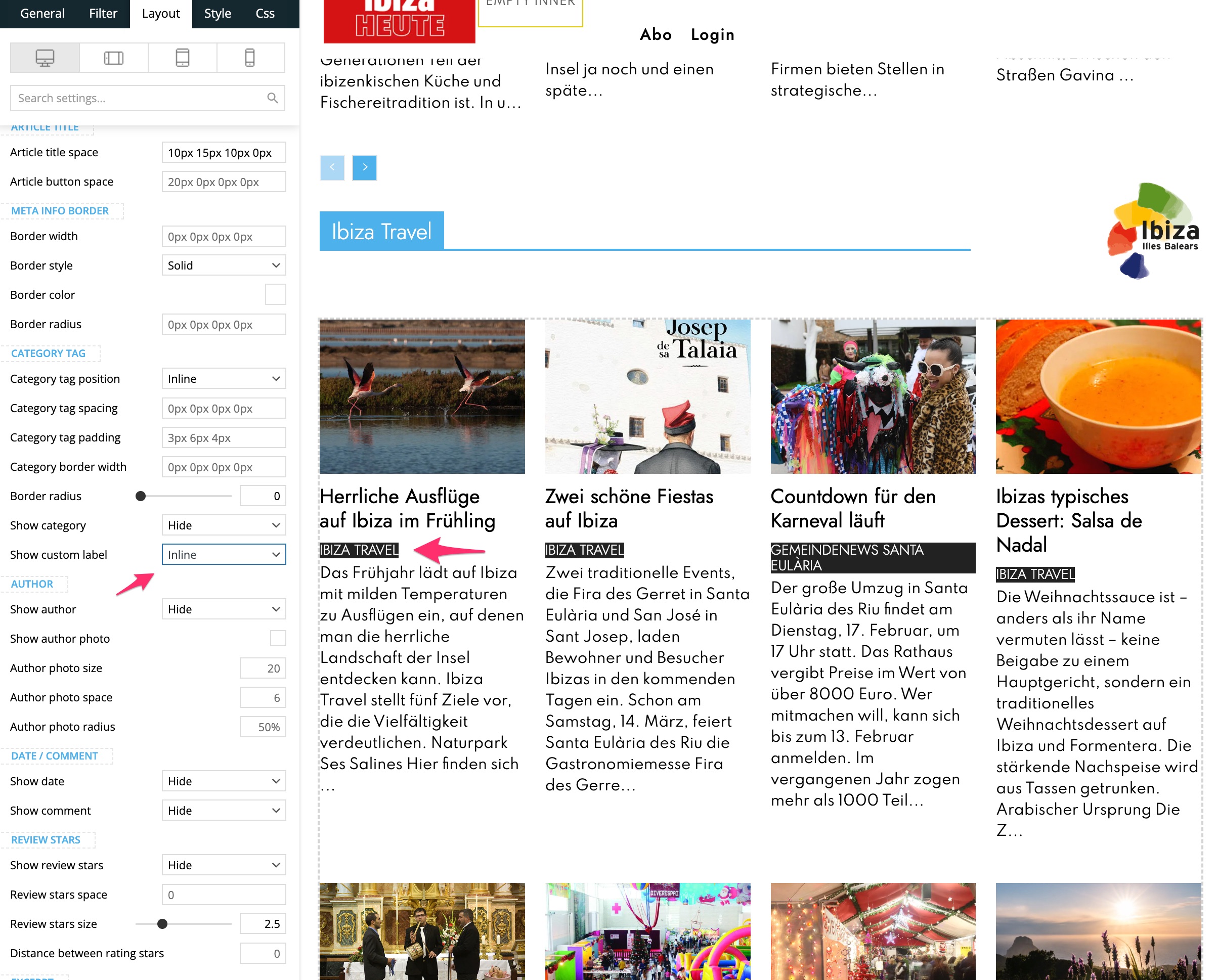
BikulHello,
on this page there is a Flex Block 1. I can choose the position of the Custom Label, but I dont know where to change its Font, Colours etc
What can I do?
Thanks for Feedback
Bernd
 PolishExpress
Hi,
I’m using the Newspaper theme together with Yoast SEO Pro, and I have a question about the option “Enable article schema” located in:
Theme Panel → Post Settings → General post settings
I would like to understand exactly what this option generates.
Does “Enable article schema” output a full Article / NewsArticle JSON‑LD block that might duplicate or conflict with the schema generated by Yoast SEO Pro?
Or is it only adding a minimal/basic schema that complements Yoast (for example: headline, datePublished, etc.) without overlapping with Yoast’s full NewsArticle structured data?
In short:
Does this option duplicate Yoast’s schema, or does it add something different that works alongside Yoast?
I want to avoid double schema output, so any clarification on what this setting actually produces would be very helpful.
Thanks in advance!
 opinandosinanestesia
 Thank you so much! Test successful!
For now, I’ll leave everything as is and configure that page with the three blocks… and we’ll continue exploring the world of Tagdiv 🙂
opinandosinanestesia 254
Okay. Thank you.
So, I’ll change the URL in the block settings every week, but I still don’t understand why there isn’t a way to activate a system so that the scheduled links are automatically implemented on the date set in the plugin.
opinandosinanestesiaHow can I remove one block from this page https://opinandosinanestesia.es/biblioteca/, leaving three, centered on the page? I tried removing an image, but it leaves a gap, and it doesn’t look clean or well-organized. Thanks!
Calin I see, in this case you can use this custom css:
body .td-image-wrap {

    pointer-events: none;

}
Set the code in Theme Panel → Custom Code → Custom CSS.
This will ensure that when a user clicks on an image, nothing happens, but clicking on the title will still link to the article.
For a more general solution that prevents clicks on the entire block, you can use the following code:
body .td-module-container,

body .td_module_wrap {

    pointer-events: none;

}
Calin Hi,
The way is now teh link needs to be manually added, also on images, there is no option to set dynamic links. Only the blocks and grid elements have the option to display and link to the latest articles/CPT/potcases.
opinandosinanestesia The problem was that the URL wasn’t linking, as usual.
I don’t quite remember what I did to get it working now, but it’s great that it’s working.
On that note, this is published weekly, and I’m wondering: do I have to change the URL every week, or does the block update it automatically?
Thanks!
Calin Hi,
The block filters will apply to all viewports, so if you want to have different content on mobile, you should consider using the mobile page option https://tagdiv.com/newspaper-10-3-7-update-brings-customizable-and-fast-mobile-pages/
What you need to know is that, on the mobile page, the cache plugin should support creating separate caches for desktop and mobile.
 infotec2
I create my website in 4 languages: Hungarian, English, Serbian, Romanian. Accordingly, the categories and entries are also in 4 languages. I use the Polylang plugin for languageization.
When defining the Single templates, I wanted to use the Flex block 1 element for display. In the element, I set the appropriate language category in the category filter. It works well in Hungarian (default language), English, and the elements are displayed, but not in Serbian, Romanian. The “all categories” elements are displayed. The same element works well if I integrate it into a page type. I tried other elements, but the category filter works similarly incorrectly.
The tagdiv works well in Composer, and the filtering result is not empty, but the elements are not displayed on the live website, it remains empty.
 MarcusMi
Hello Support,
I am contacting you because I am running into what looks like a compatibility or translation-handling issue between WPML and the Newspaper theme by tagDiv.
My setup is:
-
WordPress
Newspaper theme (Today News PRO demo/import)
tagDiv Composer / Cloud Library
WPML
Secondary language: German (/de)
Default language: English
What I am trying to achieve is straightforward:
I want to have an English footer on the English site and a German footer on the German site. The footer content was created with the tagDiv Composer as a footer template / Cloud Template.
The issue is that I cannot create or manage the translation workflow for these Cloud Templates correctly, and as a result the German footer keeps showing English text for posts.
Here is what I observed:
In WPML → Settings → Post Types Translation, I set the Cloud Template post type to:
“Translatable – use translation if available or fallback to default language”
However, in the Cloud Templates area in the WordPress backend, I do not see the WPML translation controls I would expect, such as the language columns or the “+” translation icon for German.
Because of that, I cannot create a proper German translation of the footer template through WPML.
I also checked WPML String Translation and Translation Dashboard / Other texts (Strings), but the footer text does not appear there.
The footer text is not coming from a normal theme option or a menu string. It is content inside a tagDiv footer block created in the tagDiv Composer.
I tried creating a copied/duplicated footer and also a copied single post template as a workaround, but that led to additional problems:
-
changes in the copied version affected the English version as well, or vice versa
at some points, post formatting broke for both languages
I had to manually restore several pages/templates in tagDiv Composer
some templates disappeared or behaved inconsistently in the backend, even though the frontend still partially worked
Another related symptom:
In English posts, I can select the template “Single Template – Today News PRO”.
In German posts, I only see “Default”, not the same Single Template option.
This makes me think WPML may not be recognizing or linking the tagDiv Cloud Templates correctly for the secondary language.
At one point, setting Cloud Templates to a stricter translation mode caused header/footer/template behavior to break more severely, so I reverted to the fallback setting above.
At the moment, the frontend is mostly restored, but one core problem remains:
the German version — all posts — of the site still displays the English footer text, and I have no reliable WPML-based way to translate the footer Cloud Template.
From my perspective, the main issue is:
WPML seems not to expose the translation UI for tagDiv Cloud Templates in this setup, and the footer content is also not available through String Translation.
Could you please help me with the following:
-
Is this a known compatibility issue with Newspaper/tagDiv Cloud Templates?
Should WPML show translation icons / language columns for these Cloud Templates in the backend?
Is there a recommended WPML workflow for translating tagDiv footer templates created with tagDiv Composer?
Why would the English Single Template be selectable in English posts, but only “Default” appear in German posts?
Is there any additional configuration, compatibility plugin, or troubleshooting step required so WPML recognizes these Cloud Templates properly?
I can provide screenshots of:
WPML Post Type Translation settings, the Cloud Templates backend screen where no translation icons appear and
the footer output on the German frontend
See here:
https://ibb.co/M5p25kGH
https://ibb.co/s9MCdJFY
https://ibb.co/tTF1dXHN
https://ibb.co/dJsgKd69
https://ibb.co/hxGqZZk0
Thank you in advance for your help.
Best regards,
Marcus
PS here’s the response by WPML support:
Hello there,
Thank you for contacting WPML support. I’d be happy to assist you on this issue.
According to the documentation here: https://forum.tagdiv.com/using-theme-translations-together-wpml/, the templates should display “+” signs. However, it appears that the plugin layout has changed.
Could you please reach out to their support team to check if there’s a way to view the template list as shown in the documentation?
We can also review this from our side and report it to our compatibility team, but contacting them directly would likely be the fastest solution for you.
Regarding the templates, lets translate the templates first and check it further.
Let me know there feedback on it.
Thanks
Calin Hi,
Check if you are using ajax pagination, mega menu, and many blocks (the theme is making a query for each block in parts, and if you are using mega menu, each element as mega menu makes queries, also ajax pagination makes queries to the database). Also, make sure that you use lazyload for images.
Other type of settings that can reduce the numbers of queries: use a good cache plugin WP Rocket, use object cache (redis), and use flex block cache – https://forum.tagdiv.com/use-flex-blocks-cache-option/ (with will reduce the number of request instead of a request for each page load for each flex block, this request will be only after 5-10 minutes for that flex block, it depends on the time set)
In addition, it’s a good idea to identify what’s consuming your server resources. Tools like Query Monitor – https://www.superspeedyplugins.com/kb/performance-optimization/site-owner-tips/how-to-use-query-monitor-to-analyse-wordpress-performance-problems/ and Code Profiler can help you pinpoint high CPU or resource usage caused by plugins, themes, or database queries.
Thank you!
Calin Hi,
Thanks for creating this testing page, now I will need one more thing, I need to have on the block with featured images and articles that do not have a featured image, so I can compare the structure you created and how it is with an image and without the image.
Thank you!
 E K
E KtagDiv Composer 5.4.4. unauthenticated user enumeration & AJAX vulnerability
Our site (running tagDiv Composer 5.4.4) was hit (STILL IS) with over 160,000 requests in less than 24 hours.
The attacker used the admin-ajax.php endpoint with Newspaper theme actions to trigger password reset triggers for the username teryaljw.teryaljw.
The bot is sending POST requests to: admin-ajax.php?td_theme_name=Newspaper&v=12.7.5
Even with “Anyone can register” set to OFF, the theme’s AJAX handler for user functions allows unauthenticated triggers of the WordPress wp_mail function via lostpassword_post. This allows the site to be used as a “spam relay” and causes massive server load.
In comparison, standard WordPress core blocks these attempts at the login screen while the Newspaper AJAX handler is bypassing these core protections.
Please implement Nonce Validation and Unauthenticated Request Filtering for all td_ajax_ account functions.
AjitSirohi Left side is static. Right side also no links. Just two columns with static Images. Which Flexblock to use.
opinandosinanestesia  Boostyourcity
I am experiencing a critical issue with the Newspaper theme on two of my websites (byc-news.de and notrufberichte.de). Both sites are running the latest version of WordPress and the Newspaper theme with the Classic Editor.
The Problem:
I am unable to publish new articles or update existing ones if I make any changes to the Post Title.
If I only edit the post content (body text), the update works fine.
As soon as I change a single character in the Title, the “Publish” or “Update” button just shows a loading spinner indefinitely, and the post remains a draft (or the changes are not saved).
Interestingly: If I use the WordPress “Quick Edit” feature from the post list, I can change the title and status without any issues.
What I have already tested:
Plugin Conflict: Deactivated all plugins (including MemberPress and Caching plugins) – the issue persists.
Editor: The problem occurs in the Classic Editor.
Server Environment: PHP Memory Limit is 512M, max_input_vars is set to 5000.
Hosting: Both sites are on different accounts but the same hoster (All-Inkl).
It seems like a specific JavaScript or REST-API call triggered by the Newspaper theme’s title field is being blocked or failing. Since the “Quick Edit” works, it must be related to how the Newspaper theme handles the title field within the post editor.
Could you please check if there is a known conflict with the current WordPress version or a specific theme setting that causes this behavior?
Best regards,
Meikel Dachs
opinandosinanestesiaI need to remove this block that appears on all posts and pages: https://opinandosinanestesia.es/wp-content/uploads/2026/03/2a95bb11-5905-4154-912a-2651a9d8346f-scaled.jpg; I think it’s through a plugin, but I’m not sure which one. How can I remove it from all sites?
Thanks
opinandosinanestesiaI’m trying to link this block: https://opinandosinanestesia.es/wp-content/uploads/2026/03/c225d671-a69f-4381-9e9d-9959d4b96860-scaled.jpg to this URL: https://opinandosinanestesia.es/formulario-newsletter-2/. I’m pasting the URL into the image link field, but it’s not working. Why?
Regards
Calin Hi,
There are a few options that should be enabled so you can use the popular 24 hours, 48 hours or 7 days.
Under the theme pane > Post settings, make sure that the “SHOW POST VIEWS” under post and custom post type is enabled – https://prnt.sc/9ZgYXf68s0ts then enable the “Ajax view count (keep counting with cache plugins)” – https://prnt.sc/yU9nCBscpjs_
Under Theme panel > blocks and settings, make sure that the option ” 24/48 HOURS & 7 DAYS POST SORTING” is enabled – https://prnt.sc/kekH1436n7Xu
The last thing is to make sure that on the single post template, you have the element view post count – https://prnt.sc/g_8ADbYD4eK5
Calin Hi,
The taxonomy=tdtax_app_tag and ?taxonomy=tdtax_app_category taxonomies were added through the ACF plugin and can be modified there: https://prnt.sc/haKu1OuDxYn0
After making changes, make sure to set the Cloud Template for the new taxonomy. Keep in mind that if you change the slug, the previously added entries will no longer appear, because the new slug creates a different taxonomy parameter.
Also, don’t forget to update the slug in Composer for elements such as filters and Flex Blocks, so that the correct taxonomy is displayed.

