
- TutorialsDefault Block Settings Guide
- NewspaperWP Rocket and Newspaper Theme: Optimization Guide
- TutorialsFrom WPBakery to tagDiv Composer
- TutorialsOffset Feature
- TutorialsWhat is Ajax preloading?
 buner
bunerHi,
I have implemented the responsive google adsense feature, but when I insert the “[tagDiv] Ad box” widget it does not show the block title for the widget (e.g., for other widgets like “Archive” it generates code like <div class=”block-title”> <span>Archives</span></div>).
How can I add a block title like this to the responsive adsense widget?
Thanks for your help!
 Marius
 Hi,
Edit your homepage and remove the Block 2 and use Block 3 instead, it is the same but without excerpt.
Thanks for your message!
Marius Hi,
Do you want to have a widget with recent posts on each category that shows you the posts from the category you are? I mean if you are on category “TV” in sidebar you have recent post from TV category?
You can do that using the visibility from Jetpack, configuring each widget to show only on a category or create a custom sidebar for each category.
First of all please check if you have the latest theme version 3.2
1. We have only for footer this option at this moment.
2. We have new blocks, in total 10 blocks, Block 1 – Block 9 and Block search. http://screencast.com/t/HmXcbiL4 You can create your own block if you have some programing experience, take a look in /includes/shortcodes/ on td_block files, also blocks are built using our modules that are in /includes/modules http://screencast.com/t/NvkkSH3pjYk
3. You can make this only with custom CSS, if you have some experience you can make it yourself.
4. The theme have this if is ok for you http://screencast.com/t/bQnF0Yo9 just edit and uncomment this line http://screencast.com/t/28sV5P09
5. I don’t understand your question, please can you give us more details
6. You can use a lightbox plugin for that
7. Thanks for the suggestion
7. The theme come with 3 custom ads spot that you can use it in any places, unlimited time using the Ad box widget
8. We have in plan to improve that part.
Thanks again for all suggestions!
Have a nice day!
 handiso
 Hi, I am afraid we have some misunderstanding here.
I thought I understand how it works before I read your post.
Just like you show me on the features page here:
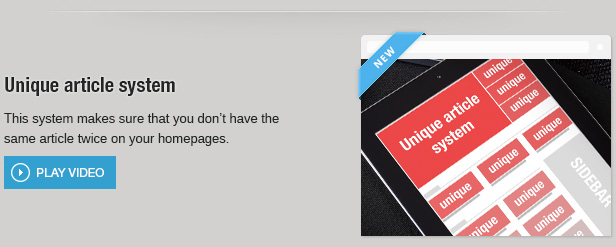
the unique Article system should work on the entire page, but NOT including the sidebar(s), at least if I want. So I thought there will be an option, including or excluding the block, but there is not.
That really does not make sense to me if I put a block on sidebar widget area with the title “Latest News”, but actually it shows, say, number 36-40 posts. I hope you understand what I mean.
Thank you.
Marius Hi,
Add this CSS in Theme panel -> Custom CSS
/* responsive phone */
@media (max-width: 767px) {
   .td_block_slide_big {
    display: none;
  }
}
Thanks!
Marius Hi,
1. That widget is not from our theme, please take a look about that widget if have an option to display only posts.
2. The recent post widget is default from WordPress and is styled to have only title post without image. IF you want with thumbnail you can use a block like you used for LATEST section, the results are the same.
Thank for your message!
Marius Hi,
Depends of how you have set the slider. You can edit your homepage and edit your slider(Big slider), each block/sliders can be edited from here http://screencast.com/t/VhaocnliS
About the memory issue you have to increase the memory, add this in wp-config.php file
/** Memory Limit */
define('WP_MEMORY_LIMIT', '128M');
Thank for the message!
Marius Hi,
The unique feature apply to the whole page, this mean you will have unique article on the entire page, no duplicated posts in homepage, sidebars, footer or anywhere.
As you can see in our video you will see that the unique feature will remove the duplicated article that is on slide, on content and on sidebar http://www.youtube.com/watch?v=qWKo1zKA8Jg
If you wave a slide with latest 5 article and on sidebar a block with latest 5 article, the first 5 article on the slide will be display and on sidebar will continue with 6th post.
Hope you understand how is work.
Thanks!
 FrankG
Been working with the theme for much of the past week, love it – covers almost all my needs.
Only significant problem I’ve come across is the ‘visibility’ function in the widgets don’t work. My posts have several categories so I aim to have a sidebar for posts in each category showcasing most recent stories in said category (eg. so a post categorised in ‘TV’ would only list posts also in the ‘TV’ category).
You have the option for that – ‘Recent Posts’ and then changing the visibility. Trouble is it doesn’t seem to work. I tried ‘Show’ ‘TV’ but the result is still the most recent posts across all 7-8 categories. I tried ‘Hide’ and selected all the other categories – same result.
In terms of suggestions for future editions:
1. ‘Dark’ color scheme. Not every site uses white backgrounds, some of us like our black and/or grey ones. An option to swap the color scheme between them would be great.
2. More ‘Blocks’. Five’s just not enough, especially as many are quite similar. Any chance of a ‘Block 6’ made entirely of ‘Module 5’ and a ‘Block 7’ made entirely of ‘Module 9’? Is there a way to build our own custom blocks?
3. Increased color options. I work on a site with seven or eight different categories. I love that I can adjust the colours of the tags and some headers to assign a specific color to different categories but can this go further? Can this apply to elements such as the color highlight in main menu, the widget sidebar headings, and the big slide titles, etc.
4. Minimised author option. Right now in posts, the only way to see the author is to include the great big honking ‘Author’ box down the bottom. Any chance of an option to change it so instead the author’s name only appears in a line of text at the top of the post – between the category listings and the publication time (like it is on the category pages)?
5. A third header style. Right now there’s a thin line underneath writing with no background (style 1), or a thin line with a raised colored background behind only the writing (default). Any chance of a raised colored background across the entire line?
6. Gallery pictures – along with attachment page or direct image, any chance of a css-only lightbox style popup option so when someone wants to see a bigger picture in comes up in a closeable box?
7. Category Pages – For those of us with a LOT of articles – in some cases over 10,000 in one category, ways to sort the order of a content are a must. Current category pages list only from the most recent to the oldest. Any chance of a way to list a categories stories in alphabetical order and jump to a specific letter?
7. More AdSense boxes – specifically a secondary sidebar one. A lot of sites use a 300×250 AND a 160×600 or 300×600 further down in their sidebars.
8. Love the various styles in the ‘Social Icons’ widget, much more than the fairly ordinary design of the ‘Sharing’ options in the posts themselves. Any chance of the latter to be more like the former?
 dillermand16
Hey i have created an Author Box on a page where i want to have all my author’s lined up.
Is it possible to change the layout of the author box module? i want it to look like Block 6 for example. so i will get the author picture, a preview of the text. how can i do this?
 nate
nate That worked, thanks!
What’s the reason you disabled the Accordion in Visual Composer? I think you need to update VC because I turned on the Accordion and there’s an issue with autoheight for the content of each accordion section, if the tallest content block is for example 200px then ALL accordion content is set to that same height no matter what, this is wrong & I think it was fixed in the latest version of VC. Also the plus/minus icons are not showing up.
Marius Hi,
You have tried from Theme panel -> Excerpts
You language couldn’t support excerpt trimming by Words, you can try by Letters.
Thanks!
 Bryson T
 Okay, how about this:
We’re having this problem because we each opted for unique posts only. Apparently the Last 7 Days filter won’t show posts that are already displayed elsewhere on the same page, and it’s likely that these popular posts will in fact appear elsewhere on that page. Otherwise, in most cases, how are they being viewed so much if not on the front page?
So, since that particular block filter is obviously meant to showcase trending items, it stands to reason that it should be exempt from the duplicate posts option.
This could be an option in the theme panel to exclude the Last 7 Days filter from any unique/duplicate post option, or it could simply be hard-coded.
How about it Devs?
handiso Well, I only tested in localhost/XAMPP.
You could replicate this very easily:
1)add a number on each post title, by posted date and time;
2)enable “Unique Article”
3)put a block in widget area with “Latest Posts”.
The “Latest Posts” block should show the number 1,2,3,4,5 post (if you set the limit to 5), right?
Thanks for your attention.
 mehedi
Hello tagDiv!
I was trying to increase my Pagespeed and got 85 (desktop), 77 (mobile). It is saying that I should “Eliminate Render-Blocking JavaScript and CSS” Will the theme work good, if I minify JS? Please let me know what can I do. BTW I’m using W3TC.
Thanks Mehedi
Marius Hi,
I can’t replicate your bug, can you give me access to your WordPress to see the issue.
Send us via email at contact@tagdiv.com write in message title FOR MARIUS and paste a link from this conversation.
Thanks!
Marius Hi,
Delete this: http://screencast.com/t/ijfBSudF
Add this CSS in Theme panel -> Custom CSS section
.iosSlider-col-3, .iosSlider-col-3 .item {
  height: 289px !important;
}
.td-slide-item-main {
  height: 289px;
}

/* responsive monitor */
@media (min-width: 1200px) {
  .iosSlider-col-3, .iosSlider-col-3 .item {
    height: 321px !important;
  }
  .td-slide-item-main {
    height: 321px;
  }
}

/* responsive portrait tablet */
@media (min-width: 768px) and (max-width: 1018px) {
      .iosSlider-col-3, .iosSlider-col-3 .item {
    height: 212px !important;
  }
  .td-slide-item-main {
    height: 212px;
  }
  .td_block_slide_big .iosSlider-col-3 {
    height: 212px;
  }
}

/* responsive portrait tablet */
@media (min-width: 521px) and (max-width: 767px) {
      .iosSlider-col-3, .iosSlider-col-3 .item {
    height: 212px !important;
  }
  .td-slide-item-main {
    height: 212px;
  }

}

/* responsive phone */
@media (max-width: 520px) {
   .iosSlider-col-3, .iosSlider-col-3 .item {
    height: 125px !important;
  }
  .td-slide-item-main {
    height: 125px;
  }
}
Don’t forgot to rebuild the thumbnails following this steps https://forum.tagdiv.com/using-the-theme-with-existing-content/
Hope this help.
Thanks!
 ecrobin
 this is my site http://www.d7zj.com
the dont miss block show too many words, how can i change the numbers of the posts conents words
Thanks
ecrobin why nobody reply us???
who can tell us how to limit the words in the mainpage
Please see the deitails http://www.d7zj.com
handisoAnother bug I guess. Unique articles is a great feature and is one of the reasons I purchased this theme. However, if you set your homepage (or any page) like the demo did, with a block in the widget area to show latest posts, when you enable Unique articles, the LATEST block will be empty. Same in the tagdiv slide widget.
Of course you can use WP native Recent Post widget without problem.
I am not sure if any switch I should use?
(Newspaper 3.1.1, WordPress 3.8.1, XAMPP.)
Bryson T I’m experiencing the same issue on my site at DC Nation in the 2nd row, Trending Articles. The most popular of that block of 3 posts is showing a count of 234 views since the theme was installed.
However, this post Clinton-Dix Scouting Report shows more than 700 views on the counter since the theme was installed and yet it does not show up in the Trending Articles row.
There are many other posts like that which do not show on the Trending Articles row. Use of the “last 7 days” sorting is enabled for that row and the theme and I am running no caching plugins (I deleted the default cache plugin for WordPress). I also do not filter that block by category or author, only by “last 7 days” popularity.
Same issue as OP. Thanks for checking into it.

 ocbln
ocblnHow do I correct the Big Slide (block_slide-big) narrower. Mean left big slider and right two images. So far I have done the following:
In the functions.php big_slider_big_image changed from 745/483 to 745/321. And then in includes/modules/td_module_slide_big comment the lines 101-109. But now I do not know any further. Now have a white space and the title is also in the wrong place. Is this much work?
ecrobinthis is my site http://www.d7zj.com
the dont miss block show too many words, how can i change the numbers of the posts conents words
Thanks
 mikep138
 Also the homepage seems to be stuck in 3/4 mode for all visual editor blocks 🙁
ocbln Thank You Marius. Works fine.
