- TutorialsDefault Block Settings Guide
- NewspaperWP Rocket and Newspaper Theme: Optimization Guide
- TutorialsFrom WPBakery to tagDiv Composer
- TutorialsOffset Feature
- TutorialsWhat is Ajax preloading?
 VeriArtem
  info@shemm.am
Hello, I have a problem with Newspaper theme, as one of my sites is using this theme every time I edit anything on the homepage a part of it starts breaking, especially the blocks with “sticky” position. The website is https://how2b.am/ ( the section before the footer and the footer itself are broken right now).
 nateb2127
 I’m sorry; I know to how to turn it off. However, I cannot access that setting for this specific CPT. I am wondering if there is function to turn off the mobile theme for specific pages or CPTs. The CPT I’m using only uses the classic editor not the block editor.
 Anamaria
 Hello,
I don’t what you mean by this ” have the mobile theme loading on a cpt but I can’t access that setting because the cpt does not go to the block editor.” please provide some screenshots.
Thank you!
 DamianSiecz
 Its done, but this block i cant edit in composer 🙁
https://prnt.sc/w8wLwBq79lnn
nateb2127 Hello, that’s what I’m trying to disable.. I have the mobile theme loading on a cpt but I can’t access that setting because the cpt does not go to the block editor.
How can I turn off the mobile theme for this specific cpt with code?
Anamaria Hello,
You can add the posts in a category and exclude that category from the blocks on the homepage -> https://imgur.com/PHnwRab -> https://prnt.sc/tV2kIiMQemfX
Thank you!
 Bettina
  albertok
 P.S. I also noted that If I put another flex block 2 in another Row… the issue is the same… -100px margin left
Anamaria Hello,
Please select the block and go to the CSS tab and check if you have there some margin left set. Also, you can check the column and rows.
Thank you!
 iniatisg
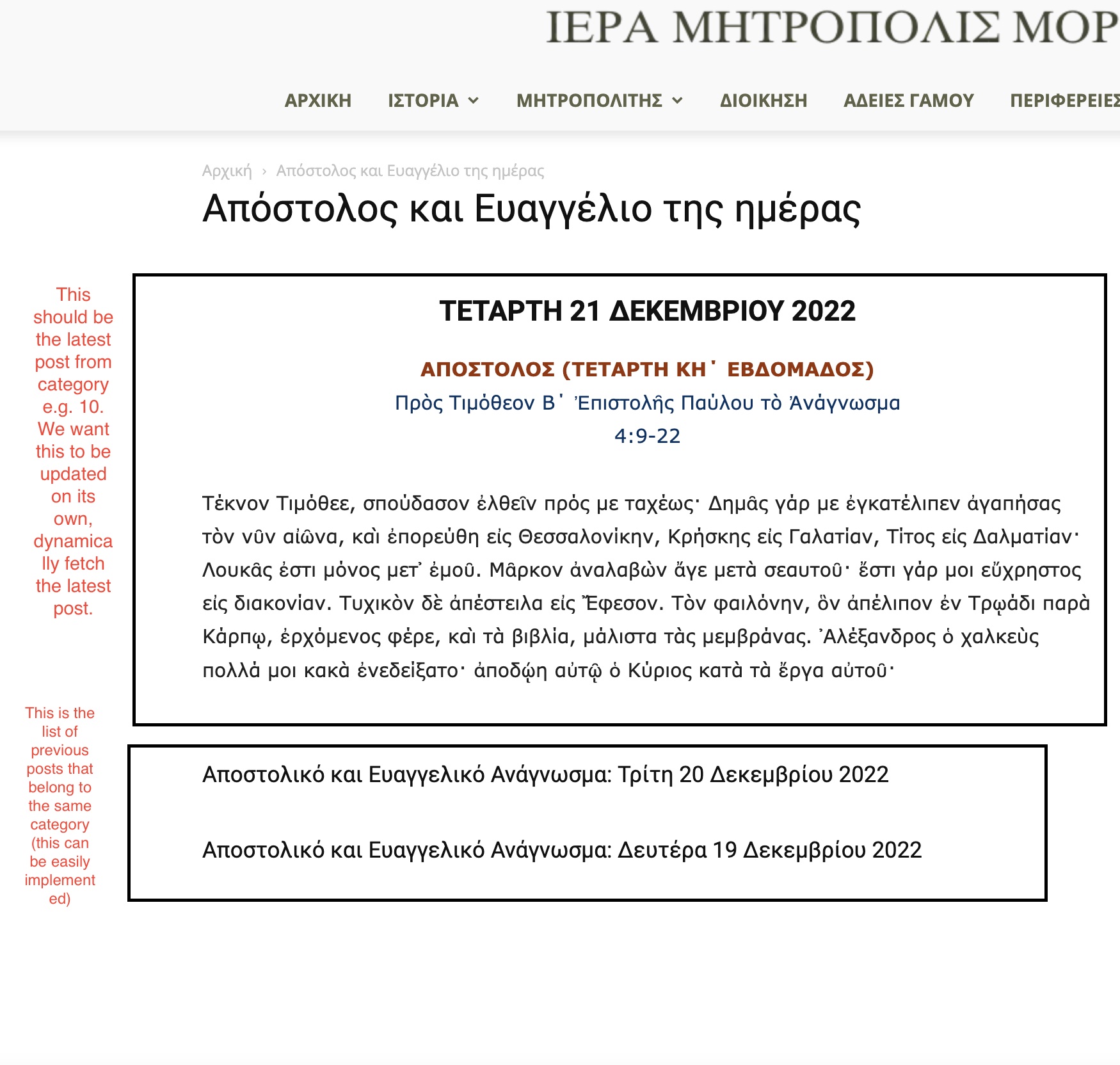
 Hello Bettina and thanks for the quick response. You can find the screenshot in the following link:
https://immorfou.org.cy/wp-content/uploads/2022/12/Screenshot-2022-12-21-at-9.07.11-AM.jpg
As you can see there are two boxes. The second box is easily implemented using flex block 1. The first box is what we want to achieve. I can easily do that using the “Text with title” element. But we want its content to be updated on its own each time a new post is added to that category. The content should be the category last post’s content.
Thanks.
 wneary
Hello, I’m trying to import Header templates, but I’m getting a “Invalid reply from server endpoint” error. Is this a login issue, or what might be blocking access to the cloud library?
Thanks,
Walter
nateb2127Hello,
I am trying to turn off the mobile theme for a custom post type – but it will not let me get to the block editor to do such. Is there a function I can call or use to turn it off on certain post types?
Thank you!
 maghrebpost
 Thanks!
I’ve used the Flex Block Module 1 (File: tds_module_loop_1.php) and updated the module according to the theme api. Worked like a charm.
 Andy White
 Many thanks. I’ll play around with Flex Block 1 when I’ve got some time. Seems to be working fine now. Appreciated!
Bettina Hello Andy!
There is a setting for show/hide: https://prnt.sc/J43shFfFExmA
If you want to share something in private, then you can send us an email at contact@tagdiv.com.
Every block has different styles and settings. However, the Flex Block 1 is the most useful and feature-rich. You can achieve and build almost every style with this block.
Thank you!
Bettina Hello Andy!
I suggest using flex blocks instead of a big grid to arrange them as you like. By setting the post ID, you can permanently exclude a post from appearing or allow only one post in the entire block to appear.https://forum.tagdiv.com/flex-block-settings-guide/
For example, check the Chained News demo, and there you can see a lot of flex block 1 arrangements: https://demo.tagdiv.com/newspaper_chained_news_pro/
Thank you!
 tlonero
our site https://www.studio93.it/ we are using the most read articles block with filter Popular(last 7 days) sometimes it works sometimes it doesn’t was wondering could it be the cache plugin maybe?
VeriArtemBettina Hello @salocharly!
You can use the post limit and the offset features. Check the documentation:
– https://forum.tagdiv.com/flex-block-settings-guide/
– https://forum.tagdiv.com/offset-feature/
Thank you!
Anamaria Hi,
The tagDiv Composer is our page builder and it can be used for building pages and cloud templates, but not for creating posts. For this, you’ll need to use Gutenberg or a classic editor.
Using tagDiv Composer, you can build/edit the single post template (the layout of the posts).
Here is a video that will show you how to use the builder to create a website from scratch https://www.youtube.com/watch?v=SoGQ0d5kIBg to do this you’ll need to already have the posts.
Also, on our channel https://www.youtube.com/channel/UCOT1RiNysIPCTPSnVZskwtQ, you can find more videos that can help you and documentation https://forum.tagdiv.com/newspaper-theme-documentation/ and you can ask us here on the forum or email if you have any questions.
Also, if you want to have some blocks/elements on a certain post, then you can use a different single template for posts, you can duplicate the template -> https://forum.tagdiv.com/topic/different-logo-in-categorypage/
I hope this will help you!
Thank you!
Anamaria Hello,
Please go and select the viewport for mobile and with tagdiv Composer you can redesign it -> https://i.imgur.com/Aij8xoc.png. You can set the block where you want.
Thank you!
Anamaria Hello,
I think that I know what the problem is, please edit the cloud template with tagDiv Composer -> https://i.imgur.com/j8YvKks.png click on the block and remove the offset -> https://i.imgur.com/dJ0iFQu.png let that field empty.
Thank you!
Bettina Hello @maghrebpost !
Unfortunately, this is not possible, even with the child theme.
Check this guide: https://forum.tagdiv.com/edit-modules-flex-block-x/
Thank you!
 Ericky
Hello, I would like you to take a look at the image I sent in the attachments section. How can I combine the two blocks in this image? In other words, I want to make them work harmoniously by making them a whole. I want the “latest posts” content that appears at the top not to repeat with the “latest posts” that appears at the bottom and work as a whole. Can you help?