
 Bogdan B.
 Hello,
The easiest way to do so is using css. You can target specific post by the unique post id: http://screencast.com/t/6afPVN4tJ0GR You can use your browser inspector to get it. Then you can use the id as a css class and target the ads inside the post.
I hope this helps. If you cannot do it please provide a link to your post and i will provide the necessary code to hide the ads.
Thank you!
Bogdan B. Hi Loano,
The block ID’s were not changed. They are still there: http://screencast.com/t/KZ3MkZOJ5 Use your browser inspector to get the unique id.
Thank you!
 Emil G
 Hi,
Brain916 – You could use the browser inspector to see what css is used on the theme button and create a custom css for the one which comes with Disqus. If you don’t know how to do this please provide the url and i’ll get back with a solution.
Thank you!
 Alin [tagDiv]
 Hi,
Please use browser inspector tool and take the menu item unique class and add your color via custom css in Theme Panel > Custom Code. Please check this topic as reference – https://forum.tagdiv.com/topic/different-colours-for-menu-buttons/
If you need more assistance regarding this or you have other issues with the theme please note that we will get in touch with you Monday – http://screencast.com/t/5EQlEtXSFCp
Thanks for understanding! Happy new year!
Bogdan B. Hello,
You can use the page id as a class in css. You can get the page id with the browser inspector:
http://screencast.com/t/RqcVAwxX758b
Then you can use the code provided above like so:
.page-id-1260 .td-boxed-layout #td-outer-wrap{

top:80px;

}
And use the code like so for multiple pages:
.page-id-1260 .td-boxed-layout #td-outer-wrap,

.page-id-1261 .td-boxed-layout #td-outer-wrap,

.page-id-1262 .td-boxed-layout #td-outer-wrap{

top:80px;

}
Thank you!
Bogdan B. Hello,
The problem originates from the custom featured image: http://screencast.com/t/27XsJPBirG
The cone is displayed over the text. If i remove it using the browser inspector the text is there: http://screencast.com/t/Ab0rFRXl
You can use this custom css to make it a bit smaller so the text can be seen underneath:
.td-post-featured-image img{

max-width:88%!important;

}
result: http://screencast.com/t/zfcGEVVqd
Thank you!
Bogdan B. Hi,
You need to create the css code and then add it in the theme panel->custom css box. We use a chrome extension called live css editor and the browser inspector to get to the part we want to edit.
For example on a block 4: you would use the code like so:
.td_block_4 .td_module_2 .td-module-title{

padding-top: 164px;

}
Just the title can get a padding-top and the excerpt will drop as well.
You can use the same method on block 7 by changing the classes and padding value.
Thank you!
Bogdan B. Hello,
Unfortunately you cannot hide the sidebar based on smartlists but you can hide it based on post id’s. Every post has a unique id you can see with your browser inspector: http://screencast.com/t/LOWjAktF
Fopr example the post id from the above screenshot is 1385 so i would use css to hide the sidebar on that particular post like so:
.postid-1385 .td-main-sidebar{

display:none!important;

}
You can use this code to apply it to your particular posts you want to use smartlists on. Simply copy and paste the code then change the id. (you can get the id from the back-end as well: http://screencast.com/t/gYFV7SoYF)
Thanks.
Bogdan B. Hello,
You can get the category id from here: http://screencast.com/t/wsKCiLU7Ves
You can target a specific category by it’s unique class. Use the browser inspector to get it: http://screencast.com/t/Y8DyIKawl8 it is a class on the body tag. You can then use your code like so:
.category-96 .backstretch {display:none;} and it will only apply to that particular category.
Thank you!
Bogdan B. Hi,
2) It is not weird as this is a default behavior of ther theme. A post will have every category or sub-category displayed on the top. If i specify 20 categoriess or sub-categoriess to the post they will all display: http://screencast.com/t/BTeOfsrvJ
Unfortunately there is no option to hide a specific category from a post. You can disable all of them from the theme panel: http://screencast.com/t/zavyzutGqHt
4)The theme has no option to hide a specific author based on the author description. Maybe you can find a plugin that provides this option in order to have it as your previous theme.
5)Indeed it is a css trick but we need to inspect it so we can get the class needed to apply the code.
for example on this block: http://screencast.com/t/SisfBDI9
code:
.td_uid_18_5661402fc34c4_rand .block-title > span{

background-color:red!important;

}
That long id number is different for every block element. You will need to identify yours and place it in the code. You can use the browser inspector to get the class.
6)You are getting posts from all categories on your block because you have it set to all categories and have not specified what categories you want your block to display posts from. You have specified categories for the ajax dropdown, which is the “menu” on the right of the title. You need to insert the categoriy id’s in the filter tab and in the multiple categories filter.
Thank you!
Bogdan B. Hi,
you can target a specific category or post using the post id or category id. you can use your browser inspector to find it on the body tag: http://screencast.com/t/nlFLTchqbRyv the same applies to categories http://screencast.com/t/6WRac6CUk
you can then use it as a class at the beggining of your css code like so:
.category-10243 .backstretch {
width: 100%;
height: 100%;
position: fixed;
z-index: -99999;
top: 0;
}
now the code will only apply to that particular category.
I hope this helps
Thanks.
 Catalin
 Hi servedaily,
Yes, it is possible to display an image in that gray box. You can set this within Theme panel, as background image, like that: http://screencast.com/t/AtlvgnQib and the image will be the full background of the page. In this category style, header container are transparent and practically in this container you can see the background image. http://screencast.com/t/6x3ZUf4ZrQo
Also, another possibility for you, would be to use a bit of Css to make some customization. Please try the code below in your Theme panel->Custom Css area to fix the problem, like this: http://screencast.com/t/gtGlwFvufE
.td-category-header.td-image-gradient-style8 {

background-image: url('enter your URL image');

background-repeat: no-repeat;

}
Note: If you want to follow the above option, please use a background color/image (white color for example).
Every category has an custom class set to it. You can get this class by inspecting the category page with your browser inspector: http://screencast.com/t/5uS8nYlTc6u
For example mine is category 66. So i would add this to the beginning of the code like so:
.category-66 .td-category-header.td-image-gradient-style8 {

background-image: url('https://upload.wikimedia.org/wikipedia/commons/b/b5/Winnersh_Meadows_Trees.jpg');

background-repeat: no-repeat;

}
Now the code will only apply to that specific category. So if you need to use the code for another category you can simply copy and paste it and change the category number and the image.
To achieve custom headers for each category is not a simply task and this things are required custom work. You can use another category_top_posts_style (1,2,3,4,5,7) for each category you have and it is necessary to create some function in php and shortcode in order to works fine. http://screencast.com/t/0DIS3Bzfxi
This is a complex task which requires lots of customization and if you’re not aware of the steps you need to take in this regard please consider hiring a developer or a freelancer to do this for you as we can’t offer customization services at the moment.
Hope this helps!
Thank you for your understanding!
Bogdan B. Hello,
Unfortunately the theme does not have such an option at this moment. The only method to do it is hard-coding it. CSS is not very hard to figure out. It is better than the alternative which involves altering the PHP files and adding conditionals to td_category_template.php.
You can use css without altering core files and you can have control over it from the theme panel which is a big plus.
You can set the code Catalin gave you to apply to a specific category only. Every category has an custom class set to it. You can get this class by inspecting the category page with your browser inspector: http://screencast.com/t/5uS8nYlTc6u
For example mine is category 66. So i would add this to the beginning of the code like so:
.category-66 .td-category-header.td-image-gradient-style8 {

background-image: url('https://upload.wikimedia.org/wikipedia/commons/b/b5/Winnersh_Meadows_Trees.jpg');

background-repeat: no-repeat;

}
Now the code will only apply to that specific category. So if you need to use the code for another category you can simply copy and paste it and change the category number and the image.
I hope this helps.
Thank you!
Bogdan B. Hello,
You can set a general image background from the theme panel: http://screencast.com/t/n50aBj8V
This will apply to the entire website: category pages, posts and pages. You can set a background image to a category as well: http://screencast.com/t/4kmyRMiBv
If you want to target just a page you will have to use css to do it.
First you will need to set a background color from the theme panel. Any color will do even white counts just change from the default which is an empty box: http://screencast.com/t/PzP3XZci
The you can use this code:
.page-id-754 {

    background-image: url("enter image url here");

 }
You can target your page id using your browser inspector. Every page has a different ID. Mine was 754. Yours will be different: http://screencast.com/t/7VqDZLTjXcr
The background will need a few adjustments to be positioned properly though.
I hope this helps.
Thank you!
Bogdan B. Hi,
I understand now. If you just want to hide the header ad on the homepage, you can use css to do it:
.home .td-g-rec-id-header{

display:none!important

}
Just place the code in the custom css box in the theme panel.
If you want to remove the ad on other pages as well, you can use the same code again, only change the .home class to the ‘page id’ class. You can get the page id number using your browser inspector: http://screencast.com/t/XRgXQokTB9
For the example page from the screenshot, the ‘page id’ class is page-id-41 so we will use the code like so:
.page-id-41 .td-g-rec-id-header{

display:none!important

}
I hope this helps
Thanks.
Bogdan B. Hello,
You can use your browser inspector to find the class and then use it to style the element.
Use this CSS:
.single-resorts .td-category a {

    color: #fff;

    background-color: red!important;}
http://screencast.com/t/fuPgb2dL1vcX
Thank you!
Bogdan B. Hello,
Unfortunately the mega-menu option is not available on the mobile version of the theme. What you can do to achieve your desired effect is create 2 menu items with the same name and make one a mega menu and the other one a custom link. Then you can simply hide the custom link on the desktop version and hide the mega menu item on the mobile one. http://screencast.com/t/MRAfgkxu
Then you can use css to hide each one on the device of your choice.
Every menu item has a custom class called menu-item-x where x is the menu item number.
You can target these with css like so:
first one:
@media (max-width: 767px){

.menu-item-362{

display:none!important;

}

}
This is for the mobile version to hide the page menu item.
http://screencast.com/t/yoIuZn5gmS
And for the other we use the code like so:
@media (min-width: 767px){

.menu-item-363{

display:none!important;

}

}
http://screencast.com/t/thg1VSizG
Use both of these codes together in the theme panel->custom css box. You will have to adapt the code to your menu item numbers. Use the browser inspector to do this: http://screencast.com/t/JMg4UDwGJz
I hope this helps.
Thank you!
Bogdan B. Hello,
We cannot say where the little box comes from based on a screen capture.We will need a link to your website so we can use the browser inspector and see exactly what the little box is. We cannot recreate it at our end. The problem with the grey strip however is from your images. Please upload bigger images than the thumbnail for that grid: http://screencast.com/t/qdY8IHH5Kq Your image should cover all the container, not leave grey arras underneath the image. If you cannot upload bigger images, you can try a plugin called thumbnail upscale to stretch your images to fit the containers.
Thank you!
Bogdan B. Hello,
All the option you are looking for are in the theme panel -> fonts section. https://forum.tagdiv.com/font-customization/
This menu should be accessible from the theme panel. Please try to disable all plugins except visual composer and try again. You can also check your browser inspector’s console and see what causes the error. for example we use chrome: ctrl+shift+i and it will bring up the inspector then click the console tab: http://screencast.com/t/iCqTDEhswH and then click the fonts section and see what error comes up in the console area.
Another thing you need to check is the theme status settings: http://screencast.com/t/ismUn3QrRQ
You can follow this topic to see how you can increase these values: https://forum.tagdiv.com/system-status-parameters-guide/
I hope this helps.
Thank you!
 lighterside
 Bogdan, either I suck at explaining things, or you just aren’t understanding.
First, how could you have really this problem on my website without having login credentials? If you are referring to editing CSS in Chrome’s browser inspector, then yes, that obviously works for me too. But those edits are cosmetic and temporary as you know.
What ISN’T working… is when I enter ANY code in the tablet panels. My custom edits just don’t show up in chrome at all. And it’s not because my code is typed in wrong. So please, let’s move on from browser answers.
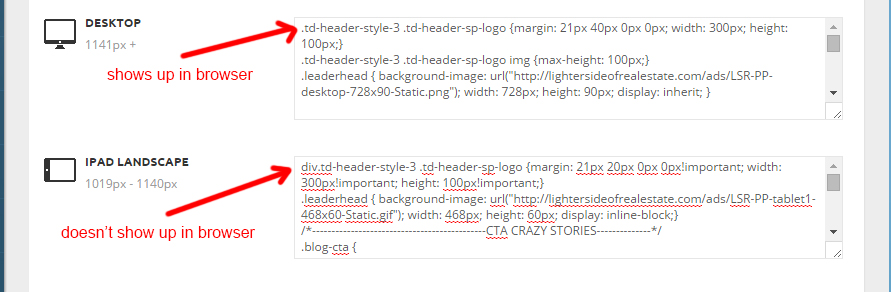
CSS entered into either “Tablet” CSS areas in the theme panel simply isn’t being recognized or reported by the browser.
That’s the problem I’m having.
I’m thinking it’s something that can’t be troubleshot from the browser. I can give credentials if need be.
Bogdan B. Hello,
That is a screenshot of your website’s console. I just inspected it with chrome’s browser inspector and then selected the console tab. https://developers.google.com/web/tools/chrome-devtools/debug/console/console-ui#opening-the-console
Thank you!
Bogdan B. Hello,
You have to be careful with css as it is a very specific language, so a code that will work on one header style will not work on another. We generally use the browser inspector (chrome) and an extension called live css editor when creating the code. It helps a lot!
I have checked your site and it seems that your modifications apply.: http://screencast.com/t/fuMVmyU2S – http://screencast.com/t/QQ73ujGNyDQx
Thank you!
Bogdan B. Hi,
I assume you are talking about the margins of different containers on your homepage. You can edit these out with the browser inspector: http://screencast.com/t/DdqD2nbNAn – http://screencast.com/t/dTVLBD4p and then use the code in the theme panel->custom CSS
Unfortunately there is no general white space removal code.
Thank you!
Alin [tagDiv] Hi Jose,
Unfortunately this is not specified in the documentation, but you can easily figure out checking the “Category tag on modules/blocks” or Excerpts sections from Theme Panel – http://screencast.com/t/SrQZMKZUdmY – http://screencast.com/t/R354s6uE0v0w Or you can use browser inspector tool – http://screencast.com/t/tjgGVkCnKah
Thanks!
Alin [tagDiv] Hi,
I’m not sure if this will work or how it works on your site. I have checked your megamenu but I could not select a spot from your map even if the browser inspector is active – http://screencast.com/t/zT7JCGWjh
Do you use a plugin to create your map?
Thanks!
