
No search results were found in Documentation!
 Calin
Calin Hi,
Most of the theme files were moved into the tagdiv composer plugin as per the requirements of envato: https://help.author.envato.com/hc/en-us/articles/360000472383-WordPress-Theme-Requirements.
We wrote an article on the subject here: https://tagdiv.com/updating-the-core-of-tagdiv-themes/
Moving forward with such requirements, a child theme will only work with functions.php, and style.css as there are very few files left in the main theme as envato requires all functionality to be added through plugins.
Sorry for the inconvenience and thank you for understanding.
 Simion C.
 Hi,
That would be the case, the child theme is quite limited after the recent update. Most theme files have been moved in the composer plugin as mentioned here
– https://tagdiv.com/updating-the-core-of-tagdiv-themes/
So now the post template files are now in the composer – http://prntscr.com/ng3e26
You could edit them there, but the modification will have to made again after each update.
Maybe you could display the ratings in different way. Some ratings sections provided by plugins can be displayed with shortcodes. You could use a cloud post template for the posts, in the cloud post templates use a column text element in which you enter the plugin shortcode. This would be one way to display ratings on posts.
I believe this request is on our list, a rating option may be available in the theme in a future update.
Thanks
Calin Hi,
I made some test and for me the is working good -> https://www.screencast.com/t/mB0AKh8bdov5
Please make sure that you do not have a plugin conflict, please deactivate all non theme plugins, also if you are using child theme or cache plugin, please deactivate them, clear all cache and try again.
Let me know how is works!
Thank you!
Calin Hi,
I checked your website, and is look like you set a menu for mobile -> https://www.screencast.com/t/qMRRcOwF9z
Also is look like your mobile version is displaying on desktop too, this is usually a cache plugin conflict, please deactivate all non theme plugins ( let only the plugins that have tagDiv in name ) , also if you are using child theme or cache plugin, please deactivate them, clear all cache and try again.
Also please check a similar topic about mobile theme -> https://forum.tagdiv.com/topic/some-pages-dont-work-on-mobile-devices/
Thank you!
 pfister@presse-augsburg.de
In the older versions could copy a edited version of each post template in the child-theme directory. This files are not used in the newest versions. How can I edit the post templates (adding some code at the end from Taboola content monetary)
 gunhanunal
 i disabled the child theme and the td-api plugin in a test server environment. when i update the theme the site no longer gives the 500 error. however, the plug ins do not update or activate. (it looks like they are updating and activating) but when you refresh it is not active. hence nothing is working because the plugins can not be updated or activated.
Not to sound frustrated, we outsource all our development efforts. when we moved to you theme we spent $2K to customize the theme and now we cant upgrade and potentially have to spend another 2k to go through the upgrade.
 MKJ
MKJThe update to 9.7 was a major disapointment. Our site was broken due to deactivated plugins. The wp-admin login url didn’t work anymore. So far so bad. The most ennoying problem, however, was the fact that many post templates were moved to the td-composer plugin folder. Many forum users reported problems, since the modified files in the child theme weren’t used anymore. While I understand that you had to do this due to Envato requirements, why didn’t you post a solution. Perhaps you did, but I couldn’t find any. Even plugin files can be overwritten. But you have to give us some information, since there is no standard procedure for this. Newspaper is a premium theme. It is absolutely not acceptable that you leave us out in the cold.
 maumbury
 I have tried an unmodified child theme, so no changes to the functions.php or style.css with the same result.
I do not understand why this does not work after your changes for Envato, if you are correct that means we have to choose between a child theme or AMP with all Envato themes. Hope you get it working in next release.
Still love the theme…
Calin Hi,
This can be a plugin conflict, please deactivate all non theme plugins ( let only the plugins that have tagDiv in name ) , also if you are using child theme or cache plugin, please deactivate them, clear all cache and try again.
Thank you!
Simion C. Hi,
The recent 9.7 is somewhat a major update in a way, there were some modifications made to how the theme and theme plugins work – https://tagdiv.com/updating-the-core-of-tagdiv-themes/
This means that to maintain the same functionality now the composer plugin has to be active at all times, because many theme files are now part of it.
If you follow the steps in the guide carefully there should be no problem. Most reliable method to update is by FTP, delete the old theme and upload the new theme. Update all the plugins as mentioned. Also here is a guide – https://tagdiv.com/update-newspaper-theme/
If you use a child theme, note that since most of the theme files are in a plugin, it will not work anymore.
Thanks
MKJ Sorry, guys, what is the message here? That we have to edit template files in a plugin folder? Usually, this is not update-safe. Theme template files should be in the theme folder, that we can overwrite them in the child theme.
-
This reply was modified 7 years by
MKJ.
 Tuudi
TuudiHi Guys!
I read previously that after update to 9.7.1 version my files from child theme will stop working. That’s exactly what happened in my website.
The problem what I have currently is how I can manually edit those files:
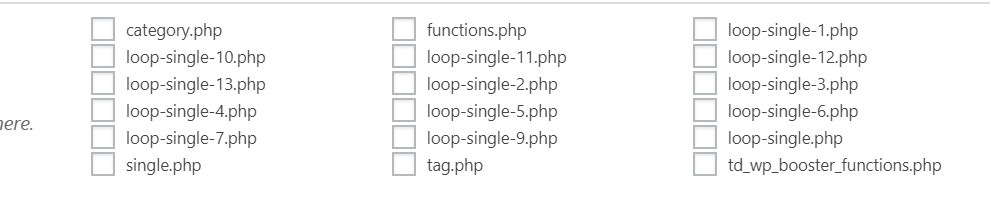
I manually implemented Ratings plugin into my website in every loop-single files:
` <div class="td-post-content">

        <?php echo $td_mod_single->get_content();?>

    </div>

<strong><div><?php if(function_exists('the_ratings')) { the_ratings(); } ?></div></strong>

    <footer>

        <?php echo $td_mod_single->get_post_pagination();?>

        <?php echo $td_mod_single->get_review();?>`
My question is: in which place can I now edit manually post templates?
Thanks a lot!
MKJ Hi, I have the same problem with single_template_2.php. How can we now modify the template file update-safe? Do you want me to change core files in the plugins folder? Seriously? How can I overwrite this template file using the child theme?
Simion C. Hi,
That would be the case, the child theme is quite limited after the recent update. Most theme files have been moved in the composer plugin as mentioned here
– https://tagdiv.com/updating-the-core-of-tagdiv-themes/
So now the file that you used to modify is in the composer – http://prntscr.com/nfpxm0 which could be modified but you will have to do it each time you update the theme and plugins.
Maybe consider using a search plugin which has this functionality, try free plugins. Here are some examples – https://colorlib.com/wp/search-plugins-for-wordpress/
– https://www.quora.com/Is-there-a-WordPress-search-engine-plugin-that-allows-you-to-search-outside-of-your-website
Thanks
Calin Hi,
I think that you are using some plugins for comments.
Please make sure that you do not have a plugin conflict, please deactivate all non theme plugins ( let only the plugins that have tagDiv in name ) , also if you are using child theme or cache plugin, please deactivate them, clear all cache and try again.
Thank you!
Calin Hi,
Please make sure that you do not have a plugin conflict, please deactivate all non theme plugins, also if you are using child theme or cache plugin, please deactivate them, clear all cache and try again.
If there is still a problem, you can send us an email at contact@tagdiv.com and provide admin login, as well as cPanel or FTP if possible. We will take a look. Include a link to this topic in the email.
Thank you!
Calin Hi,
New the single_template_1.php can be found in wp-content/plugins/td-composer/legacy/Newspaper/parts/single/single_template_1.php -> https://www.screencast.com/t/Fu7JfEo6ctB
Unfortunately these files can not longer be set in child theme.
Most of the theme files were moved into the tagdiv composer plugin as per the requirements of envato: https://help.author.envato.com/hc/en-us/articles/360000472383-WordPress-Theme-Requirements.
We wrote an article on the subject here: https://tagdiv.com/updating-the-core-of-tagdiv-themes/
Moving forward with such requirements, a child theme will only work with functions.php, and style.css as there are very few files left in the main theme as envato requires all functionality to be added through plugins.
Hope this will help you!
Thanks.
Simion C. Hi,
The 9.7 update was a somewhat major update, now the tagDiv composer has to be active at all times in order to maintain the same functionality. Most issues that can happen after update are related to how the theme is updated.
For example if you update by FTP the old theme has to be deleted and the new one uploaded. Then the plugins have to be updated as mentioned in the guide provided above. If you use a child theme this may not work anymore, the recent changes are the cause.
You can however not update for the time being and keep using the previous theme version, that depend on you entirely. You can update in the future if you should consider it. Maybe try it on a local copy of the site to see what happens, while having the main website kept safe. There are plugins that can duplicate a website if you should consider this suggestion.
If you want us to take a look you can send us an email at contact@tagdiv.com and provide admin access as well as FTP or cPanel. Let us know.
Thanks
 Catalin
 Hi all,
Most of the theme files were moved into the tagdiv composer plugin as per the requirements of envato: https://help.author.envato.com/hc/en-us/articles/360000472383-WordPress-Theme-Requirements. We wrote an article on the subject here: https://tagdiv.com/updating-the-core-of-tagdiv-themes/
Moving forward with such requirements, a child theme will only work with functions.php, and style.css as there are very few files left in the main theme as envato requires all functionality to be added through plugins.
Sorry for the inconvenience and thank you for understanding!
Simion C. Hi,
There will be a left and right padding on mobile, most elements will have it with some exceptions.
There are some things you could try. For the top form, edit the page with the composer and select the mobile mode
– http://prntscr.com/nfmnnd then set a negative margin left and right for the raw HTML element used – http://prntscr.com/nfmoe3 set a -20px value.
Or use a code like this one – http://prntscr.com/nfmox8 in the mobile CSS field of the Theme panel->Advanced CSS
.home .vc_raw_html {

margin-left: -20px;

margin-right: -20px;

}
For the column title lower down the page, you could try something like this
– http://prntscr.com/nfmw0e
.home .tdc-content-wrap .td-stretch-content:nth-child(6) {

padding-left:0;

padding-right:0;

}
Enter it in the same phones field – http://prntscr.com/nfmwdq
There may be other solutions, let me know if these work or I will think of a different way.
Thanks
Calin Hi,
We tried to get your attention for child theme in our article, for the moment that a lots of files was moved in tagDiv Composer plugin, these files that was moved will not work in child theme because now these are in plugin not in theme -> https://www.screencast.com/t/z5pqD3i116Uw -> https://tagdiv.com/updating-the-core-of-tagdiv-themes/
Unfortunately, the old td-api-plugin plugin does not work anymore and we recommend using this -> https://forum.tagdiv.com/developer-info/
You can create these modules that you made with that api using the flex blocks and you can save the element in a shortcode to can use it later in orders pages -> https://www.screencast.com/t/a2ikt4tq
Thank you for your understanding!
Calin Hi,
Unfortunately in Newspaper v9.7 the td-api-plugin will not longer work, sorry! you can achieve the modules that you made with that api using the flex blocks and you can save the element in a shortcode to can use it later in orders pages -> https://www.screencast.com/t/a2ikt4tq
Most of the theme files were moved into the tagdiv composer plugin as per the requirements of envato: https://help.author.envato.com/hc/en-us/articles/360000472383-WordPress-Theme-Requirements.
We wrote an article on the subject here: https://tagdiv.com/updating-the-core-of-tagdiv-themes/
Moving forward with such requirements, a child theme will only work with functions.php, and style.css as there are very few files left in the main theme as envato requires all functionality to be added through plugins.
Sorry for the inconvenience and thank you for understanding.
Simion C. Hi,
A list of the files that were affected by the 9.7 update can be seen here
– https://tagdiv.com/td_deploy/Newspaper/changed_files_9.6.1_9.7.html
Due to many theme files being moved in the composer plugin, a child theme now has limited functionality when it comes to making modifications to theme files. Prior to 9.7 there were many files that could be modified in a child theme – https://forum.tagdiv.com/the-child-theme-support-tutorial/
But now most files are in the composer plugin, so they cannot be used in a child theme.
Thanks
Calin Hi,
Most of the theme files were moved into the tagdiv composer plugin as per the requirements of envato: https://help.author.envato.com/hc/en-us/articles/360000472383-WordPress-Theme-Requirements.
We wrote an article on the subject here: https://tagdiv.com/updating-the-core-of-tagdiv-themes/
Moving forward with such requirements, a child theme will only work with functions.php, and style.css as there are very few files left in the main theme as envato requires all functionality to be added through plugins.
Sorry for the inconvenience and thank you for understanding.
 travel1000places
Hi,
since the update to 9.7.1 I am having problems with the backend (http://domainname/wp-admin/ or any page from the backend… on SOME browsers:
Edge (solved after deactivating / activating TD composer plugin)
Opera
Chrome
Firefox: is ok
They throw following error:
Warning: Cannot modify header information – headers already sent by (output started at /path/20/d1111111/htdocs/aaaa/wp-content/themes/Newspaper/includes/wp_booster/td_util.php:1311) in /path/20/d1111111/htdocs/aaaa/wp-includes/pluggable.php on line 1251
Warning: Cannot modify header information – headers already sent by (output started at /path/20/d1111111/htdocs/aaaa/wp-content/themes/Newspaper/includes/wp_booster/td_util.php:1311) in /path/20/d1111111/htdocs/aaaa/wp-includes/pluggable.php on line 1254
A little weird is the fact that my other domain with NEWSPAPER installed does not have that issue.
I did clear browser caches, even installed e.g. OPERA freshly on another computer, and still get the error on all machines running OPERA or CHROME.
I reinstalled all THEME files and the Theme panel confirms I am running 9.7.1.
I deactivated the child theme but no difference.
Any help is appreciated.
Thanks,
Frank
