No search results were found in Documentation!
 wpdiv
wpdiv That’s cool buddy and its works like charm via child theme here http://www.7gsolutions.com/download-like-2-discount-plugin-discount-based-on-facebook-like/
I love your theme as well as your support.
 Lucian
 Hi,
The td_module_blog.php which contains the get_content() function can also be overwritten via child theme.
Thanks
Lucian Hi,
I will add this on our issue tracker list for further testing and we will fix it if something goes wrong.
Please also try to do this using the main theme and also make sure that you update your child theme and try again.
Thanks for the message!
wpdiv I have specified wrong child theme CSS url have applied manual changes, here it is http://www.7gsolutions.com/wp-content/themes/WPDIV/style.css
wpdiv Does it means the file you specified does not supports child theme?
wpdiv Hi lucian
Thanks for your reply. I have tried the same in mirror site http://www.7gsolutions.com and failed to achieve the results when i use custom fonts via theme options panel. So, i have declare the font face manually through child theme and overrided all the CSS selectors manually here http://div.wpdiv.com/wp-content/themes/WPDIV/style.css
Note : Your custom font CSS settings not up the mark.
1. When we use custom fonts via theme settings panel, your default custom fonts font face CSS not compatible with old browsers and its compatible with modern browsers only. Here is the CSS which generated through theme options panel of Newspaper theme and its not enough when we are using old browsers like IE8.
@font-face {
font-family: ‘Titillium’;
url(‘fonts/titillium-light-webfont.woff’) format(‘woff’),
}
2. Also Theme Options panel changes does not apply in front end when we are using custom font and it really frustrates us.
Here i request you to setup complete with website with custom fonts, you might experience issues.
Newspaper theme Way to go to enhance such features and i hope it will be rectified soon especially in next version.
-
This reply was modified 11 years by
wpdiv.
Lucian Hi,
Sorry for the delay!
1. This is the function that generates the content and the top ad also you can try to alter this condition here: http://screencast.com/t/ohmn5rKZsbYB
2. Here are the files that can be overrided by the child theme: https://forum.tagdiv.com/child-theme-documentation/
Thanks
 Marius
 Hi,
I’m not sure that files is supported in Child theme, but if you want you can make a try. Also if you want you can use the solution provided above.
Thanks!
 maxtitov
Hi! I have a problem when i migrate site on the new hosting and domain:
Warning: include(/…/…/…/data/www/gtfactory.ru/wp-content/themes/Newsmag/includes/td_config.php): failed to open stream: No such file or directory in /…/…/…/data/www/gtfactory.ru/wp-content/themes/avto-child/functions.php on line 8
Warning: include(): Failed opening ‘/…/…/…/data/www/gtfactory.ru/wp-content/themes/Newsmag/includes/td_config.php’ for inclusion (include_path=’.:’) in /…/…/…/data/www/gtfactory.ru/wp-content/themes/avto-child/functions.php on line 8
Warning: include(/…/…/…/data/www/gtfactory.ru/wp-content/themes/Newsmag/includes/wp_booster/td_wp_booster_functions.php): failed to open stream: No such file or directory in /…/…/…/data/www/gtfactory.ru/wp-content/themes/avto-child/functions.php on line 9
Warning: include(): Failed opening ‘/…/…/…/data/www/gtfactory.ru/wp-content/themes/Newsmag/includes/wp_booster/td_wp_booster_functions.php’ for inclusion (include_path=’.:’) in /…/…/…/data/www/gtfactory.ru/wp-content/themes/avto-child/functions.php on line 9
Warning: Cannot modify header information – headers already sent by (output started at /…/…/…/data/www/gtfactory.ru/wp-content/themes/avto-child/functions.php:8) in /…/…/…/data/www/gtfactory.ru/wp-login.php on line 424
Warning: Cannot modify header information – headers already sent by (output started at /…/…/…/data/www/gtfactory.ru/wp-content/themes/avto-child/functions.php:8) in /…/…/…/data/www/gtfactory.ru/wp-login.php on line 437
Warning: Cannot modify header information – headers already sent by (output started at /…/…/…/data/www/gtfactory.ru/wp-content/themes/avto-child/functions.php:8) in /…/…/…/data/www/gtfactory.ru/wp-includes/pluggable.php on line 918
Warning: Cannot modify header information – headers already sent by (output started at /…/…/…/www/gtfactory.ru/wp-content/themes/avto-child/functions.php:8) in /…/…/…/data/www/gtfactory.ru/wp-includes/pluggable.php on line 919
Warning: Cannot modify header information – headers already sent by (output started at /…/…/…/www/gtfactory.ru/wp-content/themes/avto-child/functions.php:8) in /…/…/…/data/www/gtfactory.ru/wp-includes/pluggable.php on line 920
Warning: Cannot modify header information – headers already sent by (output started at /…/…/…/data/www/gtfactory.ru/wp-content/themes/avto-child/functions.php:8) in /…/…/…/data/www/gtfactory.ru/wp-includes/pluggable.php on line 1178
 michaltakac
 I added <?php comments_template(‘comments.php’, true); ?> into loop-single.php in my Newspaper-child theme:
http://gyazo.com/914cc684520a0dbc8027affd6827bb33
With disabled WordPress comments and “SEO Facebook Comments” plugin enabled, it looks like this:
http://gyazo.com/b481691f65690dad628340354cbec888
…and with this plugin, it inserts comments into database so it show comment count next to post title.
 katsdelight
 Hi,
I have removed the visual composer folder via ftp as you stated but I am still getting this error message when I try to reinstall it.
The plugin does not have a valid header.
Downloading install package from /home/katsdeli/public_html/review/wp-content/themes/Newsmag-child/includes/plugins/js_composer.zip…
Download failed. A valid URL was not provided.
Where can I down load the visual composer folder from, to upload via ftp?
Thank you,
Katrien.
wpdivHi
In http://div.wpdiv.com i am looking to insert some advanced custom field plugin variables in between Article Top Ad and Post Content.
1. In which file i need to make changes to insert such variables?
2. Does such file supports via child theme?
Expecting your reply
With regards
Selvam.S
 Kanybek
 Marius, thank you for support and such a detailed screenshots!
However regarding the 2-nd question you didn’t understand me – I meant that the arrow (not a square, but the arrow therein) somehow didn’t display in my site (http://predprinimatel.kg). How to make it appear?
With regard to the rest questions – could you please explain how to do that in the Child Theme? So that it doesn’t disappear after the next theme update. Which code have I add into the functions.php file?
Thanks,
Kanybek
-
This reply was modified 11 years by
Kanybek.
wpdiv When i read through the above article, i am really happy to have option to disable post specific ads via Advanced custom fields plugin to add some custom code in…
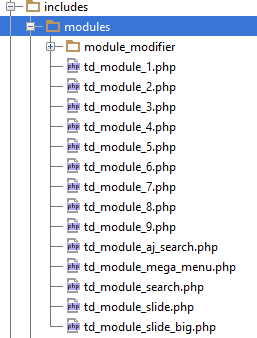
includes > modules > module modifier > td_module_blog.php
Newspaper child theme documentation https://forum.tagdiv.com/child-theme-documentation/ says that child theme supports for these files https://forum.tagdiv.com/wp-content/uploads/2014/03/04_modules.png
Does the above file supports via child theme?
Kindly help me..
 fluxresearch fluxresearch
 I’ll have to figure out if that’s something I can do with a child theme.
Thanks!
 simchris
 Good choice 🙂
I have a little cheat sheet I keep with my mods to four files, style.css, and functions.php
and I just change those each update vs dealing with the unpredictable child theme stuff.
simchris Unfortunately, this is how the CSS works with WordPress.
When using child theme
a) child theme CSS loads
b) redirects to main theme CSS
c) custom CSS loaded in head of document
the delay is unavoidable on some servers.
Not using child theme can help with issue, but best bet is to mods to the main style.css and just do that with each update. Worth doing for removing the flash of unstyled text (“FOUT”) issue.
Quick and dirty method is just paste your custom CSS at bottom of the style.css file. You’re loading some things twice, but it can cut down on the perception due to ONE file loading both CSS (try it!). I’ve done this during development sometimes. Works pretty well. 🙂
-
This reply was modified 11 years by
simchris.
 St
St Hi,
As Christopher said, the theme read style.CSS first (including default color, font, etc) then render other customization. However, I put my code in child theme – style.CSS. Why this method can not render straight from customization? Or should I put the code in theme setting?
Emil, if we have to change original style.css, we will have problem with new update.
Not mentioning there are some customization on font, etc…
regards,
st
 Emil G
 Hi,
The menus are saved for each theme, the child theme is considered by wordpress to be another theme so the menus are not saved on it. You have to set them manually from Appearance -> Menus. – http://screencast.com/t/8Fo0mbbL
Thank you, Emil G.
simchris This is common problem with all WordPress themes. This is a variant of what is called a “flash of unstyled text” — or where the default CSS is loading first, and then the “over ride” in your custom CSS is then loading. This can also impact font loading in some cases, where the font changes after a moment from default to custom font. Same issue, just different flavor.
The *only* surefire way to avoid this 100% of the time is to put your custom CSS changes at bottom of your style.css file.
Issue is also more noticeable with child themes usage since that is effectively a CSS redirect, and slows down the site (which is why Google doesn’t like child themes, but WordPress folk do).
Inherent issue with how WordPress works, and with the fact you’re loading two sets of CSS for the same classes. With a super fast page/server, it’s not very noticeable. With slower servers (e.g., slower than .05 seconds) or with child themes, more moticeable.
Adding your custom changes to bottom – or revising the actual classes in – style.css is *only* way to fix this for all users, sadly.
-
This reply was modified 11 years by
 Breakwater
For some reason, when I enable Newsmag-child theme, the menu does not appear and I can not enable it. It says, “CLICK HERE – TO SELECT OR CREATE A MENU” in it’s place. Thank you.
Breakwater Also, I was trying to make this change using child theme *.php files. Maybe that is a mistake and I need to make the change to the original theme files? What do you think?
simchris So (continued)
WP 4.1; Theme 1.31 Unit/Linux/Apache/CentOS
Not using child theme.
No minification.
Only changed name of theme folder and name in CSS file to sitename.
Not using megamenus.
Not using revslider.
Not using jetpack.
Disqus turned off.
HEADER.PHP HACK: (same hack we did with Newspaper where snippets worked right)
One hack to header.php was removing call to pingback since we don’t want that
REMOVED:<link rel="pingback" href="<?php bloginfo( 'pingback_url' ); ?>" />
Removed the “facebook sharing fix for videos” section, not needed for our use.
Yoast WordPress SEO = on
TagDiv speed booster = on
Post settings:
Default = style 2
Featured Images – use = on
Breadcrumbs = all on
Lightbox = off
more articles box = off
ajax count = off
Related article = show by category
Sharing – all off except show top article sharing
Still showing error of not seeing the rating in preview.
TEST:
on the off chance it’s one of my customizations in functions.php
(I turn off Yoast in toolbar, hide ?version numbers and change default compression; post message for those trying to hack login/ping)
I am removing all of those …… NO CHANGE
Argh. So far only thought at this point is checking the actual content that makes up the review text itself, but looking at the Techwalls site with same issue, I don’t see any oddball characters in the summary box that might cause such an issue.
-
This reply was modified 11 years by
 Aedin84
From the update released today, the changelog shows 1.3 to 1.3.1 is the result of:
[ V 1.3.1 ]
– updated visual composer to V 4.3.5 (this version of the plugin is compatible with WordPress 4.1)
I actually already own the plugin separate from the theme. I’ve already updated the plugin to its newest version as well. I did this early this morning in fact.
I just want to clarify that there was nothing else updated outside of the plugin as I’m currently deep in customizing the theme for my live website, which will replace the current version of the theme already in use on my site hopefully by Monday. If in fact there were no additional updates/changes, I plan to just change the name of the style.css file from 1.3 to 1.3.1 since it wouldn’t make sense to re-upload the files only to write over my edits (yes, I’m using a Child theme).
Thoughts?