
 nearview
 Thx, Anamaria. We also discovered that there is some CSS that was impacting the embedded block. All is working well now. I appreciate your help!
 dgtlcoin
 Hi Ana,
I did already and it works. If possible, I am looking for the exact settings / css of the way you made it look in the table in the middle of the page of this demo:
https://demo.tagdiv.com/newspaper_crypto_pro/
Here’s a picture of the table I am talking about:
https://ibb.co/55DsMY2
Thank you
dgtlcoinHi,
Can you please send me the exact settings of the cryptocurrency plugin + the custom CSS or the relevant settings on TagDiv composer for the green crypto price widget table in the middle of the page of this demo prebuilt website:
https://demo.tagdiv.com/newspaper_crypto_pro/
Thank you
 Bettina
 Hello @mila_grish !
Add this CSS to the Live CSS section:
.td-post-content img { display:inline!important;}
Thank you!
Bettina Hello Armand!
Check if you have some CSS code in the Live CSS section.
Thank you!
 ludyma
 Hi, don’t get me wrong, but much of the information you give me is outdated. Only in the theme panel, there is little that you can configure the basics, after what you could use before that you can no longer use templates for mobile phones from the cloud, there are only a few and a blank base. True I can look it up by the mentioned tool. The mobile model, OS or device type is not relevant, for that you have to use the CSS to adapt, but I wanted it for the drop-down option of the submenus. Thanks for the information.
Bettina Hello @ludyma !
How is it useless and outdated? I just asked which mobile version you use (this was the purpose of a long explanation). The location of the CSS parameters can be found if you inspect your own website and find the right CSS class for the mobile menu. By accessing the “outdates” links you can solve your issue.
Thank you!
ludyma Hello. The information received is useless and outdated, it cannot be applied to version 12.x. nothing you have sent me works or applies to version 12.x. Can you give me the location of where the CSS parameters are regarding the mobile menu version. I need it.
Thank you.
 Anamaria
 Hi,
You need to edit this file editor-style.css in this path -> wp-content/themes/Newspaper/editor-style.css and comment on these lines of CSS -> https://imgur.com/EpWJhGZ
This can be done easily using a laptop.
Thank you!
 DocDigit
Hi, can you tell why there are so many image versions of just one picture that we upload?
There are folders for every day of the month. This causes redundancy:
mysite/wp-content/uploads/2023
568 May 8 10:24 05
633 May 8 10:20 04
19 May 8 10:19 ..
457 May 1 16:34 02
7 May 1 00:00 .
568 Apr 30 00:21 03
388 Apr 29 17:38 01
Q: Would be better if just one image (the original uploaded) gets its display dimension thru CSS, according to the format of the template it is displayed in?
Q: If we remove a post, will this image and all of its versions be deleted as well? How do we maintain this?
Thank you!
Bettina Hello Giorgos!
Yes. There is a CSS issue. The background layer comes over the comments. You should just set a “position:relative” to the element class. We will fix it in the next update.
Thank you!
Anamaria Hello,
If you are using the Gutenberg editor, then there will be no sidebar in the editor, this will look like this -> https://i.imgur.com/F6PUBhU.png
If you are using some classic editor plugin, then the sidebar can be removed only from the files, for this, you need to go in -> wp-content/themes/Newspaper/editor-style.css and comment these lines of CSS -> https://imgur.com/EpWJhGZ
Hope this will help you!
Thank you!
Anamaria Hi,
To change the color you need to use a custom code
.td-post-title .entry-title {

color: red;

}
The code need to be set in Theme panel> Mobile theme> Custom code> css.
Thank you!
Anamaria Hello,
tagDiv Analyzer is a beta version and interferes with the style, please remove the CSS generated.
Also, this can be interfering with other plugins.
Thank you!
Anamaria Hello,
tagDiv Analyzer is a beta version and interferes with the style, please remove the CSS generated.
Thank you!
ludymaI want to access the CSS, and see the configuration of the mobile menu, could you tell me where it is exactly.
Why are there no mobile themes in the cloud anymore?
 Central
https://prnt.sc/c2OQUk3L_7HN
after 24 hours these are the results and they are not even the half.
How to make it work ? it is impossible to keep it open the window for 2-3 days or a week.
 Rafich
Hi all,
i used the CSS Analyzer on my Blog and created the Critical CSS for the Homepage and found my Homepage destroyed my Posts Sites are still looking good but it looks like Homepage is missing CSS completely. Can somebody help me restore the old css files.
Thank you
 vakvas@gmail.com
Hello,
please, do you have some experiences about using this plugin and ads placed as background or ad placed next to content, aligned with content left or right.
Plugin has option like “main content element”, is used for element to align ads to. Im nit able to find right CSS element.
Im not able to setup this.
What is the expectation?
Place ad next to content or in background, left side or right side, sticky or not sticky.
Any advice to make it work, will be great.
Only what work is align ads as sticky to page, but not align to content.
Thanks a lot
Vaclav
 simchris
 Updating for anyone else who finds this super minor annoying …
the code you reference, unfortunately drops the css above the main <head> element sitewide, vs the admin panel. SO, I did minor tweak, and this does work:
/* HIDE NEWSMAG AMP NAG */

add_action('admin_head', 'bye_amp_nag');

function bye_amp_nag() {

  echo '<style>

.td-amp-plugin-warning .notice { display: none; }

    }

  </style>';

}
simchris Hi
just update for anybody else looking to remove the images from search box;
once I removed entirely the line from
echo $this->get_image($image_size …)
plugins/td-composer/legacy/Newsmag/includes/modules/td_module_mx2.php
I added this to our CSS
.td_module_mx2 .item-details {

    margin: 0 20px 20px 20px;

    display: block;

    min-height: 60px;

}
Shazam! Works perfectly 🙂
 libertylens
How do I apply the global footer to the category template. (Is it global in the sense that it is applied to homepage, and page and post templates?) When I edit the category template there’s a message that I have to edit the footer template separately through the cloud templates. But there is no option to do so under category template, and as mentioned I already edited the “global” footer.
As far as the posts, I haven’t been able to find any “post” template. How do I apply the “global” footer and global header to those templates?
In the grand scheme, we are looking for an effective mobile strategy that allows use to edit – either through CSS or the TagDiv composer.
Thanks!
Ken
Anamaria Hi,
You can’t align the menu to the right.
You can add the icons only here -> https://i.imgur.com/q6CJaDe.png
You can do it only with custom code CSS
All these can be obtained if you use the modal popup -> https://forum.tagdiv.com/modal-popup/
Thank you!
 NDDdude
 Hi, we’re running Newspaper on nbnnews.com.au.
and we’re using Newspaper v9.5.
We’re trying to upgrade to the latest version, but we’ve hit a major stumbling block.
Here’s the problem, when we have a video and enter its file name in a custom the video player appears.
We use custom fields to populate required fields to display a video player and poster frame.
1) Enter a file name
2) Enter a image name
SO basically our journalist enters a video file name and image file name and the video appears.
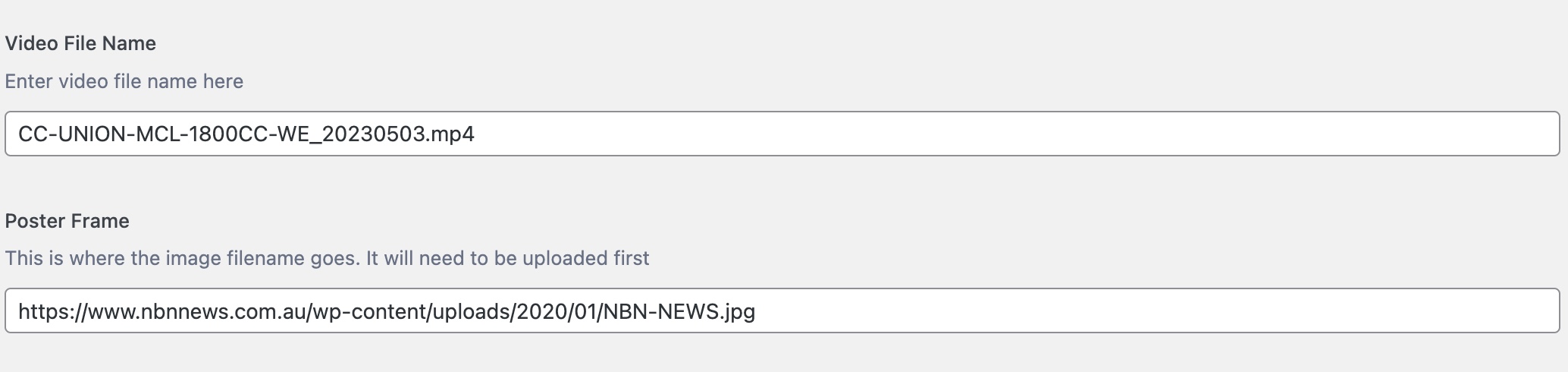
Please see here for reference:-
https://www.nbnnews.com.au/2023/05/03/father-and-son-avoid-jailtime-after-defrauding-mining-company/
Using an if/else php call, we either display a video player or not by using CSS classes.
Once the video file name is entered the “else” bit kicks in and shows the video player.
We’re using the loop-single.php file and sitting the code block just under the
And on version 9.50 this works.
On v12 I can’t get this to work in a child theme or hacking the main theme.
I can’t insert any code (php, html) anywhere and have it render.
I’m not a programmer, but through looking at tutorials and trial and error I got it to work.
And it’s been ok for years.
This has become critical to fix because using v9.5 and updating to php8, it’s throwing up a cross-scripting error.
Here’s the code:-
Any help would be greatly appreciated. I love this theme, but I might have to try other theme to make this work. And I really don’t want to do that.
Bettina Hello!
Add this CSS code in the Live CSS section:
#wp-admin-bar-our_support_item{display:none!important;}
Thank you!


