- NewspaperWP Rocket and Newspaper Theme: Optimization Guide
- TutorialsFrom WPBakery to tagDiv Composer
- TutorialsDefault Block Settings Guide
- TutorialsHow to use custom fonts
 ezioboy
hello
This is a post text setting setting question.
From Theme Fonts
How do I set up post headings, post font size fonts, etc.?
I can fix it using the Gudenberg block plugin or using yellowpencil, but it crashes with Newspaper.
So, I’m going to set it up in Theme Fonts.
Where can I set what
– Noto sans kr font, text content size 18, alignment hamburger, height 2.0
– I want to set H1 24 px, H2 22 px, H3 20 px, H4 18 px, etc.
Second, in Theme Fonts, please tell us the function description and operation method in each menu of the subcategory https://ibb.co/6yZWpLY menus.
Next question.
Post → Block → Advanced → Additional CSS Classes
tell me how to use
https://ibb.co/XF0hyB7 using blocks often
After creating a reusable block, an error occurs when loading it in a new article. please test this
 Alex
AlexHi,
1. In Opt-In Builder Subscriptions > Payments: All payment methods are disabled.
2. But in /tds-my-account/?account_details Billing Details form (below Account details) still exists.
– There is no need to collect Billing Details from a user, if no payment is required.
How to disable this form (not just hide via css)?
Thank you.
 dorioneill
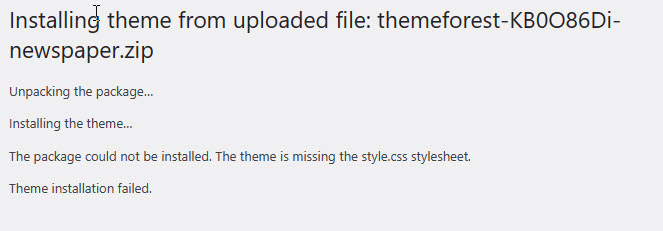
Hello I just purchased News Paper and the image shows the error missing style CSS files.
https://media.publit.io/file/balancethylife/Theme-Upload-Failed.jpg
 zhangleji
Hi, I installed bbpress and added the visual editor to make it easier for users to post.
However, the visual editor seems to inherit the theme CSS and all the icons are black background now, like this page https://weliveinus.com/forums/forum/1786/ I know the theme doesn’t allow me to use tagDev composer, but is there anyway I can stop the visual editor inherit the theme CSS? I want to make it no background color otherwise it’s so hard to see.
I added the visual editor in the functions.php with the following:
function bbp_enable_visual_editor( $args = array() ) {
$args[‘tinymce’] = true;
return $args;
}
add_filter( ‘bbp_after_get_the_content_parse_args’, ‘bbp_enable_visual_editor’ );
Thanks a lot!
 Anamaria
 Hello,
You can try to use this custom code -> https://i.imgur.com/JuUw7ap.png .wp-block-table td:first-child{
width: 35%;
}
Please set this code in the theme panel > custom code> advance css > phone section and will be applied only on a mobile.
Thank you!
 Calin
Calin Hi ItalyTravelS ,
what Bettina wanted to say is that this client uses a theme that has a featured set as a background element with css and they have no other attributes only elements set as HTML img have this option – https://i.imgur.com/G6ccb3S.png
Thank you!
Calin Hi,
Indeed that can be done, but it will need to edit the theme files, if you want, you can use this custom css:
.td-header-top-menu, .td-header-wrap .td-top-menu-full {

    width: 1024px;

    margin: auto;

}
Set the code in the theme panel > custom code> custom css and the top bar will have the same width as the ret of the content.
Thank you!
Anamaria Calin Hello,
I saw that now a module from the woocomerce plugin is used for content blocking and payment – https://i.imgur.com/5AdtUi1.png – https://i.imgur.com/0o3jfyV.png
It seems that the css you made is stronger than the one in woocommerce – https://i.imgur.com/bH86zwz.png so that that line/image no longer appears, please use this css:
.wc_ppp_paywall .post p a {

background-image: none;

}
I think you want to remove the link from the price. If so, you can use this css
.woocommerce ul.products li.product a.woocommerce-LoopProduct-link{

    cursor: default;

    pointer-events: none;

    text-decoration: none;

}
I hope this will help you!
Thank you!
Calin Hello,
For the featured image, there are 2 elements that can be used. One sets the image with css as the background image (the element it used and which is displayed on the size set on the element), and the other uses an img type element that shows the full image – https://i.imgur.com/Zu2goAo.png
I think Bettina said to disable that plugin because it interferes with some settings in the theme.
Thank you!
 Bettina
 Hello @sashos!
Please check the solutions presented in this thread: https://wordpress.org/support/topic/minifying-css-prevents-google-fonts-from-loading/
I hope that helps you!
Thank you!
Calin Hi,
The mobile version looks like this- https://i.imgur.com/UUDJr99.png if you want to make them bigger you can use this custom css:
.td_block_big_grid_3 .td-big-grid-post {

    height: 350px;

}
Please set the code in this place – https://i.imgur.com/pj0tZzP.png
I hope this will help you!
Anamaria Hello,
If you are using the Gutenberg editor, then there will be no sidebar in the editor, this will look like this -> https://i.imgur.com/F6PUBhU.png
If you are using some classic editor plugin, then the sidebar can be removed only from the files, for this, you need to go in -> wp-content/themes/Newspaper/editor-style.css and comment these lines of CSS -> https://imgur.com/EpWJhGZ
Hope this will help you!
Thank you!
 mungerald
 I finally found the mobile theme tab, put my CSS code but still not working on mobile. Only working on PC.
Here is the code
.tips-div {
background: #cef8d8;
padding: 30px;
margin-top: 50px;
margin-bottom: 50px;
border-radius: 4px;
}
 muterobert
 For anyone needing to find a way to make the arrows show permanently, you can use this CSS:
.[class name] .td-theme-slider i.td-slide-nav{

    opacity: 1;

    z-index: 1;

}
Insert your own name in [class name] (without the brackets), then add that name to the ‘Extra Class’ field in the block that you want to modify.
You can add another one with a different class name and then add that name to a different block to make different behavior for individual blocks.
 sashos
Hello,
I am having an issue with this code, which seems to be placed in the header section of every page:
WebFontConfig = {
google: { families: [‘FontOne’, ‘FontTwo’] },
fontinactive: function (fontFamily, fontDescription) {
//Something went wrong! Let’s load our local fonts.
WebFontConfig = {
custom: { families: [‘FontOne’, ‘FontTwo’],
urls: [‘font-one.css’, ‘font-two.css’]
}
};
loadFonts();
}
};
There is a lot of 404 errors because of these non-existing font css files. As a workaround I have placed two css files in the root directory, which stopped the errors “https://domain.com/font-one.css”. Still the problem continues with “https://domain.com/post-name/font-one.css”…
So, can you tell me in which directory exactly to place the css files called from the header in posts?
Alternatively, can you tell which file to open in order to remove this code from the header. (I looked at header.php, functions.php, but it’s not there.)
…
Website: https://zaistinata.com/
Google fonts are disabled in the theme panel. Custom Google font is used with url (https://fonts.googleapis.com/css2?family=Sofia+Sans+Semi+Condensed&display=swap).
….
Thank you!
Calin Hello,
I can not say for sure, but from that video, I think that the problem can be related to a css set on the logo, I believe the logo image is bigger than appears and it is applied a css on the logo element to make it smaller and that css is loading too late (possibly due to website optimizations), when you are logged in the problem persists?
Thank you!
Calin Hi Alex,
The CSS is one solution, another solution is to comment/delete the respective code from the theme.
But in that area only a user who is logged in can access the upload element, once again there are some restrictions set for that upload element and type, but I think it is unlikely that a user will continuously change his image and upload only big pictures.
Anyway, as I mentioned, a developer will check to be sure that this is not a vulnerability.
Thank you!
Anamaria Hello,
If you use a table from Gutenberg, then you need to use a custom code CSS, so please provide the link to your website where you have the tabel.
Thank you!
ezioboy Carlin, please take a look at this too
① Unknown line (I put CSS in custom for link in writing.) But this line is visible in product information.
② Previously, with the help of Carlin, I sorted the price and Buy Now button. But what I still don’t understand is that direct purchase full application on PC can’t apply CSS on mobile, so it can only look like this?
A link is attached to ‘\39000’ on the left. To remove the link, can you tell me what code I put in to make it disappear?
When you click the payment button, a slow or unknown page appears in the section leading to the checkout page. This problem is happening all of a sudden.
ezioboy hi carlin
“Using an element to set an image with css” What exactly does this mean? And what does “the image is very wide” mean? So what is the optimal size for this theme? This question has been asked from the very beginning.
Please let me know how to reliably upload thumbnails automatically in Real News Theme And why did Bettina ask me to delete the yellow pencil? I never touched CSS when uploading thumbnails.
Anamaria Hi,
Did you make some customize to optimize the website recently? Because there are some problems related to the combined CSS and js.
Thank you!
 theheritagelab
 Hi Calin,
So I tested the page speed and Siteground’s Optimization by excluding different components. I tested multiple pages for speed (posts with the Table of Contents; posts with galleries, etc)
The best result so far :
HomePage = 61 [mobile] / 79 [desktop]
Posts (average) = 62-64 [mobile] 89-91 [desktop]
Pages definitely load faster (1-1.3 seconds on desktop) & 4 seconds or more on mobile. >>> I am not using any mobile theme / AMP, so it could be because of that.
Nothing breaks if I exclude:
plugins/td-composer/legacy/Newspaper/assets/css/td_legacy_main.css
themes/Newspaper/style.css (not excluding this causes the Mega menu to not load and the Search bar on the header doesn’t expand).
Note: I had to exclude it from “CSS minification”, “CSS combination” both. It didn’t work if I excluded it from only the minification / combination.
Excluded from JS minification
/plugins/td-composer/css-live/assets/external/ace/ext-searchbox.js
wp-includes/js/jquery/jquery.min.js
/wp-includes/js/jquery/jquery.min.js
plugins/td-composer/legacy/Newspaper/js/tagdiv_theme.min.js
I also used another plugin, recommend it too : WP Meteor .. it eliminates render-blocking Javascript. I found that it not only works on top of SG optimisation, it works standalone too, without any “exclusion” scripts. Yet to test what happens if we add exclusions to it and eliminate the use of SG’s plugin.
Will appreciate any inputs you / other users have.
Have a good day!
Calin Hi,
The only solution is to use css for articles or areas where the layout is not appropriate.
If you need help with this, we can help you.
Thank you!
Calin Hi,
You can try this custom css:
.widget_recent_entries a{

    font-size: 16px;

}
You can set the code into theme panel > custom code> custom css.
Thank you!