
 Anamaria
 Hi,
The demo has a css that made the previous and next icons to look like that, there is the code, and you need to change the value for top to align as you want the icons. https://i.imgur.com/NqOjrGN.png
You can delete the extra class on the block and will look like this https://i.imgur.com/WVTYPMo.png
Thank you!
 Calin
Calin Hello,
1. To adjust this on footer you can use a custom css like this one:
html[lang="ar"] .td_block_popular_categories  a{

   display: flex;

    flex-direction: row-reverse;

    width: 100%;

}

html[lang="ar"]  .td_block_popular_categories  .td-cat-name {

    order: 2;

}

html[lang="ar"]  .td_block_popular_categories  .td-cat-no {

    order: 1;

}
This css should be set in the theme panel > custom code> custom css.
2. Please use tagDiv Composer to edit the page then use the right click on the sign element and click on delete – https://i.imgur.com/t5gPFGR.png
3. Yes, the child theme can be used. For this you can triger the language to apply that css on on that language, like this html[lang=”ar”] or on rtl like this [dir=”rtl”]. Now , most of element have options that allow you you to set the text from RTL to LTR and vice versa, but there are a few elements that do not have this option and need to be used a css.
4. Yes, the templates can be set as global per language and for each language it will be used the one set as global.
5. This is a strange situation, also that one is a page get from cloud library and it can be get for each language, but is not a page template. In that situation if you want to use that page as homepage, then you can assign it using the WordPress option from Settings > Reading – https://i.imgur.com/kxRD8Dh.png
I hope this will help you!
 jamshid
 Theme panel → custom code → custom CSS
 Merkucio
 Hello Anamaria,
First of all, my images are not the same size, but they look that in every block except this main block. And without any changes in the CSS code from my side.
How does this happen? Apparently, you simply did not do for the main block what you did for all the other blocks. Therefore, in all blocks all images look the same size, but in the main block they do not. This is why the navigation buttons jump.
Secondly, from your answer it is absolutely unclear to me exactly what changes I should make to the CSS code.
Could you please just copy the required piece of the code here?
 Anamaria
 Hello,
You need to have the same image size and you can change the pagination CSS here https://i.imgur.com/03bwOsi.jpeg
Thank you!
Anamaria Hi,
Please block /wp-json/tdw/save_css
If an attacker wants to target this URL /wp-json/tdw/save_css they can do so. Even if the website uses a different theme, the attacker can still try that URL. We could add an option to be able to enable/disable the Live CSS, it will be considered. But for now in order to remove it this can only be done with a modification to the composer plugin. I think that all that removing it requires is to comment this line of code – https://prnt.sc/RtwvL5Nc4ikR -> https://prnt.sc/ymZmhdUfp57U But as I mentioned, the attacker can still try to access the URL.
Thank you!
Anamaria Hello,
You need to add a row, stretch it if needed, and set the background in the CSS tab.
Thank you!
 LitRejections
I have added a background image for the mobile menu. But everytime I go into Theme Colours > Mobile Menu > and change the gradient from its default blue to transparent and save settings, it just keeps reverting back to a blue gradient. Like a code is telling it to ignore any opacity changes. I have no CSS on the site as it is new. Broken feature. Please help
 heathcliff
I noticed today my server is under stress. save_css is being targeted according to my log file.
Please advice.
Thanks.
 snoopy
1. How can i fix the most viewed section in the footer, the text should be at the right side, and the numbers at the left https://ibb.co/h269SqS
2. How can i remove the Signin/Signout option from the Top menu? https://ibb.co/kMvxKSz
3. I had to adjust many sections in the RTL template ebcause it was left aligned after the updates, and i’m using a child theme. how can i make sure that the updates does not break such css adjustments? and how come the template is RTL but aligned left? is it possible that i add CSS adjustments to the child theme that are related only to the Arabic language template? how?
4. I have two languages English and Arabic, for each i have its own template the RTL and the non RTL, should i mark the templates as GLOBL? what’s the meaning of GLOBAL?
5. There’s an error when assigning this template as a global one https://ibb.co/Kyrg1HZ
Thank you
 leogarcia1988ha
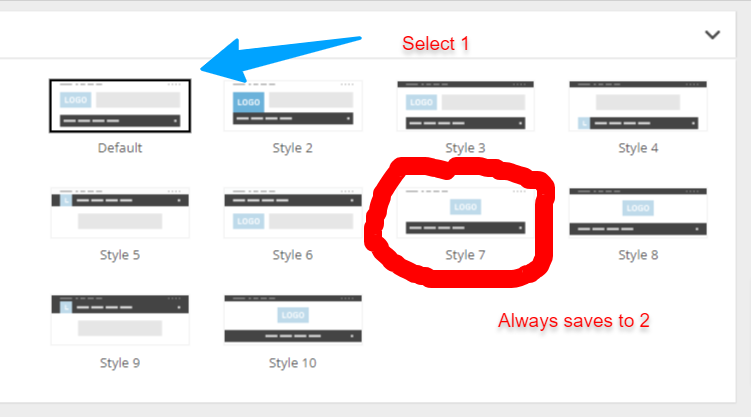
Hello. Everytime I try to change the header settings, it reverts to the original one (see image)
Also when I try to add new CSS code it does not save it.
jamshid Yes, I meant the Inside the post content, but this code I’m adding to the custom css theme code is not making any changes.
Anamaria Hello,
The forum can not be edited with tagdiv Composer, and a cloud template cannot be used for it.
Our forum is made custom. Please check this topic https://forum.tagdiv.com/topic/bbpress-css/
Thank you!
jamshidHi
I’d like to round the corners of the images in my text body. Could you please provide the CSS class for that?
Thanks in advance.
 bogdan.martiniuc
 This is all i have in my Analytics/Js Codes – https://snipboard.io/uZ3leN.jpg
I have some CSS but this does not insert any iframe.
And the ADS section is empty.
Calin Hello,
There is no need to use an extra function, for this just use this css:
.single .comment cite a {

    pointer-events: none;

}
This css can be set on single post template in a raw css so it will be used only on the single post templates.
I hope this will help you!
Anamaria Hi,
We do not have the tutorials, but plugins install normally and work with their options. Unfortunately, you will not be able to use TagDiv Composer to style them or to add elements that are available in the composer. Please check those guides https://codex.bbpress.org/bbpress-styling-crib/ and this topic https://forum.tagdiv.com/topic/bbpress-css/
Thank you!
Calin Ok, in this situation to use the code only on blocks, then replace the custom css with this one:
.td_module_wrap .td-post-date {

display: none;

}

.td_block_2 .td_module_wrap .td-post-date {

display: inline-block;

}
Thank you!
Anamaria Hello,
This can be done with custom code CSS, maybe, and using the page IDs. I can try to provide a code, but please send the link to your website and the pages where you want to hide it.
Thank you!
Calin Ok, first it will be need to enable the option for dates on modules in the theme panel and after that use this custom css:
.td-post-date {

display: none;

}

.td_block_2 .td-post-date {

display: inline-block;

}
The css needs to be set in the theme panel > custom code > custom css.
Thank you!
Calin Hi volkanunal, if the code is set in the theme panel > custom code> advance css > phone css it should not causing any problems. Also I do not understand how that code could interfere with the social counter, because the class td-top-menu-full should be only on the top bar.
Using that css is the only way to display the top bar on mobile.
Maybe the problem was not the css and maybe it is related to something from social counter if the problem was resolved after you disable the plugin.
Calin Hello,
Yes, the theme panel option for blocks is a global one.
Yes, it can be used a css to hide the dates. Just please provide some links from where you want to hide it and some screenshot to make sure I will remove it from the right blocks.
Thank you!
 andrea.turco
 I’m using Website Manager. I removed the theme colors and added my custom colors, but css variables are still undefined.
andrea.turcoHello, I’ve installed the Center Magazine Pro template. Some page elements have css variables as colors, but they’re not defined (checked with browser inspector). Where can I define the global css variables for colors? i.e. var(–center-demo-1)
 leagcooks
Hi, I have used the hide date in the theme panel but it removes the date on everything.
Is it possible with some CSS that it hides the date on categorys/modules but still shows the date on my home page like below?
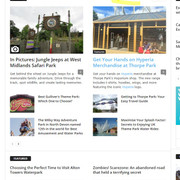
I would like the dates still to be shown on Block 2 on my homepage..
thanks



