
No search results were found in Documentation!
 BattleGrind
 Also,
6. How can I place images on the side of the text like in the demo site? https://imgur.com/AEYx1yV
Thanks!
 Calin
Calin Hi,
The difference is that a PRO demos is using cloud templates, in this way the whole website can be edited with tagDiv Composer.
Also when you tested the theme with a pro demo, did you disable the tagDiv Standard pack? only in this way you can get the best from a pro demo.
Thank you!
 tald2629
Hello, after editing my home page i am trying to open the composer inside categories but it is not exist when i leave the home page, how should i edit other pages?
tald2629hello i use Influencer PRO demo and i cant find where the default background pictures are stored so i will be able to change them, i want to change for example for the slider but cant find them.
also, where can change the number of slides the slider will be, suppose to be while i use the composer but i am not able to change this through.
thanks
 sahuchandralal
tagdiv importer detected an error. the importer will try to recover and continue to install the demo after you click ok on this dialog
 neolucky
After installing the PULSES PRO template, when reviewing articles it does not display as in the demo version.
on my website:
https://dev.mojcazin.ba/ocekuje-nas-vrelo-ljeto-padavina-nece-biti-skoro-nikako/
on demo version:
 Iryna IMN
Hi,
Is it possible to activate Whatsapp sharing also for the PC in Newspaper demo (TagDiv)?
Thanks
 brdan20
 EDIT:
My question is: What changes does a demo do the the website ? In terms of design, nothing is changed FOR THE MOBILE THEME if i install the demo, but in terms of performance i have 20+ points.
 jvalin
Hi Team,
I am trying to create a contact us page (since none of your demo has it which is quite shocking and disappointing)
Can you please let me know how what element do i need to use in tagdiv composer so that i can integrate wpforms shortcode?
Thanks,
Jvalin
 meeshymee
i downloaded a theme (instead of just parts) and now anything i click that is theme related says internal error. i can’t do ANYTHING. i can’t undo, i can’t get into theme panel or edit with composer etc. pls. help – i want to go back to my site before downloading a new demo.
BattleGrindHello
I have just bought this theme and have installed the Fast News Theme.
1. How can I change the colour of the top menu? I went through the theme panel but cannot seem to find where to change it https://imgur.com/sQCJ0cw
2. I like that the red colour of the top menu is a blended color. If I change to another colour, how can I keep it blended instead of having it as one solid colour?
3. On the mobile, the top menu is black and a different colour to the website version. No matter which demo theme I install, it’s always black. https://imgur.com/9fOCq7g How can I change this back to the original Fast News colour?
3. With the Composer, you can see what the page looks like before saving it, but with the theme panel, you cannot see the changes without saving it. Is there a way to make changes in the theme panel and see what my site looks like before saving it?
4. I would like my mobile menu https://imgur.com/9zs2vzn to look just like the demo version https://imgur.com/SuZmQKB How can get the icons, what is the text font and colour text codes from this demo menu?
Thank you!
brdan20Hello,
I have configured my website first page with tagDiv, and i also installed the tagDiv mobile & AMP theme
and on google page speed i have 70-80 for mobile and 90+ for desktop
Now, i have installed the Old Fashioned demo, and on mobile i have 90+ (and remember that the demo does NOT change the mobile theme, it’s still the theme that I configured) and on desktop i have also 90+.
My question is: What changes does a demo do the the website ? In terms of design, nothing is changed if i install the demo, but in terms of performance i have 20+ points.
Can somebody explain ?
 dronur007
 Hi! Your demo also has this problem.
https://demo.tagdiv.com/newspaper_pro/page/4/?p=index-bidpage%2F2%2Fpage%2F2%2F
 Ruffo
Ruffo Calin,
my website don’t have directory: /blog is the same with @jaspalsingh
I think the theme is breaking the Yoast code and adding a canonical tag.
I already tried almost everything and I can’t solve it!
I reset the theme, delete demo, I installed the demo again. add the filter to function file: remove_action (‘wp_head’, ‘rel_canonical’, 100); and nothing works.
My static page name is: ‘Inicio” (home)
But I don’t have posts page: /Blog
Please look my image:
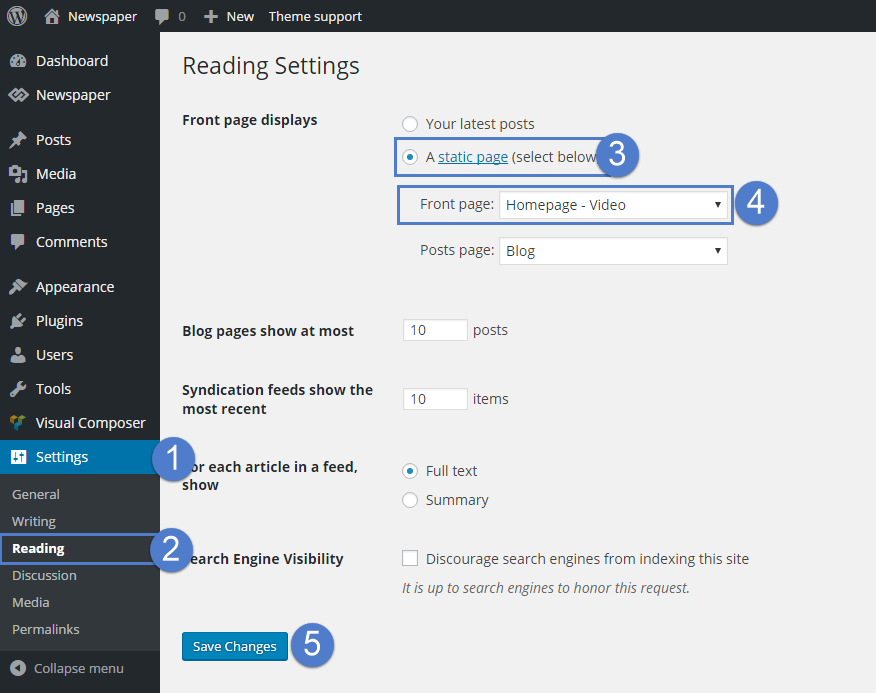
Could it be the issue you should fix? I can see that @jaspalsingh is not fixed the issue yet.
Thank you very much!
 tanteidee
Hi!
About Newspaper demo Gadgets PRO, I need to replace standard author with ACF code in the Single Related Posts (https://ibb.co/kQTXxSt), can you indicate the file containing the code that refers to the shortcode author string?
Thanks!
 ted
tedHello,
We would like to display tags on each article that is posted on our home page. Our site is based on the Tech News Pro demo. We were able to add categories to each post when editing the home page with tagDiv Composer, but have been unable to figure out how to add the post’s tags as well.
Can you tell me how to add tags to posts on the home page? Our site is regulatory.news. We’d like the tags to appear directly under the excerpt for each post on the home page.
Thanks for the help!
 megha
megha Hi Vlad,
Thanks for your help.
Regarding your answer for question 2:
I have tried to install the template as you mentioned.
But it is not the one I want to install.
I want to install this template in link below:
Kindly please check it.
I tried to find it in all the templates but couldn’t find it anywhere in tag library.
Our site is getting delay due to this.
I hope you can understand.
Please assist.
Thanks!
brdan20Hello,
I’m trying to create a new design for my homepage.
I have installed the “Black Version PRO” and I have saw that in desktop version I have the theme from the demo and on my phone I have the default theme (one with white).
How can I create a home page like the one from “Black Version PRO” ? Do I need to use WPBakery ? because I don’t see any option to edit the menu or other features in the tagDiv page builder.
The pages created with WPBakery are also compatible with AMP ?
Thank you 🙂
Calin Hi,
That blink is on our live websites too -> https://demo.tagdiv.com/newspaper/
I will as our developers about this problem, maybe they can find a solution.
Thank you for your understanding!
 ASedyshev
Hello
I load demo newspaper_lifestyle with content
I try edit menu in tagDiv Composer, but in inactively
I can edit only body, but heder with menu can`t….
How fix it?
Calin Hi,
That is because you are using the mobile theme plugin, you’ll gain a better speed then responsive version of theme, but in order to achieve that speed you’ll need to create a new content for pages because in the most of cases those were made with builders ( tagDiv Composer, WPBakery ) and you need to use only the mobile editor ( you need to set the content for pages in mobile editor and this content will be display on mobile theme)
-> https://i.imgur.com/9d0UWLT.png
Also you can show the responsive version on mobile theme -> https://i.imgur.com/m0bVB5T.png you can check more details about mobile theme in our documentation -> https://forum.tagdiv.com/the-mobile-theme/ or if you want to have the responsive version only, you can use the amp option from mobile theme -> https://i.imgur.com/oofST3D.png (to use the mobile theme template on amp) or you can disable the plugin.
Also if you are using the responsive version and you have a pro demo install, then you have a cloud header this can be edited as in our video tutorial from here -> https://www.youtube.com/watch?v=HXQQygkCCJo
Have a nice day!
 manoj@b107
hi there , it is urgent.
I tried to activate the theme but failed. i did installed the demo once and then reinstalled it before trying to active the theme . I reinstalled the theme once still facing the issue. please help.
 Shahidul
Hello there. I am having this error “Sorry, you are not allowed to access this page” when I am trying to activate the license in the updates. I installed the theme correctly. Installed a demo. Everything is good.
Thanks.
Calin Hi Nagarig,
Please note that our theme has not been tested on these platforms, therefore we can not say what results can be provided from there.
I just make a quick test with this website https://facesoman.com/ and on nibbler are no SECURE JAVASCRIPT LIBRARIES message -> https://i.imgur.com/Mtlv3W3.png also I tested some of our live demos and the messages is is not there.
Also in the file source on that website the only warnings are these -> https://i.imgur.com/QnxVfee.png
Thank you for your understanding!
 chiboyanyiki
Hi Support,
I need to know how to optimize my website speed. I recently installed the newspaper theme and the site loads fast for sure from my end but when I test on google site speed test and also gtmetrix, it doesn’t score good. Please, I need to know if there’s any additional setup I need to do from my end. I’ve tried every optimization means, I even installed demo of newspaper theme on one of my new website, yet doesn’t score great.
I need your assistance, if there’s any speed optimization for premium users?



