
- NewsmagAbove footer ads
- NewsmagSmart list ads
- NewsmagArticle ads
- NewsmagSidebar ads
- NewsmagHeader ads
 Alin [tagDiv]
 Buna,
Daca vrei sa adaugi content in pagina de forum, poti crea o noua pagina denumita Forums si sa folosesti shortcoduri – http://screencast.com/t/l3qDftKrgH De aceea am adaugat documentatia pluginului – https://codex.bbpress.org/ si forumul se poate accesa aici https://itutorial.ro/forums/
5. Incearca te rog aceasta solutie – https://forum.tagdiv.com/topic/newspaper-6-upgrade/#post-54686
6. Incearca totusi si fara plugin-uri, lasa doar Visual Composer activat, da clear la cache si incearca din nou. Daca tot ai aceasta problema trimite un mail la contact@tagdiv.com si da-ne acces sa ne uitam si noi de asemenea specifica problema si un link la acest topic.
7. Se poate cu ajutorul functiei do_shortcode sa-l afisezi de exemplu sub meniu si va aparea pe toate paginile/articolele iei shortcodul din pagina – http://screencast.com/t/PvC5klsnn si il adaugi in header style care il folosesti intr-un div – http://screencast.com/t/DjeiIu0n
<div class="td-container">
<?php echo do_shortcode('[td_block_trending_now limit="5"]');?>
</div>
Result: http://screencast.com/t/mnvGjWdA
1. Se pare ca lipseste documentatia pentru smart list(am trecut-o pe todo si o sa fie adaugata). Poti vedea documentatia de la Newsmag, se aplica in acelasi mod doar ca stilurile le poti gasi aici( http://screencast.com/t/ZhN4WjoX3 ) – https://forum.tagdiv.com/smart-list/ De asemenea acest topic poate ajuta – https://forum.tagdiv.com/topic/smart-lists/
2. Din pacate ai nevoie de modificari in tema pentru a obtine acest lucru. O cale mai usoara ar fi sa nu mai folosesti article top ad, ci un custom ad pe care sa-l afisezi dupa featured image pe template-ul care vrei – http://screencast.com/t/IXOzj4Cf0oc daca te referi la ad-ul special pentru stilul 1 acesta il poti muta asa – http://screencast.com/t/ATZMdDfux
3. Foloseste acest css in Theme Panel > Custom Css – http://screencast.com/t/lG6Gal6P9
.td-header-menu-wrap.td-affix {
background-color: white;
}
Mersi!
-
This reply was modified 11 years by Alin [tagDiv].
-
This reply was modified 11 years by Alin [tagDiv].
Alin [tagDiv] Hi,
You have to add that value the same like above in these files – http://screencast.com/t/UFopUU1fMq – http://screencast.com/t/vacSsBG81NZu paste your code in a custom ad and set the size from Theme Panel > Ads > custom ad.
And use the shortcode function to display your ad bellow the main menu – http://screencast.com/t/wd6YOeiQBnd
<?php echo do_shortcode('[td_block_ad_box spot_id="custom_ad_1"]');?>
Result: http://screencast.com/t/ifKtfGmrm
Hope this helps!
-
This reply was modified 11 years by Alin [tagDiv].
 jeffreya93
Hi,
I try the solution for newspaper 4 but no solution. Do you know of it is possible to add a 970×250 ad for all the pages and post without a custom action in visual composer.
The result is the ad under the menu bar< not the top header but the main header > we used the default menu style.
I need the same postion as Newspaper 4:http://screencast.com/t/UdpqvFyrOl
The following is not working;
Hi,
Please add the value inside the panel_ads.php file – http://screencast.com/t/om4CzClEd like Emil suggested then use the do_shortcode() function to place the ad you use inside an ad box in theme panel > ads, like this: http://screencast.com/t/yk9RG2diwKyj
Here si the code you have to add:
echo do_shortcode(‘[td_ad_box spot_id=”custom_ad_1″]’);
echo td_page_generator::wrap_end();
echo td_page_generator::wrap_start();
Result: http://screencast.com/t/UdpqvFyrOl
Note that my example it’s for the default post template without sidebar, you will have to modify and add the code into which template you want to have this.
Thanks,
 lighterside
 Thanks a ton Alin. It worked like a charm.
There’s one problem tho. I’m noticing that inserting the ad right there creates a gap between the nav menu and the main article block. The blue part (in the screenshot) is actually our background image showing through.
Is there a different place I can insert the “echo do_shortcode(‘[td_ad_box spot_id=”custom_ad_1″]’);” code so that it shows up in the (top) of the main body section?
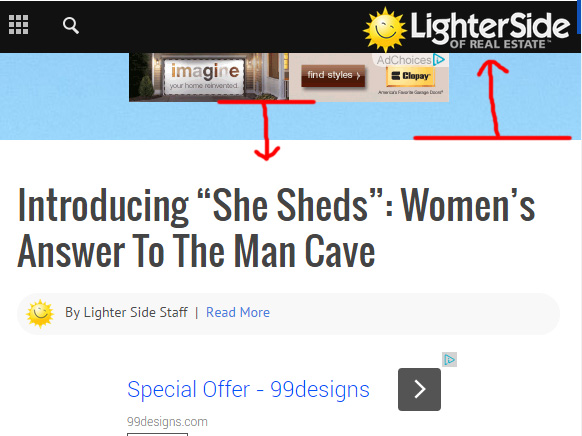
Thanks again Alin.
-
This reply was modified 11 years by
lighterside.
-
This reply was modified 11 years by
Alin [tagDiv] Hi,
If you want to take the shortcode (any block shortcode) please edit the page and switch to Classic View and take the shortcode – http://screencast.com/t/YutUK4FRJ
If you want to place it in the code please use do_shortcode() function – https://codex.wordpress.org/Function_Reference/do_shortcode
<?php echo do_shortcode('[td_block_ad_box spot_id="custom_ad_1"]');?>
Thanks!
-
This reply was modified 11 years by Alin [tagDiv].
Alin [tagDiv] Hi,
As you can see we changed this on newspaper 6, we have added next/prev image links. Also you can use do_shortcode() to display a custom ad on attachment page – http://screencast.com/t/hAKlfZOa – http://screencast.com/t/JCd8RZpmzH
<?php echo do_shortcode('[td_block_ad_box spot_id="custom_ad_1"]');?>
Thanks!
-
This reply was modified 11 years by Alin [tagDiv].
Alin [tagDiv] Hi,
You can try to add it after theme’s share buttons – http://screencast.com/t/Qr4xbSkxu5xt
$buffy .= do_shortcode('[whatsapp]');
Thanks!
 Lewis
LewisHi
i want add WhatsApp Share Button using this https://wordpress.org/support/plugin/whatsapp
its gave me this php cod <?php echo do_shortcode('[whatsapp]'); ?>
where shouid i add it to appears beside facebook and google +

or put it insted of pinterest ..
 bernienor
 Hi Alin!
Thanks for update. But I don’t understand.
The sites had identical settings – both using inline ad, and its the exact same code from our revive server, but still its rendered differently. I’m not placing the ad in post content, only using the theme Ad functionality.
You also say that (in the docs)
The ad code is automatically detected by the theme and it will be rendered using the following rules:
Google adSense – If you enter a google adsense code, the theme will make it responsive and the ad will fill the available space.
Simple ad code (js/flash/images) – this is rendered as entered by the user
[shortcodes] – the spot will run do_shortcodes() on the ad. Using shortcodes you can add adRotate ads to that spot
Now on the same site – two different articles is rendered differently
OK: http://www.hooked.no/artikler/villmarkskampanjen-2015
Wrong: http://www.hooked.no/artikler/terje-fikk-kjempelaks-i-drammenselva
Please help out, this is driving my nuts.
Alin [tagDiv] Hi,
Unfortunately theme doesn’t have an option to change header ad position on mobile. A solution could be to disable header ad on mobile, use a custom ad bellow the menu for header style that you use(edit header.php file and use do_shortcode function) – http://screencast.com/t/PpSNXg2mbCII off course enable this custom ad for mobile from Theme Panel.
echo do_shortcode('[td_ad_box spot_id="custom_ad_1"]');
Result: http://screencast.com/t/ySMAR0Jp78IF
Thanks!
Alin [tagDiv] Hi,
@mazhar I have already provided a solution here – https://forum.tagdiv.com/topic/how-to-change-featured-image-position-in-blog-post/
*Title
*Ad
*Featured image
Unfortunately you cannot achieve that without custom modifications and you have to use a custom ad instead of article top ad. You can try this, it should work:
The easiest solution is to paste your code in a custom ad from Theme Panel > Ads and use do_shortcode function in the post template above the featured image code – http://screencast.com/t/wTdBJhfG0y
<?php echo do_shortcode('[td_block_ad_box spot_id="custom_ad_1"]');?>
Result – http://screencast.com/t/f42xB0OpktYR
Thanks
Alin [tagDiv] Hi,
You will have to edit post template that you use and add your code there after comments – http://screencast.com/t/HHrMyism
You can use do_shortcode() function(if your widget ) to display your widget allows shortcodes – https://codex.wordpress.org/Function_Reference/do_shortcode
Thanks!
Alin [tagDiv] Hi,
1. Please use this divs – https://forum.tagdiv.com/ads/ as what you are using there is from Newspaper 5 documentation.
2. Just replace # with your url – http://screencast.com/t/mIAlBWEow9i
3. If you want to not display your header ad on your homepage you can add a condition to not appear on your home page – http://screencast.com/t/068xjygFQ you can find more info – https://codex.wordpress.org/Conditional_Tags
4. After you create your menus from Appearance > Menus – http://screencast.com/t/g87envJ30 you have to select your top menu and main menu from Theme Panel > Header section – http://screencast.com/t/hNRJq77FYOW
5. You will have to use fewer menu items if you don’t want menu goes on 2 rows/lines and adjust it using custom css. Let me know after you set your menu, I will try to provide a css solution, but if you have many menu items it will drop on 2 lines on tablets.
6. Unfortunately this is not recommended to create a page as your category and I cannot provide you a solution to make a category megamenu and link to a page.
There is a solution to add a banner/ad to category pages using do_shortcode function. Please check these topics as reference:
https://forum.tagdiv.com/topic/category-page-ads/
https://forum.tagdiv.com/topic/how-to-add-ads-in-category-pages/
Thanks!
-
This reply was modified 11 years by Alin [tagDiv].
Alin [tagDiv] Hi,
1. Copy this code – http://screencast.com/t/UuundnNlXw
2. Use the code that I have provided to you above do_shortcode – http://screencast.com/t/VykTEwlbHn7 and replace your shortcode text.
Thanks!
 alienplot
 I do not understand that I place in do_shortcode (‘your shortcode’);
Could be more detailed.
Thank you for your patience. Greetings.
Alin [tagDiv] Hi,
You can find header templates in parts > header – http://screencast.com/t/bbM68e3A You can create a condition depending in template that you use and add a condition to display “header ad” on your homepage and else used do_shortcode to display a custom ad(paste your code in Theme Panel > Ads). You can find out more details about conditional tags here – https://codex.wordpress.org/Conditional_Tags and use this code for your custom ad:
<?php echo do_shortcode('[td_block_ad_box spot_id="custom_ad_1"]');?>
Thanks!
-
This reply was modified 11 years by Alin [tagDiv].
Alin [tagDiv] Hi,
Yes, edit the page change to Classic mode and take the shortcode like I have suggested above and use do_shortcode function to display it (depending on header style that you use) bellow menu.
Thanks!
Alin [tagDiv] Hi,
Please take a look at the post template code – http://screencast.com/t/9XNlfPau as you can see the featured image is displayed before the post content and you will need custom work for this, the content function is in the td_module_single_base.php – http://screencast.com/t/KEQT0x8vBfF
The easiest solution is to paste your code in a custom ad from Theme Panel > Ads and use do_shortcode function in the post template above the featured image code – http://screencast.com/t/wTdBJhfG0y
<?php echo do_shortcode('[td_block_ad_box spot_id="custom_ad_1"]');?>
Result – http://screencast.com/t/f42xB0OpktYR
Thanks!
-
This reply was modified 11 years by Alin [tagDiv].
-
This reply was modified 11 years by Alin [tagDiv].
-
This reply was modified 11 years by Alin [tagDiv].
Alin [tagDiv] Hi,
If you want to this banner to appear on all pages(post, categories…) you can use do_shortcode function and display it bellow the main menu.
*change to Classic mode and take the shortcode – http://screencast.com/t/yHgk8eeDqtTf
*edit the header file and use use do_shortcode to display your banner depending what header style you use – http://screencast.com/t/YeUw15OUHgVg
echo do_shortcode('your shortcode');
Result: http://screencast.com/t/M49oSLRDGt
Thanks!
Alin [tagDiv] Hi,
Unfortunately Newsmag theme was initially designed at this width – 1021px – with an fixed grid layout,responsive as it is fluid and style for desktop/tables/mobile screens. So changing the width would not be easy as it needs changing the width value for all elements on pages and for this you would need custom work.
If you have basic css/html experience and you want to do this for post pages please check this topic, but you may need additional customziations – https://forum.tagdiv.com/topic/728-x-90px-ads-in-article-inline-ads/#post-43914
Also do you refer to the non-responsive ads? We recommend these divs to be used for non-adsense code – https://forum.tagdiv.com/ads-system-full-guide/ but you can try to use a plugin if you don’t want to use those. Theme Ad system was designed to work with adsense code and make it responsive for different screen sizes, but also you can use shortcodes in Ads section, so if you you use a plugin for your ads just paste the shortcode there:
[shortcodes] – the spot will run do_shortcodes() on the ad. Using shortcodes you can add adRotate ads to that spot
Thanks!
Alin [tagDiv] Hi,
If you don’t want to use recommended divs for banners(also there you have just to replace images and links), Theme Ad system also allows shortcodes so you can paste there plugin’s shortcode – https://forum.tagdiv.com/ads-system-full-guide/
[shortcodes] – the spot will run do_shortcodes() on the ad. Using shortcodes you can add adRotate ads to that spot
Hope this helps!
 Riskdiver
 Hi Lucian. That’s just perfect! Of course, do_shortcode is so flexible, all my nice blocks could be placed anywhere! Thank you very much for the thorough explanation and wonderful support. Definitely will recommend your theme and your team to the people. I wish “tagdiv” all the best!
With best regards 🙂
 Lucian
 Hi,
Glad you’ve managed to get it done.
1. Regarding that block on authors template it can’t be done using the page builder as the author template isn’t customizable however you could try to create your block using the VC page builder then use the do_shortcode function to place block’s shortcode to the template here: http://screencast.com/t/uuJFRN3aWNvQ
Should get a result similar to this: http://screencast.com/t/TUGrkBES9rF
2. On author template the post’s section is given by the loop.php template and for the it can’t be set other pagination other than the numbered one so the infinite/load more pagination can’t be used there, just on blocks. Here is the pagination called on author template on each sidebar case: http://screencast.com/t/KKsV9rFB4 – http://screencast.com/t/SmJ0BQrns
Thanks
Alin [tagDiv] Hi,
You can place a block instead of Related Articles using do_shortcode function:
* Take the shortcode of a block(use setting for sort order,title..): http://screencast.com/t/143oITwq9byA – http://screencast.com/t/NlBT470SYPnP
* Replace the Related Articles code in post template that you use – http://screencast.com/t/hvyJrzYZfdji – http://screencast.com/t/xj7M3jOJ – http://screencast.com/t/eapEU5vP6
<?php echo do_shortcode('your shortcode');?>
Thanks!
-
This reply was modified 11 years by Alin [tagDiv].
Alin [tagDiv] Hi,
Sorry for delay, we’ve answered to the most oldest topics and because you’ve added a new reply we missed your post!
I have also checked this, you can use plugin’s shortcode and replace the top menu social share like you wish – http://screencast.com/t/XclcTlcnpIj
<?php echo do_shortcode('[flagicons]'); ?>
And use this custom css in Theme Panel to customize flags – http://screencast.com/t/xRvWPGQqx
.td-header-sp-top-widget a {
float: left;
margin-right: 3px;
}
Thanks!
-
This reply was modified 11 years by Alin [tagDiv].
