
- Apitd_api_header_style::delete
- Apitd_api_header_style::update_key
- Apitd_api_header_style::update
- Apitd_api_header_style::add
- ApiAPI – Header style – Introduction
- Apitd_api_top_bar_template::update_key
- Apitd_api_top_bar_template::update
- Apitd_api_top_bar_template::add
- ApiAPI – Top Bar Template – Introduction
- Apitd_api_single_template::update_key
- Apitd_api_single_template::update
- Apitd_api_single_template::add
- ApiAPI – Single Template – Introduction
- Apitd_api_footer_template::update_key
- Apitd_api_footer_template::update
- Apitd_api_footer_template::add
- ApiAPI – Footer Template – Introduction
- Apitd_api_smart_list::update_key
- Apitd_api_smart_list::update
- Apitd_api_smart_list::add
 knthdgd
Hi!
This is kind of strange.
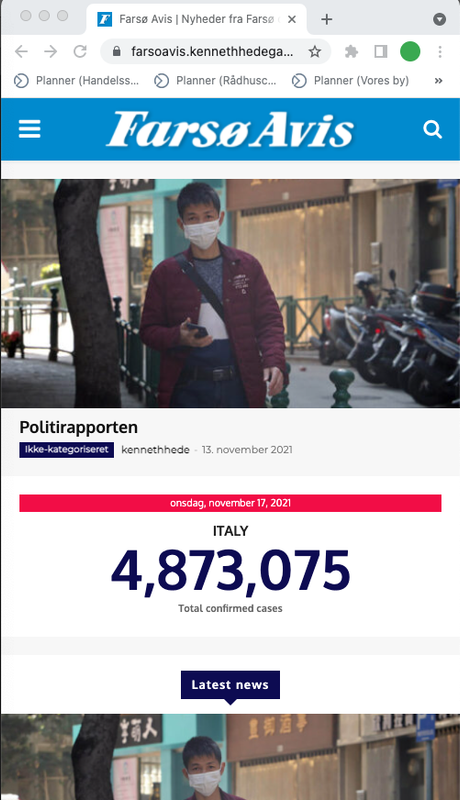
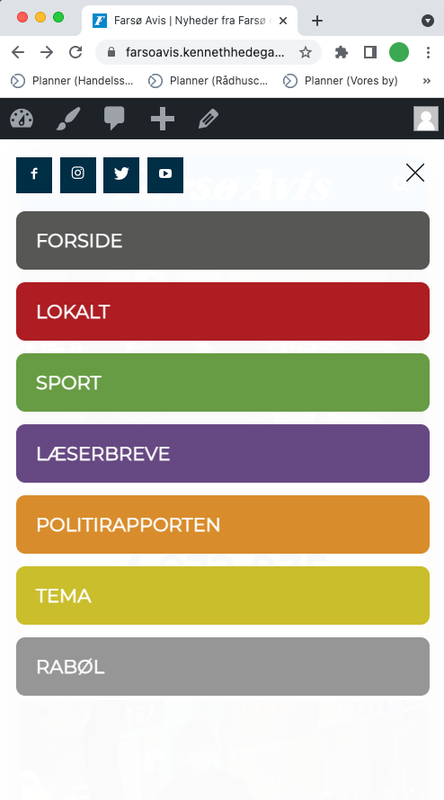
I designed a header using tagDiv Composer, and it works great on my desktop in different browser window resolutions. Works perfectly.
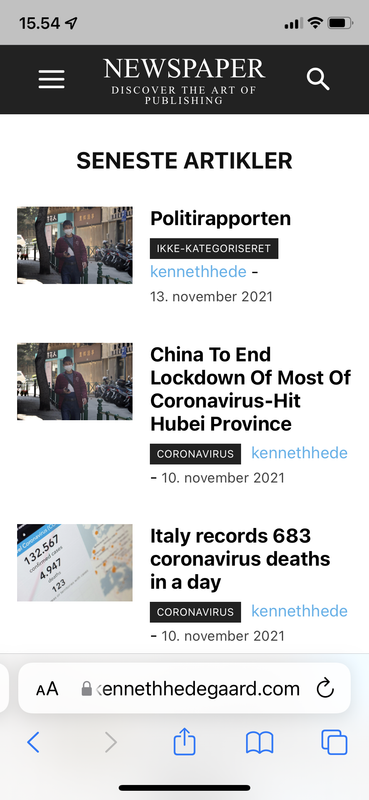
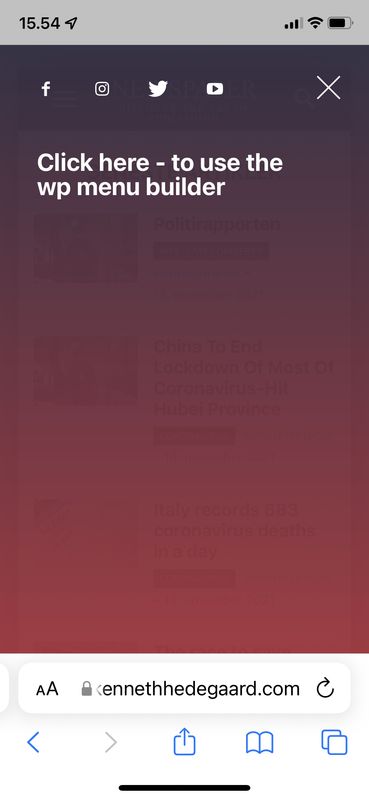
But when I visit the website on my iPhone it is a completely different design showing?
Live at desktop:
Live on mobile:
Heeeelp 🙁
 makerkook
I have the latest version of my WordPress Newspaper installed. I am using MegaMenu function in Header. However, there are many times when MegaMenu does not work. Sometimes it runs and feels like waiting to win the lottery. Can you help me with MegaMenu not working properly?
My WP Link: https://www.everwiki.net/
 Amit
Amit1. Add child theme support for mobile theme.
Many sites alter the layout or add some extra ad codes, widgets to a single post page. So, every time the theme gets an update, the developer needs to redo those customizations. (Single template, header, footer) [/wp-content/plugins/td-composer/mobile/]
2. td Plugin updates
Every time we update the theme it’s doesn’t auto-update all the plugins. Consider fixing this or provide plugin updates in the plugin section directly. Most of the time you just change the updated date of the plugin and not its version which confuses most of the users. Also, make sure it should not install or update the td plugin which is not in use. In our case, we don’t use td social counter plugin but on every update, it is being auto-installed from the welcome screen.
3. Changelogs and Patch files
Provide clear changelogs (you used to provide it earlier before you introduced td standard plugin and td composer) Now even on the minor updates like (Newspaper 11.3.2), we have been asked to update td composer plugin and we lose all the customizations made in the plugin files (especially for mobile). So releasing even minor updates takes a lot of time for each site. Earlier it was really super easy to release minor updates just by overwriting theme files with patch (https://www.screencast.com/t/BXNL8iaX). Now every update has a few changes to the plugin files as well. I will suggest you provide clear changelogs for plugin files as well.
4. AdSense Responsive ad units for AMP (AMP Compatible ad unit)
Google recommends using responsive ad units on the site as they have started auto optimizing ads on the page. The mobile theme supports responsive ad units, but it uses fixed-size for AMP.
AMP should support Responsive AMP-compatible ad units. I am using Responsive AMP-compatible ads and I have seen improvements in earning. The last time I shared a solution for this via mail was on April 2, 2019, with you, but you have not implemented it yet.
 /*

		         * if its a google adsense ad on amp..

		         * we use the 'g_data_ad_client' && 'g_data_ad_slot' to generate a adsense ad type > amp ad component

		         *

		         * <amp-ad width=300 height=250

				 *    type="adsense"

				 *    data-ad-client="ca-pub-2005682797531342"

				 *    data-ad-slot="7046626912">

				 * </amp-ad>

		         *

		         * */
/*
* Modified by Amit Refer: https://support.google.com/adsense/answer/7183212?hl=en
**/
$buffy .= '<amp-ad width="100vw" height="320" ';
$buffy .= 'type="adsense" ';
$buffy .= 'data-ad-client="' . $ad_array['g_data_ad_client'] . '" ';
$buffy .= 'data-ad-slot="' . $ad_array['g_data_ad_slot'] . '" ';
$buffy .= 'data-auto-format="rspv" ';
$buffy .= 'data-full-width> ';
$buffy .= '<div overflow></div> ';
$buffy .= '</amp-ad>';
5. Newsletter
The theme comes with Newsletter plugin, but it does not work with mobile theme and AMP. Now Google has started mobile indexing first. From the sites I am handling, I can see 80-85% of overall traffic is from mobile devices.
Try to make a Newsletter plugin compatible/usable with a mobile theme/AMP version. Having a Newsletter popup will be the cherry on the cake. Currently, we have added Newsletter on Mobile and AMP by modifying the code.
That’s it for now.
 Anamaria
 Hello,
I’m glad you solved the issue.
I saw you use the mobile theme, so to change the header color you need to go in Theme Panel -> Mobile Theme -> Theme Colors -> Menu bar =>https://i.imgur.com/Aes2jN8.png
Thank you!
 Bettina
 Hello Sebastian!
You can change the url from wp-content\plugins\td-cloud-library\shortcodes\header\tdb_header_user.php 385 line
Hope that helps you!
Thank you!
 Andreazanetti
 i contacted siteground, their support is workinf 7/7 24h. i solved with them. Nother question. How can i change the mobile header colour?
 mihai_somanescu
 jaydeedaley1
Dear Support
I decided to change the theme, installed Art Creek on http://www.jaydeedaley.com but the theme header is missing. When I tried to install a cloud template header, the download fails to load a template and there is the error:
Error at zones: 5(models) : 1(dom). The model does not match the content Current state has involved an issue. You could try an UNDO operation (CTRL+Z / CTRL+SHIFT+Z)
I urgently need to complete this website this week, but the page errors when trying to edit it, the cloud templates don’t install, the demo hadn’t installed complete.
I would be grateful if you can help me resolve this matter.
 Sebastian
 Hi Bettina,
What if I want to change the link on the logged in user name, as per above, but within a cloud header template (like in Header Template 7)?
Thanks!
Sebastian
-
This reply was modified 4 years by
Sebastian.
 Calin
Calin Hi,
It looks that now the ad provided is correctly display -> https://i.imgur.com/mxAtcjc.png -> https://i.imgur.com/tC8C4HW.png -> https://i.imgur.com/5FG2usr.png
For your screen it looks like the content deliver for add is beggar then the size of header ad.
Thank you!
Bettina Hello!
You can modify only from the CSS code. For example, try to apply this code in the Live CSS, save it and see the changes:
.td-technology .tdm-header-style-2 .sf-menu > li > a { padding: 0 22px!important;}
Thank you!
Anamaria Hello,
@OnlineTushar as it is written in the displayed text, that type of header is not a cloud header.
So please make sure you have Header Template -> https://forum.tagdiv.com/header-manager/
@AWAY FROM LIFE Please make sure that all theme plugins are installed (tagDiv Composer, tagDiv Cloud Library and tagDiv Standard Pack if you are using standard elements). Most of the time one of the theme plugins is not activated.
Thank you!
 avertizor.ro
Warning: Invalid argument supplied for foreach() in /home/avertizo/public_html/wp-content/plugins/td-composer/includes/tdc_mapper.php on line 42
Warning: Cannot modify header information – headers already sent by (output started at /home/avertizo/public_html/wp-content/plugins/td-composer/includes/tdc_mapper.php:42) in /home/avertizo/public_html/wp-includes/functions.php on line 6712
Warning: Cannot modify header information – headers already sent by (output started at /home/avertizo/public_html/wp-content/plugins/td-composer/includes/tdc_mapper.php:42) in /home/avertizo/public_html/wp-admin/includes/misc.php on line 1310
Warning: Cannot modify header information – headers already sent by (output started at /home/avertizo/public_html/wp-content/plugins/td-composer/includes/tdc_mapper.php:42) in /home/avertizo/public_html/wp-admin/admin-header.php on line 9
What can i do? This error comes from tagDiv.mobile.themes and AMP plugins.
 Toma Romica
Hi,
Adsense ads in the header often do not display correctly. Why? Can you help me? Thanks.
My blog: https://www.programegratuitepc.com/
 charamis
I have the 11.2 Version. After I update to 11.3.2 the whole site is broken.
TagDiv plugins like “TagDiv composer”, “tagDiv Standard Pack”, were not enabled. After I enabled them only some blocks was working. Header was reset to default demo and the main body of the home page was just displayed the pseudocode of TagDiv composer.
I restore now the site in previous backup.
How can I be sure that the site will not broke again? I want to update it.
Can you give me a solution?
 OnlineTushar
Hi,
I want to edit the header cloud template but I am getting an error message. Please check attached screenshot.
Screenshot :
 Sikandar
 I did install the pack but I am not seeing any options to change header and footer inside the theme panel.
 cancbry
 Same here. Tried reverting to a previous update of the theme and the header still won’t change + some pages are totally broken and displaying code.
SikandarIt broke the current layout for header, footer, and grid. I managed to fix the grid but header and footers aren’t accepting any changes. Reverted to the previous version, still nothing is working.
 jitendrachrysolite
Hello,
I’m working on my new project where I have used the “technology hub” theme and I want to remove sing up button from the header main menu but can’t find any option to remove it, the theme panel option (SHOW SIGN IN / JOIN) isn’t working for it, and this theme header isn’t editable with tagdiv-composer, I really need your help and also let me know how to change the main menu padding.
Screenshot: https://paste.pics/EY0ER
here I found some related issues but not satisfied: https://forum.tagdiv.com/topic/newspaper-technology-demo-template/
Anamaria Hello,
Depends, if you have block 1-24 in your website, or if you use style header/footer/post from the theme panel, then if you deactivate the tagDiv Standard Pack you will only have shortcodes, but you can disable it, you make the changes for the mobile theme, after which you can activate it again.
Thank you!
 LPresse
Hello,
Our site was affected by the Licence Key incident and the update 11.3.2 changes nothing.
Our website is always broken, SEO rankings is damaged.
Images and Header have disappeared, fonts and colors are wrong…
We pay licence key + support and you have no solution.
You have updated Theme, updated plugins, deactivate and desinstall plugins, reactivate plugins, clear cache…
Nothing works !
Bettina Hello!
This issue has been discussed here: https://forum.tagdiv.com/topic/how-to-add-header-tags/
Thank you!
Bettina Hello!
This issue has been discussed here: https://forum.tagdiv.com/topic/how-to-add-header-tags/
Thank you!
 pablo ™
 Hello Anamaria,
Thanks for help me and I’m sorry for giving you so much trouble.
The first code left the header ok, but removed the margins from Google ads.
The second code fixed Google ad margins but didn’t fix the header. He just fixed the menu, but left the logo and banner out of alignment.
P.S.: The second code is online.



