
- Apitd_api_header_style::delete
- Apitd_api_header_style::update_key
- Apitd_api_header_style::update
- Apitd_api_header_style::add
- ApiAPI – Header style – Introduction
- Apitd_api_top_bar_template::update_key
- Apitd_api_top_bar_template::update
- Apitd_api_top_bar_template::add
- ApiAPI – Top Bar Template – Introduction
- Apitd_api_single_template::update_key
- Apitd_api_single_template::update
- Apitd_api_single_template::add
- ApiAPI – Single Template – Introduction
- Apitd_api_footer_template::update_key
- Apitd_api_footer_template::update
- Apitd_api_footer_template::add
- ApiAPI – Footer Template – Introduction
- Apitd_api_smart_list::update_key
- Apitd_api_smart_list::update
- Apitd_api_smart_list::add
 aurelienmatte
Hi,
Just bought your theme and it’s great work !
I already have a menu plugin named UberMenu from my actual website, and i want to keep it with your theme. But it only appears fine with the defaut header, not with a Cloud Template.
The problem is there is not too many options to personalise the default theme, compared to Cloud Template headers. I’d like to modify the size of the logo, how can i do it for a default header please ?
Also, i found the Header Composer quite hard to master because of the columns and rows, it’s difficult to organise. Do you have any documentation for this please ?
Thank you very much for your help, see you
 Pedro Ferreira
Hi,
We are using the latest version of the Newspaper plugin and migrated fully to using the cloud templates.
Context. We have a set of pages that have a different look and feel from the rest of the website. Our approach to that is straight forward, we created these pages with TD Composer and made sure that they reference the desired header, footer and menu.
Now we have a new requirement, where, when a particular group of users visits the rest of the website, we want to apply the same look and look and feel (specifically headers/menu/footer) as the pages above.
We are using the “Simple Membership” plugin and we can differentiate between visitors that are logged in, or not. We can have more granular control than that (hence the requirement about a specific group of users).
Questions:
– Can we override the header/menu/footer selection for a sinlge post at run time?
My assumption here is that we can implement and trigger some conditional logic along the lines of
if(user_group_x()) {
// code to specify replacement header cloud template
// code to specify replacement menu
// code to specify replacement footer cloud template
}
– If Yes, how to we get about it?
– A secondary question is about the possibility to change the post layout in the same way i.e. can we override the Post template selection programmatically?
Kind Regards,
Pedro
 Dabang
Dear Calin,
This is Suman Dwivedi, I Have My client Website, and I have a Premium Theme i.e Newspaper X, I have Three Concerns.
1. jQuery Migrate Helper — Warnings encounteredThis page generated the following warnings:https://politicswala.com/wp-content/themes/Newspaper/includes/wp-booster/wp-admin/js/tagdiv-theme-plugins-setup.js: jQuery.fn.load() is deprecatedjQuery.fn.live() is deprecatedjQuery.fn.live() is deprecatedjQuery.fn.live() is deprecatedhttps://politicswala.com/wp-content/plugins/td-composer/assets/js/js_files_for_wp_admin.min.js: jQuery.fn.load() is deprecatedPlease make sure you are using the latest version of all of your plugins, and your theme. If you are, you may want to ask the developers of the code mentioned in the warnings for an update.
2. When I share the Post or Blog URL link on WhatsApp, Then No thumbnail and meta are shown.
3. The website Speed is too Low, When I used any plugin for optimizing, the header shows error, here so many coding on the header section.
blob:https://web.whatsapp.com/fc295856-bdfb-4af0-9776-acfe699a8dec
What can I do please suggest me.
 Vikramsinghrao
When I open my website inside a mobile device, the menu bar is not opening in the header menu and the search bar is not working either….
What is the reason behind this? Once you tell me in detail, I have spoken to my server provider, he spoke to the theme developer.
it’s my website not a work header menu bar in mobile device how to solve this error check it please
https://techproidea.com/
 Vlad S
 Hello !
Yes, if you want to edit the templates you will have to only use tagDiv Composer.
Yes, or you can only edit the header or any other template by going into the dashboard as you can see here: https://www.screencast.com/t/1CschYfoEg4
I hope this was helpful !
Thank you !
 Calin
Calin Hi,
Usually this is happen when you set some elements that you want to be in your page content -> https://i.imgur.com/DyXJd73.jpg, but from mistake you set it in header zone -> https://i.imgur.com/drifeq9.jpg open your page in tagDiv Composer and click on the email element to see if this is set in content or header and if is in header set it in that page content using drag and drop.
Let me know the results!
 viniciusyamada
Hello, how are you?
I manage the banners and ads through the ADs of the Theme Panel, which is really easy to manage. However, the site is in three languages by the WPML plugin, how to define a banner for each language version? In principle it would be in the “header” and “top article”. Grateful.
 pavel_t
Hi, in Newspaper theme with social icons on, in mobile view there are social icons inside mobile menu, on the top, left to Close button.
I’m trying to create Cloud template based on one of yours Demo layout. There is social icons element in header, but when I switch to mobile view, social icons element disappears – and it is not even in the mobile menu… I browsed whole settings area for menu element as well as social icons element but can’t figure out how to set social icons into mobile menu, while creating Cloud template header?
 japjeet1
I created an animated advertisement on adobe website, and when downloaded it – I got it in mp4 format.
now after placing it on my header ad spot, – it’s not loading appearing properly. showing a broken image link. – Please advise on how can I get a custom animated advertisement to appear on my website.
Thanks
 SvijetS
 Also, please how to remove td-demo-header-menu from xmlsitemap
 Cara
Cara Deci un demo PRO poate fi editat DOAR folosind TD Composer?
Iar optiunile din Manager, din TD Composer, referitoare la Header de ex, se suprapun peste setarile pe care le poti accesa direct din TD Composer, cand dai click pe portiunea fizica a headerului ?
 Tribiker
Hi,
The images in my header are pixelated.
I already tried to regenerate thumbnails and to select full size in media (this option doesn’t appear on my wordpress)
I also tried do disable smush and nothing changed.
 gumball44
 .td-main-menu-logo img {
margin-bottom: -5px;
}
this code works on amp version but not on mobile version can you help me ?
I would like to apply this code on mobile version, mobile logo in sticky header
-
This reply was modified 6 years by
gumball44.
 theincredibleyaya@gmail.com
Whatever I put in the first row on my homepage under the top menu bar gets carried into my blog posts (shows up as header in blog post)
see what I mean here:
https://thecreatecafe.com/2020/09/14/how-to-differentiate-your-jewelry-in-a-saturated-market/
The “email signup” i only want on my homepage. And I added it on the homepage with TD composer. But it got carried into all my blog posts too.
How to fix?
 MANOHAR CHIMMANI
I’m using Default PRO Header template
Newspaper – version: 10.3.6
I don’t see any Topbar settings tab in theme panel.
is there any way to change topbar background color?
Thanks
 eemskrant2
I had my ads aligned in the sidebar now i noticed there off again.
See – https://www.eemskrant.nl/ –
I have some custum codes running:
.td-g-rec-id-custom_ad_4 { margin-left: 0; }
.ajdg_grpwidgets,
.td-a-rec-id-sidebar,
.td-g-rec-id-custom_ad_4 .adsbygoogle {
}
.td-all-devices{
margin-bottom:5px!important;
}
.td-g-rec-id-custom_ad_3 { margin-left: 0; }
.ajdg_grpwidgets,
.td-a-rec-id-sidebar,
.td-g-rec-id-custom_ad_3 .adsbygoogle {
margin-bottom: 10px
}
.wpa {
float: left
}
.widget .g {
max-width: 100%;
}
.widget {
font-family: ‘Open Sans’, arial, sans-serif;
margin-bottom: 10px;
}
.td-g-rec-id-header {
text-align: center;
}
.bsaProContainer-20 {
max-width: 300px;
margin: 0 auto;
}
Calin Hi,
I think that you can achieve this with a custom css like this one -> https://i.imgur.com/YsgY0Of.png
#td-header-menu #td-top-mobile-toggle .td-icon-mobile, #td-header-menu .td-search-icon{

    margin-top: 10px;

    height: 40px;

    width: 40px;

    line-height: 45px;

}

#td-header-menu .td-search-icon .td-icon-search{

    line-height: 45px;

  margin-left:-10px;

}
Set the code in theme panel> mobile theme> custom code> css.
Thank you!
 thearrangers
Hello
On all the posts, there is no gap between header and banner, but on contact us page, there is gap between header and contact us banner. I could not find option to remove this margin.
(No Margin)
https://www.knitpay.org/tour-and-travel-booking-wordpress-plugins-supported-in-knit-pay/
(Margin of around 90px between header and banner)
https://www.knitpay.org/contact-us/
 mouthing off magazine
 Dear Calin,
I think I maybe didn’t explain myself well enough here.
So, what your showing, if I’m understanding your instructions correctly, is the Header for Mobile. I’ve already customised this area. What I’m trying to do is customise the Mobile Browser Address Bar which is the bar above this header used to get to and from the website.
See here: 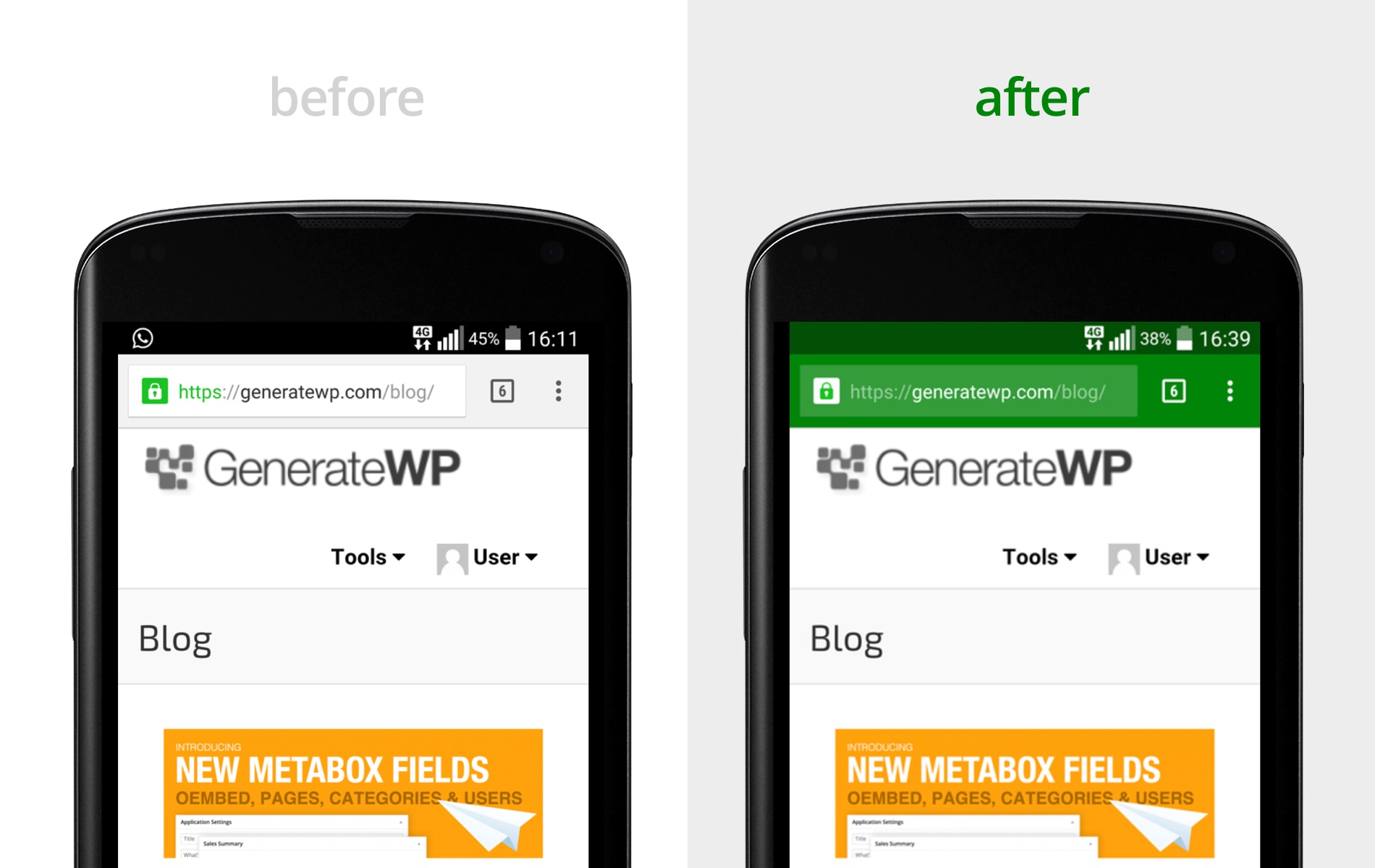
I just want to change the colouration of this bar to match with my theme. So going from white to yellow (#FFFF00) for android phone users and then white to translusent-black for iOS users.
Apologies in advance if I’ve misunderstood your instructions here.
Please let me know if you need any more details from me.
All the best,
Greg
 T Cheung
 Terrifying as i found it clashed the Pages created by not using TD composer, when we save the customized headers using TD composer.
T CheungI have created two Pages and made them as Front page and second Page in the site. However, when i customized the top header using the TD Composer. The first Home and second page “label” are still there, but cannot be referred to or loaded. The first two menu labels became unclickable even i removed and added them back at the “Menu” setting. Anyway to link the pages up at TD Composer, or other area?
Thanks.
T CheungWhat’s the API Key when using the header weather? What exactly the location should be input? Any short form?
Thanks.
 Golam Rabby
 I am not using any plugins except the tagdiv theme plugins… you can checkout This Image of the the plugins I am using… I am not using any Child theme and cache plugins.. everything is clean.. And anothr thing what about the Search Button I mentioned earlier.. how can I move it to the black header menu?
 line77
hi,
I set the header live search placeholder text and when I click the live search icon the placehoder text just flashes for a microsecond – maybe because the cursor is set to the search fiueld automatically – can the placehoder text stay on when I click the header live search icon???
 pbnshelley52
I’m using the Gourmet Pro demo and cannot find anywhere to change the header image. I can click on the row, and delete the text overlay element, but I want to actually swap out the image for my own. Please advise, thank you



