

Dear Tag Div Team,
Today I noticed that our Instagram widgets were not working, both in the footer and sidebars.
I went to our Instagram Access Account Configuration to check that the API was in date and it was. I tried to reconnect and this failed, so therefore proceeded to delete the configuration to start afresh.
However, even after doing this it is still failing to connect with our Instagram after clicking ‘Continue’. All it does is either bring up an error message or just loads back into the theme panel of the site.
All help would be much appreciated as our site has gone live and having these gaps doesn’t look great.
All the best,
Greg
The message that appears is as follows:
tagDiv Instagram API V2
Instagram Connection Error
Failed to connect account.
Error type: access_token_verification
Error message: error_type: OAuthException error_code: 2 message: An unexpected error has occurred. Please retry your request later.
Ignore!
Don’t worry I managed to solve it. I emptied my cache and it has done the job. All back and operational!

Thanks for that Calin.
I do have another question (apologies for all my recent posts)
I’m trying to find a way of altering our Mobile Browser Address Bar Colour and I can’t seem to find an option of doing so in the theme.
I’ve read that I can alter this by adding additional code into the functions.php file
As shown here (https://generatewp.com/easy-custom-mobile-chrome-address-bar-colors-wordpress/)
However, I am a little hesitant to do so, as I have read that this could potentially cause issues either now or later down the line.
Is there an easy solution to this or have I missed something within the theme panel that would do this for me?
Thanks for all the help once again!
Greg
Hi,
Yes, you can use a cloud header from tagDiv Cloud Library, these can be edited using tagDiv Composer and you can adjust the mobile layout (please note that this can be use only if you are not using the mobile theme plugin).
-> https://i.imgur.com/Gr8rnN0.png -> https://i.imgur.com/cc9yP6A.png
Thank you!
Dear Calin,
I think I maybe didn’t explain myself well enough here.
So, what your showing, if I’m understanding your instructions correctly, is the Header for Mobile. I’ve already customised this area. What I’m trying to do is customise the Mobile Browser Address Bar which is the bar above this header used to get to and from the website.
See here: 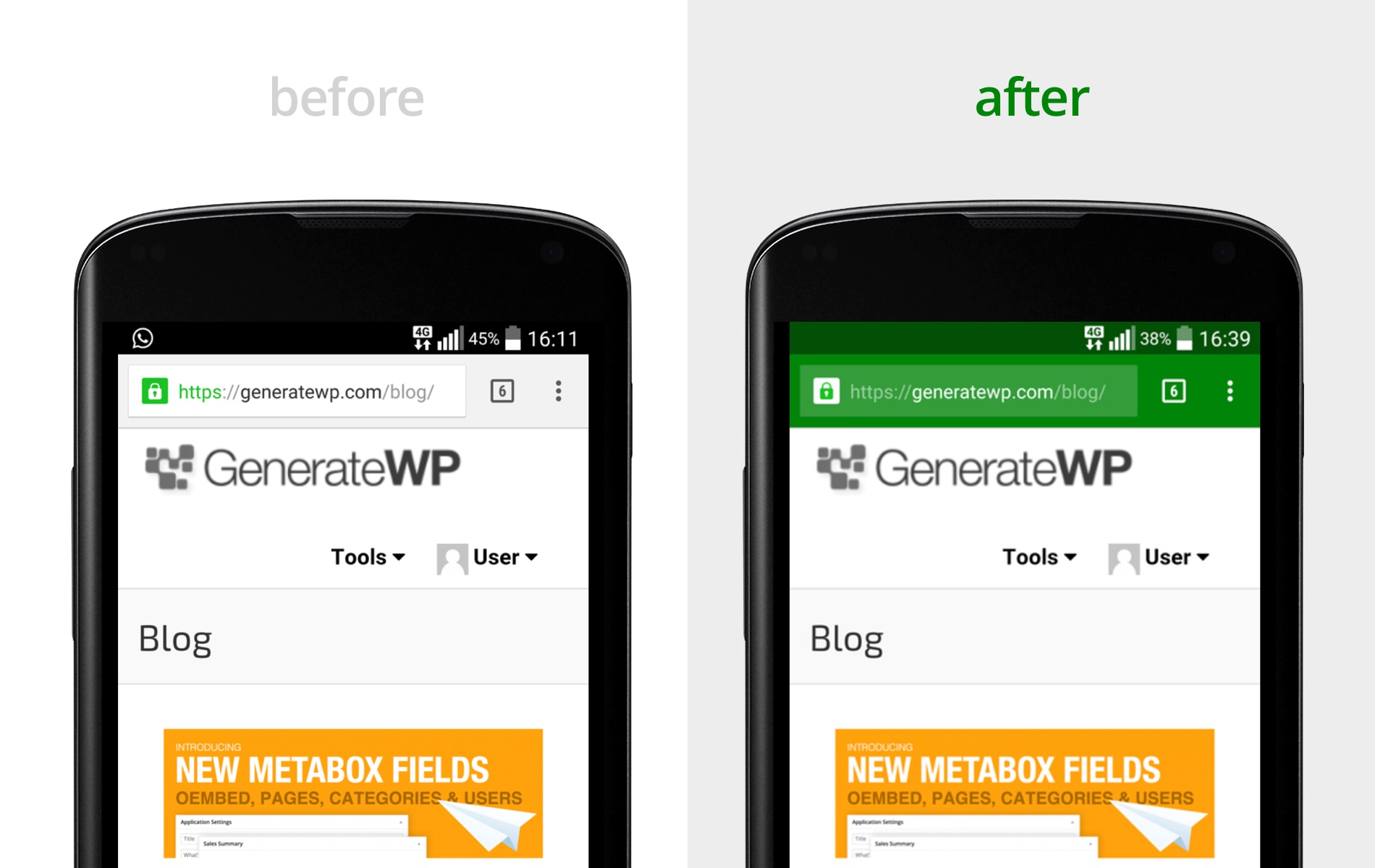
I just want to change the colouration of this bar to match with my theme. So going from white to yellow (#FFFF00) for android phone users and then white to translusent-black for iOS users.
Apologies in advance if I’ve misunderstood your instructions here.
Please let me know if you need any more details from me.
All the best,
Greg


Same problem happened to me. A few days ago I noticed that instagram widgets are not working. I still can’t connect even though I cleared the cache. I also tried in different browsers. asks permission from instagram. I allow it and I just get a blank screen saying “tagDiv Instagram API V2”.
screenshot is here:
https://prnt.sc/mmSIpskYblZN

Hello @fetihmedya,
Please let me know what version of the theme you have.
Also, please check this guide on how to connect to Instagram https://forum.tagdiv.com/instagram-widget/
Thank you!
Theme Version: 11.5.1
I glanced at the guide. It was working flawlessly before. But I tried it when it stopped working recently. As I said before, I am faced with a white screen that says “tagDiv Instagram API V2”
I just applied it. but it didn’t. The same problem continues.
I disconnected facebook and instagram. I tried to connect again. This time facebook did not connect either.
https://prnt.sc/mrVSIdAuLtbz
-
This reply was modified 4 years by
fetihmedya.
Hello,
Strange. We can take a look.
Please contact us via email at contact@tagdiv.com and provide the following:
– admin URL and credentials
– CPanel URL and credentials
– a link to this topic in order to identify you
Thank you!
Thank you. My problem is solved. We realized that the problem was with some of the chrome extensions I used. I am also very grateful for your special help. Thank you so much.


