
- Apitd_api_header_style::delete
- Apitd_api_header_style::update_key
- Apitd_api_header_style::update
- Apitd_api_header_style::add
- ApiAPI – Header style – Introduction
- Apitd_api_top_bar_template::update_key
- Apitd_api_top_bar_template::update
- Apitd_api_top_bar_template::add
- ApiAPI – Top Bar Template – Introduction
- Apitd_api_single_template::update_key
- Apitd_api_single_template::update
- Apitd_api_single_template::add
- ApiAPI – Single Template – Introduction
- Apitd_api_footer_template::update_key
- Apitd_api_footer_template::update
- Apitd_api_footer_template::add
- ApiAPI – Footer Template – Introduction
- Apitd_api_smart_list::update_key
- Apitd_api_smart_list::update
- Apitd_api_smart_list::add
 morikahn
 OK, follow up on this.
I’ve determined the issue seems to be when i tried to add / remove elements from a header template. If I just modify one (im making mods to the default 3 header template) its works fine.
So.. I’m good for now, but maybe this help you guys (the devs) if you come across this problem.
 bdil
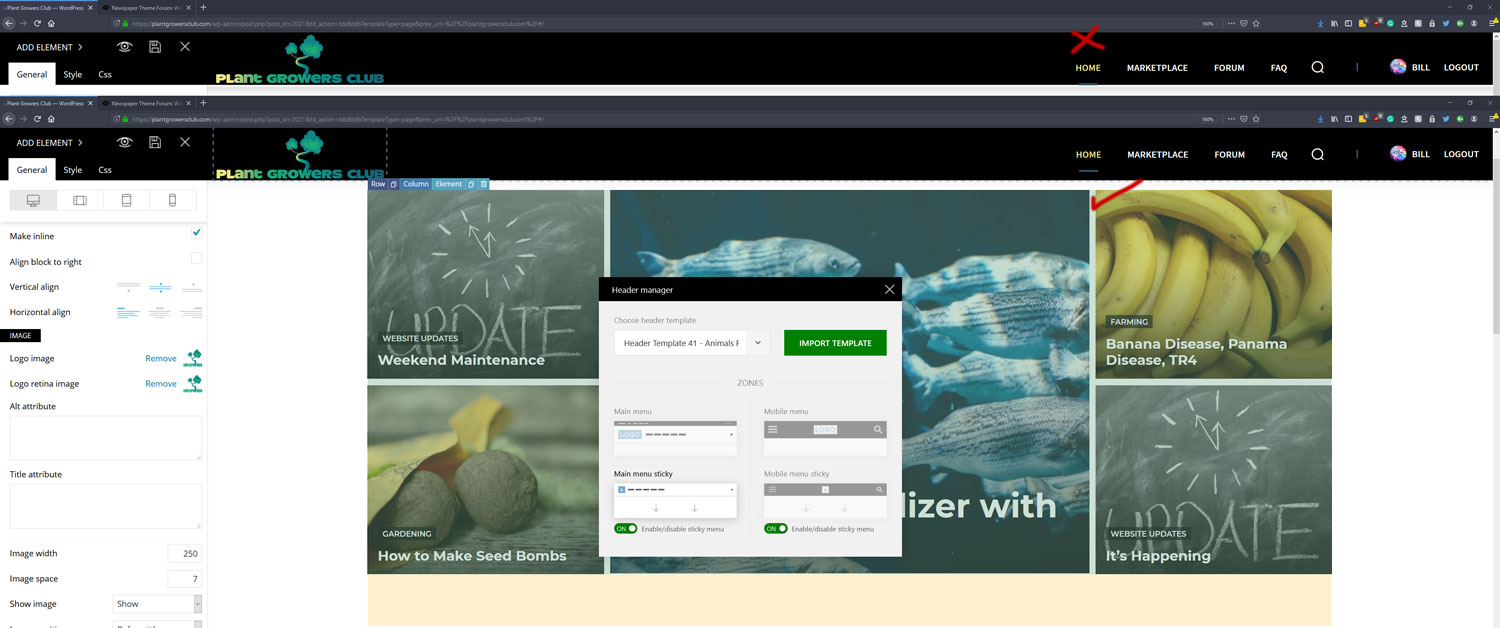
bdilI want my header logo sizing to look good with the rest of the header so I changed the image width from auto to 250 because it was making the header too big. Is this the best way to do this or should I use padding in the CSS options?
How can I make my header content stay centered on both scrolling sticky and when its at the top? Right now it changes the positioning on sticky scroll.
 Jorge Guevara
Hello good morning, there is a lateral line in the header and in the footer of the mobile version that I cannot remove, can you help me?


 cantoute
hi,
I was trying to reproduce the “no template” single post template.
At bottom there was a block showing related posts by categories and a tab to view related by author.
How can I do the same thing in a cloud template ?
I tried loading a few templates but didn’t find one with this feature.
Thanks
morikahnok, I’m losing my mind here.
The tagdiv composer works fine when I’m editing a page. Or editing a post template.. or anything else.
BUT! When i try to work on a Header.. it craps out. I get warnings the template wasn’t made by the composer. I save the file i was working on, and try to close the composer.. and then get a warning my changes weren’t saved.
I then close the manager, re-open and its right. My changes weren’t saved.
I don’t understand why the composer is working fine for everything else, but not for the Headers.
 migracionculinaria
Hello,
Since Google Tag script requires specific instructions to setup as high as possible on the <header> and another section of script intermediate after the <body>. I am trying to use the header.php file directly. I am implementing my code and saving it but I do not see it when I inspect my website. Do I have to take additional steps in order to see it? I checked the site using incognito.
See screenshot:
https://prnt.sc/p8vn55
Thanks
Fabian
 chabotjeff
 thank you Calin. I just had to choose the right header template.
 Calin
Calin Hello,
You can trty this custom css to hide the “:”
.tag .td-page-header .td-page-title {

  overflow-x: hidden;

  text-indent: -14px;

}
, also if you want to have more control over the the tag templates, you can use a tag template from tagDiv Cloud Library.
Thank you!
 Vlad S
 Hello !
When using Cloud Template header the sticky header must be edited with tagDiv Composer Header Manager and erased the content of it as you can see here: https://www.screencast.com/t/Bzi8kbneOKQc
Thank you !
Calin Hello,
I think that you are referring to this banner -> http://prntscr.com/p8jgub if is so then you need to add it in the header ads but if you are using the mobile theme, then you need to add the banner ad in mobile theme ads too -> http://prntscr.com/p8jic2 .
Thank you!
Calin Hello,
You can get the functions.php and footer.php from theme, but those are only the basic files, but you can get the files from wp-content/plugins/td-composer/legacy/Newspaper/parts/footer&header and set theme in child theme, also you can get more information from our guide .
Hope this will help you!
Thank you!
Vlad S Hello !
Unfortunately you cannot move the ad bellow the header.
We are sorry for the inconvenience !
Thank you !
Calin Hello,
If you want to have more control over the header you can import a header template from tagDiv Cloud Library and edit it with tagDiv Composer after your needs.
Thank you!
 RobinKiera
So I updated to new Theme, new child theme and all plugins.
1. This issue came up: https://nimb.ws/XU0N3A on post and page, It works when I deactivate tagdiv composer. The problem lies in post, page. It also works on classic builder and when I install Gutenberg plugin By Gutenberg Team but not in default like it used to.
2. Template is missing. Standalone themes need to have a index.php template file. Child themes need to have a Template header in the style.css stylesheet. I see this error even I have updated all files from the zip I download. I double checked and all file are there. https://nimb.ws/NG8Ted
3. Wp Editor error, https://nimb.ws/rx73wR can’t save nor can I switch. This problem was there before update.
Thanks
Vlad S Hello !
I’m sorry but we will inspect and see what should the issue be. We will see if the header has some bugs or how will the site handle another header. There are many things to check that maybe you are missing to see. An external opinion is always better.
Also I couldn’t manage to find any e-mails regarding this topic.
Thank you !
Vlad S Hello !
Unfortunately the LuckyWp Table of content is not a tested plugin so we cannot offer support for that due to our support policy: https://forum.tagdiv.com/newspaper-theme-support/
For that you will need a header from the Cloud Library which can be edited using the tagDiv Composer and set the ROW stretch to the width you want as you can see here: https://www.screencast.com/t/EYEHrqVyHL
Find more about the Header manager here: https://forum.tagdiv.com/header-manager/
Thank you !
Vlad S Hello !
First you have to import a Header template from the Cloud library : https://forum.tagdiv.com/header-manager/
Then you will have to edit the Headers menu ROW using tagDiv Composer as you can see here: https://www.screencast.com/t/EYEHrqVyHL
I hope this was helpfull !
Thank you !
 melcu
melcuHello guys,
Is there any possibility to import a header menu from another template? Something like this one: https://cybercity.ro/wp-content/uploads/2019/09/MenuSS.png
I mention i use ChurchMag template.
If i try to do it from wp i get a very ugly one 🙂
 Jeremypus
I am using the plugin LuckyWP Table of Content and it adds the TOC both in the post and in the footer as you can see at this url https://templatetester.com/it/wix-programmi-per-creare-siti-web/
Any suggestion on how to solve the problem?
Another thing. I would like to have the HP with a full width header right below the menu. Is there a setting for that or I need to use Tagdiv Composer?
Thx
 findlay
Hi,
Try as I might I cannot achieve by using the TagDiv tools header tools available what I want to achieve for my header design.
What I really, really want is for the main menu to extend to the full width of the page starting with “Home” aligned with the waggly Dogs logo above.
Can you please tell me how to do this.
Thank you.
Vlad S  Simion C.
 Hi,
Should work fine using one header template, WPML adds the language parameter to the permalink when the language is changed.
But it may be easier to create 2 header templates, so you can use for example different logos if needed, and different menus etc directly in the template. You can for example duplicate the template and customize it for each language – https://prnt.sc/p86qss
Thanks
 aleabuamer
 thx but all links of this page are broken:
one link
another
https://forum.tagdiv.com/%3Cb%3Eheader%3C/b%3E-%3Cb%3Emanager%3C/b%3E/
 rhyscreed
Hi,
I’m in the process of moving my website. I wanted to change to this theme so I have installed it and am having a few issues with WP Bakery. I have read all the forums and guides and I understand that the two editors do conflict.
I have built my site using WP Bakery with another theme so I though when installing this it would display the same. I’m having a few issues getting it to look the same and I need to use WP Bakery because I need the ability to add Accordians, Tabs, Maps, Videos etc, which aren’t in tagDiv.
See the two links below for the difference between my current site and the new site I’m builidng using this theme:
Old website (other theme): https://www.socialfishing.com.au/complete-guide-golden-perch-in-dams/
New website (Newspaper Theme): https://member.socialfishing.com.au/complete-guide-golden-perch-in-dams/
It looks similar but a few of the elements are working correctly. A few issues I need help with:
1. Do I have to only use the 3 column styles mentioned here: https://forum.tagdiv.com/how-to-use-visual-composer/ and what happens if other columns are used?
2. On long pages I cannot edit for long without the page giving me the error ‘Connection Lost’. I’ve read into a few of the forums and this is said to be due to a plugin conflict. I used this plugin and all the others installed fine and once installing the new theme I get this error. I uninstalled the tagDiv Composer plugin and this error stopped. It also takes an extremely long time to load.
3. Is there a way to make the background elements full width. Like on the original site? WP Bakery says its full width but it doesn’t show.
Is there anyway I can get those pages working fine with your theme using WP Bakery. I want to stay with your theme for the ability to use tagDiv on the header, menu and footer. I would like to stay but I need to be able to fix the issues I’m having.
Any help with this would be much appreciated.
Kind Regards,
Rhys
Vlad S Hello !
In order to customize the header you will have to import a Cloud Template Header and edit it using the Header Manager as you can see here: https://forum.tagdiv.com/search/header+manager/
Thank you !

