
- TutorialsDefault Block Settings Guide
 Vlad S
 Hello !
Because many users have requested to have different headers ( sticky vs static ) and that is a feature.
You can find more information about the header manager and many more in our documentation here: https://forum.tagdiv.com/header-manager/
I hope this is more helpfull !
Thank you !
 aleabuamer
Hi.
I use Kaspersky antivirus what blocks the ads zone (in header).
I suposse this is for the name you use: “HEADER AD”
aleabuamerHi. I have to question:
Please, visit my website: lapara.mhurtado.es
1. I need to hide top header menu login
2. I don’t understand why in first main menu button is showed an arrow (there is not a mega menu)
3. I don’t understand why when I press over “LA PARA” (second button of main menu) doesn’t change the button state (another buttons this works)
thx
 Wessel
 Still .. WHY ??? im in over my head with frustrations over this
Everything changes when i scroll and i have to do everything in the header over again .. and even on mobile i have to do it again .. again ..and again .
Would have been nice if you made the theme somewhat more intuitive and easy to use.
But at least the footer doesnt change when scrolling down… my compliments on that at least.
And finally , after hours when i think i got it right .. i find out that ALL text is gone.
-
This reply was modified 7 years by
Wessel.
Vlad S Hello !
The sticky header menu can be edited or can be removed by editing it with TagDiv Composer and delete the whole content.
You will have to edit the sticky menu the same as the standard menu.
Thank you !
 chiuaua
Hello!

In the picture above, you can see the header configurator. We have the “Main Menu” and “Mobile menu” styled as we wish. But when we choose the sticky ones the style is resets. Could you help us copy the style to sticky menus or is this not possible? It this the way it should work?
 niklash
Hello,
At the top of the header you can indicate the temperature for a given location: Celsius or Fahrenheit. You can also choose between the two measurement units in live operation. However, I would like that one can not exchange the units of measure.
How can you do that?
Best regards
 DanTeuton
 Hi Vlad, many thanks.
Encountered a new problem, when Selecting to import the header, the pop up appears behind the current frame making it impossible to proceed. I’ve tried on Google Chrome and Opera.
 umituslu
When I download the theme from ftp it gives the following error;
Problematic themes
These themes are established, but not all.
name Description
Newspaper Template is missing. Individual themes require an index.php template file. Sub themes require the template header in the style.css style file.
Vlad S Hello !
That is the Sticky header menu.
In order to remove that you will have to edit it using the tagdiv composer and delete every element from it. Right click on the ROW tab and delete it: https://www.screencast.com/t/oR332f60uT5
Thank you !
 yavuzselimmz
 When the header section scrolls down, it shows the pages in the footer area, I want to avoid this.
-
This reply was modified 7 years by
yavuzselimmz.
Vlad S Hello !
That header can be edited using the tagDiv Composer. In order to edit that you will have to go into tagDiv Composer – Header Manage and edit your header: https://www.screencast.com/t/mBrhOVA1DU
Thank you !
Vlad S Hello !
You can achieve that by using a Cloud Library header template. All the Cloud Templates can be edited using the tagDiv Composer. Follow this tutorial in order to achieve this: https://forum.tagdiv.com/header-manager/
I hope this was helpfull !
Thank you !
Vlad S Hello !
You can use the tagDiv Composer to create your category page and custom header from the Cloud library. After creating your page you will save it and then assign it to your cateories. In the header you can add the AdBox element and create the ads as you wish. Please follow this tutorials in order to create the category page and header from cloud library: https://forum.tagdiv.com/cloud-library-category-templates/ ; https://forum.tagdiv.com/header-manager/
I hope this is helpfull !
Thank you !
 Calin
Calin Hi,
Please notice that if you want to set the td-login-modal.php in child theme you’ll need to set the top bar that you are using to, for example I have set top bar style 1 -> http://prntscr.com/p0l1qj also make sure that you set the path in child files like this
wp-content/plugins/td-composer/legacy/Newspaper/parts/header/
or copy those file in parts/header too.
Thank you!
Vlad S Hello !
Into the header you can integrate a mega-menu wich will be more usefull. Take a look at this tutorial regarding the mega-menu: https://forum.tagdiv.com/mega-menu/
Also for your second issue it appears that the module you have seen has a margin set. you will have to set that margin too. You can see all the options available here: https://www.screencast.com/t/uN1Y67Sd
Thank you !
 juanca1612
Hello,
Is there an option to use the entire strip of the header for the web logo? The template used is number 10 in my case and the logo appears centered and small.
Thanks!!
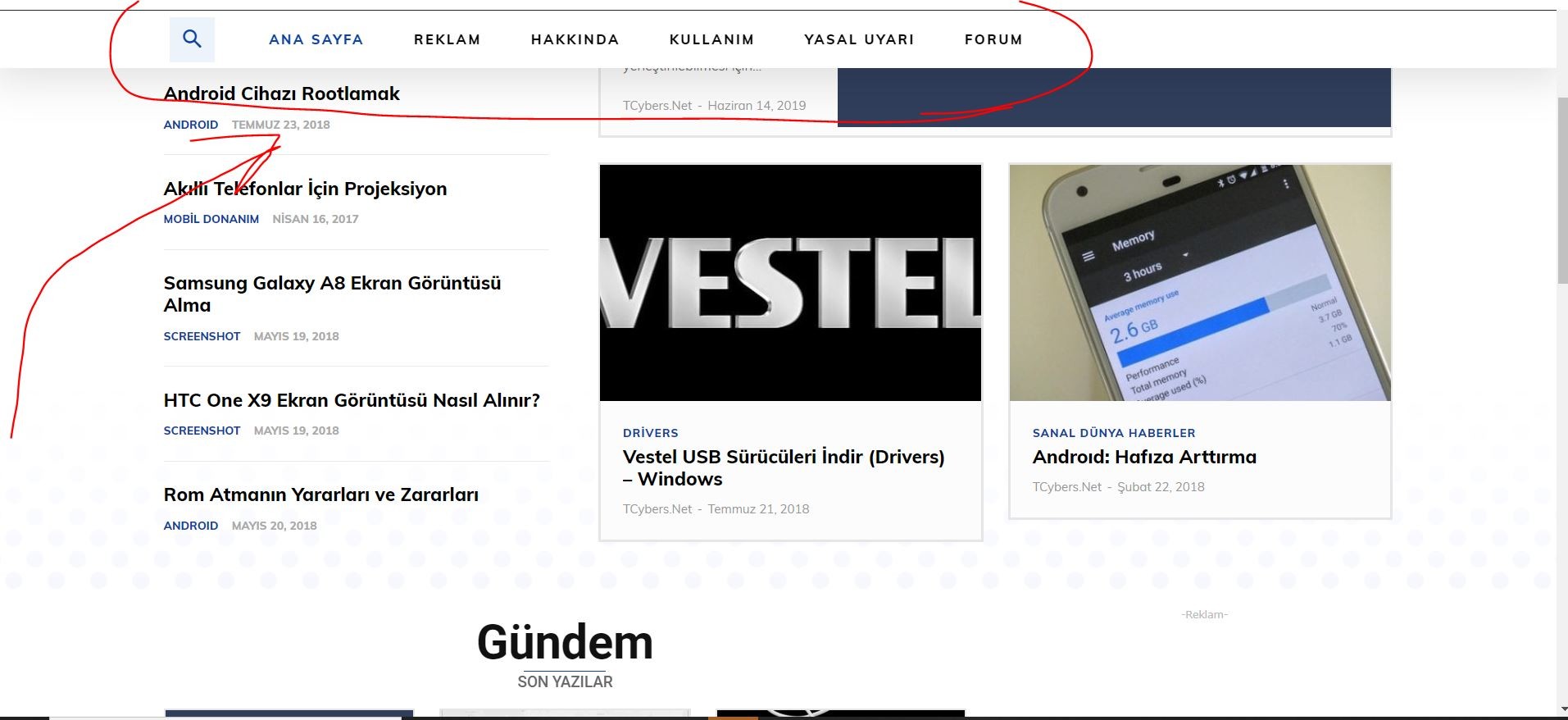
yavuzselimmzHi, I’ve uploaded the TECH News theme in the Newspaper theme, but I don’t want the information in the footer part to appear in the sticky header like the picture.
I tried to fix it, but I couldn’t.
 mparlevliet
We are using the Mobile + AMP setting. The header ad is a responsive one from AdSense, but the mobile theme does not move up when it’s a square ad compared to a more vertical ad. There is a big white space underneath it. Is there anything we can do about this?
https://www.vitalthrills.com/wp-content/uploads/2019/08/mobiletheme1.jpg
https://www.vitalthrills.com/wp-content/uploads/2019/08/mobiletheme2.jpg
 Jamison
Hi – I changed my category names in the Posts–>Categories menu of the native wordpress, but they do not update in the very top categories list. It is still the default theme categories. The new categories show up elsewhere in the composer as options. I tried deleting the cache, shift-refresh, etc.
As far as I can tell from the source, this part is not updating:
<!-- menu section -->

        <div class="td-mobile-content">

            <div class="menu-td-demo-header-menu-container"><ul id="menu-td-demo-header-menu" class="td-mobile-main-menu"><li id="menu-item-251" class="menu-item menu-item-type-post_type menu-item-object-page menu-item-home current-menu-item page_item page-item-250 current_page_item menu-item-first menu-item-251">Home

<li id="menu-item-252" class="menu-item menu-item-type-custom menu-item-object-custom menu-item-252">World

<li id="menu-item-253" class="menu-item menu-item-type-custom menu-item-object-custom menu-item-253">Lifestyle

<li id="menu-item-254" class="menu-item menu-item-type-custom menu-item-object-custom menu-item-254">Fashion

<li id="menu-item-255" class="menu-item menu-item-type-custom menu-item-object-custom menu-item-255">Sport

<li id="menu-item-256" class="menu-item menu-item-type-custom menu-item-object-custom menu-item-256">Music

<li id="menu-item-257" class="menu-item menu-item-type-custom menu-item-object-custom menu-item-has-children menu-item-257">More<i class="td-icon-menu-right td-element-after"></i>

<ul class="sub-menu">

	<li id="menu-item-258" class="menu-item menu-item-type-custom menu-item-object-custom menu-item-258">Food & Recipes

	<li id="menu-item-259" class="menu-item menu-item-type-custom menu-item-object-custom menu-item-259">Photography

	<li id="menu-item-260" class="menu-item menu-item-type-custom menu-item-object-custom menu-item-260">Recipes

	<li id="menu-item-261" class="menu-item menu-item-type-custom menu-item-object-custom menu-item-261">Travel

	<li id="menu-item-262" class="menu-item menu-item-type-custom menu-item-object-custom menu-item-262">Arts
Any help to get these updated categories to show up would be appreciated.
 Carlichy
Hi I am editing a new header with TagDivComposer (making a new page), and I have found only one type of list: “Header categories list”, but in this list I want to redirect other pages, like “Contact”, About me and more…that not belong to a category. Is it possible? I have created an icon but I only am able to redirect one link and not in a list way. I show you the image example.
My next question is about the Blocks in TagDivComposer, I have edited a new home using one slider (with slider revolution), my problem is when I use a Block (block 5) immediately after, because in the default home the blocks are integrated with the image on the top using a white border I show here the image. But when I try to make the same integration, I´m not able to do it, I show here the example.
Thanks!
 reinewswire
Is there a way that we can use just a link versus a code within the Ads?
I have images (ads) already displayed on the header and sidebar; however, we want to drive traffic to certain website links that we have and we do not have a code for it. Is this possible to do?
Any help or guidance on this would be greatly appreciated.
Thanks!
 Zyrgon
I followed this:
The headers are in the wp-content\plugins\td-composer\legacy\Newspaper\parts\header folder.
Create the same folder structure under your child theme root path (…\child_theme_name\parts\header\), copy the header file you need to modify there, and it’s ready to be used.
and it not worked for “td-login-modal.php”
Best Regards
Vlad S Hello !
In order to make the site full width you have to select every row of your page using the tagDiv Composer and then set the stretch mode you want like here : https://www.screencast.com/t/BkWwdHh6
In order to make the post page full width you will have to add a single post template and then edit it. Check more about how to have single post template here: https://tagdiv.com/customize-articles-with-single-post-templates/ And for the header you can do it here: https://www.screencast.com/t/xf56tQN0.
These are the ways you can increase your page width from theme options. Anything above this will require custom code.
Let me know if this helped you !
Also please note that the badges are custom work created by our developers.
Thank you !
 IS
ISI created a simple looking cookie consent through Cookie consent osano and it wants me to paste snippets before </head> and </body>. I found </head> in header.php but wasn’t able to locate the </body> tag in theme file.
Can you please help me fix that.
- +NO, I don’t want to use any cookie plugins.
Code to be pasted before </header>
<link rel="stylesheet" type="text/css" href="https://cdn.jsdelivr.net/npm/cookieconsent@3/build/cookieconsent.min.css" />
Code to be pasted before </body>
<script src="https://cdn.jsdelivr.net/npm/cookieconsent@3/build/cookieconsent.min.js" data-cfasync="false"></script>
<script>
window.cookieconsent.initialise({
  "palette": {
    "popup": {
      "background": "#efefef",
      "text": "#404040"
    },
    "button": {
      "background": "#8ec760",
      "text": "#ffffff"
    }
  },
  "theme": "edgeless",
  "position": "bottom-left",
  "content": {
    "href": "https://www.investingsimple.com/privacy-policy/"
  }
});
</script>

