- Apitd_api_header_style::delete
- Apitd_api_header_style::update_key
- Apitd_api_header_style::update
- Apitd_api_header_style::add
- ApiAPI – Header style – Introduction
- Apitd_api_top_bar_template::update_key
- Apitd_api_top_bar_template::update
- Apitd_api_top_bar_template::add
- ApiAPI – Top Bar Template – Introduction
- Apitd_api_single_template::update_key
- Apitd_api_single_template::update
- Apitd_api_single_template::add
- ApiAPI – Single Template – Introduction
- Apitd_api_footer_template::update_key
- Apitd_api_footer_template::update
- Apitd_api_footer_template::add
- ApiAPI – Footer Template – Introduction
- Apitd_api_smart_list::update_key
- Apitd_api_smart_list::update
- Apitd_api_smart_list::add
 Ivana
IvanaHi everyone!
How can I set to see all items in my top bar menu on mobile screen? Now I see social icons, but I dont see links for pages that are visible on desktop screen… http://brendmagazin.com/
I put this custom code but nothing is changed.
@media (max-width: 767px) {
.td-header-top-menu-full,
.td-header-sp-top-menu {
display: block!important;
text-align: center;
}}
Thanks!
 evanino
 Could it be that the below files were modified?
Modified files – 19 files
•functions.php
•includes\demos\retro\td_import.php
•includes\less_files\category-templates.less
•includes\less_files\header-search.less
•includes\less_files\header-style.less
•includes\less_files\main.less
•includes\less_files\post.less
•includes\plugins\td-composer.zip
•includes\plugins\td-multi-purpose.zip
•includes\plugins\td-social-counter.zip
•includes\td_config.php
•includes\td_css_generator.php
•includes\wp_booster\wp-admin\css\panel\controls.less
•includes\wp_booster\wp-admin\css\panel\theme-panel-general.less
•includes\wp_booster\wp-admin\css\wp-admin.css
•includes\wp_booster\wp-admin\css\wp-admin.less
•mobile\includes\less_files\post.less
•mobile\style.css
•style.css
or added files?
New files – 17 files
•includes\demos\ink\demo_style.css
•includes\demos\ink\demo_style.less
•includes\demos\ink\pages\about-us.txt
•includes\demos\ink\pages\contact.txt
•includes\demos\ink\pages\footer-template.txt
•includes\demos\ink\pages\homepage.txt
•includes\demos\ink\pages\themes.txt
•includes\demos\ink\screenshot.png
•includes\demos\ink\td_css_generator_demo.php
•includes\demos\ink\td_import.php
•includes\demos\ink\td_media_1.php
•includes\demos\ink\td_media_2.php
•includes\demos\ink\td_media_3.php
•includes\demos\ink\td_media_4.php
•includes\demos\ink\td_media_5.php
•includes\demos\ink\td_media_6.php
•includes\demos\ink\td_panel_settings.txt
 OueshOuesh
Hi everyone, i’m a complete beginner in term of coding.
I succesfully changed the background for every category with the help of this forum adding some custom css code but i didn’t find anything on changing the header size which i find too big.
I’d like to reduce the size of the header (don’t know if it’s the right name, i want to change the size of the place where the image is) and i did’nt find anything on the forum. i don’t if it’s because it’s too easy or just not possible.
Thx for the help.
evanino I did a complete re-install via FTP and still the same. not sure why, I don’t have this problem on my other site with the same theme.
But thanks for the advise. I will compare header code.
 Rhonda
Is there a way to add submenu items in the top header menu?
 Bogdan B.
 Hi,
You can try to add this code in the theme panel custom css box:
.td-category-header .td-page-title{

text-transform:lowercase;

}
Thank you!
 Simion C.
 Hi,
You can add your own image in the ad spot, Adsense is not a must if it is not needed. Please see this guide in the matter
– https://forum.tagdiv.com/using-other-ads-non-adsense-ads/
An example is the default image used as a header logo in the theme demo
– https://www.screencast.com/t/GGbBNg2c1
– https://demo.tagdiv.com/newspaper/
The image size used for the header banner image is 728x90px.
Thanks
Bogdan B. Hello,
Our theme does not have any options to add a tagline underneath the title. It can be added with customization though. You can place content in the theme header files like so:
https://www.screencast.com/t/IRQYBhYl
Thanks.
 Catalin
 Hello bdundar,
For more information about how you can activate your AdSense account, please check here -> https://support.google.com/adsense/answer/7402256?hl=en Also, for more information and instructions about where exactly you should place your Adsense code, please check our documentation here -> https://forum.tagdiv.com/header-ads-adsense/
Thanks for your understanding!
Catalin Hello Miguel Cordeiro,
Please refer to the following topic here -> https://forum.tagdiv.com/topic/header-style-8-background-image/ because it could be more useful for you.
Thanks for your understanding!
Simion C. Hi,
If you want to display that above the header, you could enter the code in the header template file, the theme itself does not have an option specific for this.
The website you mention uses header style 7, it seems to use a code like this
– https://www.screencast.com/t/PgptkikgN0vN
– https://www.screencast.com/t/eyvnEzkIH
<div class="td-container-wrap visible-on-post aligncenter">

<div class="textwidget custom-html-widget">Advertorial</div> </div>
But you could implement it in a different way using a different code (that is the exact code used in the mentioned website), in the same locations. The footer code could be entered in this file
– https://www.screencast.com/t/VSkAolJD
– https://www.screencast.com/t/TRvJYGGygu2x
Thanks
Simion C. Hi,
1. A code like this will remove the author post count, in the author page
– https://www.screencast.com/t/REyecg72Z6W6
.td-author-page .td-author-post-count {

display: none;

}
Or you could remove it in the code directly (or through a child theme if used)
– https://www.screencast.com/t/SgBp0hFqpyCj
2. I could give you a CSS solution to style the block title similar to block header style 6, it would look like this
– https://www.screencast.com/t/cdOrdxzw
– https://pastebin.com/simQByEy
3. For the tag pages – https://www.screencast.com/t/mmAnUamqcl
– https://pastebin.com/dJHvL7CN
Thanks
 BlagojGjelevski
Hello,
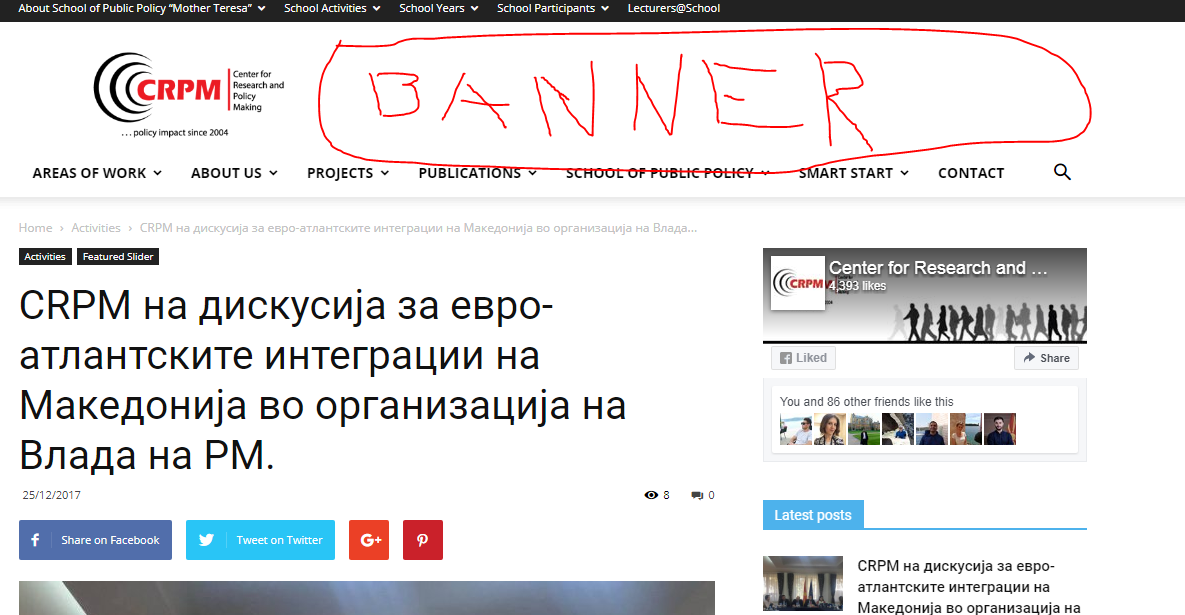
I would like to add banner photo to the header, but cannot find how to do that? I have only found through adsense, but I don’t want it through adsense. I want to put my own photo.
Here is the screenshot > http://www.crpm.org.mk/wp-content/uploads/2017/12/baner.png
Thanks,
Blagoj
Simion C. Hi,
Glad it works, you could align it to the right like this
– https://www.screencast.com/t/Dgf9jXZ7ko
Enter the property in the code, or remove it and add it again like this
.td-post-template-4 .td-post-header-holder .wp-caption-text {

display: block;

position: absolute;

top: 0;

right:0;

color: white;

padding: 5px 10px;

}
Thanks
 Miguel Cordeiro
Hi!
Need to put a background image in the header, like the footer. How can I do this?
Thanks,
Miguel
 Karmaz1
Hi guys,
Great theme, absolutely love it.
So I want to ad an advertorial disclaimer to my posts, which sits at the top of the page, and
after the copyright section at the bottom.
I have seen it done in newspaper already, where they appear to be using the custom html widget, but I can’t figure out
how to replicate it.
This is the URL:
https://buyerprotector.org/478/just-5-minutes-time-lower-electric-bill-slca-4/
See here for the header part:
And here for the footer:
If you could guide me on how to achieve this, it would be the best Christmas present ever (have spent hours trying to figure it out!)
Cheers 🙂
 majorfuss
1. Author page. In the author box, how do I remove the “Posts” count? http://majorfuss.com/author/joe-simon/
2. 404 page. In ‘THE LATEST’ section, how can I change the block header style from 1 to block header style 6? http://majorfuss.com/starwww
3. Tag page. How can I change the page title to block header style 6? http://majorfuss.com/star-wars/
Bogdan B. Hello,
Different header styles will provide different results in showing the mobile logo. Please choose a different header style.
Thank you!
Bogdan B. Hello,
The header template for thew latest articles element can only be changed from the global header template found in the theme panel: https://www.screencast.com/t/rdRIEMAFMc
Thank you!
 jpprods
Hello,
I want to change the date and time in the top menu and limit it to one timezone. Can you advise on how to proceed?
Thanks.
Simion C. Hi,
Some post templates may not display the featured image caption. That is the case for post style 4, give n the design of the template. A possibility would be to enable it and display it on top of the featured image like this
– https://www.screencast.com/t/LrhcL3F0
.td-post-template-4 .td-post-header-holder .wp-caption-text {

display: block;

position: absolute;

top: 0;

color: white;

padding: 5px 10px;

}
Thanks
Simion C. Hi,
Then you could choose a header style that does not have a limit for the logo, like header styles 9, 10 and 11
– https://forum.tagdiv.com/logo-favicon/
You can use any logo size when using these header styles, there is no limit. Just make sure to set it in full size when uploading it
– https://www.screencast.com/t/FAbxkeM1c8
– https://www.screencast.com/t/KWtpivTW
Thanks
 unit45host
Hi,
the second time happened when the theme “restore” deleted items…
I removed the demo images – 1. from wp-admin/media – 2. from everything in the uploads directory.
2nd of December had a 30 min server downtime ( still not sure what was caused – since got doubled memory/4 GB/, disk space/40 GB/ )
25th December had a DDOS attack against portal, caused a “frozen menu on mobile” and “no pictures were shown” about 5 hours on the website.
After both outages, the theme API ( what else? ) restored parts from demo content – like changed back the color settings to its default, restored all DELETED demo images to the media library…
So, I will move the stuff to a dedicated server / 2 TB disk, 64 gb ram /, but I don’t want the demo content is shown again – so complete remove the demo installer, also I want to remove all unnecessary items like woocomerce, bbpress related things from function.php
And would like to set the customised settings as default. Whenever I load a page/post I see a slight delay – and the default blue colors on the header. – Why is it loading the demo original at all?
2.,
///SSO Notice Conflict detected — your theme or another plugin is adding meta property=”og:image” to the head section of this webpage.
SSO Notice 1 duplicate meta tags found. Check 0 of 5 failed (will try again later)…
SSO Notice Checking https://1000wordsmagazine.com/?p=2321 for duplicate meta tags…
///
I removed the meta property tag because interfere was caused by wpsso SEO plugin.
wp-content/themes/Newspaper/mobile/functions.php
if (!empty($td_image[0])) {
echo ‘<meta property=”og:image” content=”‘ . $td_image[0] . ‘” />’;
3.,
I would like to show shortcodes on category and tags pages. But the snippet not works, in function .php.
And in twenty5-6-7 themes working – therefore Newspaper theme strips out the shortcode support.
add_filter( ‘category_description’, ‘do_shortcode’ );
https://premium.wpmudev.org/blog/cool-wordpress-category-pages/
https://webgilde.com/en/shortcode-not-working-category-description/
https://github.com/Yoast/wordpress-seo/issues/4786
That was the recommended solution from those websites, but it does not work at all, with the Newspaper theme.
Thank you, Zoltan
 irfan.id
 Here is my .htaccess look like:
# BEGIN Expire headers
<ifModule mod_expires.c>
ExpiresActive On
ExpiresDefault “access plus 5 seconds”
ExpiresByType image/x-icon “access plus 604800 seconds”
ExpiresByType image/jpeg “access plus 604800 seconds”
ExpiresByType image/png “access plus 604800 seconds”
ExpiresByType image/gif “access plus 604800 seconds”
ExpiresByType application/x-shockwave-flash “access plus 604800 seconds”
ExpiresByType text/css “access plus 604800 seconds”
ExpiresByType text/javascript “access plus 604800 seconds”
ExpiresByType application/javascript “access plus 604800 seconds”
ExpiresByType application/x-javascript “access plus 604800 seconds”
#ExpiresByType text/html “access plus 600 seconds”
#ExpiresByType application/xhtml+xml “access plus 600 seconds”
</ifModule>
# END Expire headers
<IfModule mod_deflate.c>
<filesMatch “\.(js|css|woff|html|php)$”>
SetOutputFilter DEFLATE
</filesMatch>
</IfModule>
And I did minify CSS and js automaticly by CloudFlare
 godfatherblog
Good afternoon. Which files specify the path to favicon? In the theme settings is not specified, in the header.php file too. Website: mafia.one