- Apitd_api_header_style::delete
- Apitd_api_header_style::update_key
- Apitd_api_header_style::update
- Apitd_api_header_style::add
- ApiAPI – Header style – Introduction
- Apitd_api_top_bar_template::update_key
- Apitd_api_top_bar_template::update
- Apitd_api_top_bar_template::add
- ApiAPI – Top Bar Template – Introduction
- Apitd_api_single_template::update_key
- Apitd_api_single_template::update
- Apitd_api_single_template::add
- ApiAPI – Single Template – Introduction
- Apitd_api_footer_template::update_key
- Apitd_api_footer_template::update
- Apitd_api_footer_template::add
- ApiAPI – Footer Template – Introduction
- Apitd_api_smart_list::update_key
- Apitd_api_smart_list::update
- Apitd_api_smart_list::add
 Simion C.
 Hi,
So the templates are imported per language. Please note that they have to be set per language so they change when the language changes. So in the cloud templates dashboard you set the desired template for one language https://prnt.sc/LiDJgOU4Jaxu and then for the other https://prnt.sc/3-Ir6tMOvUhL
You do not need to set the header using the header manager. All that is needed is to set the templates per language in the cloud library dashboard.
The templates are set correctly, and they change by language. The only unusual thing I found was a code in the wordpress custom CSS https://prnt.sc/N1sUflwbQekN That code always made the website RTL, even on English. I’m not sure what its purpose was exactly, the website should not be RTL on English. I commented that code.
You can customize the templates with the composer further if you want. If there are more issues, please let us know and we will take a look.
As a note, please do not post login information in the topic, the topics are public and any forum member can see them. I have removed them.
Thank you!
 juniordiscart
Hi
I’m running into the issue that I can’t edit the sticky mobile menu.
When editing a page, I select the sticky mobile menu in the Manager, the header title of the composer changes to ‘Mobile Menu Sticky’. On the mobile preview page, I scroll down so that I’m certain that I should be editing the sticky menu.
However, selecting any of the elements in the menu will switch it back to the regular mobile menu, so that I’m back at editing my main mobile menu again. Changing any element on the mobile menu will always apply changes to the main mobile menu.
Note: this time I deactivated all plugins before testing and writing a report. 🙂
Other data: WordPress 6.5.2
Newspaper theme: 12.6.5
Please advise, and thank you!
Kind regards,
Jan.
 snoopy
 Hello,
thank you for the feedback.
unfortunately, since all answers are together i am a bit lost which answer belongs to which problem.
What i did so far without success is:
1.Import both the news pro and news pro Header and Footer templates.
2.Open the homepage in the Tag Composer, then choose the header and footer from the Manager at the left as in here https://ibb.co/vkBpc0R
Still, the header and footer are not working properly.
kindly find below the admin user and password, hoping that you can show me a working 1 home page in english (News Pro), 1 in Arabic (News RTL Pro).
Also a working post page for the RTL and another for the arabic.
i was wondering also if i can import the arabic and enlgish translations and templates for the news pro and news rtl pro since you alerady did them to my website.
Also appreciate telling me how you fixed these issues so that i cand do it as well.
LinK: https://scoopzedev.wpengine.com/
Thank you
-
This reply was modified 2 years by Simion C..
 GEORGI
hi,i have some problemem to swap mobile menu button from left to right, and logo from center to verry left (please see the screenshot

can you help me with that?
best regards
GEORGI
 Bettina
 Hello!
First of all, you should have the TagDiv Shop plugin installed and active.
Here you should have the product categories: https://app.screencast.com/TGmWsdV01LKyP
Every product should have a category assigned: https://app.screencast.com/CXuVSIjfENR7W
They could have multiple categories assigned.
You can add the product categories to a menu and display them in your header: https://app.screencast.com/ILBFK4oyvx6Ys.
When you click on a product category, it will automatically lead you to the pages with the products from that category: https://app.screencast.com/gJhLqGexBDhFx -> https://app.screencast.com/jMR42TGJpwUQO
Some shortcodes can be added only to some pages; that’s why you can’t find any shop shortcodes for your homepage, for example.
Documentation is here: https://forum.tagdiv.com/tagdiv-shop/.
You can install the templates from the Cloud Library and use them on your website.
Here you can find the product ID: https://app.screencast.com/IuIBIFksblIyX.
Thank you!
 Anamaria
 Hi,
Usually, this happens when you set the page content in the header or footer sections.
-> https://i.imgur.com/381J9qm.jpg
-> https://i.imgur.com/wVGxYeg.jpg
-> https://i.imgur.com/0O3iGEg.jpg
So, please check if you have set the elements in the header zone.
Also, you can provide some screenshots.
Thank you!
 mochfadhil66
Can i use tag div cloud library on newsmag theme? If can’t, what is alternative? I need to create sales page or landing page for marketing purpose without header and footer section.
Thanks
Anamaria Hello,
Please delete the logo from theme panel, and assign it with tagdiv Composer https://i.imgur.com/bfPZEps.png https://i.imgur.com/EmzWCmI.jpg
For mobile please edit with tagDiv Composer, select the viewport on phone, select the header logo and change it => https://i.imgur.com/cR7F0v4.png https://www.youtube.com/watch?v=HXQQygkCCJo -> https://forum.tagdiv.com/add-logo-newspaper/ delete the text or svg code and insert your logo.
Thank you!
 kirovinvest
Okay my question is kinda simple, from WP-ADMIN, at Cloud Templates i have edited my header/footer templates and homepage template, on their options i have only
Edit with TD Composer
Edit
View
Rename
Duplicate
Delete
Can someone please tell me how to esily export those and import them / migrate them to my other installation.
 jac57
jac57This is my page: https://blog.prezentoza.pl/
And the problem is that the header in mobile is black. Is there possiblity to change it to be transparent?
 Lakuma
1) Can you please add Mastodon as an native option in the header Social icons in the header menu.
2) Can you please add the option to add more than
- one
Extra Custom Social Icon section?
3) Can you please add the option to add a “Custom” Social Icon with Link to the tagDiv Social Counter Plugin?
It would be nice to have this flexibility with all the new and old social networks changes recently and/or soon to come.
Thanks.
 molineux
 theheritagelab
Hello team,
I use the modal popup in my header for the Newsletter signup. What I’ve noticed is, if it is accessed when a page / post is open, it inherits the settings for the page / post.
To be clearer, I have a setting, where all posts have a “reaction” / emoji comment activated. This is deactivated for “pages”. But when I open a modal popup (feat. the Newsletter page id) from a post, it also shows the reaction emoji underneath. If I open the same modal popup from a page, like the About Us page, it doesn’t show the emojis.
Please note, this only happens when the modal popup is set to a page ID. It is fine when I use custom content in the modal.
Is there a way to solve this so that modal popups don’t inherit settings?
 sonyflagel
 Hi
I tried this code as snippet but it don’t work. 404 page don’t load
add_action(‘template_redirect’, ‘wp_custom_410’);
function wp_custom_410() {
if (is_404()) {
status_header(410);
nocache_headers();
include(get_template_directory() . ‘/404.php’);
exit;
}
}
Any help
 edestudio
el sitio esta dando el siguiente error:
Fatal error: Cannot redeclare gIP() (previously declared in /home/lape01/public_html/site/wp-content/themes/Newspaper/functions.php:190) in /home/lape01/public_html/site/wp-content/themes/Newspaper/header.php on line 154
Ha habido un error crítico en este sitio.
—–
la version de Newspaper es 10.4
 valerio88
Hi, I have removed the ad header in the DEFAULT PRO homepage but the title keeps staying on the left side on the desktop version. Can you help?
Anamaria Hello,
1. You need to delete text and upload the logo with tagdiv Composer https://i.imgur.com/3Ejsuut.jpg -> https://forum.tagdiv.com/add-logo-newspaper/
2. You need to add the social links with tagdiv Composer -> https://i.imgur.com/Upfp1hR.jpg
Please provide more details about what you are referring to substack.
3. Please provide some screenshots. If you are referring to this -> https://i.imgur.com/7evbwrw.jpg, you can change the display option from header zone -> https://i.imgur.com/XZJ7G8i.jpg
Thank you!
Anamaria Hello,
Do you have created a mobile page? You must convert the header and footer -> https://www.screencast.com/t/HrjOBNayd to be able to edit with tagdiv Composer. Please check this video https://www.youtube.com/watch?v=SpGkOnJeNZY
Thank you!
 punktkom
Hello, i have a problem with the Mobile Header. Everytime i go to other pages or posts within the site, the Mobile-Logo disappears and the Header looks different. On the Homepage however everything looks good.
Thanks
 lpecchiproper
 Hi
sorry, I’ve just disabled maintenance mode, please let me know when you’ve inspected the page.
I don’t think it’s a margin issue, by the way I’ve already tried to set margin, border and padding to 0, but it still doesn’t work.
The problem is exactly that I do not want ANY margin, the first row (column, by the way) have to be at position 0 in the page, as well as the last, that have to be on bottom of the page, as shown in TD Composer.
I’ve uploaded the source text for that page here
https://symt2023.proper-milano.cloud/landing-page-text-source.txt
You can copy in text mode to a new page and see what happens: after importing the text, you’ve also to disable header and footer from TD Composer website manager.
Thanks again, Luca
Anamaria Hello,
Please delete the logo from theme panel, and assign it with tagdiv Composer https://i.imgur.com/bfPZEps.png https://i.imgur.com/EmzWCmI.jpg
For mobile please edit with tagDiv Composer, select the viewport on phone, select the header logo and change it => https://i.imgur.com/cR7F0v4.png https://www.youtube.com/watch?v=HXQQygkCCJo -> https://forum.tagdiv.com/add-logo-newspaper/
Thank you!
Anamaria Hi,
Please let me know what header template you use.
Thank you!
 sohailahmed160
 Any update on this feature? Has this been implemented? If not, please consider adding the ability to modify the link URL for the author’s name in the header login.
-
This reply was modified 2 years by
sohailahmed160.
 ipro-wpadmin
Hello,
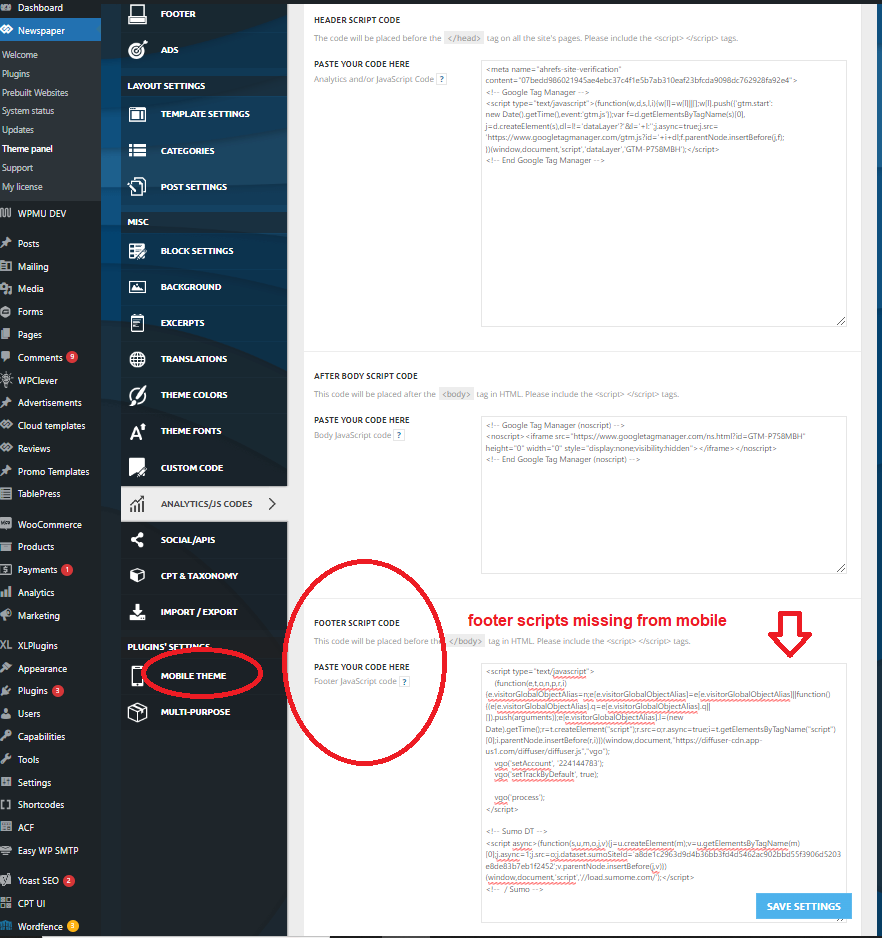
Scripts added into the Analytics Footer Script area in theme settings are not loaded on mobile when using the “mobile theme”. They load fine on desktop but are missing from mobile when the mobile theme is active. The header scripts do load on mobile.
Let me know if you have any questions or need any more information.
screenshot image – https://www.gun-tests.com/wp-content/uploads/2024/04/newspaper-footer-script-1.png
Thanks-
Stan
 smartjockz
 i change the header and footer in global newspaper themepanel and i will send screenshots showing the change and what pops up on mobile. I dont even have the newspaper image in my media library so not sure how it even displays in the absence of words or logo