
- TutorialsFrom WPBakery to tagDiv Composer
 elvinf
 Hi Andrei,
#3 – Looks like it changes the pagination buttons all through out the site. For example: On the related articles and the ticker buttons on the homepage. Is there a way to only change the buttons in the paginated article.
What I would like to do is make the buttons bigger and change its color.
 iamkingsleyf
 Hello;
It seems i need to import the contents, well my site is LIVE and i dont want to import such content…. i just need to configure the blocks for the homepage
 Bogdan B.
 Hello iamkingsleyf,
When you install a demo, it will set the demo’s homepage and content (categories, pages, etc.)
The pages can be configured with visual composer (where you also find the blocks): http://screencast.com/t/HrZ22rwt.
Make sure you access the back-end version of visual composer: http://screencast.com/t/HrZ22rwt
And the you can see and configure the blocks: http://screencast.com/t/zgUXVAvMCVY
We reccomend reading the doccumentation on how to configure your theme: https://forum.tagdiv.com/how-to-use-visual-composer/
If this is not what you mean, provide us with more details so we can better understand the issue.
Thank you.
Bogdan B. Hello pandian,
As i see it, you have the same thing set up as the other site, just that the homepage is different (not in the menu). When you access the ‘interesting on the internet’ category, the “underline” will be active. If you place a homepage link(button) in the menu, it will have an active border as well just as the other site.
If you truly want it like you said, for the category (‘ioi’) to be highlighted in the homepage you can add this custom css in the theme panel->custom css field .
I’ve also positioned your logo to your specifications. http://screencast.com/t/fR4tKRkg
.td-header-style-1 .td-header-sp-logo {

margin-left: -10px;

}

.home .menu-item-first a:after{

background-color:#4db2ec!important;

}
Thank you
 thrivehl
 This only happens in the homepage. I made a page and made that my homepage, following the directions from tagDiv. The Social counter header does show up on other places other than the homepage where I use the WP sidebar.
 Afterglow
 Hi,
Go to all pages, find your homepage and edit it. Find Homepgae latest articles and click on the 2nd tab Posts loop settings. Locate Limit post number and input the desired number of articles to appear…
Regards,
Peter
Afterglow Hello,
I edited the homepage and fixed it.
Thank you,
Peter
Afterglow Hello,
I edited the homepage and fixed it.
Thank you,
Peter
Afterglow Hello,
I managed to change the grid display for my categories, as seen here: http://pavlikeni.com/category/news/, but why can I not do it for the HOMEPAGE here: http://pavlikeni.com? Where in the admin panel do I change for the homepage?
Thanks,
Peter
 airrocker
 Hey Alin,
We are using a slightly older version of the theme (4.6.3) and of WPBakery Visual Composer (4.4.4)… so I’m not sure if that makes a difference here. But I went to Settings > Visual Composer… and went under ‘Administrator’ and told it to ‘select all’ (all of the boxes were unchecked). However, that didn’t seem to fix it. The homepage still shows the incorrect modules (see screenshot). Strangely, this seems to be the only affected page. The other pages show the correct modules within the Visual Composer.


 Edellion
Hello everyone o/
I have an issue with the “Unique Articles” feature on the homepage. Explication is simple, I enabled the feature and a same article still appears multiple times. Ajax articles aren’t enabled.
Does anyone have an idea ? You can check it here: http://www.chronollection.com, “unique articles” feature is enabled right now!
Thanks a lot in advance
edit: I forgot to say that I went through the forum and checked some of the articles, without success
 stevencage89
Hi, i’d like to change the 404 page to a full screen image(no header or footer) with just a homepage redirect button. Also i’m using the child theme, so do i add the 404 page in there?
Please let me know how this can be done.
Thank You
AfterglowHello,
Where can I find the “new big grids” display option for the homepage in version 2.2, which I loaded to my pavlikeni.com site? I am talking about the 2 large images on top of 3 smaller ones, which you show on the image below.
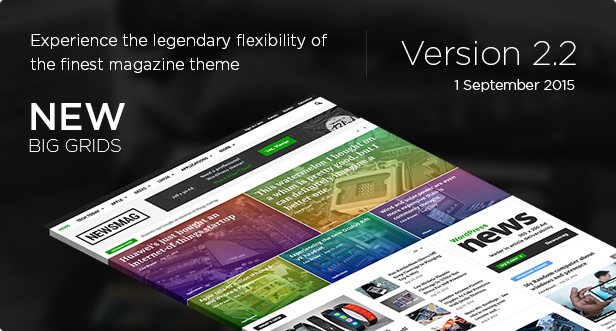
Thanks,
Peter
airrockerWhen using the Backend Editor/Visual Composer for our home page, it is showing the incorrect modules. I believe it is just showing the default modules for a blank page template (a Slide, 3 Block 1s, an empty space, and a RAW HTML box). If you switch over to Classic Mode, you can see all of the coding for our homepage… so it’s still there and still functioning… but we are unable to access/edit it using the Visual Composer for fear of resetting it back to a default page. Any idea how we can get that back working again?
Thanks!
 MMANouvelles
 I have another problem, when I try to modified my “homepage”, I have an incomplete page (with visual composer), no sidebar, nothing, http://prntscr.com/8e4004, very strange ! Thanks
 SaL
SaL Yea unfortunately that seems what I need to do.
By removing the old theme, that won’t delete my homepage block settings and stuff right? All that is saved via DB correct?
Really sucks all these wicked themes come injected with so much extra code to make it more appealing to the general audience. I understand it increases more sales, but really burdens those who only need the theme for blog site, not ecommerce, buddypress and so on.
I appreciate your support, and the great theme. I will try again this weekend with total reinstall and by adding all my edits in. Which shouldnt be that bad, we only use 2 of the post templates and the css done by you guys was so stellar that getting the look back on the site would be a breeze.
If epic fail again then looks like I need to get in touch with someone to make us a custom theme geared towards our site.
 adi_mitran
Hello,
great work with the smart lists but i have a problem.
I have a list made of 5 restaurants.
If i want to ad a module on the homepage i can’t have one that can list the five restaurants in the smart list because that smart list is actually a single post.
So what can i do to have a module that can list the items in the smart list?
An option would be to create a post in wich you cand add other posts and create a list. More accurate:
i want to create a list from different posts you want so i can have a list of top five restaurants but i can also have posts of each restaurant in my website.
I have found a way but it’s not so good:
1) I create the smart list (top 5 restaurants)
2) i create posts identical to the elements in the smart list (individual post for each of the 5 restaurants)
3) i add a module on the homepage and point it to my 5 posts of my restaurants
4) i redirect each individual post link (using a wordpress plugin) to the link that the smart list creates for each element.
Module Gurmand has the redirected posts
http://www.good-life.ro/
The smart list post to wich the redirects go
http://www.good-life.ro/cele-mai-bune-restaurante-din-bucuresti/
It works if you use it for couple of articles but in the future i will have to much duplicated content.
So tell me if you have a solution.
thank you.
 rishab55555
Hello,
I have newspaper theme v6.2 installed on my website.
URL : http://www.naukrinama.com
I have a regular push of content onto my portal and i want my homepage to refresh automatically into a user’s browser after 30 mins time interval.
I have found one way of doing it using Meta Refresh putting it into the header file of the theme, but Meta Refresh is not preferred by google and its use effects the page ranking and seo.
So i want to do it using JS or any other method. Please let me know how can this be achieved.
 fpineiro78
Hello,
I just updated to the latest version of Newspaper. Can you please tell me why my featured post title is sitting in the middle of the image on my homepage instead of the bottom (like it does on your demo)???
The site is: http://hotandpricey.com
Also, where is the setting that allows me to toggle having the post subtitle show on featured posts on the homepage?
Thanks for your help,
Fred
 felizubi
I was able to add a modified Block 1 using the td-api-plugin, but I don’t have the spinning loading square when click on the next or previous arrow.
You can see it here on the homepage, on block named “Noticias”.
 simchris
 @vijayrth11
use gtmetrix.com to debug what you’re missing.
Proper use of gzip/deflate is good for at least 20 points.
Test a post page, not your homepage.
E.g., slow server, slow connection, overloaded plugins, overloaded ad networks, un-optimized images, etc., all contribute to low rating.
Bogdan B. Hello jornhaugland,
The homepage can be customized in visual composer from http://screencast.com/t/Jk26wvxp. You can chose a predefined layout or add elements and customize them like in this tutorial https://forum.tagdiv.com/how-to-use-visual-composer/
Make sure you click the backend editor http://screencast.com/t/kMgEvg63 for options to appear.
As for the social counter, we have a tutorial here: https://forum.tagdiv.com/tagdiv-social-counter-tutorial-2/
I hope this helps.
Thank you.
 Alin [tagDiv]
 Hi,
Installing the Newspaper theme this doesn’t mean that it will automatically change the old shortcodes for you homepage. You will have to create a new page using the Visual Composer pagebuilder, set the page template.. – https://forum.tagdiv.com/block-settings-tutorial/ also a video tutorial that may help – https://www.youtube.com/watch?v=rgWqozuqmJk then set it as frontpage. You don’t have to be a developer to do this, just to have some basic WordPress knowledge and also we will answer for the theme related issues. Please note that if you install the demo without content it will import only some fonts, colors… it will not add new pages, posts, categories and also it will not change the frontpage.
Also if you want to keep your site running, you can install the theme on a subdomain to customize it. You can find more information on the subject here: http://www.passiveincomereality.com/how-to-create-a-sub-domain-in-wordpress/ You can also find a plugin for maintenance. Something like https://wordpress.org/plugins/wp-maintenance-mode/
Hope this helps!
 ihora
ihora Hello,
ok, I will try to explain.
We have added a block 18 element in our homepage and we have set it to bring articles from a specific category (This category has no subcategories). When we reload the page to see the outcome, we see the block element without the article of the category, as shown in the image below:

When we click on the “Όλα – All” Ajax filter, the article is displayed, which is what it should do:

How can we make it show the article by default, when the page is loaded, without the user having to click on All? We don’ t want to have the Ajax filter enabled.
Thank you.
thrivehl
Unless I upload the content of the demos with the content, the Big Grid will not work. I followed the instructions from the support to page a page but the Big Grid will not show even though the other features are there. Also, the trending thing is too spaced out compared to the demos.
Can anyone help me with this?
Thanks
